
Web design has followed the same sequential process for decades: brief, wireframe, mockup, code review, test, launch. Each step hands work to a different person. Each handoff introduces delay, miscommunication, and iteration cycles. A design process that once took six weeks can now be compressed into six days using AI-driven tools with measurably higher accuracy in matching client intent (Adobe Future of Design 2025 Report, cited by Big Orange Planet, 2025). That compression is not incremental. It is structural. AI website builders do not speed up the old process. They replace it with a different model: one where a user describes intent in natural language and the system generates a complete, deployable result that is refined through conversation rather than handed off through sequential review cycles. According to DesignRush (2026), more than 81% of developers report increased productivity when using AI tools, and nearly 40% of web designers now use AI tools daily. This article explains the five most significant ways this shift is reshaping modern web design, what each change means in practice, and how imagine.bo fits into that picture. For a broader orientation on what AI website design looks like for someone starting out, the AI website design guide for beginners covers the fundamentals clearly.
TL;DR: AI website builders are transforming web design through five structural shifts: collapsing the sequential design process into parallel generation, making personalization a default rather than a premium feature, automating SEO and performance optimization from the first build, enabling non-designers to produce professional-grade output, and pushing full-stack functionality into the same generation flow as front-end design. According to data, 73% of small businesses report using or planning to use AI for website design and content creation by the end of 2025, and websites using AI-optimized code structures see a 22% average improvement in Google Core Web Vitals scores (Elementor, 2025).
Way 1: Collapsing the Sequential Design Process into Instant Generation
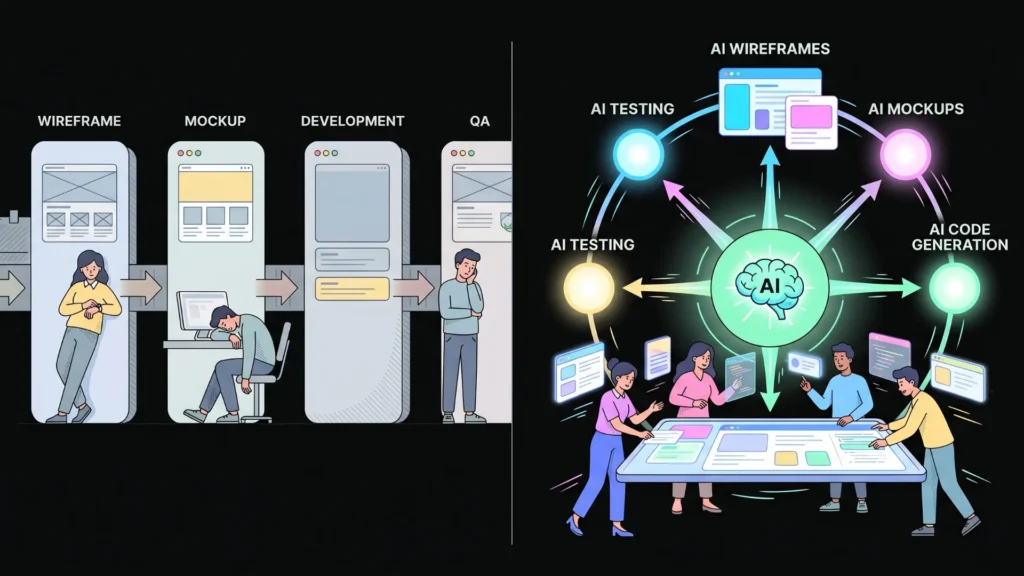
The traditional web design process is sequential by necessity. Each phase depends on the output of the previous one. Designers cannot build a mockup until the wireframe is approved. Developers cannot write code until the mockup is finalized. QA cannot test until the development build is ready. Every dependency is a waiting period, and every waiting period adds cost and delays learning.
Launch Your App Today
Ready to launch? Skip the tech stress. Describe, Build, Launch in three simple steps.
BuildAI website builders replace this sequential dependency chain with parallel generation. When you describe what you want the purpose, audience, content structure, and visual direction the AI generates the layout, content architecture, color scheme, and interactive structure simultaneously. There is no wireframe phase waiting for client approval before the visual work begins. There is no developer waiting for the design file to be handed over. Everything arrives together and is refined together.
According to Adobe’s Future of Design 2025 Report, 61% of digital designers already use AI tools to automate part of their workflow, from layout generation to usability testing (cited by Big Orange Planet, 2025). The result, as that report notes, is more time for creativity, storytelling, and human-centered design thinking the parts of the process that AI cannot substitute for. The compression of mechanical workflow creates space for the human judgment that actually differentiates good design from average design.
The deeper implication of this shift is that the design process is no longer primarily a production process it is a directorial one. The designer’s job shifts from executing decisions to making them. Which layout communicates the brand intent most accurately? Which content hierarchy serves the user’s goals? Those decisions still require human judgment. The mechanical translation of those decisions into rendered pages, responsive layouts, and deployable code is what AI handles. This is why agencies using AI are not producing worse work. They are producing more work, faster, with greater creative bandwidth per project.
Citation capsule: According to Big Orange Planet (2025) citing Adobe’s Future of Design 2025 Report, a design process that once took six weeks can now be condensed into six days using AI tools, with higher accuracy and flexibility. 61% of digital designers already use AI-based tools to automate parts of their workflow from layout generation to usability testing. The structural shift from sequential to parallel generation is the mechanism behind this compression (Adobe / Big Orange Planet, 2025).
Way 2: Making Personalization a Default, Not a Premium Feature

Personalization in web design used to require a dedicated data infrastructure, engineering time, and ongoing maintenance. You needed analytics systems tracking user behavior, a segmentation model defining user groups, a CMS capable of serving different content to different users, and developer time to wire it together. This was a premium capability that only organizations with significant resources could implement.
AI has changed this economics entirely. Modern AI website builders and AI-powered functionality layered onto existing websites make dynamic personalization accessible without dedicated engineering infrastructure. The system learns from behavioral signals: scroll depth, dwell time, click patterns, referral source, geographic location, device type. It then adjusts content presentation, recommended products, navigation priority, and layout emphasis in real time based on what it observes.
According to a McKinsey Digital Study cited by Big Orange Planet (2025), personalization powered by AI increases conversion rates by up to 30% and user satisfaction by over 40%. Sayenko Design (2026) describes the practical result: a first-time visitor sees different content than a returning one. A visitor from a paid ad for a specific service sees content tailored to that service. A user in a specific geographic region sees localized offers. None of this requires the site owner to manually configure those variations. The AI handles it adaptively.
For imagine.bo users, the AI-driven personalization guide for no-code web applications covers how to design application logic that takes advantage of behavioral data to serve different experiences to different user segments, without writing custom personalization code.
Citation capsule: According to a McKinsey Digital Study cited by Big Orange Planet (2025), AI-powered personalization increases conversion rates by up to 30% and user satisfaction by over 40%. Elementor’s 2025 data shows AI-driven dynamic content can increase on-site conversion rates by up to 15% compared to static site experiences. The shift from personalization as an infrastructure project to personalization as a default platform capability is one of the most consequential changes AI is introducing to web design economics (McKinsey / Elementor, 2025).
Way 3: Automating SEO and Performance Optimization from Day One
SEO and performance optimization have historically been afterthoughts in web design. A site gets built, launched, and then an SEO specialist reviews it and produces a list of recommended changes. A performance engineer runs speed tests and identifies images that need compression, scripts that need deferring, and cache policies that need adjusting. These are separate engagements that happen after the primary design work is complete.
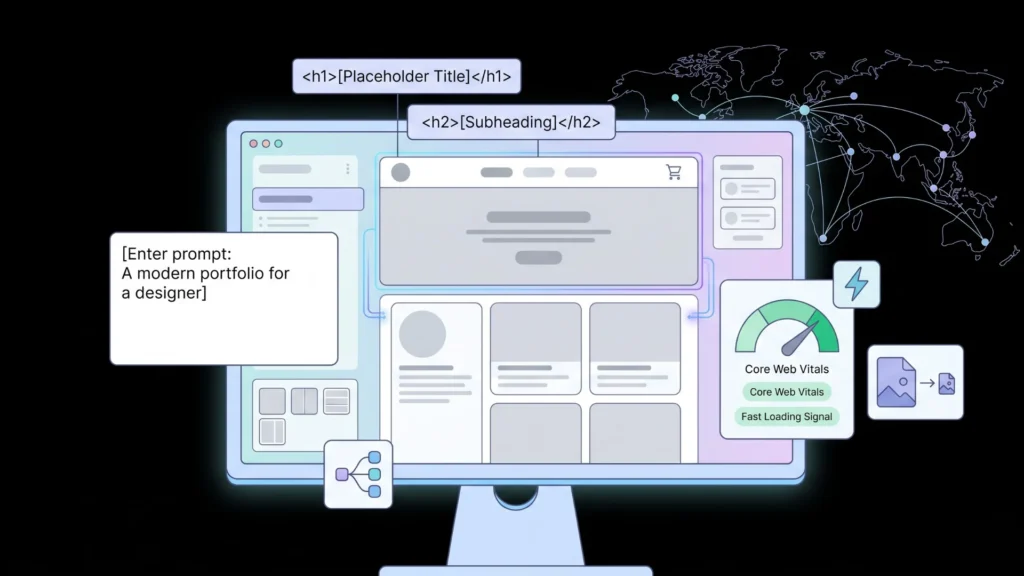
AI website builders are inverting this sequence. Platforms that generate sites from prompts increasingly bake SEO-friendly structure, semantic HTML, structured data, and performance-optimized code into the generation itself. The site does not need a post-launch SEO audit to tell you the H1 tags are missing or the images are not compressed those problems do not appear because the generation process was designed to avoid them.
According to Elementor (2025), websites using AI-optimized code structures see a 22% average improvement in Google Core Web Vitals scores compared to manually coded equivalents. AbZ Global (2026) documents how 2025 was the year major website builders started explicitly optimizing for AI answer engines, not just Google: Squarespace announced an AIO Scanner to track mentions across AI platforms, Webflow added AI-driven suggestions for both SEO and AEO (Answer Engine Optimization), and Shopify enabled AI shopping agent readiness for its stores.
Imagine.bo deploys every application on Vercel’s global edge network, which delivers consistent Core Web Vitals performance through geographic distribution, automatic HTTP/2 and HTTP/3 optimization, and image CDN processing. Every page is rendered with SEO-ready architecture from the first deployment. The SEO-friendly website design guide covers exactly what to configure and how to verify that the generated structure is optimized for both traditional search and AI search engine citation.
The SEO improvement that most imagine.bo users do not expect is the structured content benefit. When the Describe-to-Build prompt includes clear page hierarchy “the homepage should have sections for services, testimonials, and a contact form” the generated HTML uses semantic heading structure that search engines read clearly. This is not configuration work the user does. It emerges from the specificity of the initial description. The more clearly you describe the content architecture, the better the generated SEO foundation.
Citation capsule: According to Elementor (2025), AI builder speed is now a standard expectation: the average time to launch a functional landing page has dropped from 15 to 20 hours to under 30 minutes, and websites using AI-optimized code structures see a 22% average improvement in Core Web Vitals scores. Abz Global (2026) documents how major platform builders in 2025 shifted from SEO-only optimization to AEO Answer Engine Optimization preparing sites to be cited by AI search tools like ChatGPT and Perplexity alongside traditional Google results (Elementor / AbZ Global, 2025–2026).
Way 4: Enabling Non-Designers to Produce Professional-Grade Output
The most widely discussed transformation AI website builders produce is democratization: making professional-quality web design accessible to people without design training. This is accurate, but the mechanism is more specific than most descriptions acknowledge.
AI website builders do not give non-designers unlimited design capability. They give non-designers access to design decisions that have already been encoded into the system decisions about what good layouts look like, which color combinations work, what typography hierarchies communicate authority or approachability, how whitespace should function in a content section. The AI applies those decisions based on the context you provide. You still direct. The AI executes the encoded expertise.
According to data cited by F22 Labs (2025), 98% of small businesses plan to use AI tools for website development and digital presence by 2026. Elementor (2025) reports 73% of small businesses currently using or planning to use AI for website design and content creation. The shift is not that non-designers have become designers. It is that non-designers can now access the output of design expertise without going through the process of developing it themselves.
What changes as a result is who initiates and owns web design projects. Previously, web design was gated by budget and technical access. A business that could not afford a designer and could not use complex tools had a bad website or no website. That gate is largely removed by AI website builders. The practical guide on how AI builders are changing the UX design process explores this shift from the designer’s perspective including how professional designers are adapting their role in response.
For someone building their first website, the guide to making a website with a single prompt demonstrates exactly how little prior design knowledge is required to get a professional-quality result from an AI builder. The constraint is clarity of description, not design skill.
Citation capsule: According to Sayenko Design (2026), the average cost of a professional small-business website has dropped from $3,000 to $5,000 historically to a subscription of $12 to $40 per month using AI website builders. This cost compression represents access democratization at scale: professional web presence is no longer gated by budget in the same way it was five years ago. The gate has shifted from “can you afford a designer?” to “can you describe clearly what you want?” (Sayenko Design, 2026).
Way 5: Merging Front-End Design and Full-Stack Functionality in One Generation Flow
Traditional web design tools Wix, Squarespace, Framer, Webflow generate the front end of a website. They produce what users see: pages, sections, navigation, content. The back end of a web application the database, the authentication system, the API endpoints, the business logic is a separate engineering concern handled by different tools and different people.
This separation has historically been the ceiling for no-code web design. A non-technical founder can build a beautiful marketing site with any of those platforms. But if the site needs users to log in and see their own data, or process a booking that gets stored in a database, or manage a subscription that triggers different access levels those capabilities require engineering work that the design tools do not touch.
AI website builders like imagine.bo collapse this separation. When you describe a web application including its user roles, workflows, and business logic the generation produces both the front end and the full-stack architecture simultaneously. The database schema, API endpoints, authentication flows, and role-based access control are generated alongside the UI components in the AI-Generated Blueprint.
This is the transformation with the largest practical impact for product builders: web design and web development are no longer sequential, separate disciplines executed by different people on different timelines. They are simultaneous outputs of a single description. A founder describing a client portal gets both the design and the functionality in one generation pass. The guide on how AI builders handle full-stack web design through the Describe-to-Build workflow maps this capability in detail.
The guide to converting UI sketches and ideas into AI-powered apps shows how this works even when the starting point is a rough layout sketch rather than a complete description the AI interprets visual intent and generates the architecture that supports it.
Based on imagine.bo’s platform architecture, the AI-Generated Blueprint from a single prompt for a SaaS application with three user roles typically produces: 8 to 15 database tables, 20 to 40 API endpoints, 10 to 20 frontend screens, and complete role-based access control logic all in one generation pass that takes minutes. A traditional development team would estimate 6 to 12 weeks and $30,000 to $80,000 to produce equivalent output from scratch, before the UI design phase even begins. The merger of design and development into a single generation flow is where imagine.bo’s value compounds most dramatically for product teams.
Citation capsule: According to DesignRush (2026), AI in web development has become embedded in the entire lifecycle code generation, testing, deployment, monitoring, personalization, and adaptive design. By 2025 to 2026, Gartner projects that 90% of software engineers will shift from hands-on coding to orchestrating AI-driven processes. The convergence of design and development in a single AI-generation flow is not a trend on the horizon. It is the current production reality for teams using platforms like imagine.bo (DesignRush / Gartner, 2026).
FAQ
Are AI website builders only for simple marketing sites, or can they handle complex web applications?
It depends on the platform. Template-based AI builders like Wix AI and Squarespace Blueprint generate marketing pages with AI-assisted copy and layout. Full-stack AI builders like imagine.bo generate complete web applications with databases, authentication, API endpoints, and business logic alongside the UI. The full-stack AI website builder comparison covers which platforms handle which capability level. For anything beyond a presentational site, the platform’s full-stack capability is the most important evaluation criterion.
Do AI-generated websites perform well on Google?
AI-generated websites can perform very well on Google when the generation produces clean semantic HTML, correct heading hierarchy, appropriate meta tags, and fast-loading code. Elementor (2025) reports a 22% average improvement in Core Web Vitals for AI-optimized code. The key is choosing a platform that generates SEO-ready code by default, not one that requires post-launch configuration to fix SEO issues. The complete SEO-friendly website design guide maps what to configure regardless of which AI builder you use.
Can AI website builders produce responsive designs that work on mobile?
Yes, all major AI website builders generate mobile-responsive designs by default in 2026. The historical problem sites that looked good on desktop and broken on mobile is largely resolved by AI generation because responsiveness is baked into the generation templates. The analysis of where responsive design still fails even in AI-generated sites covers the edge cases where AI-generated responsive behavior still needs manual refinement.
How much design skill do you need to use an AI website builder?
None for the basic generation workflow. You describe what you want in plain language and the AI generates the layout, content sections, and visual hierarchy. Refining that output adjusting specific elements, improving visual consistency, matching precise brand guidelines benefits from design sensibility but does not require formal design training. The clearest constraint is not design skill but description clarity: the more specifically you articulate the purpose, audience, and structure of the site, the more accurate the first generation.
What is the difference between an AI website builder and a traditional website builder?
A traditional website builder gives you templates to choose from and a visual editor to customize them. You build page by page. An AI website builder generates a complete site structure from a natural language description, then provides an editor for refinement. AI builders produce more customized first-draft output because they generate based on your specific description rather than a pre-made template. They also, in the case of full-stack AI builders like imagine.bo, generate application logic and database structure alongside the visual design. The comparison of AI and traditional no-code platform approaches maps the specific differences across design workflow, output type, and learning curve.
Conclusion
The five transformations covered in this article sequential process compression, personalization as default, SEO baked into generation, democratized design access, and front-end and back-end merge are not separate trends. They are connected expressions of a single structural shift: AI website builders have moved design from a production discipline to a directorial one. The mechanical execution layout assembly, code writing, SEO configuration, responsive formatting is handled by the AI. The human judgment what to build, for whom, communicating what, achieving which outcome is what the builder provides.
This shift changes who can participate in web design, how quickly ideas can be tested, and what the economics of getting online look like. A project that once required a designer, a developer, and an SEO specialist working over six weeks can now produce a comparable output in days from a precise description. That does not make professional design expertise irrelevant. It makes the expertise that remains strategy, brand expression, user psychology, and product judgment more concentrated and more valuable.
For anyone building a first website or a product-level web application today, the guide to designing smarter products using AI assistance covers how to bring these five transformation areas together into a practical build approach. The tools are accessible. The constraint is knowing what to describe.
Launch Your App Today
Ready to launch? Skip the tech stress. Describe, Build, Launch in three simple steps.
Build




