
Most web apps treat every visitor the same. Same homepage, same content order, same onboarding flow whether someone is a power user or a first-time trial visitor. That is a costly default. According to McKinsey, companies that get personalization right generate 40% more revenue than slower-growing competitors. If you are building with no-code tools and have not added personalization yet, you are almost certainly leaving measurable money on the table. This guide covers what AI personalization actually looks like inside a no-code web app, which features deliver the most impact, how to build them without writing a single line of code, and where the real constraints are. For a broad foundation on the subject, see the guide on AI-driven personalization in no-code web apps.
TL;DR: AI personalization means your app adapts content and layout based on who each user is and what they do. According to McKinsey, personalization leaders generate 40% more revenue than slower-growing peers. For no-code builders, the fastest path is role-based views and behavioral content triggers, both of which are fully describable in plain English using imagine.bo’s Describe-to-Build feature.
What Does AI Personalization Actually Mean for a No-Code App?
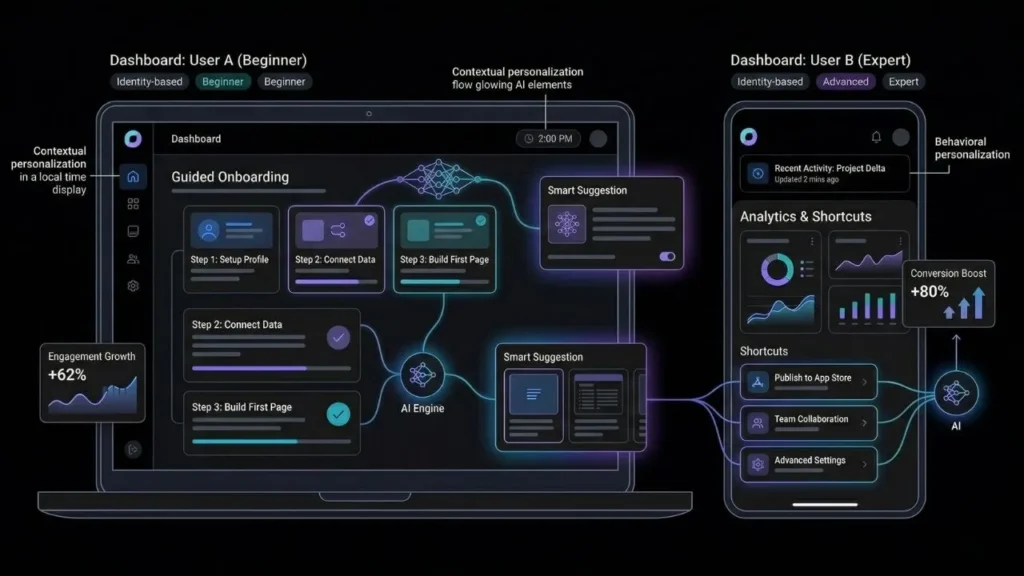
AI personalization means your app shows different content, interface elements, or pathways to different users based on their identity, behavior, or context, and it does not require a machine learning engineering team to implement. According to AppVerticals, apps using AI-powered personalization see engagement rates increase by 62% and conversion rates improve by 80% compared to apps without it. That spread is wide because implementation quality varies, but the directional finding is consistent across multiple datasets.
Launch Your App Today
Ready to launch? Skip the tech stress. Describe, Build, Launch in three simple steps.
BuildThere are three layers of personalization worth understanding before you start building. The first is identity-based personalization, meaning content driven by who the user is: their role, their plan tier, their stated goals. The second is behavioral personalization, meaning content driven by what the user has done: what they have viewed, completed, purchased, or skipped. The third is contextual personalization, meaning content driven by circumstances: device type, location, time of day, or referral source.
Most no-code founders start with identity-based personalization because it is the most direct to implement and delivers immediate value. Behavioral personalization produces the larger conversion lift but requires more planning upfront. Contextual personalization is usually the last layer added and matters most for apps with broad geographic or demographic user bases.
A poorly executed personalization layer that shows irrelevant content can actually hurt retention. The goal is not to show users more things, it is to show them fewer, better-matched things at the right moment. For a full walkthrough of how AI shapes the app-building process itself, see this guide on AI-powered no-code app development.
Why Most No-Code Apps Ship Without Personalization
The real reason most no-code apps launch without personalization is not technical: it is a prioritization mistake rooted in a false assumption. According to Bloomreach, 84% of e-commerce businesses now rank AI personalization as their top strategic priority. Yet the majority of no-code apps built by solo founders and small teams still serve a single, undifferentiated experience to every user.
The common assumption is that meaningful personalization requires ML expertise, a large dataset, and an engineer to wire it together. None of that is true for the forms of personalization that most impact conversion and retention. Role-based content rendering, behavioral content triggers, and user preference memory all operate on conditional logic that any well-designed app builder can generate from plain English descriptions. The engineering complexity is in the plumbing, not in the product thinking.
McKinsey data shows personalization can reduce customer acquisition costs by 50% while increasing revenue by 5 to 15%. That means for most early-stage products, a personalized onboarding flow is worth more than the next feature on the roadmap. Founders who treat personalization as a “phase two” consideration often discover in phase two that their retention numbers make the improvement much harder to measure cleanly. Build it in from the start.
If you have not yet framed your product idea as a full app description, start with the practical walkthrough on building an app by describing it in plain English.
How Do You Add AI Personalization to a No-Code App?
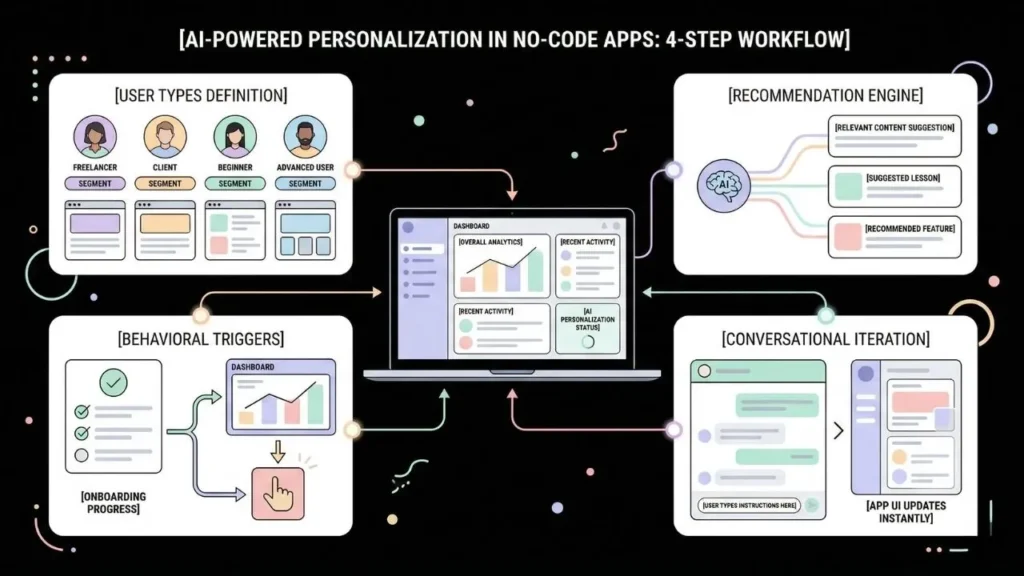
Adding AI personalization to a no-code web app is a four-step process. According to research from Codewave citing IDC, low-code and no-code platforms cut development time by 50 to 70% and costs by up to 40% compared to traditional development. That advantage compounds when you are iterating on logic-intensive features like personalization because the changes happen through conversation rather than visual workflow reconfiguration.
Step 1: Define Your User Types Before You Build
Start by identifying the two or three user types your app actually serves. A project management tool serving both clients and freelancers needs role-based personalization from day one. A fitness app serving beginners and advanced athletes should surface entirely different content by default. Write down what each user type needs to see first, what they should never see, and what a successful first session looks like for them.
This exercise costs an hour and saves weeks of rebuilding. When you describe your app through imagine.bo’s Describe-to-Build feature, the precision of your user role descriptions directly determines how accurate the AI-Generated Blueprint will be. Vague prompts produce generic dashboards. Specific descriptions of two or three distinct user types produce genuinely differentiated experiences from the first generated build.
Step 2: Use Behavioral Triggers to Adapt Content
Behavioral personalization means the app changes based on what a specific user has done, not just who they are. A user who has completed onboarding should never see onboarding prompts again. A user who has activated a premium feature should see that feature foregrounded, not buried in a menu. A user who returns repeatedly to one section of the app should see that section at the top of their navigation.
All of this is describable in a single prompt. For example: “If a user has completed onboarding, hide the onboarding checklist and show a personalized dashboard with recent activity and recommended next steps based on features they have used in the last session.” imagine.bo can generate the conditional logic and database queries to support this without any custom code. The key is being specific about the trigger condition and the resulting interface change.
Step 3: Add a Recommendation Engine Without Writing Code
Recommendation engines sound complex. At the functional level used in most early-stage SaaS apps, they are not. A recommendation engine in a no-code context means: given what this user has done or selected, surface the items most likely to be relevant to them next. This can be rule-based, which works well at any scale, or pattern-based, which improves as your user data grows.
Research from Barilliance shows product recommendations increase revenues by up to 26% in sessions where users actively engage with them. Rule-based logic delivers most of that lift without requiring ML infrastructure. Describe your recommendation rules explicitly: “After a user completes a lesson, surface the next three lessons most commonly completed in sequence by users with similar goals.” The guide on building a recommendation engine without coding walks through the full architecture for non-technical founders.
Step 4: Iterate Through Conversation, Not a Visual Editor
One concrete advantage of imagine.bo over visual no-code editors is that personalization refinements happen through conversation. If your recommendation engine is surfacing items from the wrong category, you describe the fix in plain language. “Only show recommendations within the user’s selected topic area” is a sentence you type, not a conditional block you hunt through a drag-and-drop interface to reconfigure. This makes iteration on personalization logic significantly faster than most founders expect.
What Personalization Features Can imagine.bo Build From One Prompt?

Running the ROI math for a typical bootstrapped SaaS: if your app has 1,000 monthly active users at $25 average revenue per user ($25,000 MRR), adding behavioral personalization that improves conversion by 15%, consistent with the low end of McKinsey and AppVerticals benchmarks, adds $3,750 in monthly recurring revenue. At imagine.bo’s Pro plan ($25 per month), the payback period on a well-described personalization feature is roughly the first day of the first month it runs. The implementation cost is a few credits and a well-framed prompt.
Here are the personalization features you can build through Describe-to-Build in a single session, described as prompts:
Role-based dashboards: Different views for different user types. An admin sees platform-wide analytics. A client sees only their project data. A team member sees tasks assigned to them. Describe the role types and what each should see, and imagine.bo generates separate view logic for each.
Behavioral content surfacing: Show content based on what a user has previously viewed, purchased, or completed. Hide banners or prompts that no longer apply to their stage in the product. Describe the trigger condition and the display rule, and the generated code handles the rest.
Preference capture and application: Let users set preferences, such as notification frequency, default content filters, or display categories, and apply those preferences automatically on every subsequent session without the user having to reset them.
Personalized onboarding paths: Route new users to different onboarding flows based on their stated role, their referral source, or the goal they entered at signup. This alone significantly reduces early churn in most SaaS products.
Dynamic calls to action: Show different prompts based on where a user is in their lifecycle, from free trial to active subscriber to at-risk account. Each state has a different message and a different destination.
When any personalization feature becomes complex enough that AI generation reaches its limits, the Hire a Human feature connects you directly with a vetted engineer who can complete that specific task from your imagine.bo dashboard. For the full architecture of a SaaS product built this way, see the guide on building a SaaS product with AI and no-code.
The Real Limits of AI Personalization in No-Code Apps
Behavioral personalization requires behavioral data, and that data takes time to accumulate. If your app has fewer than a few hundred monthly active users, the signals are too sparse to drive meaningful pattern-based adaptation. Rule-based personalization works at any scale and should be your starting point. Data-driven personalization becomes genuinely useful around 500 to 1,000 monthly active users when patterns become statistically reliable.
Privacy and consent requirements are real and non-negotiable. GDPR, CCPA, and emerging AI-specific regulations mean that collecting behavioral data for personalization requires explicit consent mechanisms and clear disclosure. imagine.bo builds in GDPR foundations by default, including RBAC, SSL, and SOC2-readiness out of the box. But your data collection strategy and consent flows still require your active design choices, not just platform defaults. According to Gartner, over 75% of the world’s population will be covered by modern privacy laws by 2025, and enforcement is accelerating.
Third-party data integration adds complexity. If your personalization strategy depends on behavioral data from an external CRM, analytics platform, or ad network, the integration complexity increases materially. Standard API connections are well within imagine.bo’s generation capabilities. Deeply custom data pipelines generally require Hire a Human tasks.
Performance overhead is worth planning for. Real-time personalization adds database queries to every page load. imagine.bo’s default deployment on Vercel for frontend and Railway for backend handles this well at most early-stage scales, but it is worth knowing that heavier personalization logic will show up in your infrastructure costs as you grow. The guide on best practices for AI in no-code apps covers performance considerations in practical detail.
FAQ: AI Personalization in No-Code Web Apps
Can a no-code app actually deliver real-time personalization without custom code?
Yes, for most practical cases. Role-based content rendering, preference-based filtering, and behavioral content surfacing can all be built through prompt-based platforms like imagine.bo. According to Gartner, 70% of new applications will be built using low-code or no-code platforms by 2025. Real-time personalization requiring complex ML inference at very large scale still benefits from custom engineering, but most early-stage apps never reach that threshold.
How many users do I need before personalization is worth building?
Rule-based personalization is worth building from day one, even with 50 users. It improves onboarding completion and reduces early churn by showing each user type relevant content immediately. Data-driven behavioral personalization starts delivering clear value around 500 to 1,000 monthly active users. According to McKinsey, personalization reduces customer acquisition costs by 50%, making it one of the highest-ROI product investments at any scale.
Does personalization in a no-code web app hurt SEO?
Not when structured correctly. Content rendered conditionally behind authentication is not crawlable by search engines, so it does not affect index coverage. Public-facing pages should remain fully crawlable without aggressive personalization that hides indexable content. According to UserGuiding, 73% of businesses currently use AI-powered tools for customer experience, but SEO considerations apply only to pre-authenticated, publicly accessible surfaces of your app.
What is the easiest personalization feature to add first?
Role-based content rendering. Describe your two or three user types, what each should see by default, and what each should never see. imagine.bo’s Describe-to-Build generates this structure in the initial AI-Generated Blueprint. According to HelloRep, 78% of consumers report a higher likelihood of repeat purchases from businesses that personalize their experience, and role-based rendering is the foundation that every subsequent personalization layer builds on.
Can I add personalization to an app I have already built on imagine.bo?
Yes. Personalization is added iteratively through conversation. Describe the layer you want to introduce: “Add role-based dashboard views so admins see all user activity and clients see only their own project data.” The platform generates the update as a change to your existing app, the AI-Generated Blueprint updates to reflect the new logic, and you can test it before deploying. According to AppVerticals, apps that integrate AI personalization convert at 12.3% versus 3.1% for non-personalized apps in comparable categories.
Conclusion
Three things to take from this guide. First, AI personalization in no-code web apps is not a future capability waiting for better tooling. It is available now through descriptive prompts, and the ROI data from McKinsey, AppVerticals, and Bloomreach consistently shows it outperforms almost any other UX investment at equivalent cost. Second, the barrier to building it is not technical. It is clarity about your users. Founders who can describe their user types and their expected journeys in specific language get personalization features that work from the first build. Third, start with role-based views and behavioral content triggers, measure their impact on your conversion and retention numbers, then layer in recommendation logic as your user base grows into the behavioral data needed to make it meaningful.
If you are ready to build a web app with AI personalization built in from the start, imagine.bo’s Describe-to-Build feature lets you specify user roles, content logic, and behavioral triggers in plain English and generates a full-stack app ready for production deployment on Vercel and Railway. The non-technical founder’s guide to building products covers how to frame a product description that produces the best results from the first prompt.
Start your first build at imagine.bo.
Launch Your App Today
Ready to launch? Skip the tech stress. Describe, Build, Launch in three simple steps.
Build




