

Three years ago, a polished 60-second marketing video required a production crew, several thousand dollars, and at least two weeks of editing cycles. Today, that same video can be generated from a text prompt in under 30 minutes, no camera or editing software required. According to Vivideo (2026), AI tools have cut average video production costs by 91%, from roughly $4,500 per minute with traditional methods to around $400 per minute. If you’re a non-technical founder who has been putting off video marketing because it felt too expensive or too complex, this guide covers what you need to start. You’ll learn how no-code video generation tools work, which ones suit beginners in 2026, and how to produce your first video without writing a single line of code. For a broader look at how this category has evolved, see AI video generation for no-code tools and platforms.
TL;DR: No-code video generation lets anyone create professional-quality videos from text descriptions or scripts, with no editing skills required. The global AI video generator market was valued at $788.5 million in 2025 and is growing at 20.3% CAGR through 2033 (Grand View Research, 2025). Top beginner tools are Synthesia, HeyGen, and InVideo, each offering free tiers to test before paying.
What Is No-Code Video Generation and How Does It Work?

No-code video generation means creating a finished video by typing a description or pasting a script, with AI handling everything from animation to audio sync. The AI model has been trained on large libraries of footage, images, and audio so it can translate written instructions into moving video sequences without you touching a timeline or keyframe. Grand View Research (2025) estimates the AI video generator market was valued at $788.5 million in 2025 and will grow at a CAGR of 20.3% through 2033, driven primarily by demand from small businesses and independent creators who cannot afford traditional production.
Launch Your App Today
Ready to launch? Skip the tech stress. Describe, Build, Launch in three simple steps.
BuildTwo types of tools dominate the category. Avatar-based platforms like Synthesia and HeyGen take your script and produce a talking-head video with a digital human presenter, ideal for product demos, training content, and explainers. Generative tools like Runway and Kling take a text or image prompt and produce raw cinematic footage, which suits ads, B-roll, and brand visuals. Most beginners should start with an avatar platform because the output is predictable and the workflow is structured.
The distinction matters more than most guides acknowledge. Avatar tools produce reliable, consistent output but the creative ceiling is lower. Generative tools produce more cinematic footage but require significant prompt iteration before you get something usable. A founder building a product demo in one afternoon needs the former. A creator building a brand aesthetic needs the latter. Mixing up the two leads to wasted hours.
Citation capsule: According to Grand View Research (2025), the global AI video generator market was valued at $788.5 million in 2025 and is projected to reach $3.44 billion by 2033 at a CAGR of 20.3%. The solutions segment drives 63% of market revenue, reflecting sustained demand for software platforms that automate video creation from text prompts with minimal manual input.
For context on how AI-generated media fits into a wider no-code creative workflow, building a text-to-image app without code covers still-image generation, where many of the same prompt principles apply.
Why Are Founders and Small Teams Switching to AI Video in 2026?
The time and cost case is straightforward. Vivideo (2026) reports that the average time to produce a 60-second marketing video dropped from 13 days to 27 minutes with AI tools. That is not a marginal improvement. It is a structural shift in what a solo operator or two-person team can produce without outside help. For a founder already stretched thin, that gap is the difference between having video content and not.
Adoption reflects this. Vivideo (2026) reports that AI video generation volume grew 840% between January 2024 and January 2026. HeyGen’s mid-market customer base grew 152% year-over-year as of January 2026, according to YipitData (2026). These are not niche tools for tech enthusiasts. They are being used by marketing teams, e-commerce brands, course creators, and service businesses that previously relied on freelance editors or agencies.
A SaaS founder building a product explainer used Synthesia to produce a two-minute walkthrough video in a single afternoon. The script went in, the avatar delivered it, and the founder had a production-ready video for the landing page by end of day. The equivalent project with a freelance videographer would have taken a week and cost $800 to $2,000. The ROI calculation is not complicated, and it gets clearer every quarter as model quality improves.
For more on how AI tools are changing what small teams can actually ship, AI tools every indie hacker should know covers the broader toolkit beyond video.
Citation capsule: According to Vivideo (2026), 52% of B2B marketers named AI video their most-adopted new marketing technology of 2025-2026. AI tools reduced average production costs by 91%, and companies using AI video report a 68% faster time-to-publish for video campaigns. The total global AI video generation volume grew 840% between January 2024 and January 2026.
Which No-Code AI Video Tools Are Best for Beginners?
The best starting tools in 2026 are Synthesia, HeyGen, and InVideo. Each has a free tier, a simple interface, and predictable output, which is what you need when you are still learning the workflow. The right choice depends on your use case, not which tool has the longest feature list.
Synthesia is the most mature platform for business video. It suits training content, product demos, and internal communications. The platform supports over 140 languages and its free plan provides basic access to explore the avatar interface, while the Starter plan at $29 per month unlocks 120 minutes of video per year (Zapier, 2026). The limitation is lower flexibility for custom creative work, but for founders who need one clear explainer video, that is rarely an issue.
HeyGen grew its mid-market customer base 152% year-over-year as of January 2026 (YipitData, 2026) and is the best choice when video localization matters. You can produce one video and have it dubbed into 40-plus languages with synced lip movements. HeyGen’s free plan allows up to 3 videos per month. The Creator plan at $29 per month provides unlimited generated videos, making it cost-effective for founders producing regular content.
InVideo is template-based and offers more creative flexibility for social media and YouTube content. It suits founders who need regular short-form content rather than a single polished explainer, and its pricing is competitive for solo creators on a tight budget.
Mapping these three by beginner profile: Synthesia wins for corporate and training content where script clarity drives the output. HeyGen wins for global audiences and marketing content where a human-like presenter builds trust. InVideo wins for high-frequency social content where template speed matters more than production polish.
For an adjacent creative workflow worth knowing, AI music generation apps without coding covers how to add royalty-free AI soundtracks to your videos without leaving the no-code stack.
Citation capsule: According to YipitData (2026), HeyGen’s mid-market customer base grew 152% year-over-year as of January 2026, outpacing Synthesia’s approximately 30% growth in the same period. Synthesia continues to lead on average contract value, with ACVs more than three times higher than HeyGen’s, reflecting stronger enterprise positioning despite lower adoption velocity.
How Do You Choose the Right Tool for Your Use Case?

The fastest way to choose is to match the tool to the output format you need before comparing pricing or features. Avatar platforms are best when you need a presenter delivering a script. Generative tools are better when you need cinematic footage, visual sequences, or abstract brand content. Most beginners will need the former.
If you are producing a product demo or onboarding video, use Synthesia or HeyGen. The avatar presenter adds a human element that builds trust on a landing page, and the script-to-video workflow is the most direct path to a finished output. If you are creating social ads or short promotional clips, consider InVideo or Creatify, which are purpose-built for performance marketing. Creatify’s URL-to-video feature turns a product page link into 5 to 10 ad variations in under 10 minutes (Creatify, 2026).
If you need B-roll or cinematic brand content and are willing to iterate on prompts, Runway’s Standard plan at $15 per month gives access to all core models (Zapier, 2026). Expect to run 5 to 10 prompt variations before you get footage worth keeping. That is not a flaw; it is how generative tools work.
Most beginner guides recommend the tool with the most features. This is the wrong starting point. Start with the tool that matches your first deliverable. Complexity kills motivation faster than any learning curve. Ship one video, internalize the workflow, then consider adding tools.
To understand how AI generative tools fit into building full product experiences, not just videos, generative AI for UI/UX with no-code tools covers the same principles applied to interface and design generation.
How to Create Your First AI Video in 5 Steps
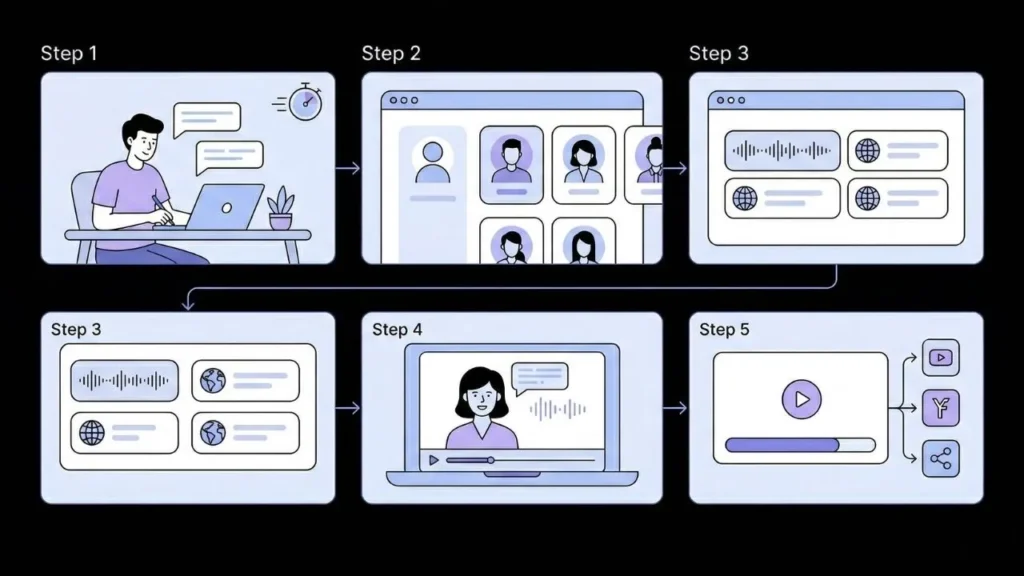
Creating your first AI video takes less than 30 minutes once you know the flow. The steps below use HeyGen because its interface is the most beginner-friendly for talking-head content, but the same logic applies across Synthesia and InVideo.
Step 1: Write your script. Aim for 100 to 250 words for a 60 to 90-second video. Write conversationally, the way you would explain your product to a smart friend. Avoid jargon. Short sentences read better out loud.
Step 2: Choose your avatar. HeyGen provides a library of pre-built avatars across different professional styles. Pick one that fits your brand’s tone. If you want the presenter to look like you, HeyGen supports custom avatar creation from a short video clip.
Step 3: Select a voice and language. HeyGen supports over 40 languages (Lummi AI, 2026). Start with your primary market language. You can duplicate the project later and swap languages to build localized versions without re-recording anything.
Step 4: Generate and preview. Paste your script, select avatar and voice, then generate. The platform produces a preview within minutes. Watch it once for pacing and any pronunciation issues before downloading.
Step 5: Download and deploy. Export in MP4 at 1080p on a paid plan and upload directly to your landing page, YouTube, or social accounts. The whole process from script to published video runs under 30 minutes once you have done it once.
Vivideo (2026) reports that 71% of creators use AI video for first drafts and then refine manually. That is the right mental model for beginners. Treat your first output as a starting point. The second video will be faster and better.
For more on moving from a raw idea to a deployed product on the same timeline, going from idea to live app in seconds covers the speed-first philosophy applied to web app development.
Citation capsule: According to Vivideo (2026), 71% of creators use AI video tools for first drafts and refine manually afterward. This human-in-the-loop workflow balances the speed of AI generation with the quality control of human judgment. Short-form video under 60 seconds accounts for 67% of all AI-generated video content, making it the dominant format for beginners to target first.
What Are the Real Limitations of No-Code Video Generation?
No-code video tools are genuinely useful, but they have real constraints that most introductory content ignores. Knowing them upfront saves time and prevents expensive mistakes.
Consistency across a video series is hard. Avatar platforms maintain a consistent presenter across videos. But if you use a generative tool like Runway for multiple clips in a series, keeping the same character, lighting, or setting requires careful prompting and significant iteration. This is a known limitation of current models that even professional users work around rather than solve.
Commercial rights vary by plan. Most free tiers restrict commercial use. If you plan to use AI video in paid advertising or customer-facing marketing, check licensing terms before publishing. Adobe Firefly Video is notably safer for brand campaigns because it is trained entirely on licensed content, reducing IP risk (AutoGPT, 2026).
Native audio quality is still maturing. Audio integration became a standout feature in 2026, with Veo 3.1 introducing 4K output at 60fps in January 2026 (AutoGPT, 2026). However, consistent, natural-sounding speech in generative video tools remains a work in progress on several platforms. Avatar tools like Synthesia handle voice more reliably because the voice is synthesized separately from the video.
Free tier output is limited. HeyGen caps free users at 3 videos per month. Synthesia’s free plan functions as a demo rather than a working tier. Runway’s free plan provides 125 one-time credits (Zapier, 2026). If you need regular output, factor in a paid plan from the start.
These constraints do not undermine the value proposition. They mean you should enter with calibrated expectations rather than assuming one subscription replaces your entire content workflow. For a clearer read on where no-code tools trade off against traditional development, no-code vs low-code for startups covers the trade-offs honestly.
FAQ
What is no-code video generation?
No-code video generation uses AI to produce videos from text descriptions, scripts, or image inputs without requiring video editing skills or technical knowledge. Platforms like Synthesia, HeyGen, and InVideo handle the entire production pipeline from input to rendered file. According to Vivideo (2026), AI tools cut average video production time from 13 days to 27 minutes per 60-second video.
Which AI video tool is best for beginners in 2026?
For most beginners, HeyGen and Synthesia are the clearest starting points. HeyGen’s free plan allows 3 videos per month and offers one of the most intuitive interfaces available (Zapier, 2026). Synthesia suits business-focused content and supports over 140 languages. Both produce consistent, presenter-led output without requiring prompt engineering experience.
Can I use AI-generated videos commercially?
Most free plans restrict commercial use. Paid plans on platforms like HeyGen ($29/month), Synthesia ($29/month), and Runway ($15/month) include commercial rights at their respective price points (Zapier, 2026). Adobe Firefly Video is the safest option for brand advertising because it is trained on licensed content, reducing intellectual property risk (AutoGPT, 2026). Always check terms before publishing in paid campaigns.
How much does no-code video generation cost?
Consumer subscriptions for leading platforms typically range from $10 to $35 per month for standard paid plans (AutoGPT, 2026). Free tiers exist on HeyGen, Runway, Synthesia, and InVideo but include watermarks and output limits. API access to frontier models like Veo runs approximately $0.15 to $0.40 per second of generated video for developers building custom workflows.
How do I add AI video to my web app or product?
The most direct approach is embedding the finished video file on your app’s landing page or inside the product itself. For automated, AI-generated video workflows triggered by user actions, HeyGen offers API access on paid plans. If you need to build the surrounding web application itself, AI-powered no-code app development explains how tools like imagine.bo generate a full-stack web app from a plain English description, so you can have both a video and a working product without writing code.
Conclusion
No-code video generation has matured to the point where a non-technical founder can produce a polished product demo, onboarding video, or social ad in a single afternoon. The workflow is simpler than most content suggests. Write a script, pick an avatar, generate, review, publish. Three takeaways worth holding onto:
First, match the tool to the output, not the feature list. Synthesia and HeyGen cover the vast majority of business video use cases without any learning curve. Save generative tools like Runway for when you genuinely need raw cinematic footage. Second, plan for a paid plan from day one if you need commercial rights or consistent output volume. Free tiers are for testing workflows, not running campaigns. Third, the 71% of creators who use AI video for first drafts and refine manually have the right model (Vivideo, 2026). AI generates fast. Judgment and iteration are still yours to apply.
If you are building a product alongside your video content, imagine.bo’s Describe-to-Build feature generates a complete full-stack web application from a plain English description, including pages, database logic, and one-click deployment to Vercel and Railway, no developer required. You can have a demo video live on your landing page and a working app behind it in the same day. Explore how founders are shipping fast with monetizing prompt-built apps without coding.
Related Articles
- Searchable Cinema: Build an AI-Powered Video Library with Automatic Captioning
- Unlock Your Video Editing Potential: Mastering AI Video Editing Tools
- Unlocking Generative AI: Your Comprehensive Guide to Building Cutting-Edge Applications
- AI Website Builder for Videographers Streamlining Creative Portfolio Creation
- Supercharge Your Marketing with Generative AI: A Practical Guide to the Best Tools
Launch Your App Today
Ready to launch? Skip the tech stress. Describe, Build, Launch in three simple steps.
Build




