
Most founders building their first product hit the same wall. They have a clear picture of what the app should do, but no idea how it should look or feel. Hiring a UI/UX designer for a pre-revenue startup costs between $5,000 and $15,000 for even a basic design system. Freelance platforms are slower tha n you expect. And “just use a template” usually produces something that looks generic the moment a real user touches it.
Generative AI has changed this calculation in a real way. This guide walks through exactly how non-technical founders can use generative AI tools to produce production-quality UI/UX without a design background. You’ll learn which AI capabilities are actually production-ready in 2026, where the genuine limits are, and how platforms like imagine.bo handle the design layer within a full-stack build. If you’ve ever felt stuck between “I can’t afford a designer” and “I can’t ship something ugly,” this is written for you. See how non-technical founders are building products without dev teams to understand the broader context.
Launch Your App Today
Ready to launch? Skip the tech stress. Describe, Build, Launch in three simple steps.
BuildTL;DR: Generative AI can produce solid, conversion-ready UI in 2026 without a professional designer. According to Lyssna’s 2025 survey of 100 designers, 93% are already using generative AI tools in their current work, and teams report up to 8.6x faster design-to-prototype cycles (UXPin, 2026). For non-technical founders, the practical workflow is: describe the interface in plain English, iterate through conversation, apply basic color and hierarchy principles, and use a platform like imagine.bo that generates the frontend, backend, and deployment together.
What Can Generative AI Actually Do for UI/UX Today?
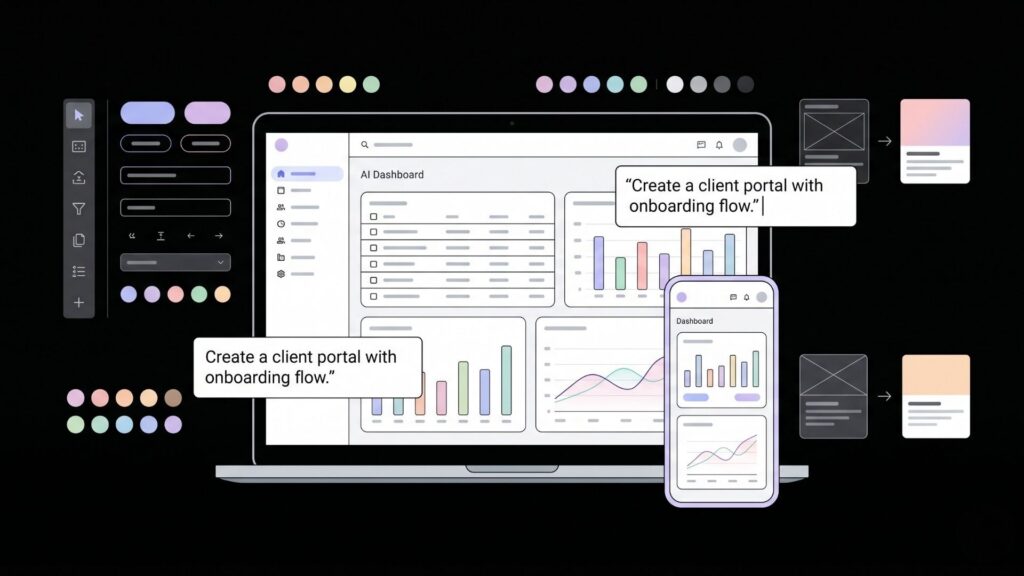
Generative AI can now produce complete, interactive UI layouts from plain text descriptions, with consistent component libraries and responsive behavior, in under a minute. This isn’t wireframe sketching or mood board generation. It’s production-oriented output. According to UXPin (2026), teams using AI-first design workflows report up to 8.6x faster design-to-prototype cycles when AI generates the first 80% of a layout. That’s not a productivity bump. That’s a fundamentally different timeline for getting something in front of users.
The key shift that matters for non-technical founders is that AI design tools have moved from generating generic mockups to working with real component libraries and design systems. When AI output is constrained to actual components, the result is immediately usable rather than requiring a designer to translate it into working code. For imagine.bo users, this happens automatically through the Describe-to-Build feature. You describe your app in plain English, and the AI-Generated Blueprint includes the frontend layout alongside the database schema and backend logic. It’s not a visual canvas you drag things around in. It generates the whole thing from your description, frontend included.
What works well right now:
- Generating clean dashboard layouts with data tables, charts, and navigation
- Creating multi-page flows with consistent component styles
- Producing responsive layouts that work on mobile and desktop automatically
- Matching a described color palette or brand style across all screens
- Generating form-heavy interfaces (booking flows, onboarding steps, client portals)
For a deeper look at how AI tools are changing the design discipline itself, how AI builders are changing UX design breaks down the workflow shift in practical terms.
Citation capsule: According to Adobe Digital Trends (2025), more than 65% of design teams now use AI features to accelerate interface creation and test UX hypotheses. The generative AI in product design market reached $15.84 billion in 2025, growing at a 12.4% CAGR (BayOne, 2025). For non-technical founders, this means the tooling is mature, not experimental.
How Do You Describe a UI to an AI and Get Something Good Back?
The quality of your AI-generated UI depends almost entirely on the specificity of your prompt. Vague instructions produce generic results. Specific descriptions of user goals, screen flows, and interaction patterns produce interfaces that actually reflect how your users think. According to Lyssna’s December 2025 survey, 93% of designers are already using generative AI tools, but 54% report that their clients want to jump on AI trends without clear use cases. That gap between adoption and intention is exactly where most non-technical founders get stuck.
Here’s the practical difference between a weak prompt and a strong one. A weak prompt says: “Create a dashboard for a project management app.” A strong prompt says: “Create a dashboard for a project management app used by freelancers managing 3 to 5 clients at once. The main view should show active projects, upcoming deadlines in the next 7 days, and unread client messages. The sidebar should have navigation for Projects, Clients, Invoices, and Settings. Use a dark navy and white color scheme with orange as the accent.”
The second prompt gives the AI enough context to make real decisions about hierarchy, information density, and component selection. Think of it less like giving design instructions and more like briefing a designer on how the user actually works.
When building a client portal with imagine.bo, founders who describe the user journey step by step (“when a client logs in, they should see their active projects, recent invoices, and a message thread”) consistently get better initial layouts than those who describe the visual appearance first. The platform builds the frontend from the functional description rather than the aesthetic one, which produces more usable results.
For hands-on guidance on writing prompts that produce working apps, prompt engineering tips for no-code AI developers covers the techniques that matter most.
Citation capsule: UXPin (2026) reports that AI constrained to a real design system never breaks brand rules, spacing tokens, or component APIs, and that conversational iteration lets designers modify layouts in place without regenerating from scratch. This iterative refinement model is the same workflow imagine.bo uses, where conversation replaces a visual editor entirely.
Does AI-Generated UI Actually Convert? What the Data Says
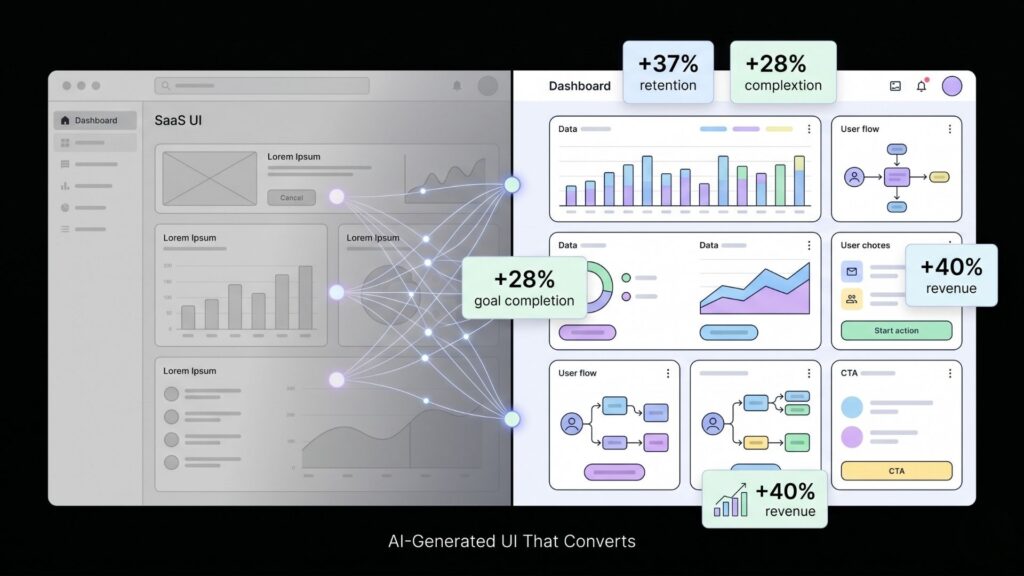
There’s a common assumption among technical founders that AI-generated UI looks “off” to users and hurts conversion. The data does not support this when the AI has clear constraints to work within. Phenomenon Studio (2025) tracked 14 AI-augmented projects and recorded an average 37% increase in first-30-day retention and 28% higher goal completion rates. These aren’t marginal improvements. They indicate that AI-generated interfaces, when designed with user intent in mind, perform at least as well as manually crafted ones for typical web app use cases.
The more important finding is about personalization. McKinsey data shows companies that excel at AI-driven personalization generate 40% more revenue than those that don’t (McKinsey, 2025). Gartner projects 30% of all new apps will use AI-driven adaptive interfaces by 2026, up from under 5% just two years ago. For founders building SaaS products or client portals, this means the baseline expectation for interfaces is already moving upward.
What this means practically: the risk of shipping an AI-generated UI that feels generic is real, but it’s a prompt quality problem, not a technology problem. Generic inputs produce generic outputs. Specific descriptions of your actual users and their actual tasks produce interfaces that feel intentional.
make a website with one prompt shows how a single well-constructed description can generate a complete, live web presence.
Citation capsule: According to Statista (2025), 79% of design professionals believe AI has improved their productivity. Generative UI tools have been shown to cut prototyping cycles from 14 days to 4 days while preserving strict brand rules (Phenomenon Studio, 2025). For non-technical founders, this represents a viable path to shipping polished interfaces without hiring a designer.
What Are the Real Limits of AI in UI/UX Design?
AI-generated UI has genuine limits that no honest guide should skip. The most significant one is interface homogenization. An Adobe study (2025) found that more than 42% of interfaces generated using AI tools feature similar navigation structures and components. If every AI-generated SaaS product uses the same sidebar layout and the same card component structure, the differentiator shifts from the interface to the product logic itself.
For most non-technical founders, this is fine. Your users care whether the app solves their problem, not whether your navigation is visually distinctive. But if brand differentiation matters for your product category, you’ll want to push beyond the defaults. The way to do this in imagine.bo is through iterative refinement. After the initial build, you describe specific deviations from the default patterns. “Remove the sidebar. Use a top navigation instead. The dashboard cards should be full-width, not grid-layout.” Each conversation step moves the interface further from the generic baseline.
The second real limit is emotional and brand-specific design. AI handles functional UI well. It handles distinctive brand expression less reliably without specific guidance. Color palettes, typographic personality, and motion design require explicit direction. For that reason, color theory to enhance app aesthetics is worth reading before you start describing your UI to any AI tool. Knowing the basic principles lets you give better instructions.
The third limit is accessibility. Generative AI produces layouts that work visually for typical users. It doesn’t automatically catch contrast ratio failures, keyboard navigation gaps, or screen reader compatibility issues. These require a human review pass or dedicated accessibility tooling.
Citation capsule: The World Economic Forum (2025) found that 44% of design professionals believe AI now significantly influences decisions about information architecture and interface hierarchy. The same report noted that relying on AI training data from existing products tends to reproduce dominant design patterns, which poses a risk for products where visual differentiation is a competitive advantage.
How Does imagine.bo Handle UI/UX Generation in Practice?

imagine.bo generates the full frontend as part of a complete full-stack build, meaning the UI and the backend logic are generated together from a single plain English description. This matters because it eliminates the most common failure point in AI-assisted development: a well-designed frontend connected to backend logic that doesn’t match it. When both layers come from the same Describe-to-Build prompt, they’re structurally aligned from the start.
The AI-Generated Blueprint shows you the proposed app structure, including the page hierarchy, component layout, and navigation flows, before any code is generated. You can revise the blueprint through conversation before accepting it. This is the stage where most UI/UX decisions get made. Describing your users’ tasks at this stage rather than your visual preferences produces better results consistently.
Founders building booking systems or client portals with imagine.bo consistently find that the default layouts handle functional screens well (login, dashboard, form pages, data tables) but benefit from one or two refinement passes to adjust information hierarchy on the most important screens. The platform’s iterative refinement through conversation means you don’t need a visual editor to make these changes. You describe what you want different, and the build updates.
For more complex products where the UI requirements exceed what iterative prompting can handle, the Hire a Human feature connects you directly with vetted engineers from within the dashboard. You don’t leave the platform or open a separate project. This is where the hybrid model earns its value. AI handles the 80% that’s functional and standard. A human engineer handles the specific layout or interaction pattern that requires real design judgment.
For an example of how this workflow plays out for a specific product type, sketches into AI-powered apps: no-code UI design walks through converting rough ideas into working interface specs.
Citation capsule: imagine.bo deploys frontend to Vercel and backend to Railway by default, with RBAC, SSL, and GDPR foundations built in. The Hire a Human feature means that when AI-generated UI reaches its practical limits, vetted human engineering support is accessible directly from the dashboard without switching tools or starting a new project.
How Do You Refine and Iterate on AI-Generated UI Without a Design Background?
The refinement process is where non-technical founders typically feel most uncertain. You can tell something looks wrong but can’t articulate why. The practical answer is to describe the user experience, not the visual problem. Instead of “the dashboard doesn’t look right,” say “the most important information (active projects) is getting lost below the fold. Users should see it immediately when they log in.”
This approach works because AI tools respond to user-centered language. They’re trained on design principles that prioritize task completion and information hierarchy. If you frame your feedback in terms of what the user needs to see and do, the AI makes structurally sound adjustments rather than cosmetic ones.
Three refinement questions worth running through after every major screen:
- What is the user trying to accomplish on this screen, and is that action the most visually prominent element?
- What information does the user need before taking that action, and is it visible without scrolling?
- What happens after the action, and does the design communicate that flow clearly?
These are not design questions. They are product questions. Any founder can answer them. And once you can answer them, you can direct an AI to improve a screen without knowing anything about grid systems or spacing tokens.
Designing smarter products with AI assistance covers the product-first framing in more depth, which is exactly the lens that produces better AI-generated UI.
Citation capsule: Teams using conversational AI for design modification can change layouts in place, with UXPin (2026) reporting that iterative prompting (“make the sidebar narrower,” “swap the data table for cards”) produces production-ready output without regenerating from scratch. This conversational model is well suited to founders who know what their users need but lack a design vocabulary.
Frequently Asked Questions
Can AI generate UI that looks professional enough for a paying customer?
Yes, for the majority of web app use cases. According to Phenomenon Studio (2025), AI-augmented projects achieved 37% higher first-30-day retention and 28% higher goal completion rates than non-AI baselines. The output quality depends on the specificity of your description. Generic prompts produce generic UIs. Specific user-task descriptions produce interfaces that work well for real users.
What should I describe to get a better UI from an AI builder?
Describe who the user is, what task they’re trying to complete on each screen, and what information they need to do it. According to UXPin (2026), AI constrained by a real component library and guided by functional requirements produces immediately usable output. Avoid describing colors or layout positions first. Start with the user’s goal, then describe visual preferences as a second pass.
Is no-code UI design with AI good enough for a SaaS MVP?
For most SaaS MVPs, yes. The generative AI in product design market reached $15.84 billion in 2025 with 12.4% CAGR (BayOne, 2025), reflecting real adoption by product teams, not just experimenters. Platforms like imagine.bo generate the frontend, backend, database, and deployment from a single description, which means the MVP ships as a functioning full-stack product, not just a UI prototype. For MVPs where visual differentiation matters heavily, a human refinement pass is worth the investment. Designing smarter products with AI assistance covers how to identify which screens warrant that extra attention.
Does AI-generated UI work on mobile as well as desktop?
Responsive behavior is handled automatically by most production-grade AI app builders in 2026. imagine.bo generates responsive layouts by default. The practical gap is in interaction design for touch-specific patterns (swipe gestures, bottom navigation) which sometimes need iterative refinement to feel natural on mobile. Describe the device context explicitly in your prompt if mobile is the primary use case.
How do I handle accessibility in an AI-generated interface?
AI generates layouts that pass basic accessibility standards in most cases but doesn’t automatically audit for contrast ratios, keyboard navigation completeness, or screen reader compatibility. Run a pass with a free tool like axe DevTools or WAVE after launch. For applications serving users with specific accessibility needs, the Hire a Human feature in imagine.bo is the practical path to getting a vetted engineer to audit and fix the specific issues.
Conclusion
Three things are clear from where AI-generated UI/UX stands in 2026. First, the technology is production-ready for the majority of web app use cases. Teams are shipping real products with AI-generated frontends and seeing better retention and completion rates than manually designed alternatives, not worse. Second, quality is a prompt quality problem, not a technology problem. Founders who describe their users’ tasks and goals get better interfaces than those who describe visual preferences first. Third, the hybrid model that combine AI generation with on-demand human expertise fills the genuine gaps. AI handles the 80% that’s functional, standard, and fast to produce. A human engineer, accessible directly from the imagine.bo dashboard through the Hire a Human feature, handles the 20% that requires real design judgment.
The practical path forward is straightforward. Start with a plain English description of your app that focuses on what users need to accomplish. Use imagine.bo’s Describe-to-Build to generate the full-stack build including the frontend. Refine through conversation using user-task language rather than visual language. For screens where the stakes are highest, use Hire a Human to get expert input without leaving the platform.
Start building at imagine.bo. Your first 10 credits are free, with no card required. For context on how AI builders have already changed what’s possible for solo founders, AI tools every indie hacker should know covers the broader toolkit worth having in your stack.
Related Articles
- Unlocking the Power of Generative AI: Your Guide to Building AI Apps
- Unlocking Productivity: 5 Businesses Revolutionizing Work with Generative AI
- Supercharge Your Marketing with Generative AI: A Practical Guide to the Best Tools
- Unlock Your Creativity: A Step-by-Step Guide to Generative AI Design Tools
- Unlock Your Inner Game Designer: Generative AI for Non-Coders
Launch Your App Today
Ready to launch? Skip the tech stress. Describe, Build, Launch in three simple steps.
Build




