

Most people with a good app idea stop before they start because they assume the next step is learning to code or finding a developer. According to Clutch, the average custom app development project costs $30,000 to $150,000 and takes three to nine months before a single user tests it (Clutch, 2025). For someone with an idea and limited time or budget, that quote ends the conversation. AI app builders have changed that math entirely. imagine.bo’s Describe-to-Build interface takes a plain English description of your app idea and generates the complete full-stack product: frontend, database, backend logic, authentication, and deployment. The technical work happens automatically. Your job is to describe what you want clearly. This guide covers exactly how to do that, from the first sentence of your idea to a deployed app real users can access. For a practical walkthrough of the building process specifically, this post on building an app by describing it in plain English shows the workflow in detail.
TL;DR You can turn any app idea into a working product by describing it in plain English using imagine.bo’s Describe-to-Build interface. The platform generates the full stack from your description, shows you the AI-Generated Blueprint before building, and deploys to production infrastructure in one click. The free plan starts at $0 with 10 credits per month. According to GitHub, AI-assisted development reduces build time for common software patterns by 55% (GitHub, 2024). No coding required at any step.
Why Describing Your App Works Better Than Building It Yourself
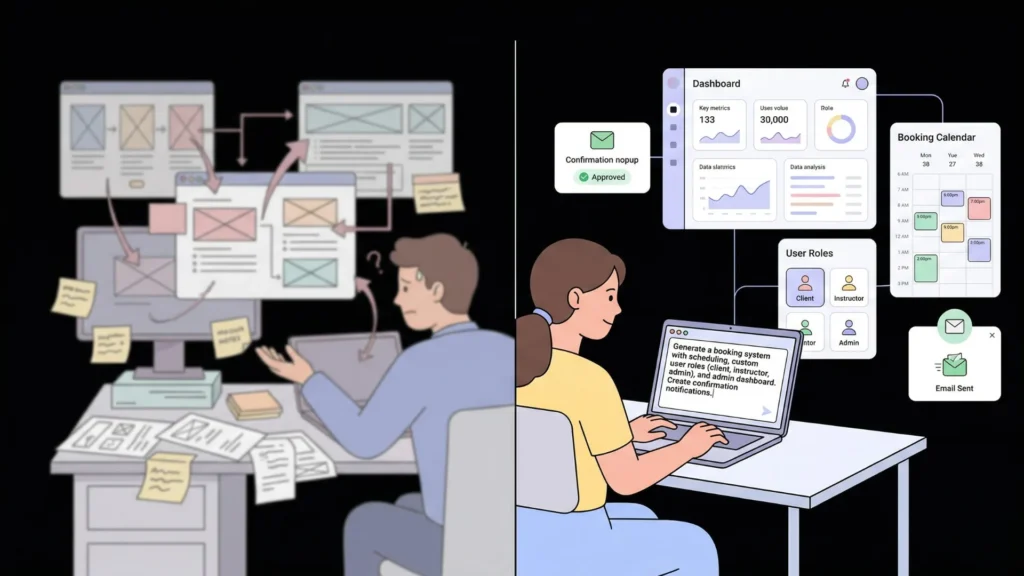
The assumption behind traditional app development is that the person closest to the idea is least qualified to build the product. The idea person writes a brief, hands it to a developer, and waits for the output to match the intent. That translation process between what you described and what got built is where most of the cost, time, and frustration in software development lives.
Launch Your App Today
Ready to launch? Skip the tech stress. Describe, Build, Launch in three simple steps.
BuildAI app builders invert that assumption. The person with the clearest understanding of the problem, the intended users, and the workflows the app needs to support now produces the most accurate generated output. A founder who knows exactly how their booking system should work, exactly who has access to what data, and exactly what confirmation emails should say generates a better first version from a prompt than a developer working from an ambiguous brief.
The quality difference between a good app description and a vague one is not subtle. A description like “build a booking app” generates a generic product with assumed features that may or may not match your intent. A description like “build a session booking system for a private yoga studio. Clients log in, view available class slots by instructor and day, book a session, and receive an email confirmation with a calendar invite. Instructors see their own upcoming sessions and can mark sessions as cancelled. Admins see all sessions across all instructors and can manage instructor accounts” generates a product with the exact data model, the exact user roles, and the exact workflows the studio actually uses. The quality improvement comes entirely from you, not from the platform.
This post on turning ideas into apps with AI prompts covers the specific prompting techniques that consistently produce accurate first generations.
Step 1: Clarify Your Idea Before You Describe It
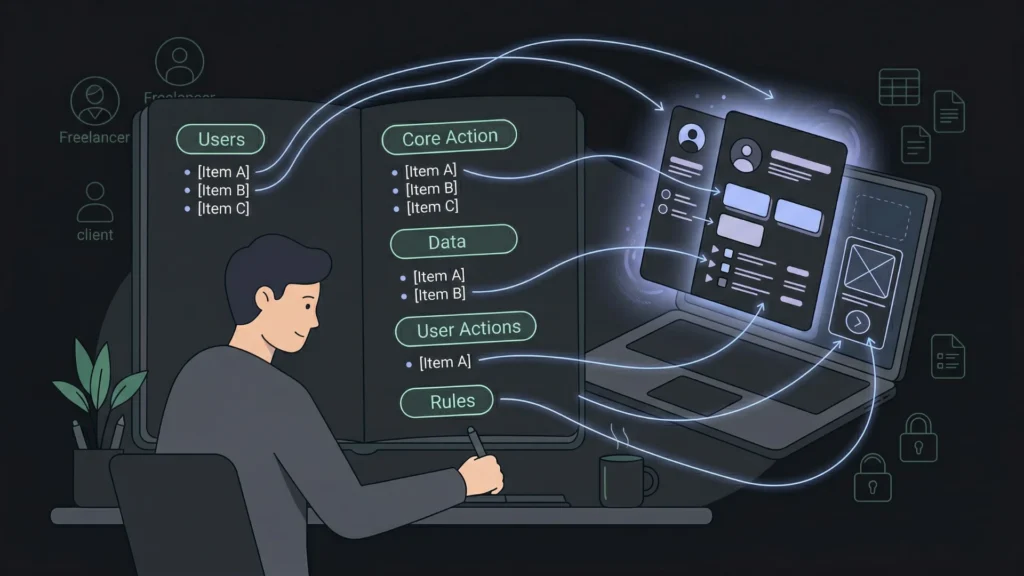
The most common reason an AI-generated app misses the mark is not a platform limitation. It is a description that was written before the idea was fully formed. Spending ten minutes clarifying the idea before writing the description consistently produces a better output than spending thirty minutes correcting a vague generation.
Answer five questions before writing a single prompt:
Who uses this app? Name every type of user specifically. Not “users” but “freelance nutritionists and their clients.” Each user type has different screens, different data access, and different permissions. Naming them in the description generates those distinctions automatically.
What is the core thing the app does? One sentence describing the primary action the app enables. Not the full feature list, just the single most important thing a user accomplishes when they open the app.
What data does the app store? Name the main entities: appointments, products, clients, orders, messages, invoices. This is your data model, and getting it right in the description produces the correct database schema in the generated output.
What can each user type do? Walk through one session for each user type from login to the completion of their primary task. Every action in that walkthrough maps to a page or a function in the generated app.
What rules govern the app? Who can see whose data. What triggers what. What one user can do that another cannot. These rules, stated explicitly, prevent the most common generation errors around access control.
The question that produces the most useful clarification is the last one. Most app ideas have implicit rules that the builder assumes but never states. A tutoring platform assumes a tutor cannot see another tutor’s students. A team task manager assumes a member cannot delete tasks assigned to other members. A rental marketplace assumes a renter cannot see a host’s private notes. None of those rules generate automatically unless they appear in the description. Writing them out explicitly before prompting consistently reduces the number of correction rounds after the first generation.
Step 2: Write Your App Description Using the Four-Element Structure
A description that uses four elements consistently produces accurate first generations: Persona, Problem, Features, and Rules.
Persona names every user type and their context. Specific and operational rather than demographic.
Problem states what the app solves in one sentence. The problem the user has today, not the solution.
Features lists every feature the app needs for its core workflow. Specific enough that a developer could implement each one without asking a follow-up question.
Rules defines every access control boundary, every edge case, and every constraint that governs how the app behaves.
A complete example for a freelance invoice and time-tracking app:
“Build a time tracking and invoicing platform for freelance consultants managing multiple client projects. Consultants need one place to log billable hours by project, generate invoices from logged time, and track which invoices have been paid. Features: project list showing client name, project name, hourly rate, and total hours logged this month; time entry logging with date, project, duration, and description; invoice generation from a selected project and date range showing line items, totals, and a due date; invoice status tracking as draft, sent, or paid; and a dashboard showing total hours logged this week, outstanding invoice value, and paid invoice value this month. Rules: Consultants can only see their own projects and invoices. Clients receive a read-only link to view their specific invoice. No client can access another client’s invoice or project data.”
That description generates a complete application with the correct data model, the correct role separation between consultants and clients, and the correct dashboard metrics. For a library of proven descriptions across twelve app types ready to adapt for your own idea, this 40-prompt copy-paste library by app type has starting points for the most common app categories.
Step 3: Submit the Description and Review the Blueprint

Open imagine.bo, paste your description into the prompt field, and submit. Before any code is written, imagine.bo generates the AI-Generated Blueprint: a complete architectural map of what the platform is about to build.
The blueprint shows: the full database schema with tables and relationships, the user role structure and what each role can access, the complete page list with navigation hierarchy, and the backend API endpoint design.
Reviewing the blueprint before confirming takes five minutes. It is the single highest-leverage step in the entire process because every issue caught at this stage costs one follow-up prompt to fix, while issues caught after the build costs multiple correction rounds.
Three blueprint checks that catch the most common issues:
Check that every entity you named in the features section appears as a table in the database schema. A time tracking app needs tables for Users, Projects, TimeEntries, Invoices, and InvoiceLineItems. If any of those are missing, add them with a follow-up prompt before confirming.
Check that each user type from your description has a separate section in the role structure. Consultants and clients should appear as distinct roles with distinct permissions. If they are combined into a single “user” role, correct that before building.
Check that the page list maps to the features you described. Every screen in your core workflow should have a corresponding page entry. If the dashboard page is missing, add it before confirming.
For a detailed breakdown of what the blueprint review catches and how to interpret what you see, this post on building complex apps with imagine.bo covers the architecture review process in depth.
Step 4: Build, Refine, and Deploy
After confirming the blueprint, imagine.bo builds the complete application. Generation typically takes three to eight minutes depending on complexity. When complete, your app is visible in the preview environment.
Review the generated output as a first-time user would. Complete the primary workflow from start to finish. Create an account, log some time, generate an invoice, check the dashboard. Note every gap between the generated output and your intent.
Use targeted correction prompts for each gap. One issue per prompt, described with the current behaviour and the expected behaviour.
Effective correction example: “The invoice generation page is showing all time entries regardless of project. It should show only time entries for the selected project within the selected date range.” That prompt applies a surgical fix to the specific feature without touching anything else.
When the app matches your intent, click Deploy. One-Click Deployment pushes the frontend to Vercel and the backend to Railway. SSL applies automatically. Your app is live on a public URL within minutes.
Citation capsule: According to imagine.bo’s platform documentation, the One-Click Deployment feature provisions infrastructure, applies SSL certificates, configures environment variables securely, and deploys both frontend and backend in a single action with no DevOps knowledge required. Frontend deployment targets Vercel’s global edge network for fast global load times, and backend deployment targets Railway for automatic scaling as user volume grows (imagine.bo, 2026).
For the complete picture of what happens between first generation and a polished app users want to keep using, this post on building an AI app people buy and keep covers the post-launch refinement playbook.
What Types of App Ideas Work Best With AI Generation
The app ideas that generate most accurately share a common structure: well-defined user types, clear data relationships, and predictable workflows. The ideas that require more iteration typically involve unusual real-time requirements or highly custom visual interactions.
Generates accurately from a description:
SaaS tools with subscription access, user dashboards, and tiered feature availability. Client portals with role-based data access, document sharing, and messaging. Booking and scheduling systems with availability management, confirmation flows, and admin views. Internal business tools like CRMs, inventory trackers, approval workflows, and reporting dashboards. Marketplaces with listing management, buyer search, inquiry flows, and admin controls. Community platforms with membership, content feeds, and moderation tools.
Benefits from the Hire a Human feature for specific modules:
Real-time collaborative editing across multiple simultaneous users. Complex payment flows with non-standard billing logic, multi-currency management, or marketplace escrow. Machine learning inference at the application layer for personalisation or recommendation features. Integrations with legacy enterprise systems using non-standard API authentication.
For ten specific app ideas with validated market demand and detailed enough descriptions to start building today, this post on 10 profitable no-code app ideas you can build today provides ready-to-use starting points.
How Much Does It Cost to Turn an Idea Into an App With imagine.bo?
| Build path | Typical cost | Time to first version | Code ownership |
|---|---|---|---|
| Development agency | $30,000 to $150,000 | 3 to 9 months | Yes |
| Freelance developer | $8,000 to $40,000 | 6 to 16 weeks | Yes |
| imagine.bo free plan | $0 | Days | Yes |
| imagine.bo Pro plan | $25/month | Days | Yes |
| imagine.bo Done For You | $499 one-time | 1 to 2 weeks | Yes |
The free plan’s 10 credits per month are enough to build and deploy a complete scoped MVP. The Pro plan’s 150 credits with rollover supports ongoing development through multiple feature additions and post-launch iterations. The Done For You plan delivers a fully managed build by imagine.bo’s engineering team for founders who want production-ready delivery without any building involvement.
For the detailed cost breakdown including what each credit buys and how costs compare across development approaches at different app complexity levels, this 2026 cost comparison for app development covers the full picture.
FAQ
How specific does my app description need to be?
The description needs to be specific enough that a developer could implement each feature without asking a follow-up question. If you can read back your description and identify any ambiguity, a gap, or a missing rule, resolve it before submitting. According to imagine.bo’s prompting documentation, descriptions that include all four elements, persona, problem, features, and rules, produce accurate first generations in the majority of cases. Descriptions that omit rules, particularly access control rules, consistently produce generations that require correction rounds that could have been avoided. This post on AI prompts for building apps from ideas covers the specific techniques for writing descriptions that generate accurately.
Can I build a mobile app by describing it?
Imagine.bo generates mobile-responsive web applications that work on phones and can be added to a phone’s home screen as a Progressive Web App. If you need a native iOS or Android app that appears in the App Store or Google Play, that requires a different build path. For the majority of app ideas where a mobile-responsive web app delivers the intended user experience, imagine.bo’s generated output works on mobile without any additional configuration. This post on building a mobile app without coding in 2026 covers the distinction between mobile web apps and native apps and when each approach is appropriate.
What if the first generation is not what I wanted?
Use targeted correction prompts to refine the output. Describe the current behaviour and the expected behaviour for each issue specifically. Most first generations require two to four correction rounds to reach the quality level you want for deployment. If a specific feature requires more than three correction prompts without resolving, that feature is a good candidate for the Hire a Human feature at $25 per page. For a candid account of what the correction and refinement process looks like for a first-time builder, this post on what founders learn from their first no-code MVP covers the real experience.
How is imagine.bo different from other AI app builders like Bolt.new or Lovable?
Imagine.bo is one of the few AI app builders that combines full-stack generation with on-demand human engineering in the same workflow. Bolt.new and Lovable generate code but have no built-in path for handling features that go beyond what AI generates reliably. imagine.bo’s Hire a Human feature connects you with a vetted engineer for $25 per page when the AI reaches its limits, in the same dashboard where you build. imagine.bo also produces clean exportable code you own outright, and deploys to Vercel and Railway rather than proprietary hosting. For a direct feature comparison, this post on imagine.bo vs Bolt.new for startup app building covers the key differences.
Conclusion
The gap between an app idea and a deployed product is now measured in days rather than months, and in the cost of a Pro plan subscription rather than an agency invoice. The technical barrier that stopped most ideas from becoming products has been replaced by a clarity barrier: the ability to describe what you want specifically enough for a generator to build it accurately.
The four-element description structure, persona, problem, features, and rules, is the skill that closes that clarity gap. Write those four elements before opening any tool and the first generation will be accurate. Skip them and the correction rounds will cost more time than the initial description would have.
imagine.bo’s free plan provides 10 credits to build and deploy your first version at zero cost. Start with your clearest idea, write the four-element description, review the blueprint before building, and share the live URL with your first five potential users this week. For the full range of app ideas with enough structural detail to start building immediately, this post on AI platforms that turn business ideas into apps covers the specific product types that generate most successfully with current tools.
Related Articles
- What If You Could Build an App Just by Describing It
- 7 Coding Myths Busted: No-Code Entrepreneurs Prove You Don’t Need to Code to Build
- This No-Code Platform Changed How I Build Products (For the Better)
- No-Code MVPs: How Founders Are Shipping Products Without Dev Teams
- Build Your AI App in Minutes: A No-Code Revolution
Launch Your App Today
Ready to launch? Skip the tech stress. Describe, Build, Launch in three simple steps.
Build




