

Starting a dropshipping business used to mean hiring a developer, paying $3,000 to $10,000, and waiting months for a store that might not convert. That math has changed. According to Grand View Research, the global dropshipping market is projected to grow at a compound annual growth rate of 23.4% through 2030 (Grand View Research, 2023), which means the window to enter a niche and build a real brand is still wide open. This guide walks through every step of launching a dropshipping website without writing a single line of code, from picking your niche through your first live order. It also compares the two main no-code paths honestly, so you can choose the right one for your situation. For broader context on what building without code looks like today, this guide to launching a website without coding covers the current tools landscape well.
TL;DR You can launch a fully functional no-code dropshipping website in under a week using either a dedicated ecommerce platform like Shopify or a full-stack AI builder like imagine.bo. Shopify is faster for pure product-catalog stores. imagine.bo generates a custom storefront with order management, supplier workflows, and admin logic from a plain English prompt, starting at $0. According to Baymard Institute, the average cart abandonment rate is 70.19%, meaning your store’s checkout experience matters as much as your product selection (Baymard Institute, 2024).
What Does a Dropshipping Website Actually Need to Work?
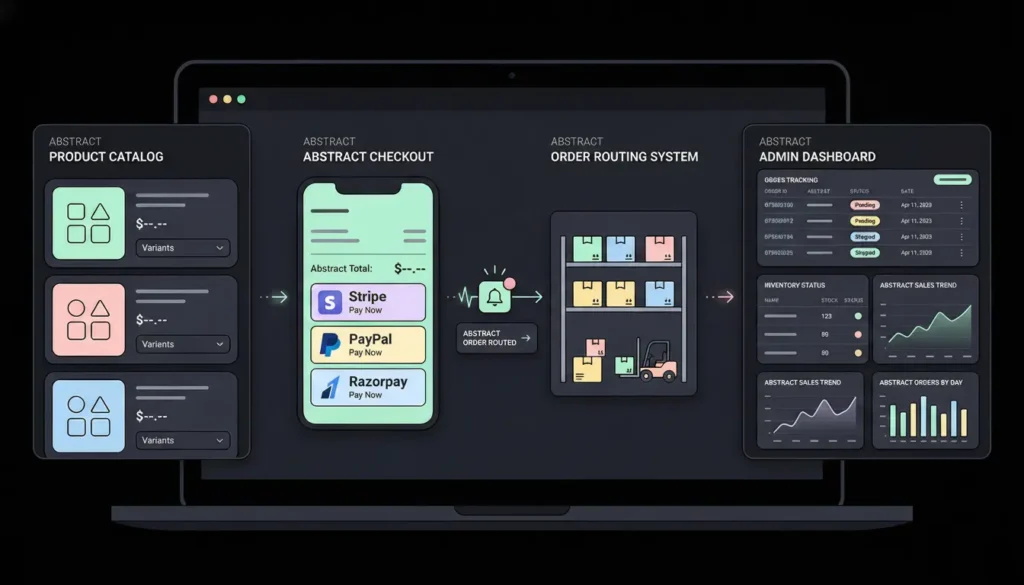
A dropshipping website needs more than a product catalog and a Stripe button. The core functional requirements are a product listing system, a checkout flow with payment processing, an order routing mechanism that notifies the supplier when a sale happens, and an admin view where you can track orders and manage inventory status. Most no-code builders handle the first two. Fewer handle the third. Almost none handle the fourth without additional tools or plugins.
Launch Your App Today
Ready to launch? Skip the tech stress. Describe, Build, Launch in three simple steps.
BuildUnderstanding this upfront saves you from rebuilding six weeks after launch. According to Shopify’s own merchant data, stores that lose sales to checkout friction and poor mobile experience account for a significant share of early dropshipping failures (Shopify, 2023). Before you pick a platform, know what you are actually building. This post on building an ecommerce app without developers breaks down the functional stack in more detail.
The four things every dropshipping site must have to work:
- Product catalog with images, pricing, variants, and descriptions
- Checkout with payment processing (Stripe, Razorpay, or PayPal minimum)
- Order notification to supplier when a purchase completes
- Order tracking and admin dashboard for you to manage the business
Step 1: Define Your Niche and Source Your Suppliers First
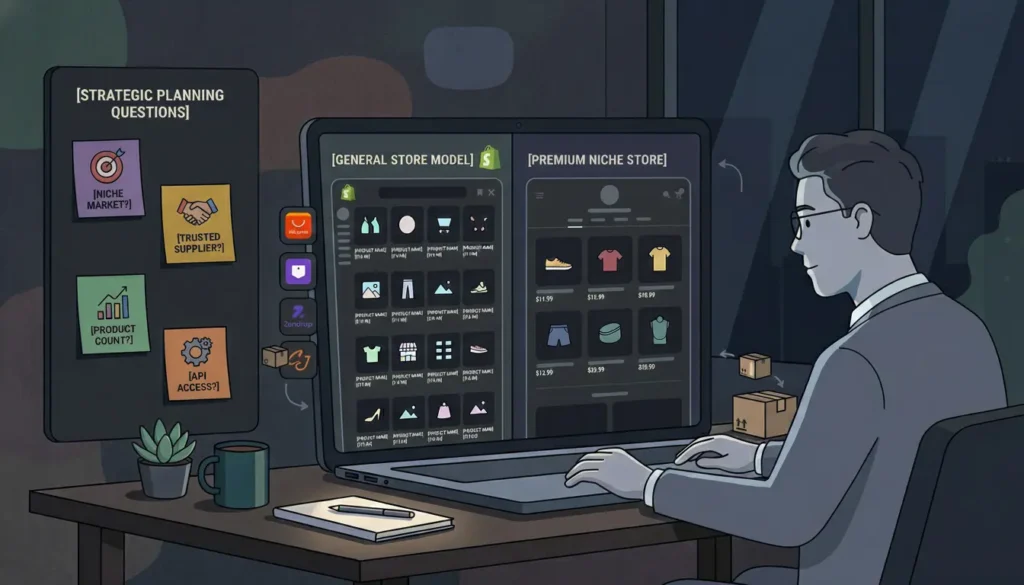
The single biggest mistake first-time dropshippers make is building the store before confirming the supplier. Your supplier’s product catalog, shipping times, and API access directly determine what your store can and cannot do. Define your niche and lock in at least one primary supplier before you touch a no-code tool.
The niche you pick affects which no-code platform you should use, not just what products you sell. A high-SKU general merchandise store with thousands of products benefits from a platform with native catalog import tools like Shopify. A focused niche store with 20 to 50 curated products, a strong brand story, and custom ordering logic is better served by a custom-built store through imagine.bo. Trying to build a high-SKU general store on a custom builder wastes the platform’s core strength. Trying to build a premium branded niche store on Shopify often results in a generic-looking site you cannot differentiate without expensive theme customization.
Questions to answer before you build:
- How many products will your store carry at launch? Under 50 is niche; over 500 is general.
- Does your supplier provide an API or data feed, or do you manage orders manually?
- Do you need a branded, custom-looking storefront, or is a clean template sufficient?
- Do you need a custom admin dashboard, or will basic order tracking in a spreadsheet work?
Popular supplier directories to evaluate: AliExpress, Spocket, Zendrop, CJdropshipping, and Modalyst. For US-based suppliers with faster shipping, Spocket and Zendrop generally outperform AliExpress on delivery times, which directly affects your refund rate.
Step 2: Choose Your No-Code Path: Platform or Custom Builder?
There are two honest paths to a no-code dropshipping website, and they suit different founders. The platform path uses Shopify or a similar ecommerce platform with built-in dropshipping app integrations. The custom builder path uses imagine.bo to generate a branded storefront with custom logic from a plain English description. Neither is universally better. The right choice depends on your store type, your budget, and how much you want to differentiate.
According to Shopify, its platform powers over 4.6 million active stores globally (Shopify, 2024), which tells you the platform path is mature and well-documented. The tradeoff is recurring platform fees of $29 to $79 per month before apps, and a template ecosystem where most stores look broadly similar. imagine.bo generates clean, exportable code you own, deploys to Vercel and Railway for production performance, and starts at $0 on the free plan.
| Factor | Shopify | imagine.bo |
|---|---|---|
| Starting cost | $29/month | $0 (free plan) |
| Setup speed | Hours (template-based) | Hours (prompt-generated) |
| Design differentiation | Template-dependent | Fully custom |
| Built-in dropshipping apps | Yes (DSers, AutoDS, Zendrop) | Via Hire a Human |
| Custom backend logic | No | Yes |
| Code ownership | No | Yes |
| Scales to custom workflows | Limited | Yes |
| Best for | High-SKU general stores | Niche branded stores |
The imagine.bo Describe-to-Build workflow generates a complete dropshipping storefront when you give it the right prompt. A strong starting prompt looks like this: “Build a branded dropshipping store for home fitness equipment. Include a product catalog with categories, product detail pages with images and variants, a shopping cart, and a Stripe checkout. Add an admin dashboard where I can view orders by status: pending, fulfilled, and cancelled. Include a customer account area where buyers can view their order history.” That single prompt generates the full frontend, database schema for products and orders, backend API endpoints, and the admin view automatically.
For a full walkthrough of what a prompt-generated ecommerce store looks like in practice, this post on building ecommerce stores with voice commands is a useful companion.
Step 3: Build Your Storefront With a No-Code Tool
Once you have your niche, supplier, and platform decision locked, building the actual storefront takes less time than most founders expect. On either path, the core sequence is the same: set up the store structure, add your products, configure your checkout, and connect your supplier workflow.
Building with imagine.bo

Open imagine.bo and submit your storefront prompt. Be specific about your product structure, the user roles your store needs (admin vs. customer), and the checkout flow. The AI-Generated Blueprint appears before any code is written. Review it to confirm the database models for products, orders, and customers match your expectations before proceeding. Adjust through follow-up prompts if anything is missing.
After the initial generation, use the Describe-to-Build interface to refine specific pages. Examples of effective follow-up prompts:
- “Add a product filter on the catalog page by category and price range.”
- “Show a sticky cart icon in the header that updates as products are added.”
- “On the order confirmation page, display the estimated delivery date and a tracking number field.”
One-Click Deployment sends your store live on Vercel’s global edge network. For payment processing integration or supplier API connections that go beyond what the AI generates, the Hire a Human feature connects you with a vetted engineer for $25 per page.
Building with Shopify
Create a Shopify account, select a theme from the theme store, and use the drag-and-drop editor to configure your homepage, product pages, and navigation. Install a dropshipping app: DSers connects to AliExpress, Zendrop to US suppliers, and AutoDS supports multi-supplier management. Import your product catalog through the app, which pulls product images, descriptions, and pricing directly from the supplier.Step 4: How Do You Set Up Payment Processing on a No-Code Store?
Payment processing is where most first-time dropshipping builders lose time. The setup varies significantly by platform, country of incorporation, and whether you want a fully hosted checkout or a custom flow.
Based on standard payment processor terms as of 2026: Shopify Payments charges 2.9% plus $0.30 per transaction on the Basic plan with no additional transaction fees. Using a third-party payment processor on Shopify adds an additional 2% transaction fee on the Basic plan, which on a $50 average order value costs you an extra $1 per sale, or $1,000 per year on 1,000 orders. On imagine.bo, payment integrations through Stripe or Razorpay carry no additional platform-level transaction fees, since you own the code and the payment relationship directly.
For imagine.bo stores: Stripe is the most straightforward payment integration for imagine.bo-generated stores. Include payment in your initial prompt: “Integrate Stripe checkout with support for credit and debit card payments.” For markets where Stripe is not available, Razorpay is the supported alternative. Both imagine.bo’s Lite and Pro plans include a 20% discount on Hire a Human tasks, so if your payment integration requires custom configuration, the engineering cost is lower than it appears.
For Shopify stores: Shopify Payments activates in the dashboard under Settings > Payments and eliminates third-party transaction fees. If Shopify Payments is unavailable in your country, Stripe, PayPal, and local payment providers integrate through Shopify’s payment gateway settings. For the full picture of what payment integration challenges look like in no-code contexts, this post on payment gateway integration in no-code apps covers the common failure points.
Step 5: How Do You Connect Your Supplier and Automate Order Fulfillment?
Connecting your supplier is the step that separates a real dropshipping business from a broken one. When a customer places an order, that order needs to reach your supplier automatically, or you will spend your days copy-pasting order details into supplier portals by hand.
According to a 2023 survey by ecommerce research firm Jungle Scout, manual order fulfillment is cited as the top operational pain point by early-stage dropshippers, with 41% reporting it as their primary time sink (Jungle Scout, 2023). Automating this from day one is not optional if you want to scale.
On Shopify: DSers (the official AliExpress partner app) handles automatic order forwarding to AliExpress suppliers when a sale is made. Zendrop and AutoDS offer similar automation for their supplier networks. These apps cost $19 to $49 per month on top of your Shopify subscription. For suppliers not in these networks, a Zapier or Make automation connecting your Shopify order webhook to an email or form submission is the standard workaround.
On imagine.bo: Include order routing logic in your initial prompt. A specific prompt example: “When a customer places an order, create an order record with status ‘pending’, send the customer a confirmation email, and send an email to [supplier email] with the order details including product SKU, quantity, and shipping address.” This generates the webhook logic and email notification system automatically. For suppliers with a REST API, use the Hire a Human feature to have a vetted engineer write the integration, rather than trying to handle it through conversational prompts alone.
For a broader view of how no-code platforms handle retail operations end to end, this no-code guide for retail is directly applicable to dropshipping operations.
Step 6: How Do You Make a No-Code Dropshipping Store SEO-Ready?
A dropshipping store with no organic traffic is entirely dependent on paid acquisition, which destroys margins in most niches. Getting SEO right from day one costs nothing extra and pays compounding returns. According to BrightEdge, organic search drives 53% of all website traffic, more than any other channel including paid search and social (BrightEdge, 2023).
imagine.bo generates SEO-ready architecture by default. All public-facing pages deploy through Vercel’s global edge network, which gives you fast page load times out of the box. Fast load times matter: according to Google, a one-second improvement in mobile page load time improves conversion rates by up to 27% (Google, 2023). Product pages render in a search-engine-friendly format, and HTTPS applies automatically on every deployment.
The SEO actions that matter most for a new dropshipping store:
Unique product descriptions are the single most important SEO action. Most dropshippers copy supplier descriptions verbatim, which means their pages are duplicate content competing against thousands of identical pages. Rewrite every product description in your own voice, with your target customer’s language, before you launch.
Page titles and meta descriptions on product and category pages should include the product type, a key modifier (brand, material, use case), and a differentiator. A prompt to imagine.bo handles this during setup: “Set unique meta titles for each product page in the format: [Product Name] – [Key Benefit] – [Store Name].”
Internal linking between related products and category pages builds crawl depth and keeps visitors on your store longer. Both are positive ranking signals. This SEO-friendly website design guide covers the technical and content fundamentals that apply to any no-code store.
Step 7: What Does the imagine.bo Dropshipping Prompt Actually Look Like?
A complete imagine.bo prompt for a focused dropshipping store, ready to submit, covers six elements: store type, audience, product structure, checkout, admin needs, and design direction.
Full prompt template:
“Build a branded dropshipping store for [your niche]. Target audience: [describe your customer]. Product catalog with categories [list your top 3 to 5 categories], individual product pages with image gallery, variant selection, and add-to-cart. Shopping cart and Stripe checkout with email order confirmation. Customer account area with order history. Admin dashboard showing all orders with status: pending, processing, shipped, and cancelled, with the ability to update status and add a tracking number. Clean, modern design with [color direction, e.g., minimalist white with black accents]. Mobile responsive.”
After the AI-Generated Blueprint generates, review the database schema to confirm product variants, order records, and customer accounts are structured correctly. Then deploy with One-Click Deployment to Vercel. For the Hire a Human feature, use it specifically for the supplier email notification webhook and Stripe webhook handling, the two integrations most likely to need precise engineering rather than AI generation.
For a practical library of prompts across different app types including ecommerce, this 40-prompt copy-paste library by app type is a useful reference to have open while you build.
How Much Does Building a No-Code Dropshipping Website Cost?
Cost comparison is where the platform and custom builder paths diverge most sharply, especially as you scale.
| Cost Item | Shopify (Basic) | imagine.bo (Pro) |
|---|---|---|
| Monthly platform fee | $29/month | $25/month |
| Dropshipping app | $19–$49/month | $0 (built in logic) or Hire a Human one-time |
| Payment processing | 2.9% + $0.30/transaction | Stripe direct (no added fee) |
| Theme/design | $0–$350 one-time | Included in generation |
| Custom development | $500–$5,000 | $25/page via Hire a Human |
| Year 1 total (conservative) | ~$700–$1,000+ | ~$300–$500 |
A solo founder running a niche dropshipping store on imagine.bo’s Pro plan at $25 per month, with one Hire a Human session for payment and supplier integration at $25 per page, spends roughly $325 in year one on platform costs, compared to a minimum of $576 on Shopify Basic before apps. Add a standard dropshipping app at $19 per month and Shopify’s year one cost reaches $804 before any design or customization spend. imagine.bo’s cost advantage compounds as you add custom features, because platform pricing stays flat regardless of what you build into the product. For a detailed cost breakdown across no-code categories, this 2026 app development cost comparison covers the full picture.
FAQ
How long does it take to launch a no-code dropshipping website?
With imagine.bo, a first working version of your store goes from prompt to deployed in a single session of two to four hours, including the time to review the AI-Generated Blueprint, refine with follow-up prompts, and push through One-Click Deployment. Shopify with a prebuilt theme runs similarly fast for basic stores. Adding payment processing, supplier integration, and product catalog population typically adds another four to eight hours across both platforms. According to Shopify’s own documentation, most simple stores can go live within a day when using a prebuilt theme (Shopify, 2024). A full-featured custom store on imagine.bo with order management and admin dashboard typically takes two to three days of iterative building.
Do I need a business registration to start a no-code dropshipping store?
Not to build the store, but you need business registration to activate payment processing. Stripe and Razorpay both require a registered business entity or sole proprietor details, tax identification, and a bank account to process real payments. You can build and test the entire store with Stripe’s test mode before any registration is complete. According to the U.S. Small Business Administration, a sole proprietorship can be operational in most U.S. states within one to three business days at minimal cost, which is typically the fastest path for first-time dropshippers (SBA, 2024).
Can I use imagine.bo to build a dropshipping store if I have no technical background?
Yes. imagine.bo’s Describe-to-Build interface requires only the ability to write a clear description of what you want to build. No coding, no database configuration, and no deployment knowledge is needed. The platform generates the frontend, database, backend logic, and deployment automatically. The guide to building an app by describing it walks through the prompting process for non-technical founders step by step. For tasks beyond AI generation, the Hire a Human feature connects you with a vetted engineer who handles the technical implementation while you manage the business.
What are the biggest mistakes first-time dropshippers make with no-code stores?
Three mistakes account for most early failures. First, building the store before confirming the supplier, which leads to rebuilding product pages and checkout flows when supplier terms change. Second, using default supplier product descriptions, which creates duplicate content across thousands of competing stores and tanks search rankings. Third, not testing the full checkout and order notification flow before going live, meaning the first real customer order either fails at payment or never reaches the supplier. Running a complete test purchase, from adding to cart through receiving the supplier notification, before your first marketing push catches all three. For practical inventory and order management guidance, this post on building a real-time inventory tracker in ten minutes covers the operational side.
Is Shopify or imagine.bo better for a dropshipping beginner?
It depends on your store type, not your experience level. Shopify is better for beginners building a high-SKU general merchandise store who want native dropshipping app integrations with AliExpress or Zendrop and are comfortable with recurring platform fees. imagine.bo is better for beginners building a focused niche store who want a custom-branded storefront they own, without per-transaction platform fees and without looking like every other Shopify template. Both are accessible without technical knowledge. The key question is whether you need native supplier app integrations immediately, which favors Shopify, or whether you want a custom product that differentiates from competitors, which favors imagine.bo.
Conclusion
Three things matter most when launching a no-code dropshipping website. First, confirm your supplier before you build anything. The supplier’s product data, API availability, and shipping times determine your store’s capabilities before you choose a platform. Second, match your platform to your store type: Shopify for high-SKU general stores with native supplier app needs, imagine.bo for niche branded stores where differentiation and custom logic are the competitive advantage. Third, automate order routing to your supplier from day one. Manual order forwarding does not scale past your first dozen sales and creates the operational chaos that kills most early dropshipping businesses.
Start with imagine.bo’s free plan. Write a one-paragraph description of your store including product type, customer, checkout requirements, and admin needs. Review the AI-Generated Blueprint before the platform builds anything, then deploy and test a complete purchase flow before your first marketing push. For the full imagine.bo dropshipping workflow from a live community perspective, this dedicated post on building your dropshipping website without code covers the platform-specific steps in detail.
Related Articles
- AI Website Builder for Dropshipping Business
- AI Website Builder for Online Stores: Launch Your E-commerce Brand Without Writing Code
- AI Website Builder for Dog Trainers: Streamline Your Online Presence Effortlessly
- From No-Code to AI-Code: How Non-Tech Heroes Are Building Real Apps
- From Idea to App: How to Launch Without Hiring Developers
Launch Your App Today
Ready to launch? Skip the tech stress. Describe, Build, Launch in three simple steps.
Build




