Nonprofits are among the organizations with the most to gain from custom software and the least budget to commission it. A donor management system from a development agency costs $30,000 to $80,000. Salesforce Nonprofit costs $60 per user per month before customisation consulting fees that frequently exceed the software cost itself. According to the Nonprofit Technology Network, 55% of nonprofits cite limited technology budget as their primary barrier to digital transformation, and 42% are still managing donor relationships and volunteer coordination in spreadsheets (NTEN, 2023). AI-generation tools have changed what is affordable. A full-stack donor portal, volunteer management system, program tracking tool, and impact dashboard now generates from a plain English description in days, at a fraction of the cost of generic platforms. This guide covers exactly how nonprofits build and launch custom apps without developers in 2026. For the foundational workflow of building an app without a development team, this post on launching apps without developers covers the full process.
TL;DR Nonprofits are building donor portals, volunteer management systems, program tracking tools, grant management dashboards, and community engagement apps without developers using imagine.bo’s Describe-to-Build interface. The platform generates full-stack applications from plain English, starting at $0. According to Blackbaud, nonprofits that use a dedicated donor portal see 36% higher donor retention than those managing relationships through email alone (Blackbaud, 2023). Custom builds on imagine.bo cost under $325 in year one with built-in RBAC, SSL, and GDPR foundations applied by default.
Why Generic Nonprofit Platforms Fail Small Organizations
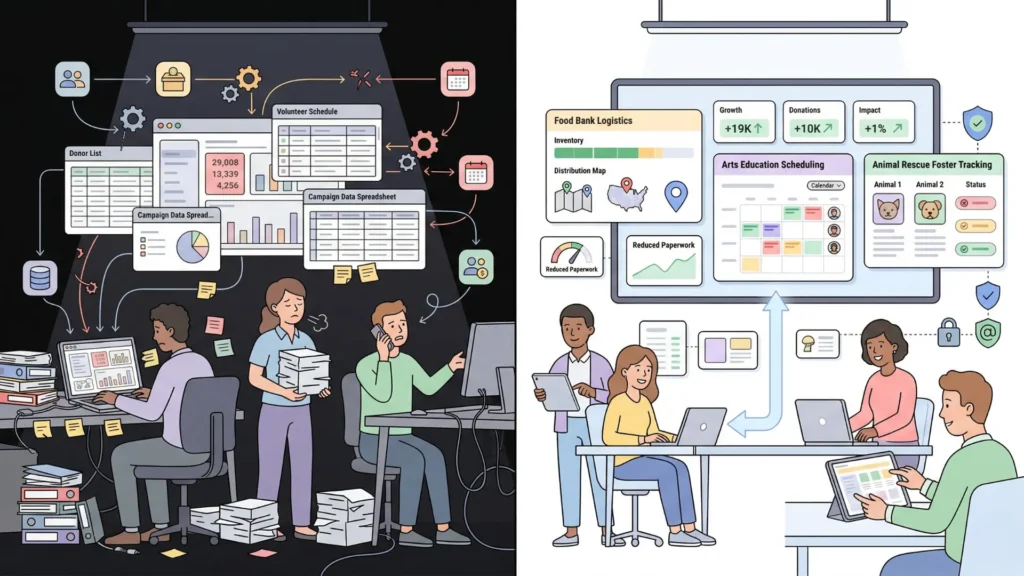
Salesforce Nonprofit, Bloomerang, and DonorPerfect all solve the average nonprofit’s workflow. They do not solve your nonprofit’s workflow. A community food bank managing weekly distribution shifts has different volunteer coordination requirements than an arts education nonprofit managing semester-long teaching residencies. A grassroots advocacy organization tracking campaign petition signatures needs a different data model than an animal rescue managing foster placements. Generic platforms force both to use the same structure and fill the gaps with workarounds.
The workaround cost is real. Staff time spent on manual processes, double-entry between disconnected systems, and maintaining spreadsheets that supplement a platform’s missing features adds up to significant administrative overhead in organisations where every hour of staff time has a mission opportunity cost. According to Charity Navigator, nonprofits that reduce administrative overhead by 10% can redirect an average of $47,000 per year toward program delivery at the median-sized organisation (Charity Navigator, 2023).
imagine.bo generates every application with built-in role-based access control, SSL on all deployments, data encryption, and GDPR readiness foundations. For nonprofits handling donor personal data and volunteer information, these defaults meet the baseline data protection requirements without additional configuration or compliance consulting fees. This post on no-code app security best practices covers the full security audit checklist for AI-generated applications handling sensitive organizational data.
App 1: Donor Management and Giving Portals
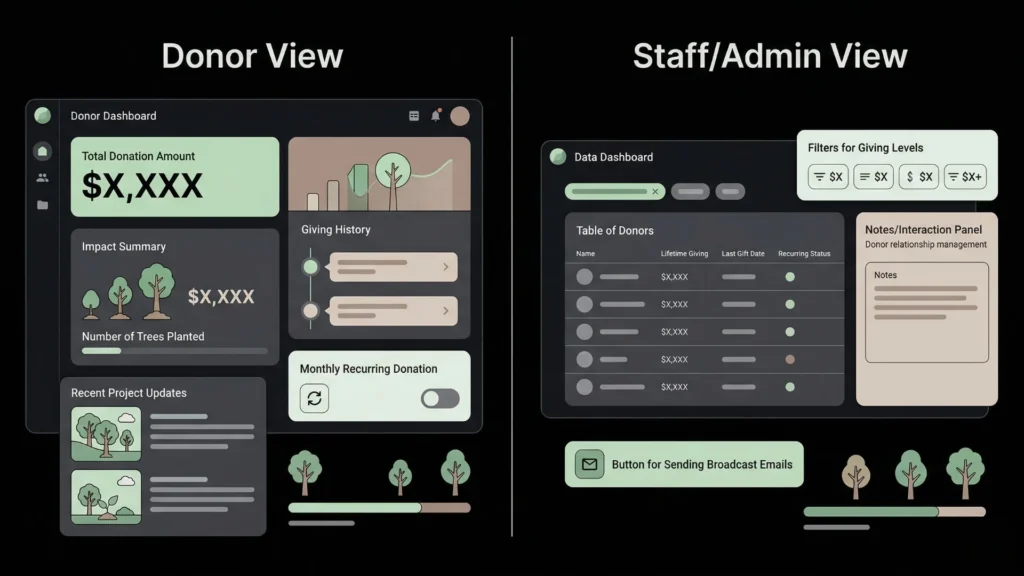
Donor management is the operational core of most nonprofit funding models, and it is the area where the gap between what generic CRMs provide and what a specific nonprofit needs is most consistently wide. A custom donor portal built on imagine.bo generates a structured giving history, a donor communication log, a recurring donation management interface, and a donor-facing view where supporters can see their impact, all in one system the organization owns.
A complete donor portal prompt: “Build a donor management platform for an environmental nonprofit. Donors register and can view their giving history, update their contact details, and set up or cancel a monthly recurring donation via Stripe. Donors see a personalized impact summary showing the total they have given, the number of trees planted from their contributions using a calculation of one tree per $5 donated, and three recent project updates from the organization. Staff see a donor dashboard showing all donors, total lifetime giving, last gift date, and recurring status. Staff can log manual donations, add relationship notes to donor profiles, and filter donors by giving level: under $100, $100 to $999, $1,000 to $4,999, and $5,000 and above. Staff can send a broadcast email to all donors in a selected giving level.”
The donor portal element that produces the highest retention impact is the personalized impact summary on the donor-facing dashboard. Donors who can see a tangible calculation of their specific contribution, trees planted, meals funded, children reached, return more frequently to the portal and renew at higher rates than donors who receive only generic thank-you emails. This is not a design choice. It is a data architecture choice. Building the impact calculation into the data model from the first prompt, as a formula field derived from total giving, costs nothing additional and creates the retention mechanism at build time rather than as a post-launch add-on.
For the Stripe recurring donation webhook that activates donor status and processes monthly charges, use the Hire a Human feature at $25 per page. The subscription lifecycle webhook requires precise implementation to handle failed payment recovery and cancellation access revocation reliably.
Citation capsule: According to Blackbaud’s Charitable Giving Report, donors who have access to a self-service impact portal where they can view their giving history and personalised impact metrics show 36% higher year-over-year retention rates than donors managed through email-only communication, with the largest retention improvement seen among mid-level donors in the $100 to $999 annual giving range (Blackbaud, 2023).
App 2: Volunteer Management and Shift Coordination
Volunteer coordination at most nonprofits runs through a combination of email blasts, SignUpGenius links, and manual spreadsheet tracking of who showed up. A custom volunteer management system built on imagine.bo replaces that stack with a structured portal where volunteers self-register for shifts, organizations track hours, and program managers see who is available, certified, and scheduled without cross-referencing three documents.
A volunteer management prompt: “Build a volunteer management platform for a community services nonprofit. Volunteers register with their name, contact details, availability by day of week, and any relevant certifications from a checklist: food handling, first aid, driving. Program managers create volunteer shifts with a date, time, location, required certification if any, and a maximum volunteer count. Volunteers see available shifts that match their availability and certifications and can sign up for up to two shifts per week. Volunteers see their upcoming shifts and their total volunteer hours logged to date. Program managers see all shifts with signup counts, can mark individual volunteers as attended or absent after each shift, and can see total hours by volunteer for any date range. Volunteers who reach 50 hours receive an automated certificate of recognition by email.”
The volunteer management feature with the highest operational impact is not the scheduling interface. It is the certification filter on shift signup. Nonprofits that run programs requiring specific volunteer qualifications, food handling for pantries, first aid for events, background checks for youth programs, consistently report that the single largest source of day-of shift failures is volunteers who signed up for roles they were not qualified for. Building the certification filter into the signup flow at the data model level prevents those failures structurally rather than requiring manual review of every signup.
For the automated certificate email triggered at 50 hours, this post on automating email with AI and no-code covers the scheduled trigger and personalised email generation architecture.
App 3: Program and Beneficiary Tracking
Program tracking is the operational layer most nonprofit platforms handle worst. Every program has its own data model: a food bank tracks distribution quantities per household, a tutoring nonprofit tracks sessions per student and grade improvements, a housing nonprofit tracks case status per client across a multi-year support timeline. Generic platforms offer one data structure and ask every program to fit into it.
A nonprofit paying $99 per month for a program management SaaS add-on to handle a data structure the platform does not natively support spends $1,188 per year on a workaround. A custom program tracking tool built on imagine.bo’s Pro plan at $25 per month costs $300 per year and implements the exact data model the program requires. Over three years, the custom tool saves $2,664 while providing a system that actually matches the program’s logic rather than approximating it.
A beneficiary tracking prompt: “Build a program tracking tool for a youth tutoring nonprofit. Each student record contains name, age, grade, school, enrolled subject areas, and enrollment date. Tutors log session records for each student with date, duration, subject, topics covered, student engagement rating from one to five, and a notes field. The student profile shows all sessions, total hours tutored, and a grade progress section where tutors can record grade at enrollment and current grade for each enrolled subject. Program managers see all students with total hours, last session date, and a flag for students with no session logged in the past 21 days. Program managers can export the full student list with summary data as CSV for grant reporting.”
The CSV export for grant reporting is a specific element to include in the prompt explicitly. Many nonprofits discover after building their tracking tool that their funders require data in a specific format for impact reports. Building the export with the correct fields at launch, rather than retrofitting it later, saves a correction session.
For the full data model and dashboard architecture for internal analytics tools, this post on building internal analytics dashboards with AI prompts covers the prompt structure and blueprint review process.
App 4: Grant Management and Reporting Dashboards
Nonprofits managing multiple grants simultaneously face a specific tracking problem: each grant has its own reporting deadlines, its own allowable expense categories, its own deliverable milestones, and its own funder contact. Managing this across email folders and a shared spreadsheet means missed deadlines and fumbled funder relationships. A custom grant management dashboard built on imagine.bo structures every grant with its own timeline, budget tracking, and deliverable log in one system.
A grant management prompt: “Build a grant management dashboard for a nonprofit managing up to 15 active grants. Each grant record contains funder name, grant title, amount awarded, start date, end date, reporting deadlines, allowable expense categories, and a primary funder contact. Each grant has a deliverables section where staff add specific deliverables with a due date, responsible staff member, and completion status. The dashboard shows all active grants with the nearest reporting deadline highlighted in red if within 30 days. Each grant has a budget section tracking planned versus actual spend by expense category. Staff receive an automated email reminder 14 days before each reporting deadline. The executive director sees a summary view of all grants showing total funding under management, grants due for reporting in the next 30 days, and total budget variance across all active grants.”
Citation capsule: According to GrantStation’s 2024 State of Grantseeking Report, nonprofits that use structured grant management systems with automated deadline reminders submit reports on time at a rate 28% higher than those managing grants through email and spreadsheets, directly improving funder relationships and renewal rates for future grant cycles (GrantStation, 2024). A missed reporting deadline is the most common reason a funder declines to renew a grant relationship, making deadline management infrastructure the single highest-ROI investment in grant-funded programs.
For automating the grant reporting reminder sequence and other operational email workflows, this post on AI automation tools for small teams covers the implementation approach.
App 5: Community Engagement and Membership Portals
Nonprofits with a membership model, a community of practice, or a constituency they need to engage regularly benefit from a custom portal that manages member access, content distribution, event registration, and communication in one system. Generic membership platforms like Wild Apricot or MemberClicks charge $50 to $400 per month for features a custom-built portal replaces permanently.
A community portal prompt: “Build a membership portal for a professional association nonprofit. Members register and pay an annual membership fee of $95 via Stripe. Members access a resource library of guides and templates organised by topic category. Members see an events calendar showing upcoming webinars and in-person events with a registration button. Registered event attendees receive a confirmation email with joining details. Members can post to a community discussion board and reply to others’ posts. Board members have access to a private documents section with meeting minutes and governance documents. Admins manage member accounts, approve new memberships, post resources, and create events. Members who have not renewed within 30 days of their anniversary receive an automated renewal reminder email.”
The Stripe annual membership payment and the renewal reminder automation are the two precision engineering tasks for Hire a Human. The webhook that activates membership access on payment confirmation and the scheduled job that sends renewal reminders 30 days before expiry both require careful implementation to avoid access errors that affect the member experience at the moment of highest engagement: when they first pay and when they are deciding whether to renew.
For the full client portal architecture and the data isolation patterns that keep member data correctly scoped, this post on launching a client portal without code covers the technical structure in detail.
FAQ
Can a nonprofit team member with no technical background build these apps?
Yes. imagine.bo requires describing your program workflow clearly in plain English. A program director who knows their volunteer certification requirements, their grant reporting structure, and their donor recognition tiers produces a more accurate first generation than a developer who has never run a nonprofit program. According to Gartner, non-technical professionals now build more applications than trained developers at many organisations (Gartner, 2022). This post on non-technical founders building products with AI covers what that experience looks like for first-time builders.
How does imagine.bo handle donor and beneficiary data privacy?
Every imagine.bo deployment includes RBAC enforced at the API layer, SSL on all connections, data encryption in transit and at rest, and GDPR readiness foundations by default. For nonprofits handling EU donor or beneficiary data, GDPR data export and deletion workflows are available through the Hire a Human feature, which implements the right-to-erasure and data portability functions correctly. For the full security and compliance checklist, this post on no-code app security best practices covers every layer.
What is the fastest nonprofit app to build without developers?
A grant management dashboard with no payment integration is typically the fastest to build, reaching a first deployed version in under a day because it has a small number of user types, a well-defined data structure, and no external payment flows. Volunteer management systems with shift signup reach a working first version in two to three days. Donor portals with Stripe recurring donation setup take three to four days including the Hire a Human task for the subscription webhook. For the full workflow of describing and deploying an app in a single session, this guide on building an app by describing it walks through every step.
Conclusion

Nonprofits that build custom apps without developers gain three advantages over those relying on generic platforms. Their tools match their specific program model rather than forcing their program to conform to a platform’s generic structure. They redirect the money they would have spent on per-user SaaS fees toward mission delivery. And they own clean, exportable code that a developer can extend without rebuilding from scratch as the organization grows.
imagine.bo’s free plan provides 10 credits to build and deploy a first version at zero cost. The Pro plan at $25 per month adds 150 rollover credits, private projects, and a one-hour expert pre-launch session. Start with the app that addresses the most immediate administrative friction, likely the grant management dashboard or the volunteer coordination system, and deploy your first version this week. For the specific post on nonprofits using AI tools to build their own platforms, this post on nonprofits launching apps with AI covers the platform-specific steps in detail.