
Most law firms and solo practitioners are managing client intake through email, tracking case progress in spreadsheets, chasing invoice payments manually, and storing documents in a folder structure that one departing paralegal could make unnavigable. Practice management software like Clio costs $49 to $129 per user per month and covers roughly 70% of what a specific firm actually needs, leaving the rest managed through workarounds. A custom legal client portal and case management tool from a development agency costs $40,000 to $120,000. According to the American Bar Association’s 2023 Legal Technology Survey, 46% of small and solo law firms have no dedicated practice management software at all, relying entirely on general-purpose tools (ABA, 2023). AI-generation tools have changed what is economically viable for small and mid-size legal practices. A full-stack client portal, case tracker, document vault, and billing system now generates from a plain English description in days. This guide covers how legal professionals build and launch custom apps without code in 2026. For the broader context of what building a custom app looks like for non-technical professionals, this guide on building a tech startup without a developer covers the foundational workflow.
TL;DR Legal professionals are building custom client intake portals, case management dashboards, document vaults, time tracking and billing tools, and deadline management systems without code using imagine.bo. The platform generates full-stack applications from plain English descriptions, starting at $0. According to the ABA, 46% of solo firms use no dedicated practice management software (ABA, 2023). Custom builds on imagine.bo cost under $325 in year one. Built-in RBAC, SSL, and GDPR foundations apply to every deployment by default, matching the baseline security requirements legal client data demands.
Why Generic Practice Management Software Falls Short
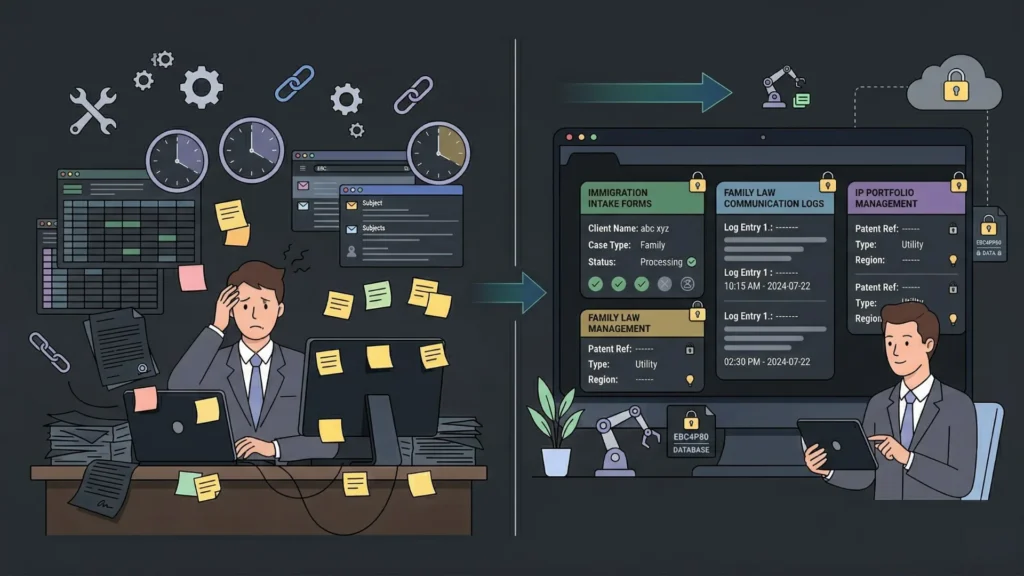
The gap between generic practice management platforms and what a specific legal practice actually needs is widest for firms with non-standard workflows. Immigration law firms need intake forms that gather country-specific documentation requirements. Family law practices need a communication log that tracks every client interaction with a timestamp for billing and compliance. Boutique IP firms need a matter management structure that connects patents, trademarks, and licensing agreements to client portfolios differently from how Clio’s generic matter model works.
Launch Your App Today
Ready to launch? Skip the tech stress. Describe, Build, Launch in three simple steps.
BuildGeneric platforms solve the average firm’s workflow. They do not solve your firm’s workflow. The workarounds firms build around generic tools, the spreadsheets, the email folders, the manual processes, represent real administrative cost. According to the Wolters Kluwer Future Ready Lawyer Survey, lawyers spend an average of 48% of their time on non-billable administrative tasks, and firms that implement custom workflow tools reduce that figure by an average of 20 percentage points (Wolters Kluwer, 2023). A custom-built app that matches your specific intake, case tracking, and billing workflow eliminates the workarounds rather than adding to them.
imagine.bo generates every application with role-based access control enforced at the API layer, SSL on all deployments, data encryption in transit and at rest, and GDPR readiness foundations applied by default. For legal client data, these are the baseline requirements, and meeting them without manual security configuration is a direct advantage over building on platforms that treat security as an add-on. This post on prompt-based app security best practices covers the full security audit checklist for AI-generated applications handling sensitive client data.
App 1: Client Intake and Onboarding Portals
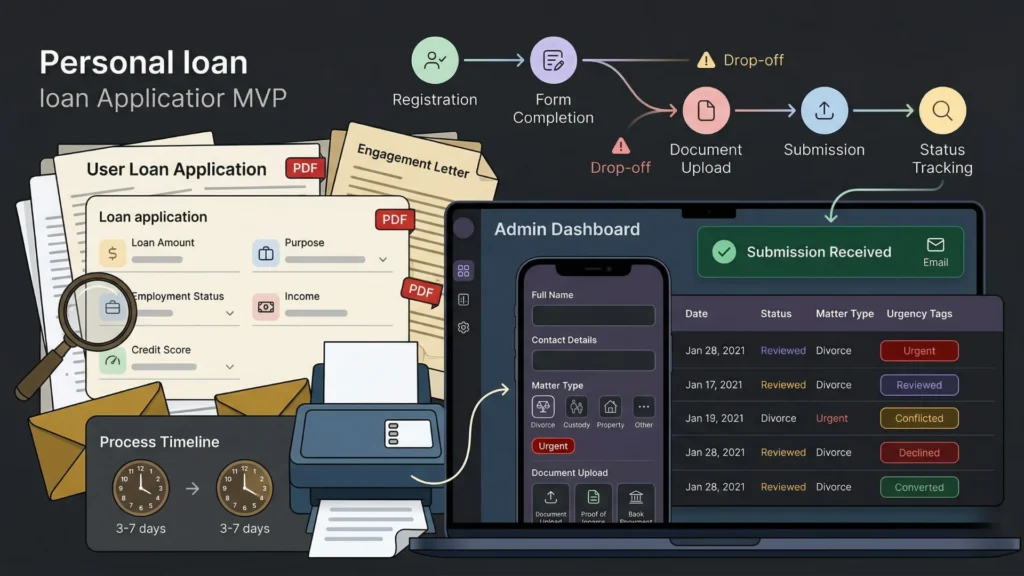
Client intake is where most legal practices lose the most administrative time. A prospective client submits a contact form. A paralegal emails them a questionnaire. The client replies with incomplete information. Three more emails confirm the missing details. A conflict check runs manually. An engagement letter goes out as a PDF attachment. The client signs it, scans it, and emails it back. That sequence takes three to seven business days and involves eight to fifteen touchpoints before the matter is open.
A custom client intake portal built on imagine.bo compresses that sequence into a single structured flow. The prospective client completes a detailed intake form online, uploads required documents, and receives an automatic email confirming receipt. The firm’s admin dashboard shows every intake submission with completion status, flagging incomplete submissions and conflict check results. The engagement letter generates from the intake data and goes out for digital signature without manual drafting.
A complete intake portal prompt: “Build a client intake portal for a family law firm. Prospective clients complete an intake form collecting full name, contact details, matter type from a dropdown: divorce, custody, property, or other, a brief description of their situation, and an urgency level: urgent, standard, or exploratory. Clients upload up to three documents at intake. After submission, the client sees a confirmation page and receives an email confirming their intake was received and the expected response time is two business days. Firm admins see all intake submissions in a dashboard sorted by submission date, with intake completion status, matter type, and urgency flagged in red for urgent submissions. Admins can open any submission, view all details and documents, add an internal note, and mark it as reviewed, conflicted, declined, or converted to active client.”
The intake field that saves the most follow-up time is an open text field asking the prospective client to describe their situation in their own words, without character limits. Legal professionals consistently report that this field, positioned before the structured fields rather than after, produces more accurate structured answers in subsequent fields because clients who have articulated their situation understand what information is relevant. It also reduces the first-email follow-up by approximately 60% because the free-text summary captures context that structured dropdown fields cannot.
For the full client onboarding flow design, this post on automating customer onboarding with AI covers the sequence from first contact to active client.
App 2: Case and Matter Management Dashboards
A case management dashboard for a small law firm does not need the full complexity of Clio or PracticePanther. It needs a structured view of every active matter, the key dates associated with each matter, the documents filed, and the next action required. A custom-built matter management app on imagine.bo generates exactly that structure without the per-user monthly fees that make generic platforms expensive at team scale.
The most effective case management structure for a small firm is not a kanban board or a status pipeline. It is a deadline-centric view that surfaces every matter with an action due in the next seven, fourteen, and thirty days. Most case management software defaults to showing all matters sorted by client name or matter number. Lawyers consistently report that a deadline-first view changes how they start their day, because it shows the work that has the highest consequence for missing rather than the work that is alphabetically first. Building that view requires describing it explicitly in the prompt.
A matter management prompt: “Build a case management platform for a five-attorney immigration law firm. Each matter has a client name, matter type: visa application, green card, citizenship, or deportation defence, assigned attorney, open date, status: active, pending, closed, or on hold, and a notes field. Each matter has a deadlines section where attorneys add specific deadline items with a date, description, and completion status. The main dashboard shows all active matters with their nearest upcoming deadline highlighted in red if within seven days. Attorneys see only their own matters by default but can request access to another attorney’s matter. The managing partner sees all matters from all attorneys. Each matter has a document section where files can be uploaded and tagged by document type.”
For the full CRM and matter tracking architecture including data model design, this post on how to create a custom CRM app without coding covers the prompt structure and blueprint review process.
App 3: Secure Document Vaults for Client Files
Legal document management has two distinct requirements that most general-purpose storage solutions handle poorly. First, documents must be accessible to the right people and inaccessible to everyone else, at the matter level, not just the firm level. A client should be able to see their own documents but not another client’s. A paralegal should be able to upload documents but not delete them. Second, document access needs an audit trail showing who viewed or downloaded what and when, because that log is a compliance and liability requirement in many jurisdictions.
imagine.bo generates both requirements when they are specified in the prompt. The role-based access control at the API layer means that even if a client guesses a document URL, the backend refuses to serve the file if their session does not have permission for that matter. The audit log records every access event automatically.
A document vault prompt: “Build a secure document vault for a corporate law firm. Each matter has a document section. Documents are categorised by type: contracts, correspondence, court filings, evidence, and invoices. Attorneys can upload, view, and download documents in their own matters. Paralegals can upload documents but cannot delete them. Clients can view and download documents in their own matter that an attorney has marked as client-visible. Clients cannot see internal documents. Every document view and download is recorded in an audit log with the user, the document name, and the timestamp. Admins can view the audit log for any matter.”
A five-attorney firm paying $25 per user per month for a document management add-on to their practice management platform spends $1,500 per year on document storage with no custom access rules and no built-in audit logging. A custom document vault built on imagine.bo’s Pro plan at $25 per month costs $300 per year, includes the exact access rules and audit logging the firm specifies, and generates exportable code the firm owns outright. For the security configuration details that underpin document access control in AI-generated applications, this post on no-code app security best practices covers every layer.
App 4: Time Tracking and Invoice Generation
Legal billing is time-sensitive, literally. Time entries that are not recorded on the day the work happens are partially forgotten or rounded in ways that cost the firm billable revenue. According to the 2024 Clio Legal Trends Report, attorneys capture an average of 2.9 billable hours per day despite working an average of 8.8 hours, partly because manual time tracking creates friction that leads to underbilling (Clio, 2024). A custom time tracking tool built into the firm’s case management system, rather than in a separate app, reduces that friction because time entries happen in the same interface where the work is tracked.
A time tracking prompt: “Add a time tracking section to the case management platform. Attorneys can log time entries against any of their active matters. Each time entry has a matter, a date, duration in tenths of an hour, a billing code from a dropdown, a description, and a billing status: billable or non-billable. The matter view shows all time entries and total billable hours for that matter. Attorneys see their own billable hours by week and by month on their personal dashboard. The admin can generate an invoice from a matter’s time entries, selecting a date range and an hourly rate. The invoice shows the firm’s name, the client name, itemised time entries with date, description, hours, and amount, and a total. The invoice exports as a PDF.”
For a dedicated guide to invoicing workflows built on no-code tools, this post on AI invoicing for freelancers and professionals without code covers the invoice generation and payment tracking architecture.
App 5: Deadline and Compliance Calendars
Statute of limitations deadlines, court filing dates, regulatory compliance dates, and client reporting deadlines all have one thing in common: missing them has consequences that range from professional embarrassment to malpractice liability. Most small firm deadline management is a shared calendar, a spreadsheet, or a manual task in the case management software that someone has to remember to create. A custom deadline management app built on imagine.bo enforces deadline tracking as a structural requirement, not an optional to-do.
A deadline calendar prompt: “Build a firm-wide deadline and compliance calendar for a litigation firm. Matters have deadline items with a matter name, deadline type: court filing, statute of limitations, discovery cutoff, trial date, or regulatory, a due date, the responsible attorney, and a status: upcoming, completed, or missed. The calendar view shows all deadlines for the next 90 days colour-coded by type. The list view shows deadlines sorted by due date with overdue deadlines at the top in red. Attorneys receive an automated email reminder five days before any deadline assigned to them and again the day before. The managing partner receives a weekly digest every Monday showing all deadlines due in the next 14 days across all attorneys. Completed deadlines are archived with the completion date and attorney logged.”
Citation capsule: According to the American Bar Association’s Malpractice Statistics, missed deadlines and calendar management errors represent approximately 25% of all legal malpractice claims filed annually, making deadline management infrastructure one of the highest-ROI investments a small law firm can make in practice management technology (ABA, 2024). A custom deadline calendar that sends automated reminders and maintains an audit trail directly addresses the most common source of legal liability from administrative failure.
For the automated email notification architecture, this post on automating email with AI and no-code covers the scheduled email implementation approach.
FAQ
Is client data secure in an app built with imagine.bo?
Yes. Every imagine.bo deployment includes SSL on all connections, data encryption in transit and at rest, RBAC enforced at the API layer, and GDPR readiness foundations by default. These apply automatically without additional configuration. For legal client data specifically, the RBAC implementation means that access control is enforced at the data layer rather than only at the UI layer. A client who guesses another client’s matter URL receives an API-level rejection, not just a redirect. For the complete security framework that covers legal data handling, this post on prompt-based app security best practices is the right reference.
Can a solo practitioner with no technical background build these apps?
Yes. imagine.bo requires describing your legal workflow clearly, not writing code. A solo practitioner who knows their intake process, their matter structure, and their billing workflow produces a more accurate first generation than a developer who has never run a legal practice. According to Gartner, non-technical professionals now build more applications than trained developers at many organisations, driven by AI-generation tools that convert domain expertise into working software (Gartner, 2022). This post on launching apps without developers shows what that first-build experience looks like for non-technical practitioners.
When does a legal app need the Hire a Human feature?
Three scenarios consistently warrant engineering support rather than prompt iteration. Digital signature integration with DocuSign or HelloSign requires OAuth implementation and webhook handling. Secure document storage with access logging at the file-system level, rather than the database level, requires server configuration. Email encryption for client communications that handles PGP or S/MIME keys requires cryptographic implementation that prompt generation approximates rather than implements precisely. The Hire a Human feature at $25 per page handles each of these tasks with a vetted engineer who pushes the implementation directly to your project repository. The Pro plan’s one-hour pre-launch expert session is the right time to identify which of these scenarios applies to your specific build before your first client logs in.
Conclusion

Legal professionals who build custom apps without code gain three advantages over those on generic platforms. Their apps match their specific workflow rather than requiring the workflow to conform to the platform’s model. They pay a flat monthly subscription rather than per-user fees that compound with every hire. And they own clean, exportable code that a developer can extend without rebuilding from scratch.
imagine.bo’s free plan provides 10 credits to build and deploy a first version at zero cost. The Pro plan at $25 per month adds 150 rollover credits, private projects, and a one-hour expert pre-launch session. Start with the client intake portal, deploy it for your next three intake conversations, and use their experience to refine the matter management and document sections. For the complete workflow of building a professional services app from a single plain English description, this post on building an app for legal professionals covers the platform-specific build steps in detail.
Launch Your App Today
Ready to launch? Skip the tech stress. Describe, Build, Launch in three simple steps.
Build