Personal trainers, online fitness coaches, and gym owners are running their entire client management operation through WhatsApp messages, spreadsheets, and three separate SaaS subscriptions that do not talk to each other. A dedicated fitness app from a development agency costs $30,000 to $100,000. Trainerize charges $35 to $350 per month with per-client fees that compound as your roster grows. According to IHRSA, the global health and fitness industry generates over $96 billion annually, and solo coaches and small studios represent the fastest-growing segment (IHRSA, 2024). Yet most of them are managing clients on tools built for someone else’s business model. AI-generation tools have closed that gap. A full-stack fitness coaching app with workout delivery, client progress tracking, booking, and subscription billing now generates from a plain English description in days, not months. This guide covers exactly how fitness professionals build and launch custom apps without code in 2026. For context on what AI-built platforms look like for coaches and consultants specifically, this post on AI SaaS tools for coaches and consultants covers the platform landscape.
TL;DR Fitness professionals are building custom client management apps, workout delivery platforms, booking systems, progress trackers, and group program tools without code using imagine.bo’s Describe-to-Build interface. The platform generates a full-stack application from plain English, starting at $0. According to ClubReady, fitness businesses that use a branded client app see 31% higher client retention than those using generic scheduling tools (ClubReady, 2023). Custom builds on imagine.bo cost under $325 in year one versus $30,000 to $100,000 from a development agency.
The Actual Problem With Generic Fitness Platforms
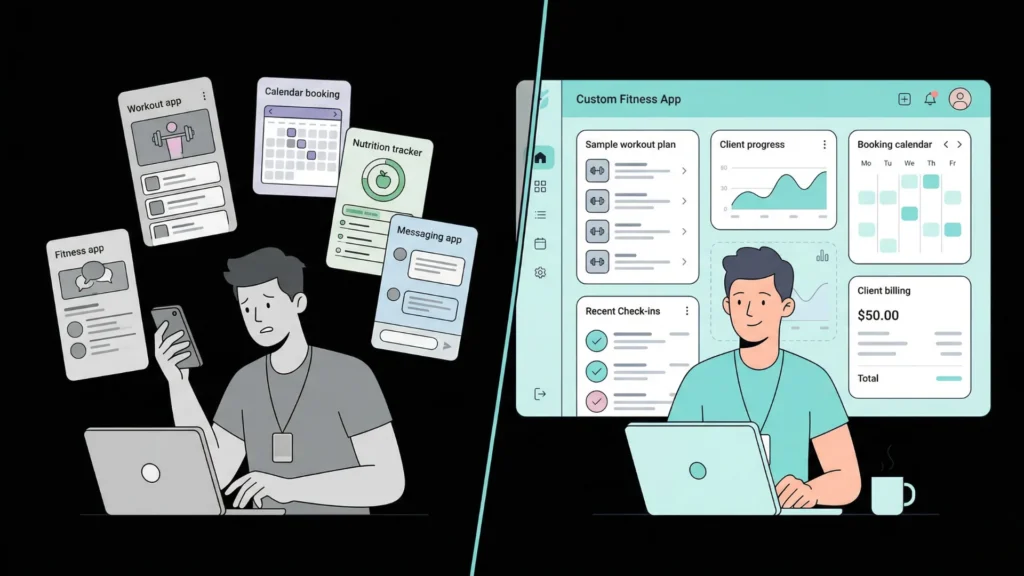
Every fitness professional hits the same ceiling with generic platforms. Trainerize handles workout delivery but its client portal looks like Trainerize’s product, not yours. Calendly handles booking but does not know your client’s training history. MyFitnessPal captures nutrition data but has no connection to the workouts you assigned. The result is a client experience stitched together from three tabs and a WhatsApp thread, which is not the professional experience that justifies a $300 per month coaching fee.
A custom-built fitness app on imagine.bo generates a single system where workout assignment, client progress, booking, check-ins, and billing all live in one place, with your brand, your workflow, and your rules. That cohesion is not cosmetic. It directly affects whether clients stay. According to ClubReady, fitness businesses using a branded, integrated client experience see 31% higher client retention than those managing clients across disconnected tools (ClubReady, 2023).
The build path for a fitness professional is also more straightforward than most realise. Fitness apps follow a predictable data model: Trainers, Clients, WorkoutPlans, Sessions, ExerciseLogs, and Bookings. A trainer who can describe those entities and the rules that govern them generates a working first version in a single session. This post on fitness professionals launching apps without developers covers what that first version looks like in practice.
Step 1: Client Management and Onboarding
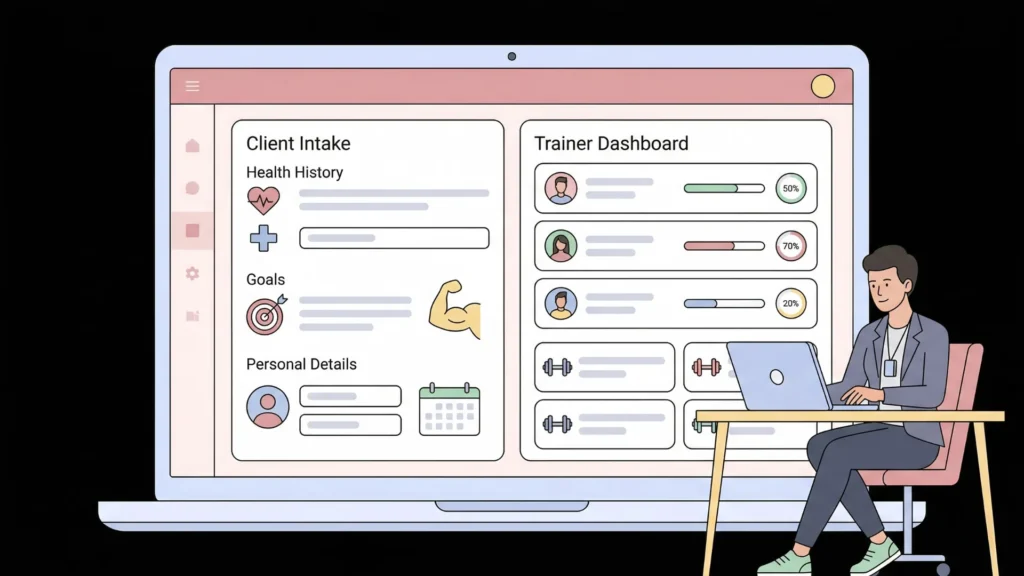
The first app most fitness professionals need is not a workout delivery system. It is a client intake and management tool that replaces the Google Form, the onboarding email sequence, and the spreadsheet where client notes live. A custom client management app built on imagine.bo generates a structured intake flow, a client profile with health history and goals, and a trainer-facing dashboard that shows the current status of every client.
A complete client management prompt: “Build a client management platform for an online personal trainer. Clients register via a link sent by the trainer and complete an onboarding form covering fitness goals, current fitness level, health conditions, injuries, available training days, and equipment available. Trainers see a client dashboard showing every client with their onboarding completion status, their training start date, and their last check-in date. Trainers can open any client profile to view their full onboarding data, add private notes, and update their status as active, paused, or completed. Clients can view their own profile and update their goals section. Clients cannot see other clients.”
The client management element that produces the highest early retention impact is the automated onboarding reminder. Adding this to the prompt costs nothing: “If a client registers but does not complete the onboarding form within 48 hours, send them an automated email reminder with the onboarding link.” Incomplete onboarding is the most common cause of first-week dropout because clients who have not articulated their goals feel no accountability to the program. That single automated email reduces incomplete onboarding by a material percentage without any manual follow-up from the trainer.
For the full client onboarding flow architecture, this post on automating customer onboarding with AI covers the design patterns that convert new signups into active clients.
Step 2: Workout Delivery and Progress Tracking
Workout delivery is the core product for most online fitness coaches. The platform needs to let trainers assign weekly workout plans with specific exercises, sets, reps, and notes, and let clients log which exercises they completed and how they felt. That data, accumulated over weeks, is what justifies the coaching relationship and makes the program feel personalised rather than generic.
The data model decision that most affects the long-term value of a fitness app is whether workout plans are assigned as one-time templates or as a reusable library. Trainers who build their workout plan data as a library of reusable templates generate programs for new clients in minutes by assembling existing plans rather than rebuilding from scratch each time. This is a structural decision that belongs in the initial prompt because retrofitting a library structure onto a template-based app requires a partial rebuild. The prompt element that implements it: “Trainers can save workout plans to a personal library and assign any saved plan to any client for a specific week. The same plan can be assigned to multiple clients.”
A workout delivery prompt: “Build a workout tracking platform for a personal trainer managing up to 30 online clients. Trainers create workout plans with a name and a list of exercises. Each exercise has a name, sets, reps, rest time, and a notes field. Trainers assign a workout plan to a specific client for a specific date. Clients see their assigned workouts on their dashboard organised by date. Clients log each workout by marking exercises complete, recording actual sets and reps completed, and adding a difficulty rating from one to five. Trainers see a completion summary per client showing which workouts were completed, which were missed, and average difficulty scores over the last four weeks.”
For a practical library of workout app prompts and other app types ready to adapt, this 40-prompt copy-paste library by app type has structured starting points across multiple fitness and coaching use cases.
Step 3: Booking and Session Scheduling
Fitness professionals running one-to-one sessions, group classes, or hybrid programs need a booking system that enforces their specific availability rules without the manual back-and-forth of DM scheduling. A custom booking system built on imagine.bo applies the exact rules of the specific training model rather than the generic rules of a third-party scheduling tool.
A group class booking prompt: “Build a class booking system for a boutique fitness studio. The studio offers three class types: HIIT, Yoga, and Strength, each with a maximum of twelve participants. The schedule shows the next four weeks of classes with date, time, class type, instructor name, available spots, and a book button. Clients register and can book up to three classes per week on the standard membership tier and unlimited classes on the premium tier. Bookings can be cancelled up to two hours before class for a full credit. Cancellations within two hours are not refunded. The admin dashboard shows class attendance by type, a waitlist for full classes, and a revenue summary by membership tier.”
The waitlist feature and the cancellation credit logic are the two elements to check specifically in the AI-Generated Blueprint before confirming the build. Both involve conditional state changes that affect the financial data model, and catching a misaligned implementation at the blueprint stage prevents a correction session later.
For the full technical walkthrough of building a booking system from a plain English description, this guide on how to build a booking or scheduling app in minutes covers the step-by-step process.
Step 4: Subscription Billing Without Platform Fees
A fitness professional charging $200 per month for online coaching on a platform that takes 5% loses $120 per year per client. At twenty clients, that is $2,400 per year in platform transaction fees for a business making $48,000 in annual revenue. A custom subscription billing system built on imagine.bo processes payments directly through Stripe at 2.9% plus $0.30, with no additional platform fee and no per-client monthly charge.
A fitness coach with 20 clients at $200 per month using Trainerize’s business plan at $350 per month plus Stripe’s standard processing fees spends approximately $5,600 per year on platform infrastructure. The same coach on imagine.bo’s Pro plan at $25 per month with Stripe processing direct spends approximately $1,000 per year including the Hire a Human task for the subscription webhook implementation. The annual saving is approximately $4,600, enough to fund a year of part-time marketing spend.
A subscription billing prompt: “Add subscription billing to the coaching platform. Clients choose a plan at signup: Basic at $99 per month for workout delivery only, and Premium at $199 per month for workout delivery plus weekly video check-ins and direct messaging. Payment is processed via Stripe Checkout. Clients see their current plan, next billing date, and invoice history on their billing page. Clients can upgrade at any time, effective immediately. Clients can cancel, effective at the end of the current billing period. Trainers see a revenue dashboard showing active subscribers by plan, monthly recurring revenue, and payment failures requiring follow-up.”
For the subscription webhook handler that activates and revokes access based on Stripe lifecycle events, use the Hire a Human feature at $25 per page. This is the specific engineering task where precision prevents silent revenue loss. For the subscription lifecycle architecture in detail, this guide on launching a subscription-based app without developers covers every lifecycle event that requires handling.
Step 5: Group Programs and Cohort Management
Fitness professionals scaling beyond one-to-one coaching run group programs: twelve-week transformations, six-week challenges, and monthly membership cohorts. These programs require a content delivery structure that gates program content by cohort start date, tracks participant progress, and facilitates peer accountability, none of which generic platforms handle cleanly for a fitness business model.
A group program prompt: “Build a twelve-week online fitness program platform. Participants register and pay a one-time fee of $299 via Stripe. The program releases weekly content: a workout plan and a nutrition guide for that week. Week two content unlocks seven days after the participant’s start date, week three unlocks fourteen days in, and so on. Participants log their weekly weigh-in and upload a progress photo for their own records. A community section shows all participants on the current program by first name only. Participants can post a message and reply to others’ messages. The coach sees all participants, their progress log submissions, and can send a broadcast message to all active participants.”
The cohort content gating logic, specifically calculating content unlock dates relative to each participant’s individual start date rather than a fixed calendar date, is the element to verify in the blueprint before confirming. Describe it explicitly in the prompt and check that the AI-Generated Blueprint represents a content access table that stores each participant’s unlock schedule rather than a single shared calendar.
According to the American Council on Exercise, fitness participants who engage in a community component during a structured program show 40% higher program completion rates than those following the same program alone (ACE, 2023). The community section is not optional for a group program product. It is the retention mechanism.
When Does a Fitness Professional Need Hire a Human?
The Hire a Human feature at $25 per page covers the engineering precision tasks where approximate implementation produces silent failures. For fitness professionals, three tasks consistently belong here rather than in prompt iteration.
Stripe subscription webhooks: The webhook that activates access when a subscription payment succeeds and revokes it when a subscription lapses must be idempotent and must validate Stripe’s signature. Getting it wrong means clients who cancelled retain access or clients who paid cannot log in.
Video content delivery from external hosts: Connecting Vimeo or Wistia workout videos to a custom-built platform with progress tracking at percentage completion requires JavaScript event handling from the video platform’s API. The completion event that marks a session as watched cannot be triggered by a user simply navigating away. It fires from the video player, and wiring that event to the progress database is engineering territory.
Push notifications for class reminders: A booking system that sends push notifications to clients’ phones 30 minutes before their booked class requires a Web Push API implementation with a service worker. This is not a conversational prompt task. A $25 engineer task produces a reliable notification system that works across iOS Safari and Android Chrome.
The Pro plan includes a 20% discount on Hire a Human tasks and a one-hour expert pre-launch session. Use the pre-launch session to audit the subscription access control, the content gating logic, and the client data isolation before the first client logs in. For the full no-code security checklist that covers these audit points, this post on no-code app security best practices is the right reference.
FAQ
Can a fitness coach with no technical background build a client app on imagine.bo?
Yes. imagine.bo requires describing your coaching workflow clearly in plain English. A coach who knows their onboarding process, their workout assignment structure, and their billing model better than any developer they could hire produces the most accurate first generation. This post on non-technical founders building products covers what that experience looks like for first-time builders with no technical background.
How long does it take to build and launch a fitness coaching app?
A scoped MVP covering client management, workout delivery, and booking typically reaches a first deployed version in two to four days of iterative building. Adding subscription billing adds one to two days including the Hire a Human task for the Stripe webhook. A complete coaching platform with all five features covered in this guide takes five to seven days from first prompt to live product. According to Stripe, fitness and wellness SaaS products that ship to paying customers within 90 days of starting development reach their first $10,000 MRR significantly faster than those with longer build cycles (Stripe, 2023).
What is the cost difference between building custom and using Trainerize?
Trainerize’s Professional plan costs $120 per month for up to 50 clients. At 50 clients over three years, that is $4,320 in platform fees with no code ownership, no customisation, and per-client fees once you scale past plan limits. imagine.bo’s Pro plan at $25 per month over three years costs $900, and you own the code outright. The Hire a Human tasks for payment and video integration add $50 to $75 one-time. For the full cost comparison across all approaches, this 2026 app development cost breakdown covers the numbers across coaching and fitness product types specifically.
Conclusion

Fitness professionals who build custom apps without code gain three things generic platforms cannot offer. Complete workflow ownership, where the app matches how they actually coach rather than how the platform vendor designed a coaching product. Direct client relationship data that they own and can export. And zero per-client platform fees that would otherwise compound with every new client added to the roster.
imagine.bo’s free plan provides 10 credits to build and deploy a first version at zero cost. The Pro plan at $25 per month adds 150 rollover credits, private projects, and a one-hour expert pre-launch session. Start with the client management and workout delivery features, deploy to your first five clients, and use their feedback to shape the booking and billing features in the following week. For the complete workflow of building your first custom coaching app from a single plain English description, this guide on building an app by describing it walks through every step from blank prompt to live product.