

Custom event apps used to be a budget item reserved for festivals with six-figure tech spend and conference organisers backed by enterprise contracts. A basic registration and attendee management system from a development agency costs $25,000 to $80,000 and takes three to five months to build. According to Eventbrite, 95% of event professionals say technology directly impacts attendee satisfaction (Eventbrite, 2024), yet most small and mid-size event businesses are running on Eventbrite templates and Google Sheets because custom apps seemed out of reach. That calculation has changed. AI-generation tools now produce full-stack event apps from a plain English description in days, not months. This article covers five specific ways event businesses are using this shift to launch apps without developers in 2026. For the mechanics of building a booking and scheduling app specifically, this guide on how to build a booking or scheduling app in minutes covers the workflow in detail.
TL;DR Event businesses are launching custom registration, attendee management, vendor coordination, ticketing, and post-event engagement apps without developers using imagine.bo’s Describe-to-Build interface. The platform generates a full-stack application from plain English, starting at $0. According to Bizzabo, 79% of event marketers say mobile event apps increase attendee engagement (Bizzabo, 2023). Custom apps built on imagine.bo deploy to production infrastructure in one click and cost under $300 in year one versus $25,000 to $80,000 from a development agency.
Way 1: Custom Event Registration and Ticketing Apps
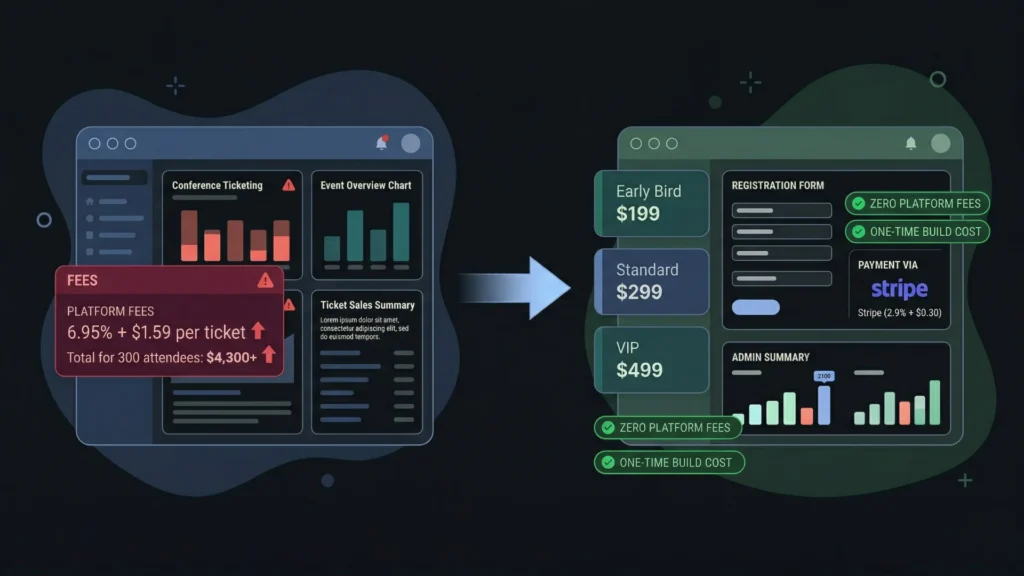
Generic ticketing platforms take a percentage of every ticket sold. Eventbrite charges up to 6.95% plus $1.59 per ticket. On a $150 conference ticket with 300 attendees, that is over $4,300 in platform fees for a single event. A custom registration and ticketing app built on imagine.bo replaces that recurring cost with a one-time build, direct Stripe processing at 2.9% plus $0.30, and zero platform transaction fees.
Launch Your App Today
Ready to launch? Skip the tech stress. Describe, Build, Launch in three simple steps.
BuildThe registration app prompt that produces the most complete first generation follows a specific structure. It names every ticket tier, every registration field, every confirmation action, and every admin view. A strong starting prompt: “Build an event registration app for a three-day professional conference. Ticket tiers: Early Bird at $199, Standard at $299, and VIP at $499. VIP includes a workshop add-on selection from three options. Registration collects first name, last name, email, company, job title, dietary preference, and t-shirt size. On successful payment, send the attendee a confirmation email with their ticket details and a unique QR code. Admins see a dashboard showing registrations by ticket tier, total revenue, and a downloadable attendee list. Admins can manually add or remove registrations.”
The AI-Generated Blueprint should show a Registrations table, a Tickets table, a TicketTiers table, and a WorkshopSelections table for VIP add-ons. Review the data model specifically for the QR code generation field and the workshop add-on relationship before confirming the build.
For the Stripe webhook that confirms payment and triggers the confirmation email with the QR code, use the Hire a Human feature at $25 per page. That webhook must be idempotent and must validate Stripe’s signature on every event. Getting it wrong means paid attendees who do not receive confirmation emails, which creates a support burden that grows with every registration.
Citation capsule: According to Eventbrite’s 2024 industry report, event organisers who use custom registration flows with branded confirmation sequences and pre-event communication see 23% lower no-show rates than those using generic ticketing platform flows, because personalised pre-event communication builds commitment and reduces drop-off between purchase and attendance (Eventbrite, 2024).
Way 2: Attendee-Facing Mobile Web Apps
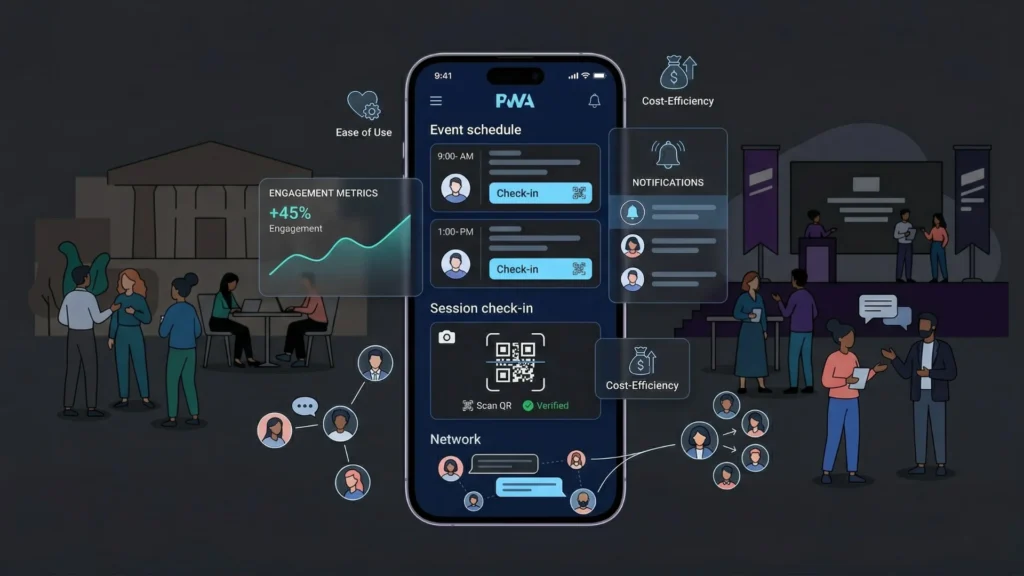
An attendee app that lives on a phone’s home screen, displays the event schedule, allows session check-in, and enables attendee networking is the feature event organisers most often get quoted $40,000 to $80,000 to build. A Progressive Web App (PWA) built with imagine.bo delivers the same attendee experience at a fraction of that cost, without App Store submission, without native app development, and without asking attendees to download anything.
According to Bizzabo, 79% of event marketers report that mobile event apps increase attendee engagement, and events with dedicated apps see 20% higher session attendance rates than those without (Bizzabo, 2023). The engagement difference comes from having the schedule, speaker information, and session check-in on an attendee’s phone rather than in a printed programme they leave at the registration desk.
A complete attendee app prompt: “Build a mobile-first attendee app for a two-day business conference. Attendees log in with the email they registered with. The app shows the full conference schedule organised by day and time slot, with session title, speaker name, room number, and a short description. Attendees can bookmark sessions to build their personal schedule. Each session has a QR code check-in that marks the attendee as present. Attendees see a speaker directory with headshots and bios. There is a networking section where attendees can opt in to be discoverable, add a short bio, and send connection requests to other opted-in attendees. Admins see check-in counts per session in real time.”
The single feature that produces the highest attendee engagement in custom event apps is not the schedule or the speaker directory. It is the networking opt-in with connection requests. Generic event platforms offer attendee lists. A custom-built app offers selective visibility, where attendees choose to be discoverable and initiate connections. That consent-based model produces significantly higher engagement than forced attendee directory access because attendees who opt in are signalling openness to connection, which makes first messages more likely to receive responses. This feature takes one additional prompt to add after the initial build and costs nothing beyond the time to describe it.
For the real-time chat feature that allows attendees who have connected to message each other within the app, this guide on how to add real-time chat to your no-code app covers the implementation approach specifically.
Way 3: Vendor and Exhibitor Management Portals
Event organisers managing twenty or more vendors, sponsors, or exhibitors are typically doing it through a combination of email threads, shared spreadsheets, and manual follow-up. Each vendor needs a booth assignment, a list of what they can and cannot bring, a setup time slot, their marketing materials submitted before a deadline, and an invoice for their participation fee. Managing that process manually for forty vendors is a full-time job in the weeks before the event.
A custom vendor management portal built on imagine.bo moves that entire workflow into a structured system. Vendors log in to their own portal, complete their profile, submit their materials, select their setup slot, and pay their participation fee. The organiser sees every vendor’s submission status on a single dashboard with red flags for anything past deadline.
An event organiser managing 40 vendors at $500 participation fee each generates $20,000 per event. If manual coordination inefficiency causes five vendors to submit materials late or cancel due to friction, the organiser loses $2,500 in revenue plus the cost of last-minute replacements. A custom vendor portal that enforces deadlines with automated reminders and streamlines submission eliminates that friction. At imagine.bo’s Pro plan of $25 per month plus a $25 Hire a Human task for the payment webhook, the portal costs $50 in year one against $2,500 in potential revenue protection per event.
A vendor portal prompt: “Build a vendor management portal for a trade show. Vendors receive an invitation email with a registration link. After registering, vendors complete their profile including company name, contact details, product category, and booth size requirement. Vendors upload their logo and a 200-word company description by a submission deadline shown on their dashboard. Vendors select a setup time slot from available options. Vendors pay their participation fee online via Stripe. The organiser dashboard shows all vendors, their submission status for each required item, their selected setup slot, and their payment status. Overdue submissions are flagged in red.”
For building the onboarding flow that vendors experience when they first receive the invitation, this post on automating customer onboarding with AI covers the invitation-to-activation workflow structure.
Way 4: Post-Event Engagement and Content Apps
Most event businesses lose their attendee relationship the moment the event ends. Attendees leave, the feedback form gets a 15% response rate, and the next communication is a promotional email announcing the next event. That pattern wastes the strongest moment of audience engagement an event business ever has: the 72 hours immediately after an event, when attendees are still thinking about what they learned, who they met, and what they want to do differently.
A custom post-event app built on imagine.bo captures that engagement window with session recordings, speaker resources, attendee connection follow-through, and a feedback mechanism that actually gets completed because it is built into the same app the attendee used during the event.
According to the Events Industry Council, event businesses that maintain post-event engagement with a dedicated content platform see 34% higher return attendance rates at subsequent events compared to those that rely solely on email communication (EIC, 2023). A custom post-event app is not a nice-to-have. It is the infrastructure for converting a one-time attendee into a recurring customer.
A post-event content app prompt: “Build a post-event content platform for conference attendees. Attendees log in with their conference registration email. The platform shows a session library organised by track, each with the session recording embedded from Vimeo, the speaker’s slide deck PDF, and the speaker’s contact information. Attendees can leave a rating and a written review for each session they attended. Attendees see their conference connections from the networking section and can message them directly. A resources section has all sponsor and exhibitor one-pagers available for download. The platform remains accessible for 90 days after the event, then redirects to a registration page for the next event.”
For building a video archive with AI captioning that makes session recordings searchable and more accessible, this post on building a video archive app with AI captioning covers the specific implementation approach.
Way 5: Multi-Event Management Dashboards for Agencies
Event agencies managing multiple clients and multiple events simultaneously need a central operations dashboard that shows the status of every event, every vendor submission, every registration milestone, and every deadline in one view. Without it, managers are pulling information from different email threads, different spreadsheets, and different client portals, which is where things fall through.
A custom multi-event management dashboard built on imagine.bo gives agency staff a single operational view and gives clients a self-service portal where they can see their event’s progress without calling the account manager.
The data model for a multi-event agency dashboard has one structural requirement that must be in the prompt explicitly: every piece of data must be scoped to a specific event and a specific client. If the prompt does not state this explicitly, the generator sometimes creates a shared data structure where all events share the same vendor list or the same registration pool. The correct constraint in the prompt is precise: “Each event belongs to one client. Vendors, registrations, and submissions are scoped to their specific event. Agency staff can see all events. Client users can only see their own events and cannot see other clients’ events or data.”
A multi-event agency dashboard prompt: “Build an event management platform for an event agency. Agency staff can create new events with a client name, event name, date, venue, and checklist of required deliverables with deadlines. Each event has a vendor section, a registration section, and a task checklist. Clients log in and see only their own events. Clients can view registration counts, vendor submission status, and checklist completion percentage. Agency staff see all events on a master dashboard with a red flag for any event that has overdue checklist items or vendors with outstanding submissions. Staff can add notes to any event visible to the client.”
According to Event Manager Blog, event agencies that use centralised project management tools report 40% faster event delivery timelines and 25% fewer client escalations compared to agencies managing events through email and spreadsheets (Event Manager Blog, 2023).
For a comprehensive guide to client portal architecture and the specific build workflow for agency-facing platforms, this post on launching a client portal without code covers the multi-client data isolation structure in detail.
FAQ
Can a non-technical event planner build these apps on imagine.bo?
Yes. imagine.bo requires the ability to describe your event workflow clearly in plain English, not programming knowledge. Event planners who understand their registration rules, their vendor submission requirements, and their attendee experience better than any developer they could hire produce the most accurate first generations. This post on launching apps without developers covers what the first-build experience looks like for non-technical builders specifically.
How do custom event apps handle large attendee volumes?
Imagine.bo deploys to Vercel and Railway by default. Vercel’s edge network handles global traffic automatically, and Railway’s backend scales with load without manual configuration. A registration app that handles 50 registrations in testing handles 5,000 registrations in production on the same infrastructure. According to Vercel, their edge network serves hundreds of billions of requests per month across millions of deployed applications (Vercel, 2024), which means event-scale traffic is well within normal operating parameters for the deployment target.
What is the fastest type of event app to build without developers?
A post-event content platform with session recordings and resources is typically the fastest because it has one user type, no payment integration, and no real-time components. It deploys as a first version in under a day. Registration and ticketing apps take two to three days including the Hire a Human task for the Stripe webhook. Attendee networking apps with real-time connection requests take three to four days including the connection request and messaging features. For the scheduling assistant and booking workflow that underpins most event registration systems, this guide covers the setup in detail.
Conclusion

Event businesses that build custom apps without developers gain three advantages over those using generic platforms. They eliminate per-transaction fees that compound across every ticket sold. They build exactly the workflow their events require rather than adapting their events to platform constraints. And they own their attendee relationship data outright rather than depending on a third-party platform’s export policy. The five app types covered here, registration and ticketing, attendee mobile apps, vendor portals, post-event content platforms, and multi-event agency dashboards, represent the complete operational and engagement stack for a modern event business.
imagine.bo’s free plan gives you 10 credits to build and deploy a first version at zero cost. The Pro plan at $25 per month adds 150 rollover credits, private projects, and a one-hour expert pre-launch session. Start with the app that addresses your most immediate friction, likely registration and ticketing or vendor management, and deploy your first version before your next event. For the full workflow of building and deploying an app from a single plain English prompt, this guide on building an app by describing it is the most direct next step.
Launch Your App Today
Ready to launch? Skip the tech stress. Describe, Build, Launch in three simple steps.
Build




