

A custom property listing portal takes five to nine months to build from an agency quote. A branded buyer app costs $60,000 to $180,000. A deal management CRM tailored to a commercial team’s specific pipeline stages requires weeks of requirements gathering before a line of code gets written. For most real estate brands, the gap between knowing what digital product they need and having it live is large enough that they settle for a generic platform or build nothing at all. According to Deloitte, real estate firms that implement custom digital products see 34% higher client conversion rates than those using generic tools (Deloitte, 2024). The gap between knowing that and closing it has shrunk significantly. AI-generation tools now produce full-stack real estate applications from a plain English description in days. This article covers seven specific ways real estate brands are launching digital products faster in 2026. For the comprehensive guide to building smart real estate platforms without developers, this post on how real estate brands build smart platforms without developers covers the full platform landscape.
TL;DR Real estate brands are launching property portals, agent CRMs, client transaction portals, rental management tools, lead dashboards, PropTech MVPs, and branded mobile experiences faster by using imagine.bo’s AI generation instead of agency development timelines. According to NAR, 97% of homebuyers use the internet during their home search (NAR, 2024). Digital products are the first impression. AI generation compresses build time from months to days and cost from six figures to under $300 in year one.
Way 1: Launch a Branded Property Listing Portal in Days
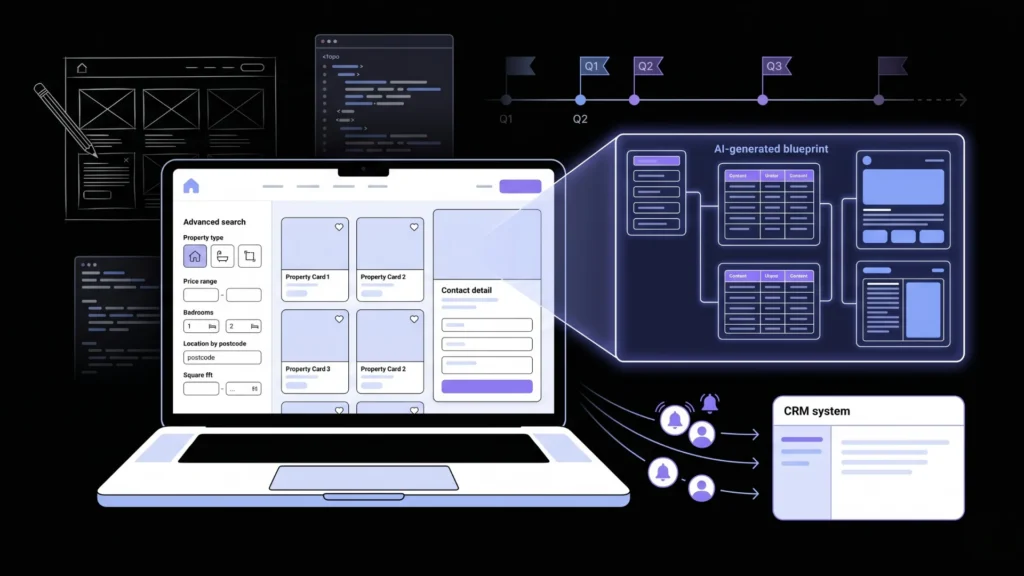
A branded listing portal that shows your inventory, captures buyer leads directly into your system, and looks like your product rather than a generic template is the foundational digital product for most real estate brands. Agency-built equivalents take three to five months. imagine.bo generates one in a single session.
Launch Your App Today
Ready to launch? Skip the tech stress. Describe, Build, Launch in three simple steps.
BuildThe speed comes from the generation model. Instead of requirements gathering, wireframing, development sprints, and QA cycles, the entire build happens from a description. The AI-Generated Blueprint shows the complete architecture before any code is written, giving the real estate team the same review opportunity that used to require a technical project manager.
The listing portal prompt element that most affects generation quality for real estate brands is the search filter specification. “Users can search properties” generates a keyword box. “Users filter by property type, price range, number of bedrooms, location by postcode, listing status, and square footage with results updating in real time” generates the filter interface with correctly structured database queries behind each dimension. The specificity of the filter description maps directly to the accuracy of the generated data model.
For the detailed guide to building a property listing portal with AI generation including the complete prompt structure, this post on real estate digital products launched without developers covers the specific build workflow.
Citation capsule: According to the National Association of Realtors, listings with a dedicated property detail page and embedded contact form receive 118% more online views than those without, and buyer enquiry rates are 32% higher when the contact form is on the listing page rather than linked elsewhere (NAR, 2024). Both elements generate automatically in an imagine.bo listing portal when described in the initial prompt.
Way 2: Build a Deal CRM Matched to Your Exact Pipeline
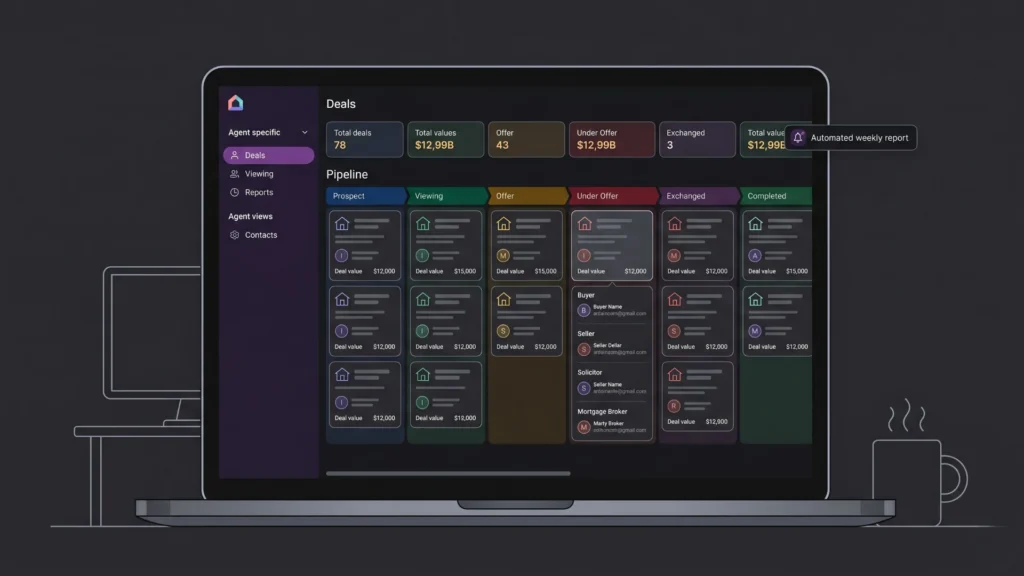
Generic CRMs like Salesforce and HubSpot require weeks of configuration to approximate a real estate deal pipeline. The pipeline stages, the deal types, the contact roles, and the reporting structure all require customisation that an implementation consultant charges $5,000 to $30,000 to deliver. A custom deal CRM built with imagine.bo generates the exact pipeline structure the team actually uses, from the first prompt.
According to the Wolters Kluwer Future Ready Lawyer Survey, professionals across service industries who implement custom workflow tools reduce non-billable administrative time by an average of 20 percentage points (Wolters Kluwer, 2023). For real estate agents, that administrative overhead is following up on deals, chasing document submissions, and manually tracking where each transaction sits. A CRM that matches the actual workflow eliminates those manual checks.
A real estate CRM prompt for a residential agency: “Build a deal management CRM for a residential estate agency with twelve agents. Each deal has property address, deal type: sale or let, client name, assigned agent, pipeline stage: prospect, viewing, offer, under offer, exchanged, or completed, estimated value, open date, and a notes log. Agents see only their own deals. Managers see all deals with a pipeline view showing deal counts and total value by stage. Each deal has a contacts section for buyer, seller, solicitor, and mortgage broker. Managers receive an automated weekly email every Monday listing deals with no note added in the previous seven days.”
For the full real estate CRM architecture guide including data model design and implementation prompts, this post on real estate CRM features, costs, and how to build one covers the complete build approach.
Way 3: Deploy a Buyer and Seller Transaction Portal Before the Next Instruction
A client transaction portal that shows buyers and sellers their transaction stage, upcoming milestones, and document status eliminates the status update calls that consume agent time and frustrate clients simultaneously. Generic transaction management platforms charge $50 to $200 per user per month. A custom portal built with imagine.bo costs $300 in year one and matches the exact stage names and milestone structure the agency uses.
An estate agency with fifteen agents paying $99 per user per month for a transaction management platform spends $17,820 per year. A custom portal built on imagine.bo’s Pro plan at $25 per month with one Hire a Human task for the client invitation webhook at $25 costs $325 in year one. The saving is $17,495, enough to fund a full year’s junior hire at an entry-level rate in many markets.
The milestone notification feature is the single element that most improves client experience in a custom transaction portal. When a transaction moves from “offer accepted” to “under offer,” the client receives an automatic email rather than waiting for an agent call. That notification, built into the data model as an event trigger, costs one line in the prompt and produces a qualitative improvement in the client relationship that generic platforms cannot replicate because they do not know your stage names or your milestone logic.
For the client portal architecture and the data isolation patterns that keep transactions correctly scoped to each client, this post on launching a client portal without code covers the implementation in depth.
Way 4: Replace Manual Rental Ledgers With a Smart Management Tool
Property management companies tracking rent payments, maintenance requests, and lease renewals in spreadsheets are operating at a level of manual effort that custom software eliminates entirely. The challenge is that generic property management platforms are built around American compliance requirements and flat fee structures that do not always match local letting agency workflows.
The most valuable feature in a custom rental management tool is not the payment tracking or the maintenance request log. It is the upcoming renewals dashboard that shows every tenancy expiring in the next 90 days, sorted by days remaining, with the landlord name and the current rent amount visible. Letting agents who use a generic platform have to manually check individual tenancy records to compile this view. A custom-built tool generates it automatically, and the landlord contact for each upcoming renewal is one click away. That single view recovers hours of manual work per week at every mid-size letting agency.
A property management prompt: “Build a letting management platform for a property agency managing 60 residential properties. Each property has a landlord, an address, a current tenancy with tenant name, monthly rent, start date, and end date. Tenants submit maintenance requests with description and photo upload. Maintenance requests have status: submitted, in progress, or resolved. Landlords see their properties, tenancy status, upcoming renewals in 90 days, and open maintenance requests. Agents see all properties and tenancies and can update all records.”
For a dedicated guide to replacing manual rental tracking with a smart platform, this post on replacing manual rental ledger templates with a smart app covers the specific data model and workflow.
Way 5: Launch a PropTech MVP to Validate Before Building Full
PropTech founders building new digital products for the real estate market, fractional investment platforms, rental yield calculators, landlord analytics tools, or agent productivity apps, face the same problem as any startup: building a full product before confirming market demand is how most PropTech ideas end. An MVP built with imagine.bo validates the core workflow with real users before a significant development investment.
According to CB Insights, 35% of startups fail due to no market need (CB Insights, 2023). A PropTech MVP that goes live in a week and tests the core value proposition with fifty real estate professionals produces learning that months of market research cannot. The specific workflows users try that you did not build, the questions they ask that reveal missing features, and the workflows they avoid that reveal misaligned assumptions are all more valuable than any pre-launch analysis.
A PropTech MVP prompt for a rental yield analysis tool: “Build a rental yield calculator web app for property investors. Users enter a property address, purchase price, estimated monthly rent, annual service charge, and ground rent. The app calculates gross yield, net yield after costs, annual profit, and payback period in years. Users save up to ten properties to a portfolio view comparing yield side by side. Users register with email and password to save properties. Saved portfolios are private to each user.”
For the full MVP validation methodology and the specific launch sequence that gets real users testing within 48 hours of deployment, this post on rapid product validation with AI app builders covers the validation workflow specifically for product founders.
Way 6: Build a Lead Capture and Follow-Up Dashboard
Real estate brands running paid advertising, content campaigns, or portal listings need a central dashboard showing where leads come from, how quickly they are followed up, and which sources convert to instructions or completed transactions. Generic analytics show traffic. A custom lead dashboard connects source data to pipeline stage and outcome in a view that reveals which marketing spend produces results.
A lead analytics prompt: “Build a lead management dashboard for a residential estate agency. Each lead has name, email, phone, property interest type, lead source: website, portal, referral, social, or direct, date received, assigned agent, and status: new, contacted, qualified, viewing, instruction, or lost with reason. The dashboard shows leads received this month versus last month by source, average time from receipt to first contact by agent, and conversion rate from lead to instruction by source. Agents see only their own leads. Managers filter by agent, source, and date range and export as CSV.”
The lead dashboard metric that most directly improves agency revenue per lead is time from receipt to first contact broken down by lead source and agent. Agencies consistently discover that their highest-converting lead source has the slowest response time because it arrives outside office hours from a portal. Building that response time metric into the dashboard as a visible, filterable field creates accountability that improves response behaviour without requiring management intervention.
For the full prompt-to-dashboard build workflow covering real estate and other property business types, this post on building internal analytics dashboards with AI prompts covers the data model and dashboard generation process.
Way 7: Create Branded Mobile Web Experiences Without an App Store
A Progressive Web App (PWA) gives buyers and renters an app-like experience on their phone, with your brand, your content, and your workflow, without App Store submission, without native app development costs, and without requiring users to download anything. According to Google, PWAs have a 36% higher conversion rate than standard mobile websites (Google, 2023). imagine.bo generates mobile-responsive web applications deployed to Vercel’s edge network by default, which provides the fast load times that make a PWA feel native rather than weblike.
A branded property search PWA prompt: “Build a mobile-first property search app for a London estate agency. Users browse available properties filtered by type, price, bedrooms, and area. Each property has a full-screen photo carousel, price, address, key details, and an enquiry form collecting name, phone, and preferred viewing time. Users can save properties to a favourites list after registering. The app loads fast on mobile with images optimised for mobile bandwidth. Navigation is thumb-friendly with a sticky bottom navigation bar.”
The mobile-first design direction goes in the prompt, and the generated output deploys to infrastructure that delivers it globally at edge performance. No App Store review, no native SDK, no minimum version targeting. For the broader context of how real estate brands compete with larger players using digital products rather than headcount, this post on single-person startups competing at enterprise scale covers the operational leverage that custom digital products create.
FAQ
Can a non-technical real estate professional build these products without help?
Yes. imagine.bo requires describing your workflow clearly in plain English. A letting agent who knows their tenancy renewal process produces a more accurate first generation than a developer who has never managed a rental property. According to Gartner, non-technical professionals now build more applications than trained developers at many organisations (Gartner, 2022). This post on non-technical founders building products with AI covers what that first build experience looks like without a technical background.
How does imagine.bo handle client and property data security?
Every imagine.bo deployment includes SSL on all connections, RBAC enforced at the API layer, data encryption in transit and at rest, and GDPR readiness foundations by default. For real estate platforms handling client personal data and transaction details, these defaults meet baseline data protection requirements without additional configuration. For the complete security audit checklist, this post on no-code app security best practices covers every layer.
What is the fastest real estate digital product to build?
A lead capture and analytics dashboard with no payment integration is typically the fastest, reaching a first deployed version in under a day because it has one user type, a well-defined data structure, and no external integrations. A client transaction portal with automated stage notifications takes two to three days. A property listing portal with search and enquiry routing takes two to three days. A PropTech MVP requiring payment integration takes three to five days including the Hire a Human task for the Stripe webhook. For the full workflow of building a real estate digital product from a single description, this post on building an app by describing it walks through the complete process.
Conclusion

Real estate brands that launch digital products faster gain three advantages over those waiting for agency timelines and budgets. They reach the market while the opportunity is current rather than after competitors have already filled it. They test with real users before investing in scale, reducing the risk that the product misses the actual workflow. And they own clean, exportable code that a developer can extend without rebuilding from scratch when the product grows.
imagine.bo’s free plan provides 10 credits to build and deploy a first version at zero cost. The Pro plan at $25 per month adds 150 rollover credits, private projects, and a one-hour expert pre-launch session. Start with the digital product that addresses your most immediate client experience or operational gap, either the client portal or the deal CRM, and deploy your first version before your next property instruction. For the dedicated resource on smart platform building for real estate brands with specific product examples, this post on how real estate brands build smart platforms without developers covers the platform-specific build steps in detail.
Launch Your App Today
Ready to launch? Skip the tech stress. Describe, Build, Launch in three simple steps.
Build




