The global SaaS market is projected to reach $315 billion by 2026, growing at a 20% compound annual growth rate toward $1.1 trillion by 2032 (BetterCloud, 2026). More relevant for founders: the AI-created SaaS market alone is expected to reach $142 billion in 2026, growing at 39.6% annually through 2033 (Coherent Market Insights, 2026). Building a SaaS product used to require a development team, six to eighteen months of runway, and $50,000 to $500,000 in capital. According to Swfte AI’s 2026 founder survey, the average MVP development time has dropped from 4.5 months to 3.2 weeks for founders using AI tools, with success rates reaching $1K MRR rising from 8% to 23% year-on-year. This guide covers the complete process from identifying the right problem to building, validating, and launching with each step grounded in what actually works for non-technical founders building with AI and no-code tools in 2026. For the deeper technical architecture context, the scalable SaaS architecture guide for no-code platforms covers the infrastructure layer this guide builds on top of.
TL;DR: Building a SaaS with AI and no-code in 2026 requires five phases: choosing a specific problem with validated demand, designing your core workflow, generating the product with an AI builder like imagine.bo, validating with real users before scaling features, and monetizing with subscription or usage-based pricing. No-code platforms cut development time by up to 90% (CodeConductor, 2026). The bottleneck is not building it is choosing what to build and getting users to pay for it.
Before You Start: The Three-Question Filter
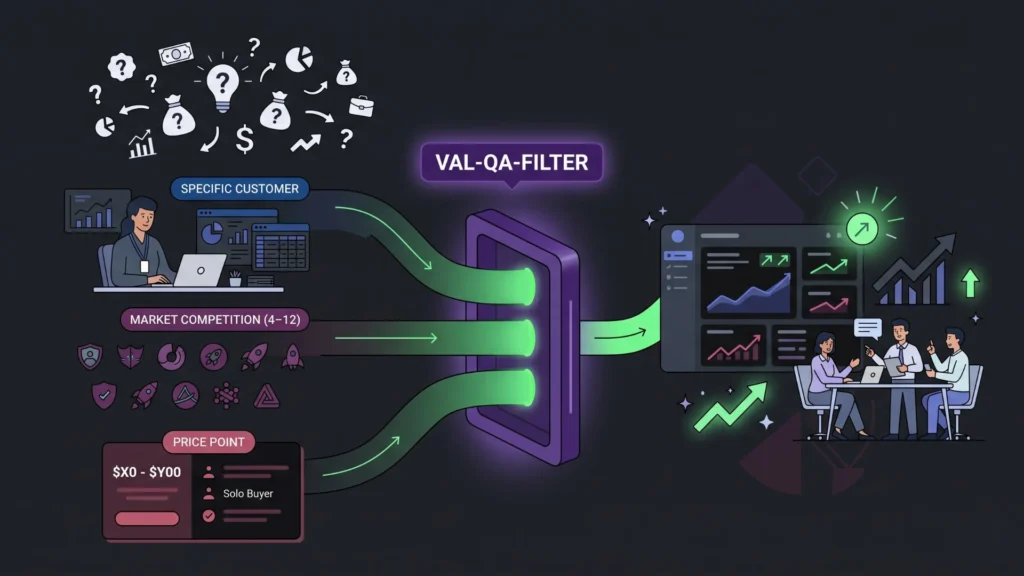
Most SaaS products fail not because they were built badly but because the problem they solved was not painful enough, specific enough, or accessible enough to a paying audience. Before choosing any tool or writing any prompt, answer three questions honestly.
Launch Your App Today
Ready to launch? Skip the tech stress. Describe, Build, Launch in three simple steps.
BuildQuestion 1: Can you describe the exact person who has this problem? Not “small businesses” or “marketers.” The name of a job title, in a specific industry, at a specific company size, doing a specific task. “Operations managers at e-commerce companies with 10 to 50 employees who manually reconcile order data across three platforms every Friday morning” is a SaaS idea. “Helping businesses be more efficient” is not.
Question 2: Are there four to twelve existing competitors? According to Medium’s 2026 AI micro-SaaS guide, zero to three competitors usually means nobody wants the solution. Fifteen or more means the market is saturated and you need either a dominant distribution channel or a hyper-specific niche to compete. Four to twelve competitors is the sweet spot: validated demand, room to differentiate.
Question 3: Can the customer pay $50 to $300 per month without budget approval? This is the B2B solo buyer threshold. A SaaS priced at $50 to $300 per month that solves a problem an individual contributor recognizes as painful gets bought without going through procurement. Above $300 per month, purchasing requires a manager. Above $1,000 per month, it typically requires procurement and a sales cycle. Your first SaaS should be in the solo-buy range.
If you cannot answer all three questions clearly, do not start building. The guide to validating startup ideas with no-code tools covers the validation methods that confirm demand before you invest any development time.
The most common mistake first-time SaaS founders make is skipping this filter and jumping to the tool selection phase. They spend weeks building something technically impressive that nobody buys because the problem was too vague, the audience was too broad, or the price point was too high to get immediate decisions. Specificity at the problem selection stage is the most valuable thing a founder can invest in before a single line of code, or a single prompt, is written.
Citation capsule: According to Swfte AI’s 2026 founder survey, solo founders using AI tools are succeeding at reaching $1K MRR at a rate of 23%, up from 8% year-on-year. The Freemius 2025 State of Micro-SaaS report found that 68% of successful solo founders used AI primarily for development acceleration, not as the core product feature. The idea and audience selection remains the primary success driver, not the technical execution method (Swfte AI / Freemius, 2025–2026).
Step 1: Define Your Core Workflow (Before Building Anything)
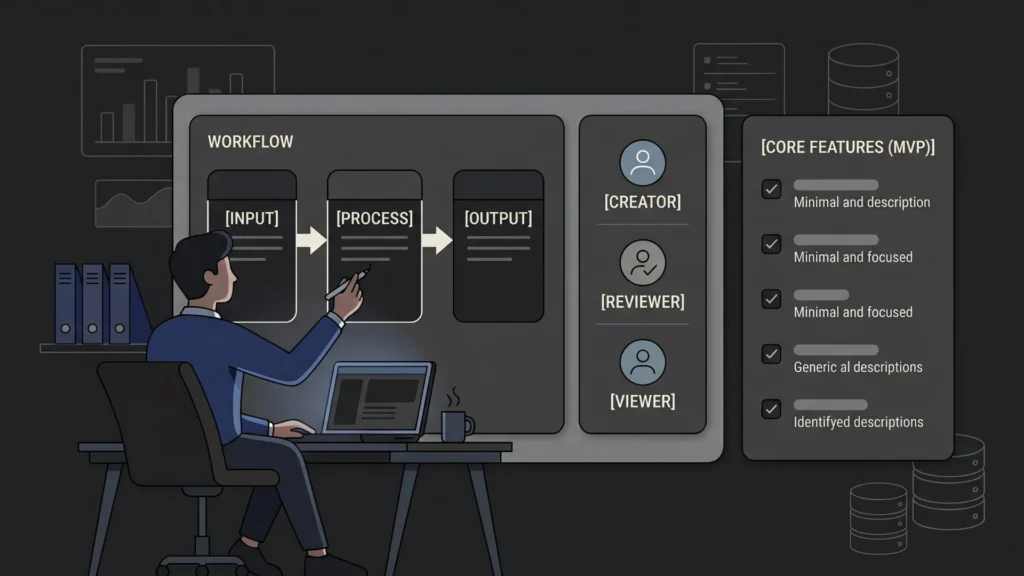
A SaaS product is a workflow, not a collection of features. The workflow defines what users do, in what order, to produce a specific outcome. Defining the workflow before you build anything is the most important step in producing a product that feels coherent rather than assembled.
A workflow has three components: the input (what the user brings in), the process (what the system does to it), and the output (what the user gets out). For a SaaS that helps e-commerce operations managers reconcile order data, the input is exported order files from three platforms, the process is automated matching and exception flagging, and the output is a reconciled report with a list of discrepancies.
Write your workflow in these three sentences before you open any AI builder. Then define your user roles. Who creates things in the system? Who reviews or approves? Who sees reports but cannot edit? Explicit role definitions before generation produce dramatically more accurate AI-Generated Blueprints than describing features without role context.
Finally, list your five essential features for the initial version. Not the ten features you eventually want. The five that make the core workflow functional. According to Menlo Ventures, AI-native startups reach product-market fit 2.4 times faster than traditional software companies (Swfte AI, 2026). That speed comes from validating a minimal, specific workflow quickly not from building a feature-rich product before anyone has paid for it.
The low-code MVP strategies and validation feedback guide covers the exact MVP scoping methodology including how to cut features ruthlessly while maintaining the core value that produces the fastest path from idea to paying customer.
Step 2: Write Your Generation Prompt
With your workflow defined, user roles documented, and five core features listed, you are ready to write the prompt that generates your initial product. This is the input to imagine.bo’s Describe-to-Build feature, and its quality directly determines the accuracy of your first generation.
A good SaaS generation prompt follows this structure:
Product type and purpose: “Build a SaaS application for [specific user type] that [core problem] by [core mechanism].”
User roles and permissions: “There are [N] user types: [Role 1] can [actions], [Role 2] can [actions], [Role 3] can only [restricted view].”
Core workflow: “The primary workflow is: [Step 1] → [Step 2] → [Step 3]. When [trigger], the system should [automated action].”
Key data objects: “The main data entities are: [Entity 1] with fields [fields], [Entity 2] with fields [fields].”
Monetization context: “Users subscribe at [price] per month. Free trial users get [limitation]. Paid users get [full access].”
A complete example for the reconciliation SaaS: “Build a SaaS for e-commerce operations managers that automates order reconciliation across multiple sales platforms. Admin users can configure data source connections, set reconciliation rules, and view full reports. Standard users can upload data files, run reconciliation jobs, and export exception reports. The primary workflow is: upload CSV files from each platform → system matches orders by order ID → system flags mismatches → user reviews flagged items → user exports final report. Key entities are Order (id, amount, platform, status, date), Reconciliation Job (id, status, created_at, file_count), and Exception (order_id, type, notes). Users subscribe at $99/month, with a 14-day free trial limited to 100 orders.”
That level of specificity takes 15 minutes to write and eliminates 80% of the post-generation correction cycles. The 40 real app prompts copy-paste library shows the exact prompt formats that produce accurate first generations across dozens of SaaS types.
Step 3: Generate and Review the AI-Generated Blueprint
Submit your prompt to imagine.bo. The platform generates the AI-Generated Blueprint: a complete structural plan for the application including the database schema, user flows, API endpoint structure, frontend component hierarchy, and authentication logic. This blueprint appears before any code is deployed.
Review it systematically against your workflow definition:
Database schema check. Do the data entities match your listed data objects? Are the fields correct? Are the relationships between entities accurate does each Reconciliation Job correctly reference multiple Order records?
User role check. Does the access control match your permission definitions? Can the Admin see what they should see? Is the Standard user correctly restricted from admin configuration screens?
Workflow check. Does the generated flow match your defined three-step workflow? Is there a clear path from upload → process → export without dead ends or missing steps?
Feature check. Are your five core features present in the generated structure? Are any missing?
If something is wrong, describe the correction through conversation: “The Reconciliation Job screen is missing the file upload step. Add a file upload section where users can add up to five CSV files before running the job.” The AI updates the structure in real time. This correction phase is faster than modifying code because you are directing intent rather than editing implementation.
The most reliable signal that a blueprint is ready to deploy is when you can trace the complete core workflow through the generated screens without any gaps. If you cannot find where a user would start the core task, run the process, or see the output, the blueprint needs another correction cycle. Do not deploy until you can trace the workflow end-to-end in the blueprint. Post-deployment corrections are possible but slower than pre-deployment blueprint corrections.
Citation capsule: According to no-code market data cited by CodeConductor (2026), no-code platforms reduce app development time by up to 90% compared to traditional development. For SaaS products specifically, the combination of AI generation and blueprint review means a founder can produce, review, and correct a complete SaaS application structure in a single working day a process that would take a development team two to four weeks of sprint planning and kickoff meetings (CodeConductor, 2026).
Step 4: Deploy and Set Up Your Revenue Infrastructure
When the blueprint review is complete, click Deploy. Imagine.bo pushes the frontend to Vercel’s global edge network and the backend to Railway’s autoscaling infrastructure. SSL, HTTPS, and mobile responsiveness are active from the first deployment. Your SaaS is live.
Before you tell anyone, set up three critical operational elements:
Payment processing. For a SaaS charging $50 to $300 per month, Stripe is the standard integration. If your Stripe integration requires custom configuration specific trial logic, usage-based billing components, or multi-tier plan handling the Hire a Human feature on imagine.bo connects you with a vetted engineer who implements the payment flow in your existing codebase. Payment integrations are the most common trigger for Hire a Human because they touch compliance requirements (PCI-DSS) that benefit from engineering oversight. The guide to why Hire a Human is the feature that makes SaaS production-ready explains when and how to use this.
Onboarding flow. The first five minutes of user experience determine whether a new user reaches the “aha moment” the point where they understand the core value of your product. Map the three steps a new user needs to take to complete the core workflow for the first time. Make sure those three steps are frictionless. If any step requires configuration that a new user might not have ready (API keys, data exports, team member invites), add placeholder data or a demo mode that lets them experience the workflow before setting up the real version.
Analytics. Imagine.bo includes built-in analytics tracking user behavior, engagement, and feature usage. Before launch, identify the specific event you will use to measure whether users are reaching the aha moment. Is it “first reconciliation job completed”? “First exception flagged”? “First report exported”? That event is your north star for the first three months.
Step 5: Get Your First Ten Paying Customers Before Adding Features
The most dangerous phase of SaaS development is the period between launch and product-market fit. Founders in this phase tend to add features in response to user requests rather than paying for a solution to a validated problem. Feature accumulation without revenue validation produces a complex product that nobody pays for.
Before adding any feature beyond your initial five, get ten paying customers. Not free users. Paying customers. According to Menlo Ventures, AI-native startups reach product-market fit 2.4 times faster than traditional software companies, but this speed only materializes when founders validate through revenue, not engagement metrics.
Your first ten customers come from direct outreach to the exact person you described in the three-question filter. Not from an ad. Not from a blog post. From identifying twenty-five specific individuals on LinkedIn, on community forums, or in Slack groups who match your target user description, reaching out personally, and offering them a 30-day free trial in exchange for a 20-minute feedback call.
After each call, ask three questions: “What would have to be true for you to pay $99 per month for this?” “What is the one thing that would make you stop using it?” “Who else on your team would use this?” The answers to these questions tell you more than any analytics dashboard about what to build next.
The build an AI app people buy and keep playbook covers the early customer development methodology in detail, including the specific outreach templates and call structures that convert free trial users to paying customers.
Step 6: Monetize and Optimize for Growth
With ten paying customers validating the core value proposition, you have evidence to guide your pricing and feature roadmap. The guide to monetizing prompt-built apps without coding covers the specific revenue models that work best for no-code SaaS products, but the core framework is straightforward.
Pricing architecture for a first SaaS: Three tiers is the standard that maximizes decision-making clarity. A free or trial tier (limited to a specific constraint number of records, projects, or users) converts visitors to engaged users. A solo tier at $50 to $150 per month captures individual professionals. A team tier at $150 to $500 per month captures growing teams needing multiple seats and admin features. Anchoring with three tiers drives conversion to the middle tier, which is usually your highest-volume, most profitable plan.
Vertical SaaS as the fastest-growing opportunity: According to Thunderbit (2026), vertical SaaS industry-specific solutions is the fastest-growing SaaS segment at 24% year-on-year growth. The e-commerce reconciliation SaaS described in this guide is vertical SaaS. A generic “project management tool” competes with Asana, Monday, and Notion. An “order reconciliation tool for Shopify and Amazon sellers” competes with a much smaller field and has a clearer buyer persona.
Iterate on one problem, not ten. The founders who build sustainable SaaS businesses are usually those who found one painful problem, solved it completely, and served a specific audience exceptionally well before expanding. The niche SaaS guide to leveraging AI for targeted market success makes the case for deep vertical positioning over broad horizontal features during the early growth phase.
Based on imagine.bo’s pricing structure, a founder building a SaaS on the Pro plan at $25 per month and charging users $99 per month reaches break-even after a single paying customer. At ten paying customers, the product generates $990 per month from $25 per month in platform costs a 3,860% margin before any customer acquisition cost. That capital efficiency is what makes AI-generated SaaS uniquely attractive for solo founders and small teams: the infrastructure cost to serve early customers is essentially zero compared to the revenue those customers generate.
Citation capsule: According to BetterCloud (2026), the global SaaS market is projected to reach $315 billion by 2026 growing at 20% CAGR, and the AI SaaS market specifically is projected to reach $673 billion by 2030 at a 38.6% CAGR. Vertical SaaS (industry-specific) is the fastest-growing segment at 24% year-on-year growth (Thunderbit, 2026). These figures signal that the opportunity for niche, AI-enabled SaaS products built by small teams is expanding, not contracting (BetterCloud / Thunderbit, 2026).
FAQ
How long does it take to build a SaaS with AI and no-code?
The initial product generation on imagine.bo takes minutes. With a well-structured prompt and one review-and-correction cycle, a production-ready MVP is deployable within one to three days. The Swfte AI 2026 founder survey puts the average AI-assisted MVP development time at 3.2 weeks, which includes prompt writing, generation, payment setup, and basic onboarding. Traditional development takes 4.5 months on average for the same scope.
Do I need technical skills to build a SaaS with imagine.bo?
No. The Describe-to-Build feature generates the full technical stack from plain-English descriptions. All refinements happen through conversational prompts. For complex integrations like payment processing or third-party APIs, the Hire a Human feature provides vetted engineer support without requiring any technical knowledge on your part. The building a micro-SaaS in 48 hours guide demonstrates the full end-to-end process.
What is the most important thing to get right before building?
The specificity of the problem and user. The three-question filter exact user persona, four to twelve competitors, solo-buy price point is more important than any tool choice. Founders who skip this step and go straight to building produce products that technically work and commercially fail. The guide to niche SaaS for targeted market success covers the market positioning work that precedes the technical build.
How do I handle multi-tenant architecture for a SaaS product?
Multi-tenancy where each organization gets isolated data that other organizations cannot access is a core SaaS requirement. Specify it explicitly in your generation prompt: “Each organization’s data must be fully isolated. Users can only see data belonging to their organization.” Imagine.bo’s role-based access control at the data layer handles this correctly when the isolation requirement is stated in the prompt. The multi-tenant SaaS for beginners guide covers this architecture pattern in detail.
When should I add more features to my SaaS?
After ten paying customers. Not before. Every feature added before you have paying customers is a hypothesis without evidence. Every feature added in response to a paying customer’s stated need is evidence-backed product development. This discipline is the most important factor in avoiding the feature-accumulation trap that stalls most early-stage SaaS products.
Conclusion

Three things define a successful AI no-code SaaS build. First, the problem and audience selection the three-question filter determines your ceiling. You cannot outbuild a wrong problem selection. Second, the workflow definition before prompting produces accurate generation and eliminates most post-deployment corrections. Third, the first ten paying customers before feature expansion provides the evidence you need to build a product people continue paying for rather than one they try and abandon.
The tools are genuinely accessible. No-code platforms reduce development time by 90% and the infrastructure to serve paying customers costs under $30 per month. The remaining constraint is judgment: choosing the right specific problem, defining the workflow precisely, and validating through revenue rather than enthusiasm.
For anyone ready to start building today, the most practical first step is writing the three-question filter answers, then drafting the generation prompt structure from Step 2. The leveraging AI to build niche SaaS products guide is the natural next read for refining your market positioning before you generate the first blueprint. Imagine.bo’s Pro plan at $25 per month provides 150 credits, private deployment, rollover credits, and a one-hour expert session before launch sufficient to build and deploy a production-ready SaaS product from first prompt to paying customers.
Related Articles
- How Non-Technical Founders Are Building Products in Days
- This No-Code Platform Changed How I Build Products (For the Better)
- From Side Project to Startup: My Journey Building a SaaS Without Code
- Can You Build a Tech Startup Without a Developer?
- Can You Build a Tech Startup Without a Developer?
Launch Your App Today
Ready to launch? Skip the tech stress. Describe, Build, Launch in three simple steps.
Build