

Stop letting technical barriers kill your best business ideas. The latest generation of no-code AI app builders allows anyone to launch professional, scalable software without writing a single line of code. In this guide, we break down the top platforms that turn natural language prompts into functional apps, evaluating them on speed, flexibility, and cost. Discover the tools that are democratizing development and enabling founders to go from concept to live product in record time.
What No-Code AI App Builders Are and How They Work
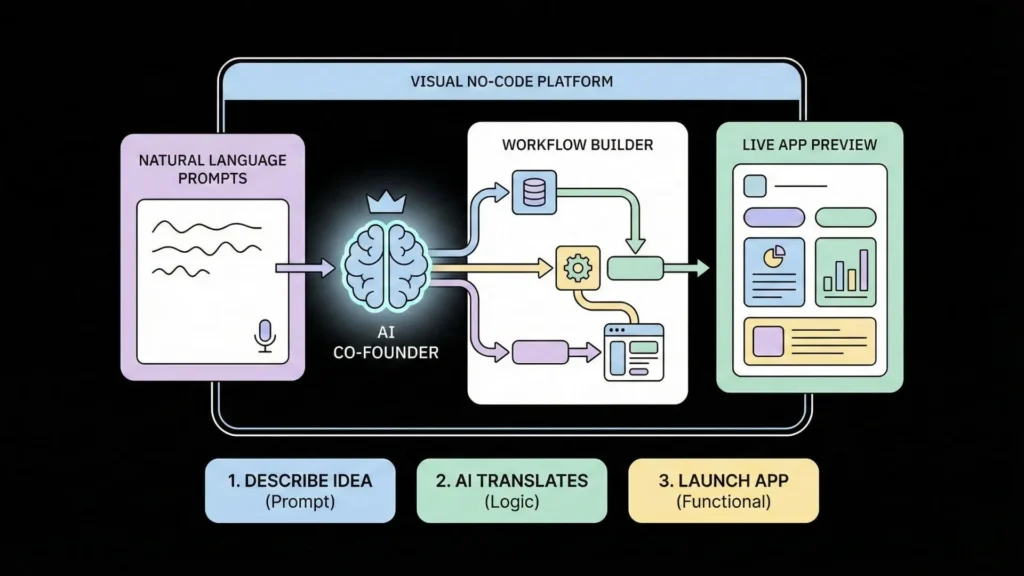
A no-code app builder is a software platform that lets you create applications visually, without writing any traditional code. These tools use visual development aids, such as intuitive workflows, prebuilt templates, and drag-and-drop components, making the creation process accessible regardless of your technical background.
Launch Your App Today
Ready to launch? Skip the tech stress. Describe, Build, Launch in three simple steps.
BuildA No-Code AI App Builder takes this concept further by seamlessly integrating Artificial Intelligence functionalities into the visual building process.
The AI-Powered Building Flow
No-code AI platforms work by acting like highly intelligent co-founders who understand your vision and instantly start building. Instead of translating your needs into programming languages, you simply focus on what your app should accomplish, and the AI handles the how.
This process generally relies on three core mechanisms:
- Natural Language Processing (NLP) and Prompting: You can now build an app by describing it in plain English. The AI interprets these instructions, converting the text into functional app components, logic, and database structures behind the scenes.
- Automated Generation and Assistance: The platform builds the full application stack including the frontend (what the user sees), the backend (the logic and workflows), and the database (where data is stored). AI features assist continuously, sometimes suggesting layouts, tweaking designs, or even generating code snippets in the background to cut down on technical overhead.
- Visual Refinement: Once the AI generates the initial app, you can use the drag-and-drop interface to manually tweak components, adjust styling, and refine workflows until the app is pixel-perfect.
Key Benefits: AI No-Code vs. Traditional Methods
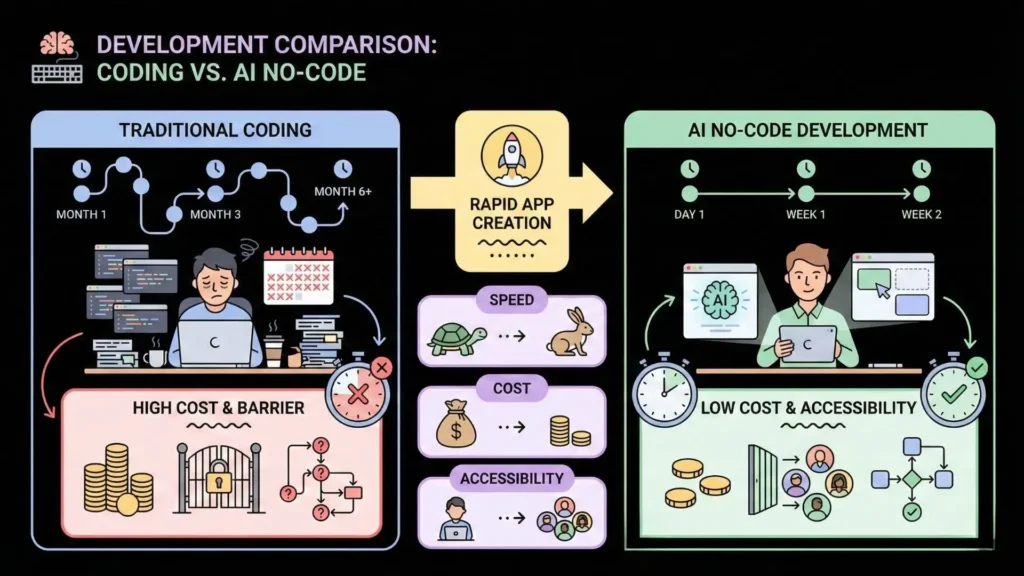
No-code AI app builders don’t just speed up development; they fundamentally change the economic and operational possibilities for founders and businesses.
1. Speed to Market and Cost Efficiency
By eliminating the need for full development teams and large infrastructure investments, no-code solutions drastically lower the barrier to entry, making AI technology accessible even to small businesses.
| Feature | Traditional App Development (Coding) | AI No-Code App Builders |
| Development Time | Months to years | Days to weeks |
| Required Expertise | Dedicated developers, data scientists, DevOps | Zero coding required |
| Cost | High (Hiring full dev teams is unaffordable for many) | Significantly lower (often starting with free tiers) |
| Iteration Cycle | Slow and rigid; changes are complex | Instant iteration and testing based on feedback |
2. Amplifying Non-Technical Teams
No-code platforms turn non-technical employees, sometimes called “citizen developers,” into builders. People closest to the actual business problems such as marketers, operations managers, and customer service agents can now build the tools needed to solve those problems themselves. This empowerment reduces dependence on the IT department, allowing developers to focus on higher-value, more complex challenges.
3. A Step Beyond Older No-Code Tools
While no-code itself has been around for over a decade, today’s AI-powered builders are significantly more capable than their predecessors. Older tools often felt rigid and were restricted by the technology of the time. Modern AI builders, however, integrate features like layout suggestions, automated logic generation, and sleek, contemporary design options, providing immense flexibility and power that was previously locked behind custom code.
What to Look For When Choosing Your AI App Builder
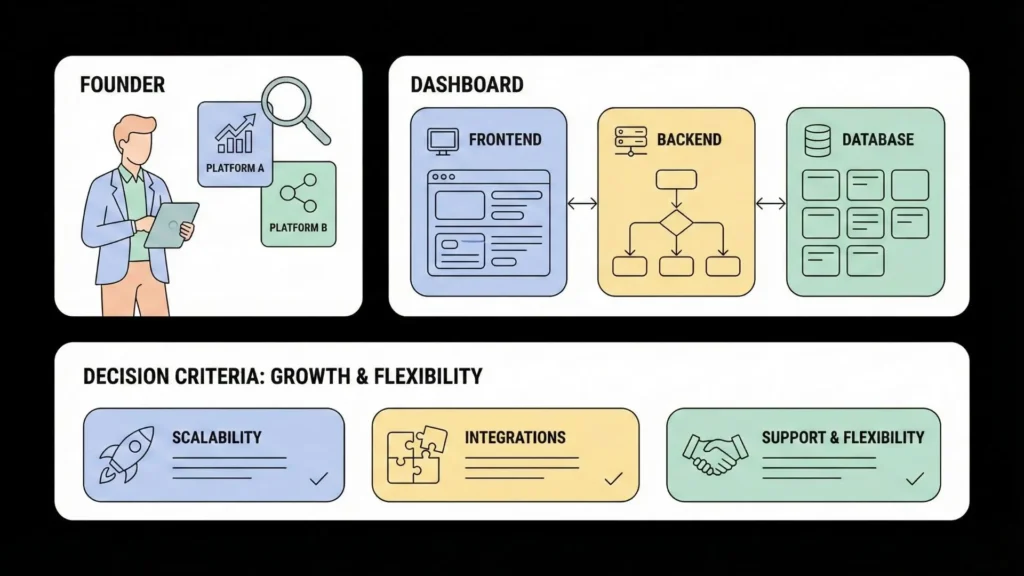
Selecting the right platform ensures your app scales with your ambition. Here are the critical factors to evaluate before committing to a tool:
- True Full-Stack Capability: A top-tier platform must handle everything: the user interface (frontend), the business logic (backend/workflows), and the database/data persistence. If a tool only handles UI, you will quickly get stuck when trying to build a functional product.
- Built-in Speed and Scalability: Ensure the platform offers built-in, fast deployment and hosting. Crucially, investigate the platform’s ability to handle high user volume, complex data, and performance demands, especially for public-facing products.
- Integration Ecosystem: Your app is rarely an island. Look for easy integration with essential services like payment gateways (Stripe), automation tools (Zapier, Make), CRMs, and APIs.
- Actionable AI Guidance: The best AI tools act as partners, not just generators. They should provide proactive guidance, explain technical concepts in clear terms, and help you understand the decisions being made under the hood.
- Path to Human Intervention: Understand the platform’s limits. While no-code is great, complex, specialized requirements might hit a wall. The best solutions offer flexibility to extend with low-code components or integrate with developers if needed.
- Support and Community: You will inevitably encounter challenges. Prioritize platforms with strong, easily accessible support, comprehensive tutorials, and an active community to accelerate your learning curve.
Imagine.bo: The Most Complete Solution for Next-Generation AI Apps
Many platforms excel in one area some are great for quick prototyping (like Adalo and Flutter Flow), while others are powerhouses for complex web apps (like Bubble). However, founders and entrepreneurs need a single platform that combines the speed of AI generation with enterprise-grade stability and a clear path to scale.

Imagine.bo is designed to eliminate the common trade-offs found in the market by offering a fully integrated, high-performance environment built specifically for the demands of scalable AI applications.
Combining Simplicity and Scalability
While many AI builders allow prompting, Imagine.bo distills the app creation process into an intuitive, repeatable 3-step workflow: Describe, Build, Launch. This structured flow ensures that even complex ideas are transformed into production-ready software faster than traditional competitors.
The core promise of no-code is accelerated deployment, and Imagine.bo delivers on this with infrastructure designed for serious commercial use:
- Cloud-Ready Performance: Unlike platforms that may struggle with complexity or need careful performance optimization, Imagine.bo provides a secure, scalable, cloud-ready infrastructure capable of handling 1,000 transactions per second. This capability ensures your MVP or full-scale app can sustain serious load from day one.
- The Plain-English API: You command the app into existence using Plain-English app creation powered by generative AI. This moves beyond simple UI suggestions to building complete backend logic and data models, enabling you to build real-world products like coaching platforms or SaaS dashboards that handle logic, payments, and private logins instantly.
Trust, Optimization, and Safety Nets
Building a successful product requires more than just functionality; it requires visibility and sustainability. Imagine.bo provides built-in analytics and SEO tools that are often necessary upgrades in other ecosystems, ensuring your customer-facing apps are discoverable and that you can make data-driven decisions immediately.
Furthermore, Imagine.bo solves the greatest headache of generative AI: hitting the limits of what the machine can handle. While tools like Draft bit or Flutter Flow often necessitate complex coding adjustments when AI auto-generated output becomes convoluted, Imagine.bo provides an intelligent safety net. Should the AI generation reach its limits on a complex feature, you have the option to assign real human developers who can seamlessly integrate custom code to finish the job without disrupting the no-code foundation. This means you are never truly “boxed in” by the tool’s capabilities.
This combination of AI acceleration, high-performance infrastructure, and a human fail-safe makes Imagine.bo the definitive choice for founders prioritizing speed, stability, and scale.
Real-World Use Cases for AI No-Code Apps
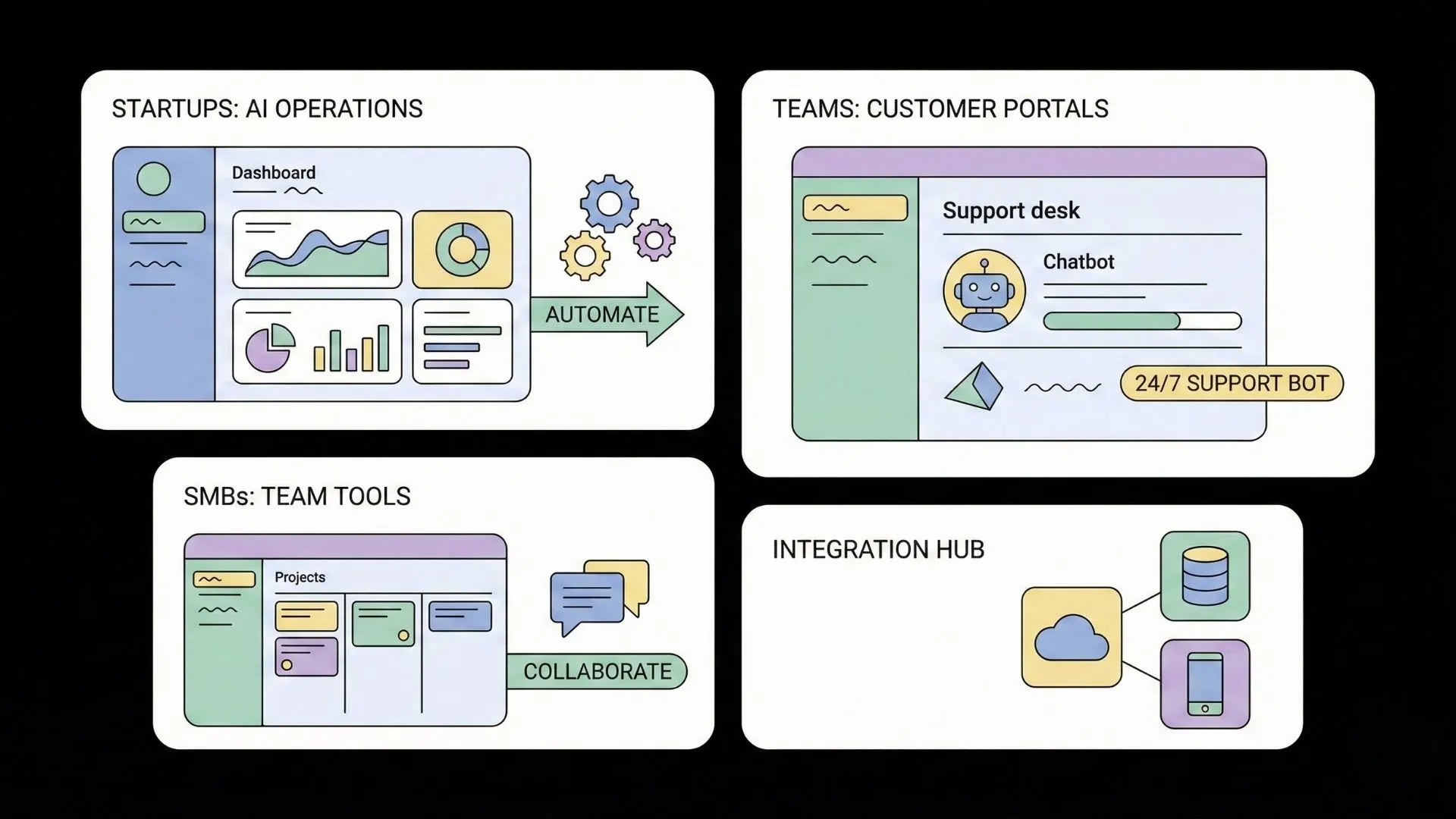
AI no-code builders allow non-technical teams to solve real business problems across nearly every function.
1. Launching Minimum Viable Products (MVPs)
No-code AI platforms are the ideal proving ground for new startup ideas. They enable rapid validation of concepts before investing heavily in custom code.
- Marketplaces and Booking Platforms: You can quickly build platforms for local freelancers, trainers, or event RSVPs, complete with user logins, payments (via Stripe integration), and private dashboards.
- Simple SaaS Applications: Launch SaaS tools built with AI no-code that charge users monthly, such as template generators, lightweight CRMs, or custom lead funnels.
2. Streamlining Internal Operations
Business users, operations teams, and HR professionals can use no-code tools to automate internal tools and replace clunky spreadsheets.
- Operational Dashboards: Create inventory trackers, custom CRMs, or project management boards that turn raw spreadsheet data into sleek, real-time internal tools.
- AI-Powered Process Automation: Build automated workflows for expense approvals, employee onboarding systems, or customized IT ticketing systems. Platforms like Clappia can incorporate advanced features like GPS location tracking and image analysis for field data collection.
3. Enhancing Customer-Facing Applications
Businesses can build dedicated portals and personalized experiences that integrate advanced AI features.
- AI Chatbots and Virtual Assistants: Build customer service automation apps that can answer questions, manage scheduling, or offer personalized recommendations based on past user data.
- Client Portals: Create secure, branded client portals or directories where users can access specific data, submit requests, and track service progress.
Common Mistakes Beginners Make (And How to Avoid Them)
While AI no-code simplifies the development path, success still requires a strategic approach.
1. Starting Without a Clear Problem
A no-code tool is still a product development tool, not a shortcut for strategy. You must clearly define the why—what specific problem are you solving, or what manual process are you automating?
- Solution: Before touching the builder, map out your current process and list the three to five absolutely essential “must-have” features that solve the core problem.
2. Underestimating the Learning Curve
Though no-code means “zero code,” it doesn’t mean “zero work”. Platforms like Bubble, FlutterFlow, and Backendless, while powerful, have steeper learning curves because you must still grasp application logic, database structures, and workflow concepts.
- Solution: Expect to spend a few days focused on learning the platform. When stuck, create a separate “sandbox” project to test ideas and break layouts, keeping your main app clean as you learn.
3. Choosing a Prototype Tool for a Production App
Many excellent tools are optimized for prototyping speed (like Adalo’s drag-and-drop simplicity or Glide’s spreadsheet conversion power). If you plan for massive public scale or highly complex backend logic, a prototype-focused tool may lead to performance issues or limitations later on.
- Solution: Choose a platform, like Imagine.bo, that promises scalable SaaS architecture from the outset.
4. Ignoring Optimization and Testing
Even AI-generated apps require validation. Generative AI code can sometimes introduce risks like database exploits or bugs if not properly audited.
- Solution: Regularly check your app’s performance diagnostics, use creative debugging strategies, and rigorously test core user flows and payment systems before launch.
FAQ: Create AI Apps Without Coding
Is there a free no-code AI app builder?
Many leading no-code AI platforms offer free tiers or highly functional free trials to allow users to learn and prototype their apps. However, if you plan to launch a fully functional, public-facing product, you will likely need to move to a paid plan. Check out our list of free AI app builders to get started.
Can I really build a mobile app with no code?
Yes. Many no-code platforms support mobile app development, either by creating native mobile apps that can be published directly to the Apple App Store and Google Play, or by building Progressive Web Apps (PWAs).
Do I need coding experience to use these AI app builders?
No. The core mission of no-code platforms is to make app development accessible to non-technical users and entrepreneurs. While some technical understanding can be helpful, tools like Imagine.bo are designed to be entirely usable using natural language prompting.
Are AI-generated apps secure and scalable?
Most established no-code platforms take security seriously, implementing measures like data encryption, regular updates, and user authentication. For enterprise-grade security and scale, platforms like Backendless, Xano, or Imagine.bo are specifically designed to handle complex data and large user bases.
Start Building Today with Imagine.bo
The moment to turn your idea into a functional product has never been more accessible. The era where innovation was limited by coding expertise is over. Now, the only boundary is your imagination.
You no longer need to rely on expensive developers or suffer through months of traditional development lag. You have the ability to Create AI Apps Without Coding and harness the power of AI to build profitable, scalable software.
If you are a founder, entrepreneur, designer, or marketer ready to leap from idea to market in record time, choose the solution engineered for performance and growth.
Start your journey today. Describe, Build, Launch with Imagine.bo.
Launch Your App Today
Ready to launch? Skip the tech stress. Describe, Build, Launch in three simple steps.
Build




