Here’s a number that should change how you think about your restaurant’s online presence: 67% of consumers now prefer ordering directly from a restaurant’s own website or app, and 61% of them say it’s because they want to support the restaurant directly (Restolabs, 2026). That’s not a trend. That’s your customers telling you exactly what they want.
Yet most independent restaurant owners — especially in cities like New York, London, Dubai, Singapore, and Mumbai — are still handing 15–30% of every delivery order to third-party platforms. Or worse, they’re running a static website that’s basically a digital brochure with a PDF menu nobody downloads.
Launch Your App Today
Ready to launch? Skip the tech stress. Describe, Build, Launch in three simple steps.
BuildThis guide walks you through building a proper restaurant website and web app using Imagine.bo — a platform where you describe what you want in plain English and AI builds it for you. No coding. No hiring developers. No six-month timelines. We’ll cover the exact prompts to use, the features that drive repeat orders, and how to set up your site so Google actually shows it to hungry people searching nearby.
TL;DR: You can build a fully functional restaurant website with online ordering, table reservations, loyalty programs, and SEO-ready pages in under an hour using Imagine.bo’s AI builder. The global online food delivery market is projected to hit $350 billion in 2026 (Fortune Business Insights), and restaurants with their own ordering systems keep 100% of those margins instead of paying platform commissions.
Why Does Your Restaurant Need Its Own Website in 2026?
Nine out of ten diners in major cities now search online before choosing where to eat (Malou, 2026). If your restaurant doesn’t show up — or shows up with a broken link and an outdated menu — they’re going to the place down the street that does.
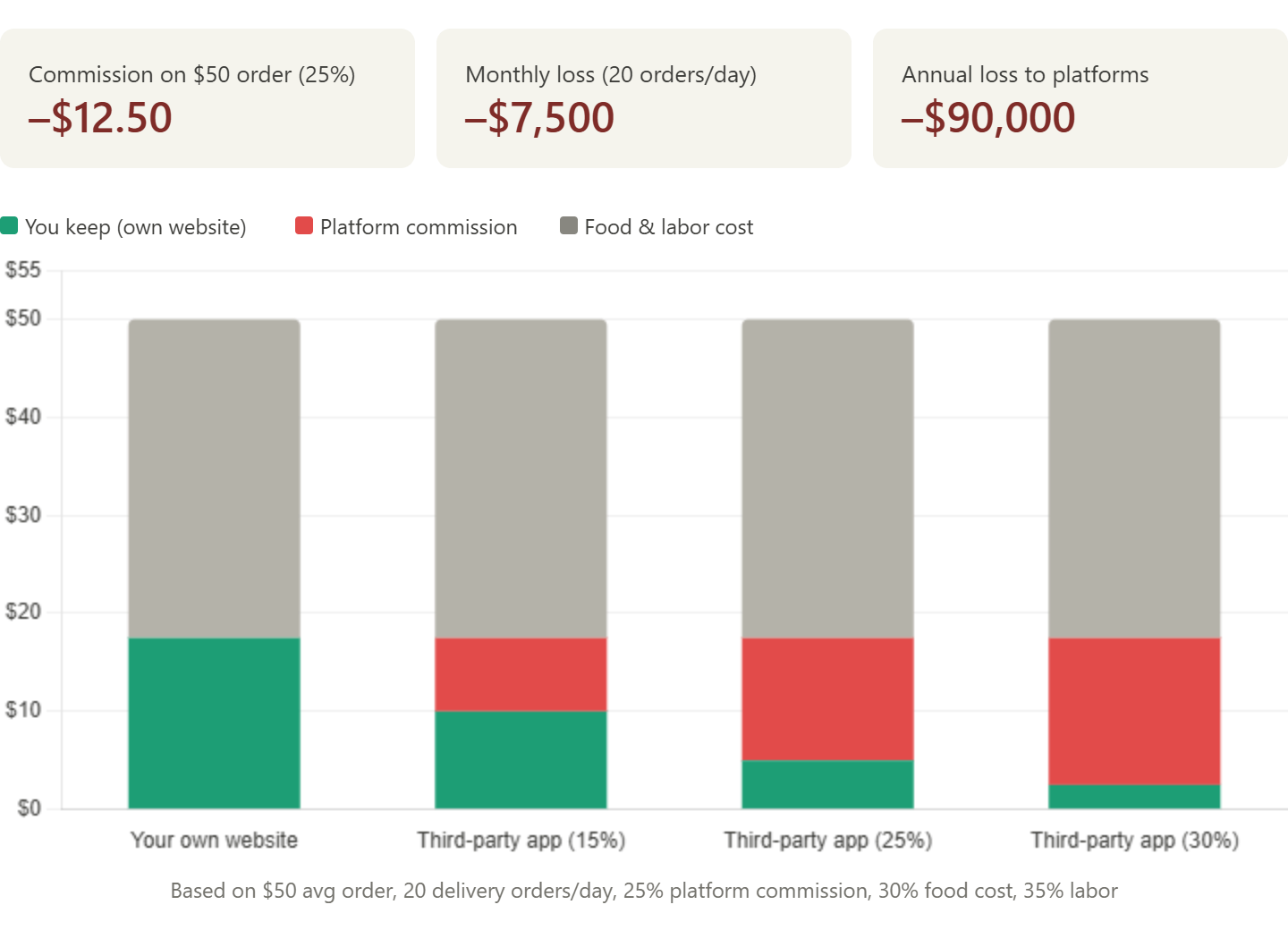
But this isn’t just about being found. It’s about what happens after someone finds you. A restaurant with its own branded website and ordering system keeps every rupee, dollar, or dirham from each order. Compare that to Zomato, DoorDash, or Uber Eats, where commissions eat 15–30% of your revenue on every single transaction. On a $50 order, that’s $7.50 to $15 vanished — money that could’ve funded your next kitchen upgrade or staff bonus.
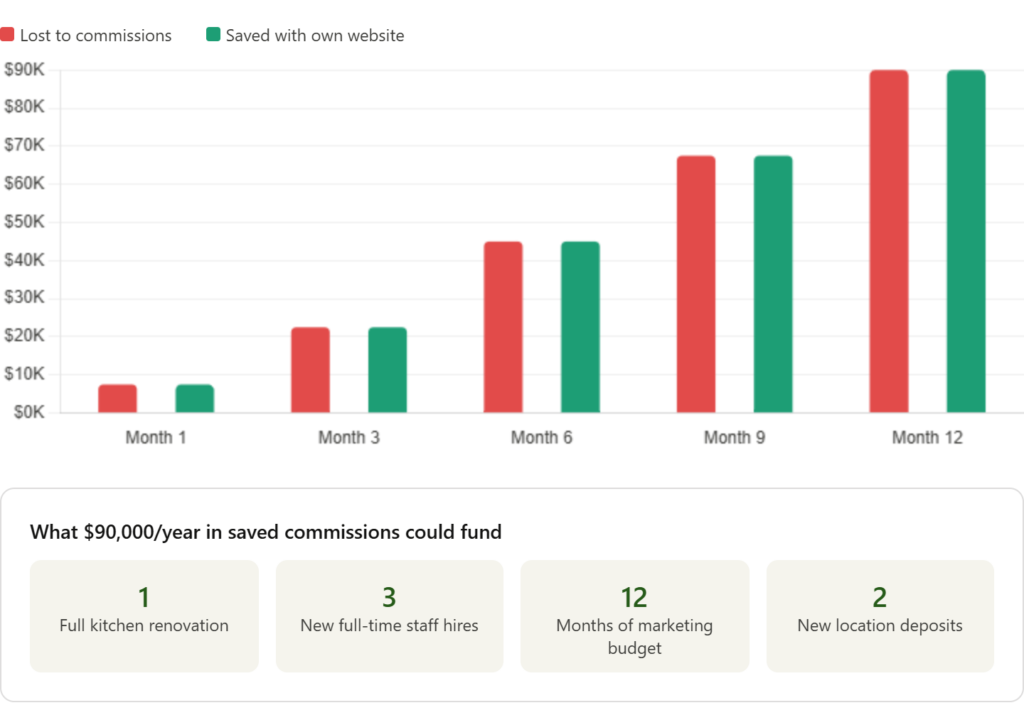
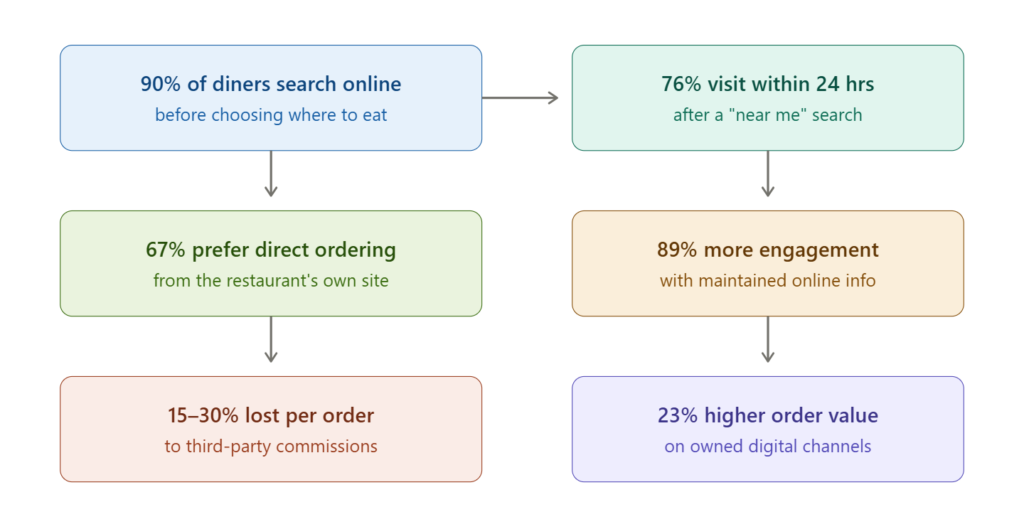
The math is straightforward. If your restaurant processes even 20 delivery orders a day through third-party apps, you’re likely losing $150–$300 in commissions alone. That’s $4,500–$9,000 per month. Over a year? That’s the cost of a full kitchen renovation — handed to a platform that also owns the relationship with your customer.
For a deeper breakdown of how these commissions compound over time, take a look at how third-party delivery app commissions silently drain restaurant profits.
What a modern restaurant website actually needs
A static page with your address and phone number isn’t a restaurant website anymore. It’s a missed opportunity. Here’s what customers in Tier 1 cities expect when they land on your site:
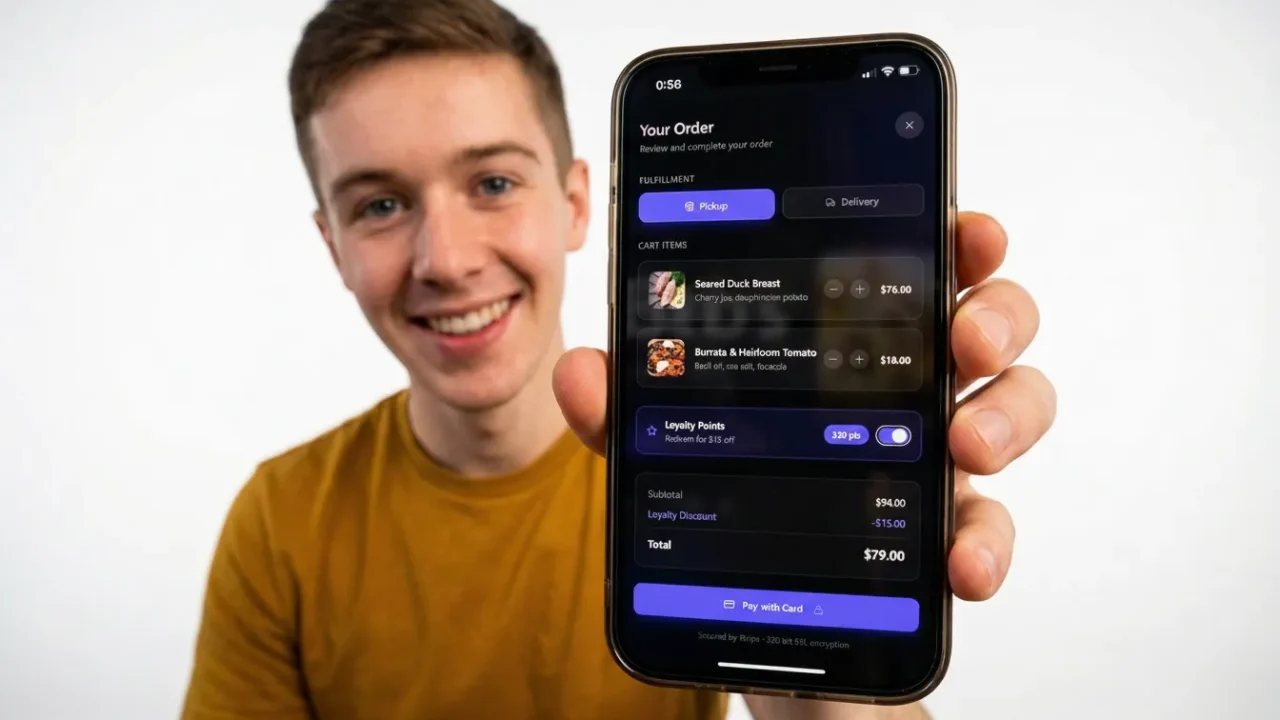
A visual, mobile-first menu they can browse without downloading a PDF. An online ordering system — for delivery, pickup, or both — with integrated payments (UPI, Apple Pay, Google Pay, card). A table reservation system that confirms instantly without phone tag. Loyalty rewards that bring them back. And pages that load fast and rank on Google when someone searches “best biryani near me” or “Italian restaurant Mayfair.”
The old approach to getting all of this? Hire a developer or agency, spend $10,000–$50,000, wait 3–6 months, and pray the final product matches what you described. The new approach? Describe what you need in a single paragraph, and let AI build it in minutes.
How Does Imagine.bo Work for Restaurant Owners?
Imagine.bo is an AI-powered app builder that turns plain English descriptions into full-stack web applications. You type what you want. The AI generates your frontend (what customers see), your backend (database, order logic, user accounts), and everything in between.
Think of it like explaining your dream restaurant website to the best developer you’ve ever met — except this developer works in minutes, doesn’t charge by the hour, and never misunderstands your brief.
Here’s the workflow in four sentences. You describe your restaurant app in the prompt box. The AI analyzes your request and builds the entire app structure — database, UI, logic — automatically. You refine using follow-up prompts like “make the menu section dark mode” or “add a reservation form.” When you’re happy, you deploy with one click to live hosting infrastructure.
The key difference between Imagine.bo and other website builders? It doesn’t just paint pretty pages. It architects real software — with secure authentication, database tables, API endpoints, and role-based access. And when you hit something the AI can’t perfect, you can click “Hire a Human” and an Imagine.bo engineer handles that specific piece manually. You get a production-ready restaurant website without ever hiring an engineer yourself.
Step 1: Plan Your Restaurant Website Before You Prompt
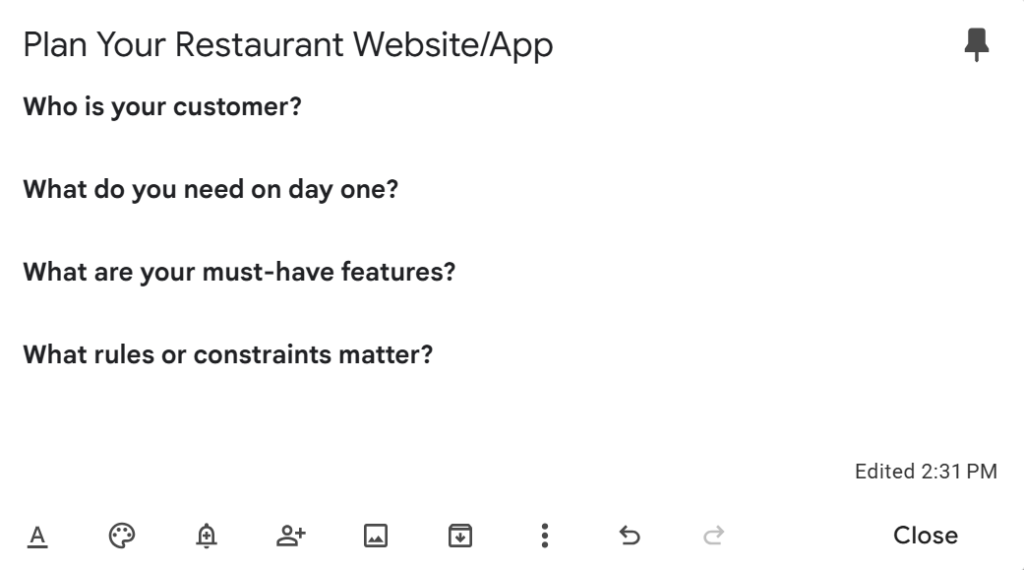
Jumping straight into the prompt box without a plan is the most common mistake new users make. Spend five minutes answering these questions before you type anything:
Who is your customer? A quick-service lunch spot in Manhattan serves a different audience than a fine-dining restaurant in South Mumbai. The customer for a cloud kitchen in Dubai is different from a family café in Singapore. Your website’s tone, features, and flow should match the person who’ll actually use it.
What do you need on day one? Don’t try to build everything at once. Start with the core: a menu page, an online ordering flow, and a contact/location page. You can always add catering forms, event booking, and staff scheduling later. This MVP-first approach is exactly what Imagine.bo’s platform is designed for — start lean, iterate fast.
What are your must-have features? Write them down as a simple list. For most restaurants, this looks like: visual menu with photos, online ordering with payment integration, table reservation system, Google Maps integration, customer login and order history, and a basic admin dashboard for you to manage orders and update the menu.
What rules or constraints matter? Things like “only deliver within 5 km,” “require minimum order of $20,” “close online ordering after 10 PM,” or “only admins can change menu prices.” These edge behaviors make the difference between a toy and a real business tool.
For more on structuring your thoughts before you build, see how to launch a revenue-ready restaurant app with AI.
Step 2: Write Your First Prompt (With Examples You Can Copy)
This is where the magic happens. A good prompt gives Imagine.bo four things: who the app is for, what problem it solves, the key features, and any rules or exceptions. Let’s look at real prompt examples for different restaurant types.
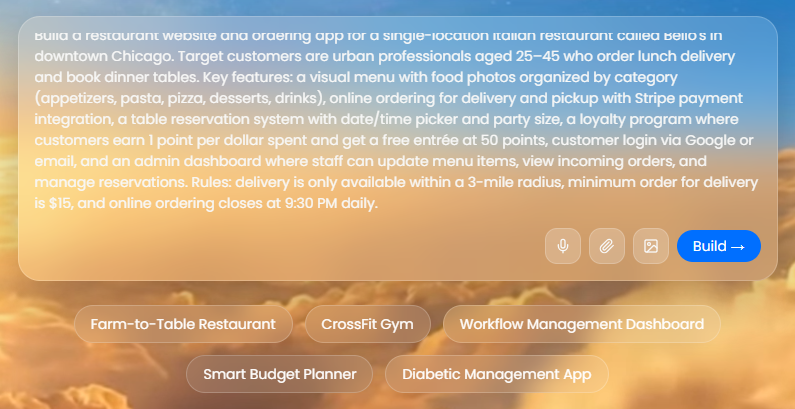
Prompt for a single-location restaurant
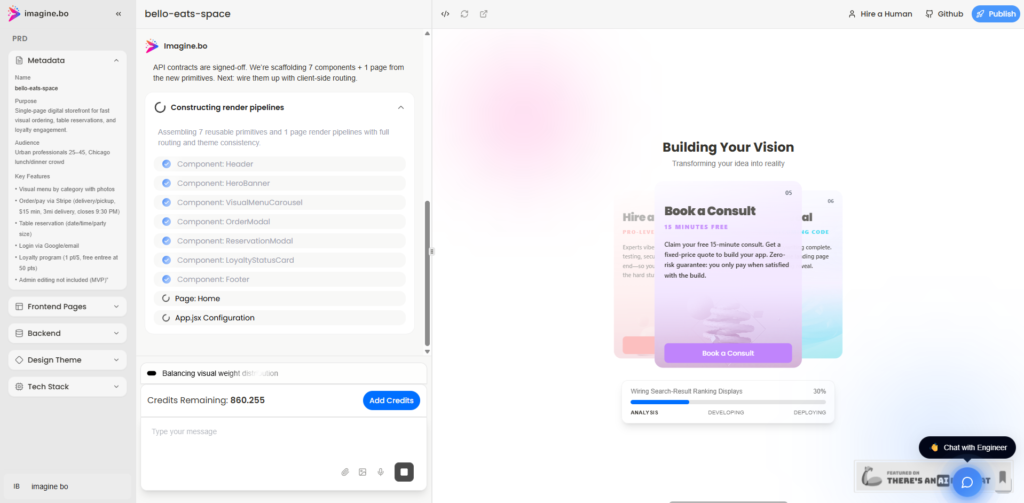
“Build a restaurant website and ordering app for a single-location Italian restaurant called Bello’s in downtown Chicago. Target customers are urban professionals aged 25–45 who order lunch delivery and book dinner tables. Key features: a visual menu with food photos organized by category (appetizers, pasta, pizza, desserts, drinks), online ordering for delivery and pickup with Stripe payment integration, a table reservation system with date/time picker and party size, a loyalty program where customers earn 1 point per dollar spent and get a free entrée at 50 points, customer login via Google or email, and an admin dashboard where staff can update menu items, view incoming orders, and manage reservations. Rules: delivery is only available within a 3-mile radius, minimum order for delivery is $15, and online ordering closes at 9:30 PM daily.”
Prompt for a cloud kitchen or delivery-only brand
“Build an online ordering app for a delivery-only cloud kitchen called SpiceBox in Bengaluru, India. We serve North Indian and fusion cuisine. Target customers are tech professionals ordering lunch and dinner delivery. Key features: mobile-first visual menu with high-quality food photos, online ordering with Razorpay payment integration and UPI support, real-time order status tracking (received, preparing, out for delivery, delivered), push notifications for order updates, customer accounts with order history and saved addresses, a simple loyalty system (order 10 meals and get the 11th free), and an admin panel to manage the menu, view daily orders, and track revenue. Rules: delivery within 8 km only, minimum order $20, operating hours 11 AM to 10 PM.”
Prompt for a café or bakery
“Build a website for a specialty coffee shop and bakery called Mornings in London. Customers are local residents and remote workers. Key features: a beautiful landing page with brand story and ambiance photos, a visual menu showing coffee drinks, pastries, and seasonal specials with prices, online ordering for pickup only (no delivery), a table reservation widget for weekend brunch bookings, an Instagram feed integration on the homepage, contact page with Google Maps location and opening hours, and an admin dashboard where the owner can update the menu and manage reservation slots. Rules: reservations only available Saturday and Sunday 9 AM to 2 PM, maximum party size of 6.”
Notice how each prompt follows the same pattern — persona, problem, features, rules. The more specific you are, the more accurate your first generation will be. And if something’s off? You don’t start over. You just tell the AI what to fix.
Step 3: Review and Refine What the AI Generates
After you hit Generate, Imagine.bo builds your entire app structure in minutes — the database, the pages, the ordering logic, user authentication, everything. Your first job isn’t to start tweaking colors. It’s to review what was generated.
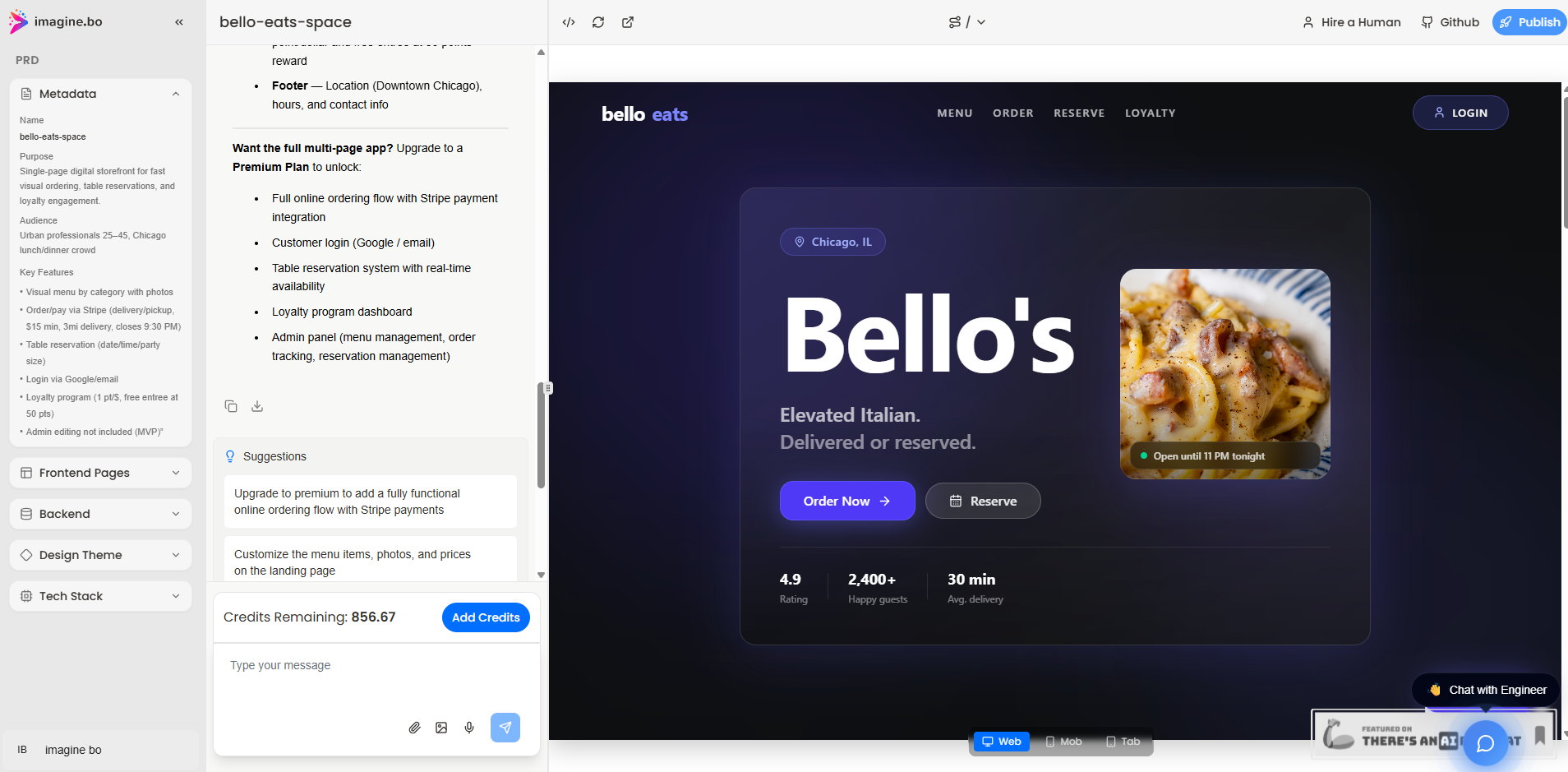
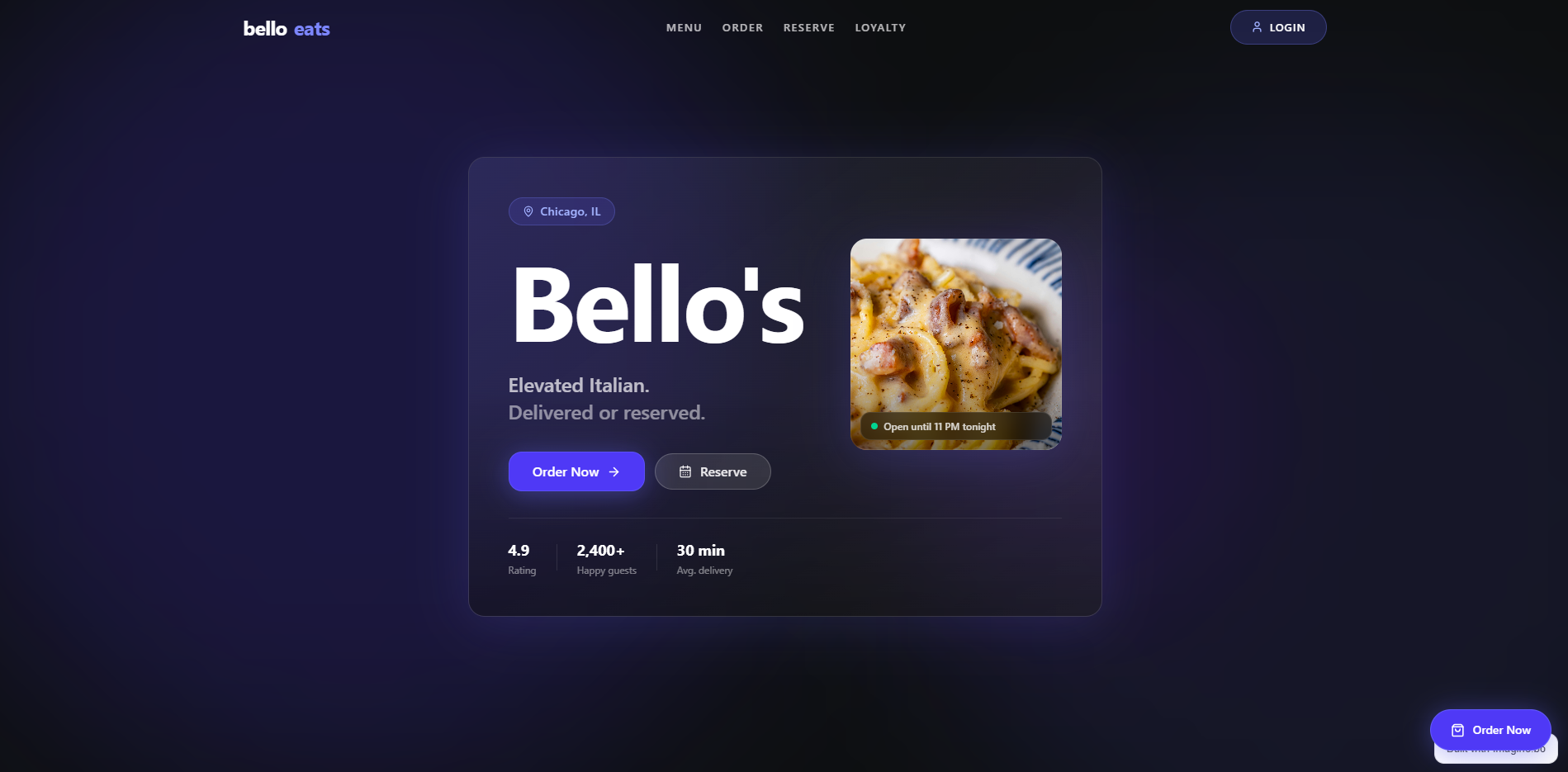
Check that all the pages you asked for are there. Verify the menu structure matches your categories. Confirm the ordering flow makes sense — can a customer add items, customize them, and check out smoothly? Look at the admin dashboard and make sure you can update prices and toggle items on/off.
If something’s missing, don’t panic and don’t restart. Simply tell the AI:
“The generated app is missing a catering inquiry form. Add a page where customers can submit catering requests with event date, guest count, budget range, and dietary requirements. Send an email notification to the admin when a new request comes in.”
Or if a layout feels wrong:
“Move the reservation widget above the menu section on the homepage. Make the hero section full-width with a dark overlay on the background image.”
This conversational refinement approach is one of Imagine.bo’s strongest advantages. You’re not learning a complex drag-and-drop editor with dozens of panels and settings. You’re just talking — and the AI updates the code in real time.
Step 4: Add the Features That Actually Drive Revenue
A pretty website is nice. A website that makes you money is better. Here are the revenue-driving features every restaurant site needs, and how to prompt for them.
Online ordering with smart upsells
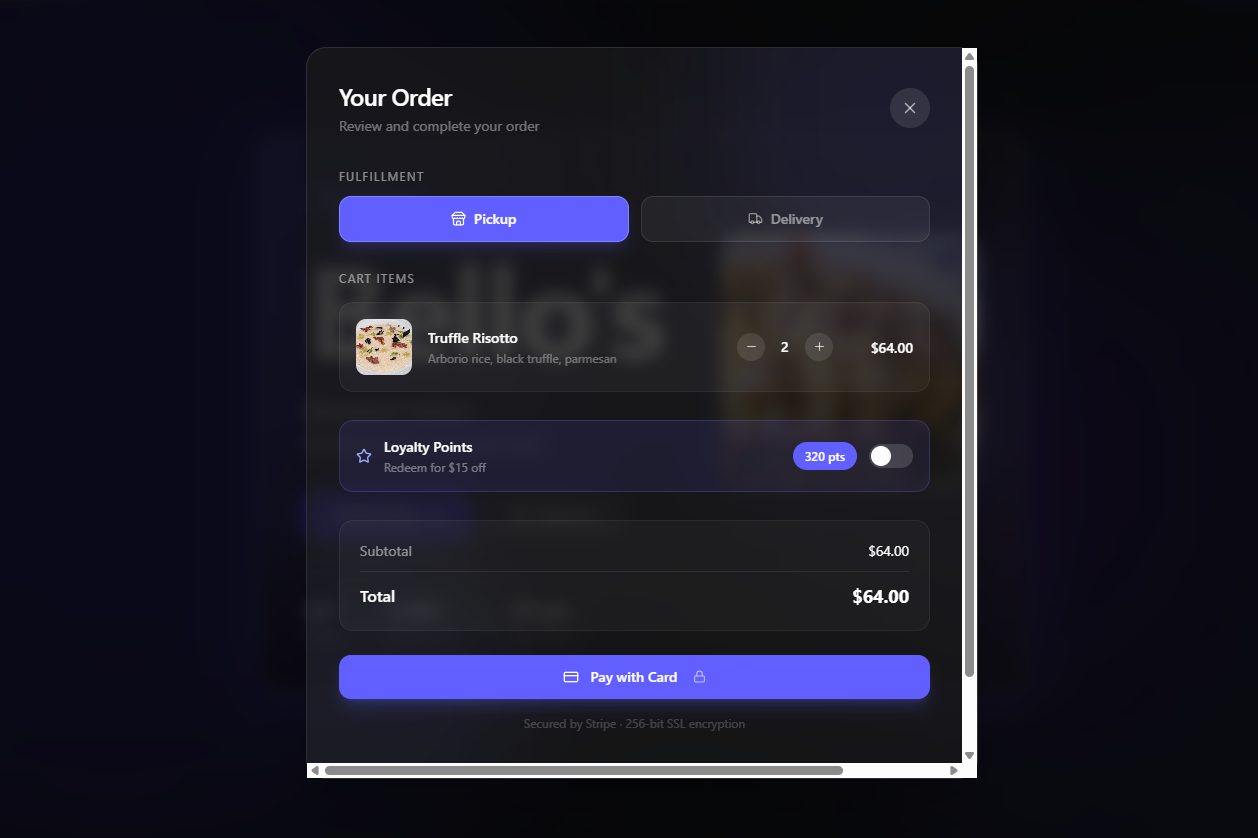
Research from Restolabs shows that customers who order online spend an average of 23% more per transaction than in-person diners (Restolabs, 2026). That gap widens further with smart upselling — suggesting add-ons at checkout, offering meal bundles, or prompting for drinks and desserts. Tell Imagine.bo:
“When a customer adds a main course to their cart, show a suggestion popup recommending popular add-ons like garlic bread, a side salad, or a drink pairing. At checkout, offer a 10% discount if the order total exceeds $49.”
Loyalty programs that keep customers coming back
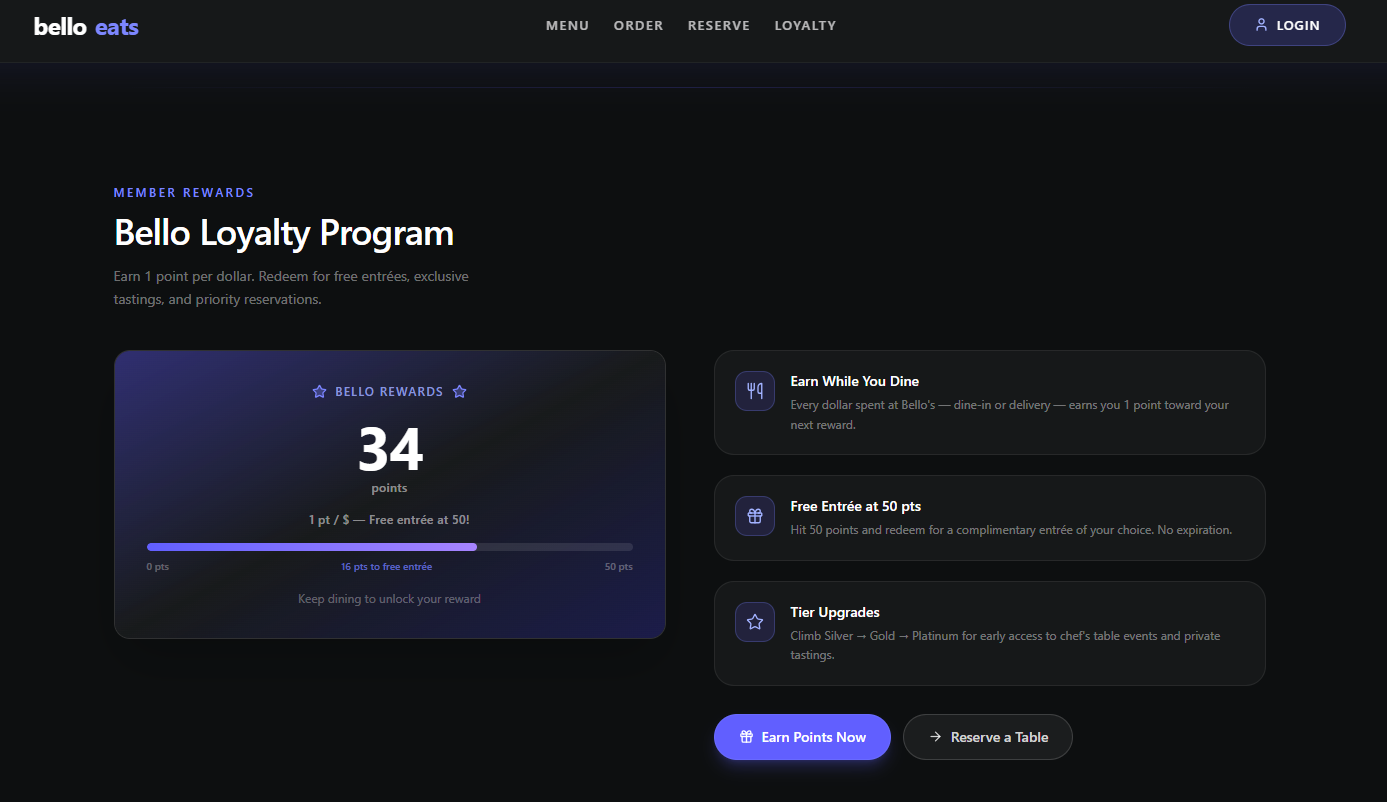
Keep it simple. Complicated point systems confuse people and get ignored. The most effective model is a straightforward punch-card mechanic: order a certain number of times, get something free. Ask the AI to build this in:
“Add a loyalty program to the customer dashboard. Customers earn 1 stamp per order over $20. After 10 stamps, they receive a coupon for a free dessert. Show progress visually as a stamp card on their profile page. Send a push notification when they’re 2 stamps away from their reward.”
Table reservations that reduce phone calls
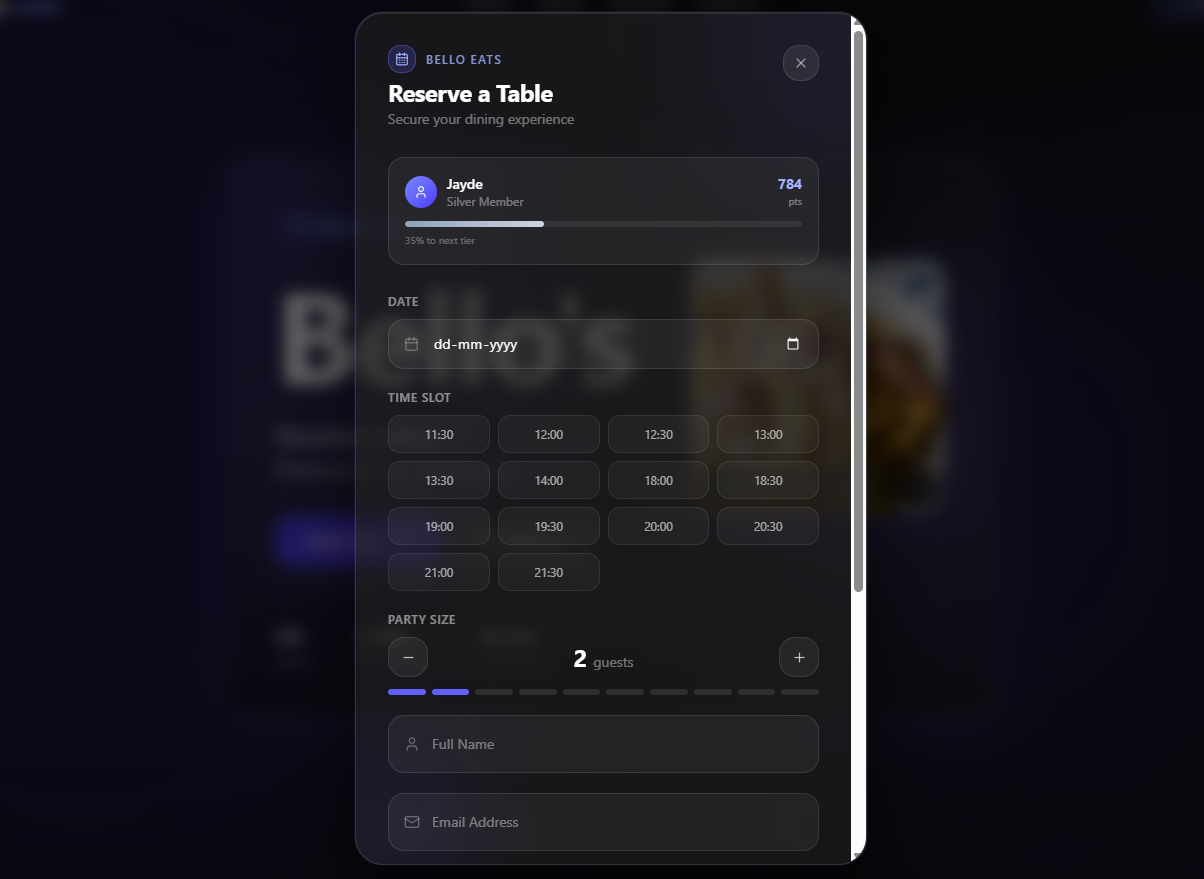
Every phone call your staff takes for a reservation is time they’re not spending on guests already in the restaurant. A self-service booking widget solves this:
“Add a reservation system where customers can select a date, time slot, and party size. Show available slots based on a capacity of 40 covers. Send a confirmation email immediately and a reminder 2 hours before the booking. Allow customers to cancel or modify up to 1 hour before their reservation.”
QR code menu for dine-in customers
This one’s easy to overlook, but it bridges your physical and digital experience. Customers scan a QR code at the table, browse your menu on their phone, and can even place their order directly — reducing wait times and increasing add-on orders.
“Generate a QR code that links to the digital menu page. Make sure the menu is mobile-optimized and loads in under 2 seconds. Add an ‘Order from Table’ option where dine-in customers can place their order and pay directly from their phone.”
For a comprehensive walkthrough of features that turn a restaurant app into a sales machine, read how to build a restaurant app that increases orders and ranks on Google.
Step 5: Set Up Your Site to Rank on Google (Local SEO Basics)
Building a beautiful website means nothing if nobody can find it. Restaurants that actively maintain their online information get 89% more calls, website visits, and direction requests compared to those that don’t (Mobal, 2026). And 76% of “near me” searches on mobile lead to a store visit within 24 hours (BrightLocal, 2025).
The good news? Imagine.bo generates SEO-ready architecture by default — your pages are structured for crawling, load times are optimized through Vercel’s global edge network, and HTTPS is applied automatically. But the content and structure you add on top of that foundation makes an enormous difference.
Page titles and meta descriptions
Each public-facing page needs a unique, descriptive title and meta description. Tell the AI:
“Set the homepage title to ‘Bello’s Italian Restaurant — Authentic Pasta & Pizza in Downtown Chicago | Order Online.’ Add a meta description: ‘Order online for delivery or pickup from Bello’s. Fresh pasta, wood-fired pizza, and Italian classics. Book a table or order now — delivery within 3 miles.'”
Keep titles under 60 characters and meta descriptions between 120–155 characters. Include your location and cuisine naturally — these are the keywords people actually search for.
Google Business Profile
This isn’t something you do inside Imagine.bo, but it’s essential. Claim your Google Business Profile if you haven’t already. Make sure your business name, address, phone number, and website URL are identical everywhere they appear — on your website, on Google, on Yelp, on Zomato. Consistency across platforms is one of the strongest signals Google uses to determine whether to show you in the local map pack.
Upload high-quality photos of your food and interior. Add your menu directly to the profile. Keep your hours updated, especially during holidays. Restroworks found that over 75% of local searches on Google convert into real leads for restaurants — calls, direction requests, website visits. You need to be there when that happens.
Structured headings and content
Your website should have a clear heading hierarchy. One H1 per page (usually your restaurant name + value proposition), followed by H2s for each section (Menu, About, Reservations, Contact), and H3s for subsections. Tell the AI:
“The landing page should have one H1 with ‘Bello’s Italian Restaurant — Authentic Pasta & Pizza in Downtown Chicago.’ Below that, add H2 sections for Our Menu, Reserve a Table, Our Story, and Visit Us. Under Our Menu, add H3s for each category: Appetizers, Pasta, Pizza, Desserts, Drinks.”
FAQ page for AI and voice search visibility
AI-powered search tools like ChatGPT, Google’s AI Overviews, and voice assistants pull answers from clearly formatted Q&A content. Adding an FAQ page to your restaurant site significantly increases your chances of being cited in these results.
“Add an FAQ page with answers to: ‘What are your delivery hours?’, ‘Do you offer gluten-free options?’, ‘How far do you deliver?’, ‘Can I book a table for a large group?’, ‘Do you cater for events?’, and ‘What payment methods do you accept?’ Keep each answer under 60 words and write in a direct, conversational tone.”
Step 6: Deploy and Go Live
When your site is ready, deployment is literally one click. Imagine.bo handles the infrastructure — your frontend goes to Vercel for global edge caching and fast load times, your backend and database are powered by Railway for automatic scaling. SSL certificates, security configuration, and hosting are all handled for you. No DevOps knowledge required.
Before you click Deploy, run through this quick checklist:
Test the ordering flow yourself. Add items to the cart, go through checkout, and confirm the order arrives in your admin dashboard. Do this on your phone, not just on desktop — mobile ordering now accounts for 72% of online food delivery traffic (IMARC Group, 2025).
Check permissions. Can customers only see their own orders? Can only admins change menu prices? Log in as different user roles and verify.
Replace all placeholder content. Every stock image should be replaced with real photos of your food. Every placeholder text should be your actual copy. Generic visuals destroy credibility faster than a slow kitchen destroys patience.
Test on multiple devices. Pull up the site on an iPhone, an Android phone, a tablet, and a laptop. Resize the browser. Everything should look clean and work smoothly.
Once deployed, your app is live, shareable, and mobile-responsive. Share the link. Print QR codes for your tables. Add the URL to your Google Business Profile. Start driving orders.
Step 7: Iterate After Launch — Your Website Is Never “Done”
Launching is not the finish line. The restaurants that win online are the ones that keep improving. Use Imagine.bo’s built-in analytics to see what customers are doing — which menu items they’re viewing, where they drop off in the ordering flow, and how many return visits you’re getting.
Then iterate. Want to add a seasonal menu section? Just tell the AI. Need to change your delivery radius for winter? One prompt. Want to test a new promotion — free delivery on orders over $20? Describe it and it’s live.
If you hit a technical limitation the AI can’t solve — maybe a specific payment gateway integration, a custom delivery zone calculator, or a complex loyalty tier system — use the “Hire a Human” feature. An Imagine.bo engineer picks up the ticket, writes the custom code for that specific module, and pushes it to your project. You get expert engineering on demand without the overhead of hiring full-time staff.
For more on why this hybrid AI + human model outperforms traditional restaurant software, read why traditional restaurant software fails and how AI no-code fixes it.
Common Mistakes Restaurant Owners Make (And How to Avoid Them)
After seeing hundreds of restaurant sites built on the platform, a few patterns emerge repeatedly. Avoid these and you’re already ahead of most competitors.
Mistake: Using a vague prompt. “Build me a restaurant website” gives the AI nothing to work with. You’ll get a generic result. Always specify your cuisine, location, target customer, and core features. The five minutes you spend on a detailed prompt saves you hours of revision.
Mistake: Trying to build everything on day one. You don’t need a catering system, event booking, staff scheduling, inventory management, and multi-location support in your first version. Start with a menu, ordering, and reservations. Get those right. Then expand. This phased approach is faster, produces cleaner results, and lets you validate each feature with real customers.
Mistake: Ignoring mobile. More than 78% of adults now have at least one food-related app on their phone (Restolabs, 2026). If your site doesn’t look and work perfectly on a phone, you’re losing the majority of your potential customers. Always preview on mobile before deploying.
Mistake: No SEO setup. A beautiful website that doesn’t rank on Google is a billboard in the desert. Set your page titles, meta descriptions, and heading structure before you launch. Claim your Google Business Profile. These basics alone put you ahead of most independent restaurants.
Mistake: Not using your own photos. Stock images of food never look like your food. Customers notice. Take well-lit photos of your actual dishes — even a smartphone with good natural light produces dramatically better results than generic stock photography. If you need guidance on this, check out practical fixes for common restaurant operational challenges.
What Does This Cost?
One of the biggest reasons restaurant owners delay going digital is cost anxiety. Traditional development runs $10,000–$50,000+ and takes months. Even popular website builders with add-ons for ordering and reservations can hit $200–$500/month with plugin fees and transaction charges.
Imagine.bo’s Pro plan — which covers full multi-page applications with authentication, workflows, and deployment — starts at $25/month with 150 credits. That’s enough to build a complete restaurant website and app with online ordering, reservations, and a loyalty program. If you want the team to build the entire thing for you, the Done-For-You plan at $499 gives you a production-ready product built by experienced engineers.
Compare that to the $4,500+ per month you’re losing to third-party delivery commissions, and the ROI becomes self-evident. For a detailed comparison of plans and what each credit tier covers, see how to replace multiple restaurant tools with a single AI platform.
Frequently Asked Questions
Do I need any coding knowledge to build a restaurant website with Imagine.bo?
No. Imagine.bo is designed for non-technical founders and small business owners. You describe what you want in plain English, and the AI generates the entire application — frontend, backend, database, and logic. If anything needs manual adjustment, the “Hire a Human” feature connects you with a professional engineer.
How long does it take to build and launch a restaurant website?
Most restaurant owners go from first prompt to a functional MVP in under an hour. Refining the design, adding your own photos, and testing the ordering flow might take another few hours. Compare that to 3–6 months with traditional development. You can be live and taking orders within a single day.
Can I accept payments in my local currency (INR, AED, GBP, SGD)?
Yes. Imagine.bo supports payment integrations like Stripe (for USD, GBP, EUR, SGD, AED, and 135+ currencies) and Razorpay (popular in India for INR with UPI support). Specify your preferred gateway in your initial prompt and the AI will integrate it into the ordering flow.
Will my restaurant website rank on Google?
Imagine.bo generates sites with SEO-ready architecture — clean URLs, fast load times via Vercel’s edge network, HTTPS, and structured HTML. However, ranking also depends on your content (page titles, meta descriptions, headings), your Google Business Profile, customer reviews, and local SEO fundamentals. This guide covers all of those steps.
What if I need a feature the AI can’t build perfectly?
That’s what the “Hire a Human” feature exists for. Complex integrations like localized payment gateways, custom delivery zone algorithms, or specific third-party API connections can be assigned directly to an Imagine.bo engineer from your dashboard. They write the code and push it to your project — no freelancer hunting or agency contracts required.
Your Customers Are Already Searching. Make Sure They Find You.
The restaurant industry’s shift to digital isn’t coming — it’s already here. The online food delivery market is projected to grow to $350 billion in 2026 (Fortune Business Insights), and 98% of consumers now search online before visiting a local business (WiserReview, 2026).
The restaurants that will thrive aren’t the ones with the biggest marketing budgets. They’re the ones smart enough to own their digital presence — their own website, their own ordering system, their own customer data, their own margins.
You don’t need to be technical. You don’t need a six-figure budget. You need a clear idea of what your restaurant offers, five minutes to write a good prompt, and a platform that turns that prompt into real, working software.
Start building your restaurant website on Imagine.bo →
Free to start. No code required. AI-assisted with expert human engineers on standby.
Launch Your App Today
Ready to launch? Skip the tech stress. Describe, Build, Launch in three simple steps.
Build