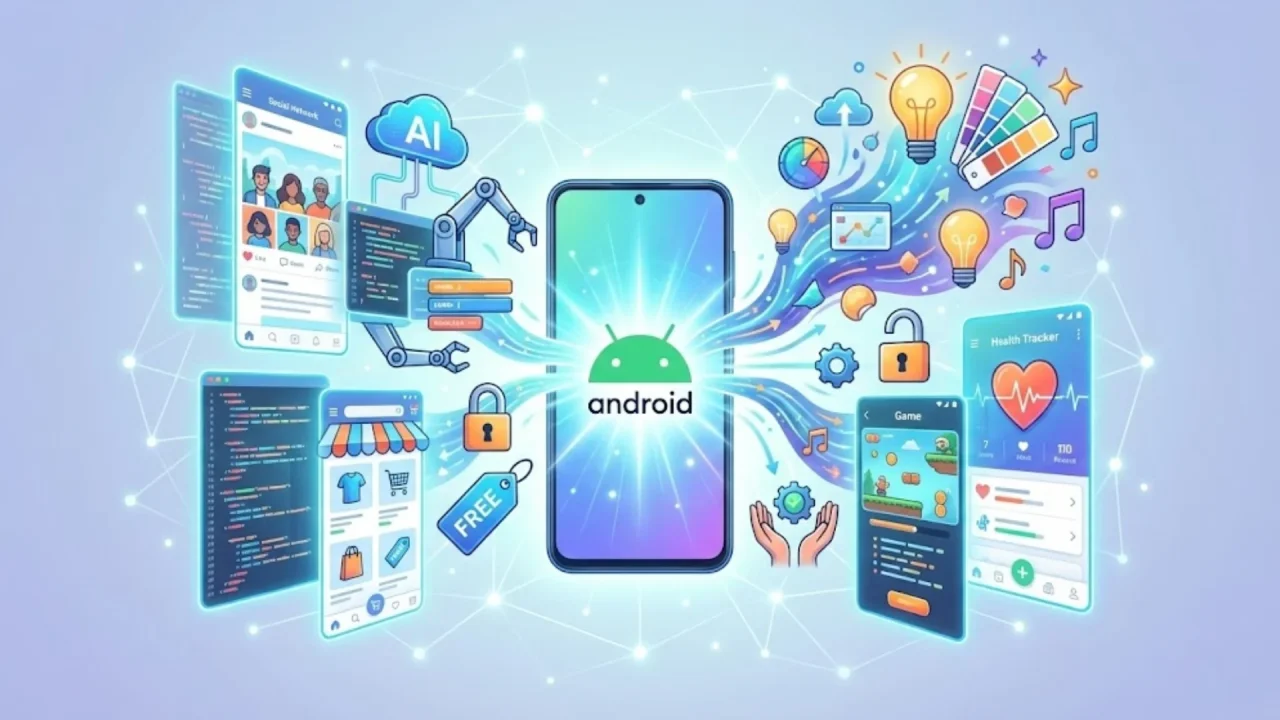
Unlock Your App Dreams: The Ultimate Guide to Free AI Android App Builders

free AI Android app builders

Understanding the Power of AI in Android App Development

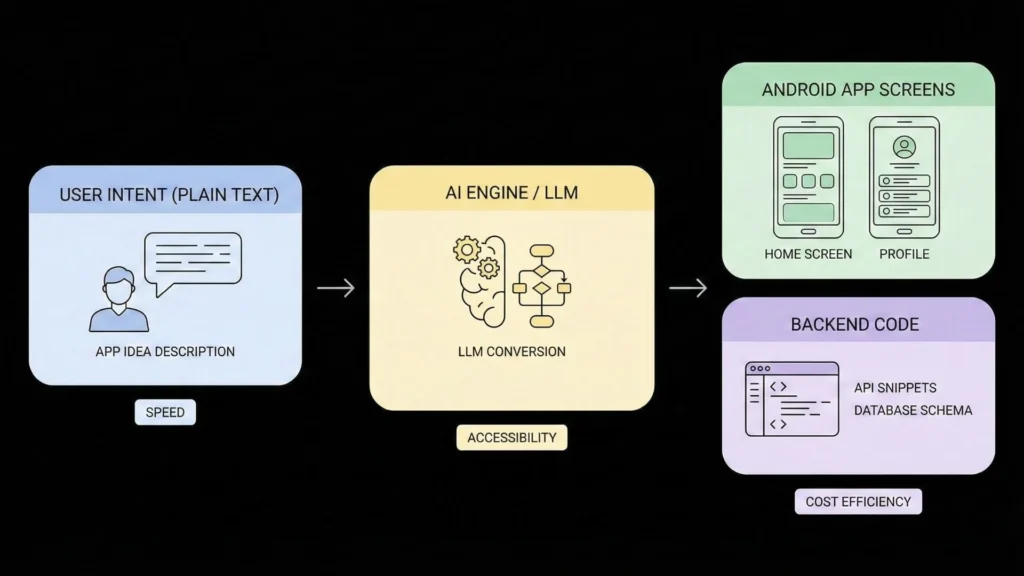
Demystifying AI-powered app builders: How they simplify development

AI-powered app builders dramatically simplify Android app development, even for beginners. They offer a user-friendly interface, often drag-and-drop functionality, eliminating the need for extensive coding knowledge. This visual approach accelerates the development process, allowing you to focus on design and functionality rather than grappling with complex syntax. Many platforms provide pre-built templates and components, further streamlining the process. This reduces development time and cost significantly. For example, platforms like MIT App Inventor leverage visual programming to create functional Android apps without writing traditional Java or Kotlin code.

These tools leverage artificial intelligence in various ways to enhance the user experience. AI assists with intelligent code completion and suggestions, helping to identify and correct potential errors. Some even offer AI-powered design assistance, suggesting layouts and features based on your app’s purpose and target audience. “This automated assistance significantly lowers the barrier to entry for aspiring app developers, making the creation of sophisticated Android applications accessible to a wider audience.” This democratization of app development empowers individuals and small businesses to bring their ideas to life without needing a large development team or extensive programming expertise.

Launch Your App Today

Ready to launch? Skip the tech stress. Describe, Build, Launch in three simple steps.

Build

The benefits of using AI for design, functionality, and optimization

AI significantly boosts the efficiency and quality of Android app development. For design, AI-powered tools can generate multiple UI/UX options based on your input, saving considerable time and effort. They can also analyze user preferences to suggest optimal design choices, increasing the likelihood of user engagement. Platforms like Appy Pie and Glide offer some of these capabilities. This accelerated design process allows developers to quickly iterate and refine their app’s look and feel.

Furthermore, AI enhances app functionality and optimization. AI algorithms can automate complex coding tasks, such as generating repetitive code snippets or integrating APIs. This automation minimizes manual work and reduces the chance of human error. In terms of optimization, AI can analyze app performance data to identify areas for improvement. Tools can then suggest ways to enhance speed, reduce battery consumption, and improve overall user experience. “This means a more robust, efficient app, launched to market faster and better equipped for user engagement.” The use of AI is revolutionizing how developers approach app creation, leading to superior and more efficient final products.

Exploring the limitations and ethical considerations of AI in app creation

While AI-powered app builders offer incredible potential for democratizing Android app development, it’s crucial to acknowledge their limitations. Current AI tools excel at generating basic app layouts and functionalities. However, they often struggle with complex logic, intricate user interfaces, and highly customized features. For truly innovative or sophisticated apps, human intervention remains essential. Think of AI as a powerful assistant, not a replacement for skilled developers. “You’ll still need programming expertise for advanced features and debugging.”

Furthermore, ethical considerations are paramount. AI algorithms are trained on existing data, which might reflect existing biases. This can lead to apps perpetuating harmful stereotypes or exhibiting unfair behavior. Concerns around data privacy and security also arise, particularly regarding the handling of user information within AI-generated apps. Developers must prioritize responsible AI practices, including thorough testing and transparent data handling procedures. “Ignoring these aspects can lead to significant ethical and legal repercussions.” Choosing a reputable AI app builder committed to ethical development is crucial for responsible app creation.

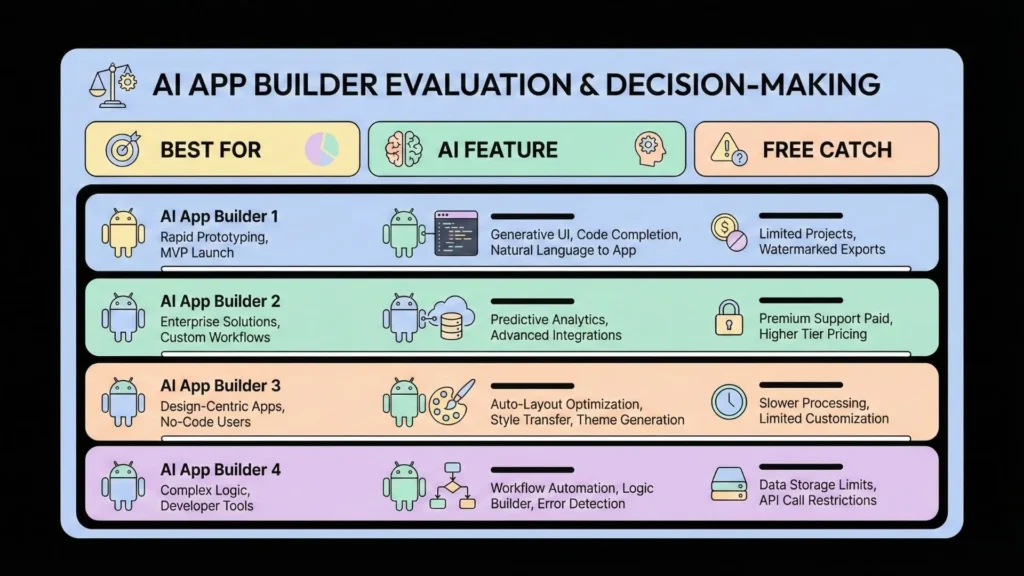
Top 5 Free AI Android App Builders: A Detailed Comparison

free AI Android app builders

Platform A: Features, pros, cons, and ideal user profiles

Platform A boasts a user-friendly drag-and-drop interface, making it ideal for beginners with little to no coding experience. It offers a range of pre-built templates and AI-powered features, such as automated UI design suggestions and intelligent code generation. This significantly speeds up the app development process. However, its free plan has limitations. These include restrictions on features like push notifications and advanced analytics. Advanced customization may also require upgrading to a paid plan. The platform is best suited for individuals and small businesses creating simple apps, such as basic information portals or straightforward utility applications. Think simple to-do lists or basic calculators.

Its pros include ease of use and rapid prototyping capabilities. Cons are the feature limitations in the free version and the lack of comprehensive documentation for complex tasks. “The platform’s strengths lie in its simplicity and accessibility, making it perfect for those looking to quickly bring a basic app to life without deep technical knowledge.” The ideal user profile includes aspiring developers, entrepreneurs with limited budgets, and students exploring app development concepts. They are looking for a quick, no-code entry point into the world of AI-powered Android app creation.

Platform B: In-depth analysis of capabilities, pricing model, and limitations

Platform B offers a compelling blend of ease of use and powerful features for building AI-powered Android apps. Its drag-and-drop interface simplifies app development, even for beginners with limited coding experience. Key features include integrated AI models for image recognition and natural language processing, readily accessible through pre-built modules. This simplifies the integration of sophisticated AI capabilities into your app without extensive programming knowledge. The free plan offers generous resource allowances, suitable for developing and testing smaller apps. However, limitations exist.

The freemium pricing model restricts access to advanced features like custom AI model integration and increased storage capacity. Scalability is limited on the free tier, potentially impacting the performance of larger apps. “While the platform excels in its ease of use, users should anticipate needing to upgrade to a paid plan for more demanding projects or significantly larger user bases.” This limitation should be considered when choosing Platform B. Consider your app’s projected scale and the complexity of the intended AI functionalities to determine if this platform suits your needs.

Platform C: User-friendliness, ease of integration, and target audience

Platform C boasts an intuitive drag-and-drop interface. This makes it incredibly user-friendly, even for beginners with no coding experience. The extensive library of pre-built templates and widgets further simplifies the app development process. Integration with other services is straightforward, thanks to well-documented APIs and readily available tutorials. Ease of use is a key selling point.

Platform C’s target audience is broad. It appeals to individual entrepreneurs and small businesses needing a simple, cost-effective solution. “Its ease of use makes it particularly suitable for those with limited technical skills but big app ideas.” However, more complex applications might require additional expertise. While powerful for its simplicity, advanced users may find its limitations frustrating. The platform’s focus on user-friendliness makes it a strong contender for those prioritizing a quick and easy app development experience.

Platform D: Focus on unique features, community support, and best use cases

Platform D distinguishes itself through its emphasis on unique features rarely found in other free AI Android app builders. For example, its integrated AI-powered image recognition tool allows for the seamless incorporation of visual elements into your app, a feature often requiring extensive coding in other platforms. This, combined with its robust natural language processing (NLP) capabilities, enables the creation of truly innovative applications.

Beyond its impressive features, Platform D boasts a vibrant and active community. This strong community support translates to readily available help and tutorials, making it ideal for beginners. Successful use cases include AI-powered language learning apps, personalized fitness trackers, and innovative productivity tools. “The platform’s ease of use, coupled with its advanced AI features and supportive community, makes it a top contender for those looking to build sophisticated applications without extensive coding knowledge.” Remember to check their official website for the latest updates and feature releases before beginning your project.

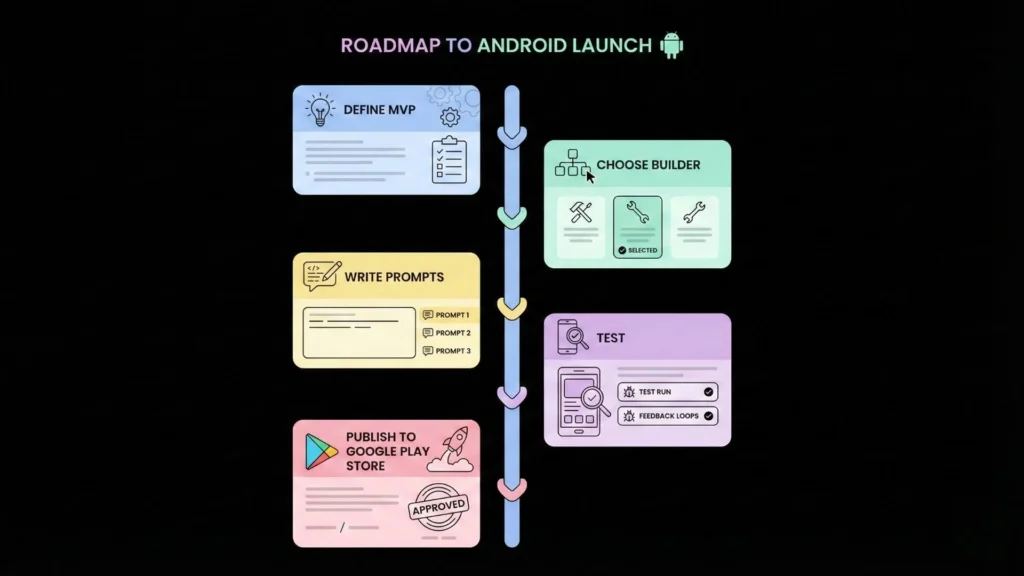
Step-by-Step Guide: Building Your First AI-Powered Android App

Choosing the right platform based on your project’s needs

Selecting the ideal no-code AI Android app builder is crucial for your project’s success. Several platforms cater to varying skill levels and project complexities. Consider your technical proficiency. Are you a coding novice or a seasoned developer? If you’re new to app development, a platform with a user-friendly drag-and-drop interface, like MIT App Inventor, might be best. More complex AI features might require platforms offering greater customization, potentially involving some coding. Think carefully about the features you absolutely need. Do you need robust machine learning capabilities, or will simpler AI functionalities suffice? Platforms like Bubble.io offer strong capabilities but may have a steeper learning curve.

“Your app’s purpose dictates the appropriate platform.” For instance, a simple AI-powered chatbot might be easily built with a beginner-friendly platform, while a sophisticated image recognition app may demand a more powerful, yet potentially more challenging, tool. Remember to factor in scalability. Choose a platform that can handle future growth and increasing user demand. Research user reviews and compare pricing structures before committing to a specific platform. Many platforms offer free plans, ideal for initial experimentation and testing of your free AI Android app builder capabilities before transitioning to paid versions with enhanced features. Thorough research is key to choosing the right tool for your vision.

Planning and designing your app’s user interface (UI) and user experience (UX)

Before writing a single line of code, meticulously plan your app’s user interface (UI) and user experience (UX). Consider your target audience and their needs. Will your AI-powered app be used by tech-savvy individuals or a broader demographic? This decision dictates the complexity of your design. Simple, intuitive navigation is key, regardless of your target audience. Think of popular apps like Google Assistant or Calm; they prioritize ease of use above all else. “A well-designed UI/UX is crucial for user engagement and app success.”

Sketch out your app’s flow. Map out the user journey from initial launch to achieving their desired outcome. Utilize wireframing tools to visualize screens and transitions. This process helps refine your AI features’ integration into the user flow. For example, if your app uses AI for image recognition, ensure the image upload process is seamless and clearly indicated. Remember, user testing is invaluable. Gather feedback early and often to identify and address any usability issues. Iterate on your design based on this feedback. This iterative process ensures your final product is user-friendly and effective.

Using AI tools to streamline development and testing

Leveraging AI significantly accelerates the app development lifecycle. Many free AI-powered Android app builders offer automatic code generation features. These tools can translate your design specifications, even simple sketches, into functional code snippets. This dramatically reduces manual coding time, allowing you to focus on the app’s core functionality and user experience. Platforms like MIT App Inventor, while not solely AI-driven, incorporate AI-assisted features that ease the process. Remember, while AI assists, thorough testing remains crucial.

AI also streamlines the testing phase. Automated testing tools powered by machine learning can identify potential bugs and vulnerabilities much faster than manual testing. They can simulate diverse user interactions and scenarios, uncovering edge cases that might be missed by human testers. This results in a more robust and stable app upon release. For example, platforms may offer AI-powered UI testing to ensure consistency across different Android versions and devices. “Using these AI-driven tools significantly improves the quality and speed of your app development process, bringing your AI-powered Android app dreams to reality sooner.”

Deploying your app to Google Play Store

Before submitting your AI-powered Android app to the Google Play Store, meticulously prepare your app listing. This includes crafting a compelling description highlighting your app’s unique AI features and benefits. High-quality screenshots and a short, engaging video showcasing functionality are crucial for attracting downloads. Remember to carefully select relevant keywords to improve discoverability within the store’s search algorithm. Consider A/B testing different versions of your listing to optimize for conversions. Thoroughly review Google Play’s developer policies to ensure compliance before publishing. Failure to comply can lead to app rejection.

After uploading your app’s APK or Android App Bundle, Google Play will review your submission. This process can take several hours or even days. During this time, the Google Play team will check your app for compliance with their technical and content guidelines, including safety, security, and performance. “Addressing any feedback promptly will expedite the process.” Once approved, your AI-powered Android app will be published and available for download on the Google Play Store. Promote your app through various marketing channels to reach your target audience. Regularly monitor user reviews and feedback to continuously improve your app.

Essential Resources and Tutorials for AI Android App Development

Curated list of online courses, workshops, and documentation

Navigating the world of AI Android app development can feel overwhelming, but numerous excellent resources exist to guide you. Platforms like Udemy and Coursera offer structured courses on machine learning, Android development, and integrating AI features into your apps. These courses often cover essential topics such as TensorFlow Lite, a lightweight machine learning framework ideal for mobile devices. Many include practical projects, allowing you to build your skills through hands-on experience. Look for courses with high ratings and positive student reviews to ensure quality instruction.

Furthermore, official documentation from Google, including their Android Developers website and TensorFlow documentation, provides invaluable technical details. These resources are directly from the source, offering the most accurate and up-to-date information. Supplement this with workshops found on sites like Eventbrite, often hosted by tech communities or universities. “Attending these workshops gives you networking opportunities and practical insights you won’t find in online courses alone,” connecting you with industry experts and potential collaborators. Remember to check course prerequisites before enrolling to ensure a smooth learning journey.

Community forums and support groups for troubleshooting and collaboration

Navigating the world of AI Android app development can be challenging, even with free builders. Fortunately, a wealth of online support exists to help you overcome hurdles. Engaging with community forums dedicated to Android development, AI programming, and specific app builders is invaluable. Sites like Stack Overflow, Reddit’s r/androiddev subreddit, and dedicated forums for popular no-code/low-code platforms often have threads tackling common problems. Searching for your specific error message or challenge can often yield immediate solutions, saving you considerable time and frustration.

Active participation in these communities offers more than just troubleshooting. You’ll find opportunities to collaborate with other developers, share insights, and learn from experienced users. “Participating in discussions and asking questions allows you to gain a deeper understanding of best practices and discover innovative solutions you might not have considered independently.” Many developers generously share code snippets, tutorials, and advice. This collaborative environment fosters a sense of community and accelerates your learning curve, transforming challenges into opportunities for growth and success in your AI Android app development journey.

Staying up-to-date with the latest advancements in AI and no-code development

The field of artificial intelligence (AI) and no-code app development is constantly evolving. New platforms and tools emerge frequently. To stay competitive, continuous learning is crucial. Follow key players like Google, Microsoft, and MIT on their AI blogs and publications. These organizations often release updates and tutorials on their latest advancements. Regularly check reputable tech news sites for breakthroughs in AI and no-code technologies. This will keep you informed about new features and capabilities.

“Staying current is vital for leveraging the full potential of free AI Android app builders.” Subscribe to newsletters from leading no-code platforms. Many offer tutorials and webinars. These resources provide valuable insights into best practices and new techniques. Actively participate in online communities dedicated to AI and app development. These forums offer opportunities for collaborative learning and troubleshooting. For example, communities like Reddit’s r/androiddev often discuss the latest tools and strategies. By consistently engaging with these resources, you’ll ensure your AI Android app development skills remain sharp and relevant.

Best practices for app optimization and monetization

Optimizing your AI-powered Android app for performance and user engagement is crucial for success. Focus on minimizing app size for faster downloads and reduced storage consumption. Regularly update your app with bug fixes and new features to keep users engaged. Employ A/B testing to experiment with different UI/UX elements and identify what resonates best with your target audience. Consider incorporating user feedback mechanisms, such as in-app surveys or rating prompts, to continually improve the user experience. Remember, a smooth, intuitive app is key to positive reviews and high ratings, vital for organic growth.

Monetization strategies should align with your app’s features and target audience. In-app purchases, subscriptions, and rewarded video ads are popular choices. However, avoid overwhelming users with intrusive ads. A balanced approach ensures revenue generation without compromising the user experience. “Successfully monetizing your free AI Android app requires a delicate balance between generating income and maintaining a positive user experience.” Analyze your monetization data regularly to optimize your strategy. Experiment with different models and pricing points to find what works best for your specific app. Remember, user satisfaction is paramount; build a loyal user base before aggressively pursuing revenue.

Monetizing Your Free AI-Built Android App: Strategies and Tips

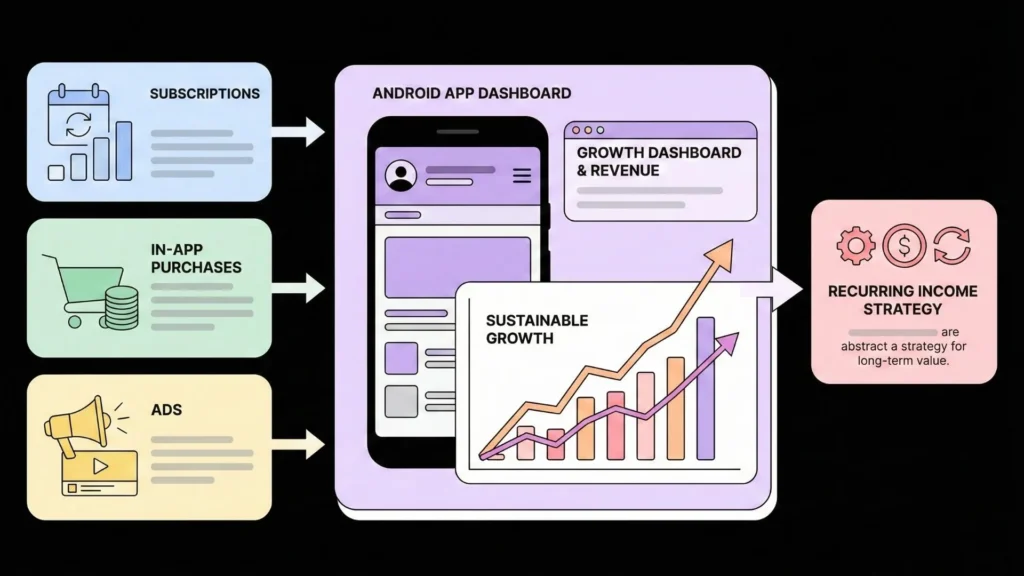
Exploring different monetization models: In-app purchases, subscriptions, ads

Choosing the right monetization strategy is crucial for your free AI-powered Android app. In-app purchases offer a straightforward approach. Users can buy virtual goods, premium features, or remove ads for a one-time fee. Popular games like Candy Crush Saga successfully employ this model, generating significant revenue through optional purchases. Consider offering a range of price points to cater to diverse budgets. Carefully plan what features you’ll offer as in-app purchases to maximize value and avoid alienating users with excessive or intrusive offers.

Alternatively, a subscription model provides recurring revenue. This works well for apps offering ongoing value, such as productivity tools or educational resources. Think of popular apps like Spotify or Netflix; their subscription models are successful examples. Offer a free trial period to attract users and then charge a monthly or annual fee for continued access to premium content or features. For apps using AI for complex tasks, a subscription provides a strong revenue model. “Remember to clearly communicate the benefits of subscribing and ensure the value proposition is compelling enough to justify the recurring cost.” Finally, ads, while potentially less lucrative per user, can provide a passive income stream. Strategically placed, non-intrusive ads can generate revenue without significantly impacting the user experience. Carefully consider ad network choices to optimize earnings and user satisfaction.

Best practices for implementing in-app purchases without compromising user experience

Successfully integrating in-app purchases (IAPs) requires a delicate balance. Avoid overwhelming users with constant purchase prompts. Instead, strategically offer IAPs as optional enhancements that genuinely add value. Consider offering a freemium model, providing core functionality for free while offering premium features or content via IAP. Examples include removing ads, unlocking advanced levels, or providing access to exclusive content. Think of popular games like Candy Crush, where IAPs are seamlessly integrated, offering boosts or extra lives but never hindering gameplay.

“Prioritize a positive user experience above all else.” Poorly implemented IAPs can quickly lead to negative reviews and app abandonment. Transparency is key. Clearly communicate the value proposition of each purchase and avoid using deceptive or manipulative tactics. Ensure the purchase process is simple, secure, and easy to understand. For instance, clearly display pricing and avoid hidden costs. Regularly monitor user feedback and adapt your IAP strategy based on user behavior. By focusing on user satisfaction, you build a loyal user base willing to support your free AI-powered app through optional purchases.

Balancing user engagement with monetization strategies

Successfully integrating monetization into your free AI-powered Android app requires a delicate balance. Aggressive monetization tactics, such as excessive ads or intrusive in-app purchases, can quickly drive users away. Remember, user engagement is paramount. Prioritize a positive user experience. Offer a valuable core functionality, even without paid features. Consider a freemium model. This allows users to access basic features for free, while offering premium features for a small fee. Think of popular apps like Spotify or Candy Crush Saga as examples of successful freemium models.

Focus on non-intrusive monetization methods. Well-placed, unobtrusive ads, relevant to your app’s content, can generate revenue without disrupting the user flow. Alternatively, explore affiliate marketing to earn commissions. You could also introduce a subscription model, offering additional features or content for a recurring fee. “The key is to find a model that feels natural and complements the app’s core value proposition, not detracts from it.” Always track user behavior and adjust your strategy accordingly. Analyze which monetization techniques yield the best results without compromising the user experience. This data-driven approach is crucial for sustained growth and profitability.

Case studies of successful free AI Android apps and their monetization strategies

Several free AI-powered Android apps demonstrate successful monetization. For example, “PhotoRoom,” initially free, leverages a freemium model. Users gain access to basic AI-powered background removal. Premium features, like advanced editing tools and high-resolution exports, are offered via in-app purchases. This strategy successfully converts a large free user base into paying customers. The app’s success highlights the importance of offering substantial value even in its free version, thus enticing users to upgrade.

Another compelling example is “Replika,” a free AI companion app. While the core experience remains free, users can opt for a subscription for access to more advanced conversational features and personalized content. This subscription model proves highly effective, demonstrating that even seemingly simple free apps can generate substantial revenue through additional, optional features. “Replika’s success underscores the potential for recurring revenue streams within the free AI app ecosystem.” Careful consideration of the user experience and the strategic placement of premium features are key to this monetization method’s effectiveness.

The Future of AI-Powered Android App Development

Emerging trends and technologies shaping the future of mobile app development

The mobile app landscape is rapidly evolving, driven by advancements in artificial intelligence (AI) and related technologies. We’re seeing a surge in the use of machine learning for personalized user experiences, predictive analytics to improve app functionality, and sophisticated natural language processing (NLP) powering conversational interfaces like chatbots. Companies like Google and Apple are heavily investing in these areas, integrating powerful AI tools directly into their development platforms, making it easier than ever for developers to build intelligent apps.

This trend towards AI-powered apps is further accelerated by the increasing availability of user data and the rise of no-code/low-code platforms. These platforms, including several free AI Android app builders, democratize app development, allowing individuals and small businesses to create sophisticated applications without extensive programming knowledge. “The accessibility of these tools is fundamentally changing the dynamics of the app market, leading to a more diverse and innovative ecosystem.” This means that the future of mobile app development is inclusive, innovative, and profoundly shaped by the power of AI.

Predictions for the evolution of AI-powered app builders and tools

AI-powered app builders are rapidly evolving, promising even greater ease of use and functionality in the near future. We can expect to see a significant increase in the sophistication of natural language processing (NLP) integration. This means users will be able to create apps with far simpler instructions, almost conversing with the builder itself. Moreover, expect more intuitive drag-and-drop interfaces, reducing the technical knowledge required. Companies like MIT App Inventor already showcase this trend, paving the way for more user-friendly options.

The integration of advanced AI features directly into the apps created will also be a major development. This could involve features like advanced image recognition, personalized recommendations, or even sophisticated chatbot integration, all built directly into the app with minimal coding effort. “The accessibility of AI app building is democratizing development,” enabling a broader range of individuals and businesses to participate in the mobile app market. This increased accessibility will likely lead to a surge in innovative and user-centric applications in the coming years.

The impact of AI on accessibility and app development for diverse audiences

AI is revolutionizing app accessibility for diverse audiences. Tools like Google’s Cloud Vision API offer image recognition, enabling blind users to better navigate apps. Speech-to-text and text-to-speech functionalities, readily integrated into many free AI app builders, further enhance usability for individuals with visual or auditory impairments. This democratizes app usage, empowering a broader range of users. “AI-powered translation tools also break down language barriers, creating truly global apps accessible to users worldwide.”

Furthermore, AI assists in creating personalized user experiences. By analyzing user data, apps can adapt to individual needs and preferences. For example, apps can adjust font sizes, colors, and layouts based on user input or inferred abilities. This personalized approach caters to diverse learning styles and cognitive abilities. This results in apps that are not only usable but also enjoyable and engaging for a wider audience. “The result is a more inclusive and user-friendly app ecosystem, driven by the power of artificial intelligence.”

Potential challenges and opportunities for the future

The rapid advancement of AI in app development presents exciting opportunities, but also significant hurdles. Free AI-powered Android app builders are democratizing development, allowing individuals with limited coding experience to create sophisticated applications. This increased accessibility could lead to a boom in innovative app ideas and a more diverse app market. However, challenges remain. The quality of apps generated by these tools can vary greatly, potentially leading to a rise in poorly designed or buggy applications. Ensuring user data privacy and security within these AI-built apps is also paramount. Platforms must invest heavily in robust security measures.

Addressing these issues is vital for realizing the full potential of this technology. Ethical considerations, such as the responsible use of AI and the potential displacement of human developers, require careful attention. Continuous improvement of AI algorithms is crucial to improve the quality and reliability of generated apps. “The future success hinges on striking a balance between accessibility and quality, fostering innovation while mitigating risks.” This includes addressing concerns about intellectual property rights and ensuring transparency in the development process. Ultimately, navigating these challenges will determine whether free AI Android app builders truly revolutionize the mobile landscape.

Launch Your App Today

Ready to launch? Skip the tech stress. Describe, Build, Launch in three simple steps.

Build

Picture of Monu Kumar

Monu Kumar

Monu Kumar is a no-code builder and the Head of Organic & AI Visibility at Imagine.bo. With a B.Tech in Computer Science, he bridges the gap between traditional engineering and rapid, no-code development. He specializes in building and launching AI-powered tools and automated workflows, he is passionate about sharing his journey to help new entrepreneurs build and scale their ideas.

In This Article

Subscribe to imagine.bo

Get the best, coolest, and latest in design and no-code delivered to your inbox each week.

subscribe our blog. thumbnail png

Related Articles

imagine bo logo icon

Build Your App, Fast.

Create revenue-ready apps and websites from your ideas—no coding needed.