
You built an app. Users sign up, poke around, and leave. The product works. But every user sees the same static screens, the same generic text, the same fixed layout regardless of who they are or what they did yesterday. That’s the problem dynamic AI content solves. This guide explains exactly how generative AI creates personalized, real-time content inside apps, which content types matter most, and how non-technical founders can build these capabilities without hiring a backend engineer. By the end, you’ll know what to build, in what order, and which tools actually ship it.
TL;DR: Generative AI content means your app produces text, recommendations, images, and responses unique to each user in real time rather than serving fixed copy to everyone. According to Fortune Business Insights (2025), the global generative AI market is valued at $103.58 billion in 2025 and growing at a 39.6% CAGR. Builders who integrate dynamic content now are entering a gap most small-scale apps still haven’t closed.
What Is Dynamic AI Content in Apps, and Why Does It Matter Now?
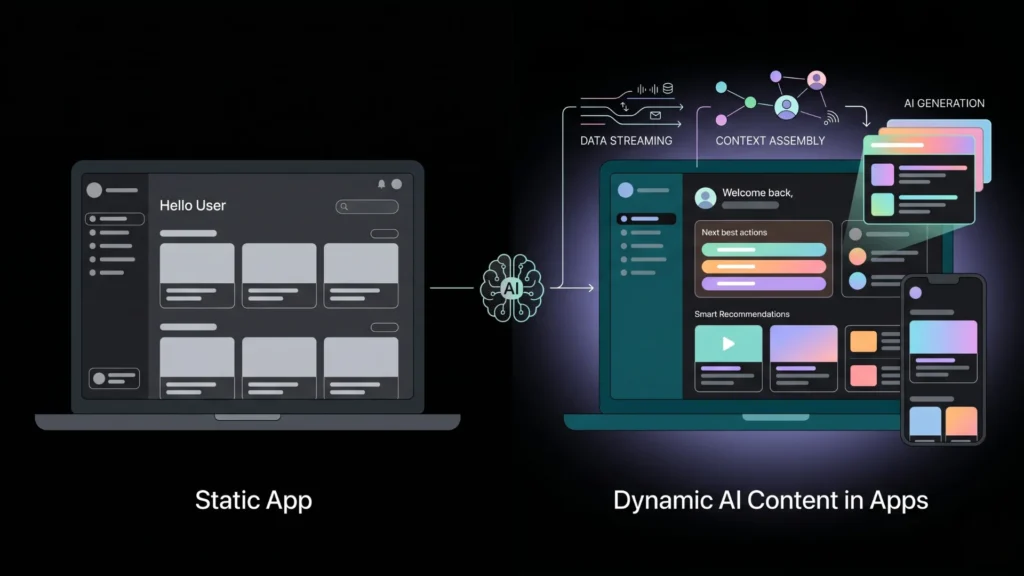
Dynamic AI content is any app output generated at runtime by an AI model based on user context, not pre-written copy pulled from a database. It matters because static apps are losing ground fast. According to Segment’s 2024 State of Personalization report, 89% of business leaders say personalization is essential to their company’s success over the next three years. The gap between an app that greets you by name and one that greets you with your three most relevant next actions is not cosmetic. It is a retention and conversion gap.
Launch Your App Today
Ready to launch? Skip the tech stress. Describe, Build, Launch in three simple steps.
BuildThe practical shift here is significant. For most of the web’s history, “dynamic content” meant swapping a name into a template. Generative AI changes this entirely. The app can now write a summary of your progress, draft a custom response, generate a product description, or adapt its UI copy based on your history, all without a developer touching a template. The Confluent framework for dynamic content identifies three layers: data streaming (what’s happening now), context assembly (what the model knows about this user), and generation (what gets produced). Non-technical builders can now access all three layers through API integrations and platforms like imagine.bo.
For a deeper look at how generative AI APIs connect to no-code apps, see top generative AI APIs for no-code developers.
What Are the Main Types of Dynamic AI Content in Apps?
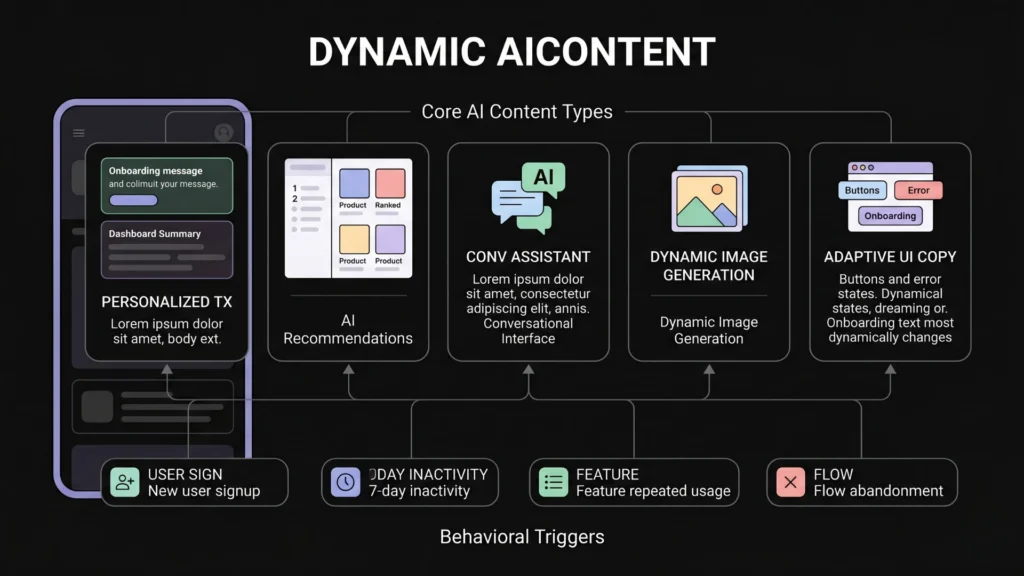
The five most-used types of generative AI content in production apps today are personalized text, AI-generated recommendations, conversational interfaces, dynamic image generation, and adaptive UI copy. Each serves a different moment in the user journey and requires a different data input to work well.
Personalized text is the entry point for most builders. This means generating a dashboard summary, a progress report, a welcome message, or a content brief that reflects what the specific user has done, said, or purchased. The model receives user context as part of its prompt and returns text tailored to that context. This is the cheapest form of dynamic content to implement and often produces the most visible engagement lift.
AI-generated recommendations are the highest-revenue content type. According to McKinsey research cited by Shopify (2025), personalized recommendations can lift revenue between 5% and 15%. Amazon’s recommendation engine alone accounts for roughly 35% of its annual sales, according to Envive.ai’s benchmark analysis (2026). The mechanism is straightforward: user behavior data flows into a prompt or embedding, the model ranks or generates options, and the app surfaces them in the right moment.
Conversational interfaces turn an app into a dialogue. Instead of navigation menus, the user types a question or describes a need and the app responds. This is not the same as a static FAQ chatbot. A generative conversational interface accesses the user’s account state and answers in context. A SaaS dashboard with a built-in AI assistant that can tell you “your best-performing campaign last month was X, here’s why” is a meaningfully different product from one without it.
Dynamic image generation is growing fast but still requires careful implementation. Text-to-image APIs like DALL-E and Stable Diffusion can create product mockups, social assets, or avatars on demand. Latency and cost are the primary constraints right now. For most apps, generated images work best in asynchronous flows where the user triggers generation and receives the result a few seconds later, not in real-time UI moments.
Adaptive UI copy is underused and high-impact. This means the button labels, error messages, onboarding prompts, and empty-state copy inside your app change based on user context. A new user who just signed up from a specific landing page sees different onboarding copy than a returning user who went dormant. This requires no design changes. It only requires a content generation layer sitting between your database and your UI templates.
Most builders focus entirely on the “what” of dynamic content (recommendations, text, chat) and skip the “when.” The highest-converting dynamic content interventions are triggered by behavioral moments: a user who reaches a feature for the third time, a user who has not logged in for seven days, a user who abandons a flow mid-way. The trigger architecture matters as much as the content itself.
You can explore how to connect these patterns to real app flows in the guide to adding AI to your app without code.
How Does a Generative AI App Builder Actually Produce Dynamic Content?
A generative AI app builder produces dynamic content through three connected components: a prompt pipeline that injects user context, an API call to a language model, and a rendering layer that displays the output in the right place in the UI. According to Statista (2024), the global AI market is growing at a 37% compound annual rate, with the majority of enterprise deployment happening through API integration rather than standalone AI products.
Here’s the technical sequence in plain terms. A user action, say opening their dashboard, triggers an event. The app collects the user’s relevant context from its database: their account data, recent actions, segment tags, and any real-time signals like current session behavior. That context is assembled into a prompt. The prompt is sent to a language model via API. The model returns generated content. The app displays it.
The key architectural decision is where the context assembly happens. Builders who drop a raw API call into their app and send a generic prompt get generic responses. Builders who design a proper context object, one that includes user history, current session state, and any relevant business rules, get output that feels genuinely personalized. This is the difference between an AI feature that impresses users and one that gets ignored after the first use.
On imagine.bo, you describe this entire pipeline in plain English using the Describe-to-Build feature. You might say: “When a user opens their home screen, pull their last five completed tasks, generate a one-sentence summary of their progress, and display it above the task list.” The platform generates the backend logic, the database queries, the API call structure, and the UI component in a single build cycle. You do not write a prompt template manually. You do not wire up API endpoints. You describe the behavior and the app implements it.
The no-code AI platform market backing all of this is substantial. According to Fortune Business Insights (2025), the global no-code AI platform market was valued at $6.56 billion in 2025 and is projected to reach $75.14 billion by 2034 at a 31.13% CAGR.
For a step-by-step walkthrough of integrating OpenAI’s API into a no-code app, see how to integrate OpenAI’s API into your app without code.
Which Generative AI App Builders Are Best for Dynamic Content?
The builder you choose determines how much of the dynamic content architecture you control versus what gets abstracted away. Different tools make different trade-offs between flexibility and speed.
imagine.bo is designed for full-stack dynamic content apps. Using the Describe-to-Build feature, you can specify exactly what data feeds the AI generation layer, when generation triggers, and how output renders in the UI. The platform deploys on Vercel for frontend and Railway for backend by default, which means your dynamic content pipeline runs on infrastructure that can scale under real user load. The Hire a Human feature covers edge cases where your AI content logic needs custom prompt engineering that exceeds what the AI builder handles automatically.

Bubble gives you the most visual control over where content renders, but building a generative AI pipeline requires manual API plugin configuration, prompt design, and data workflow setup. It’s achievable, but it takes longer and requires more platform-specific knowledge. For builders who already know Bubble, the flexibility is worth it. For new builders starting from zero, the overhead is significant.
Bolt.new and similar chat-to-code tools produce frontend code quickly, but the dynamic content layers, meaning the backend context assembly, the state management, and the API integration, require either manual coding or significant prompt engineering to get right. They’re useful for prototyping a dynamic content UI. They’re less reliable for a production pipeline that handles real user data cleanly.
Lovable has a similar positioning to imagine.bo but without the hybrid human-AI engineering option. If your dynamic content requirements stay within what its AI generation layer handles, it’s fast. When your app needs custom prompt logic, you’re on your own.
Based on the imagine.bo platform’s build workflow, a fully functional dynamic content feature, including user context assembly, API call to GPT-4, and rendered output, takes approximately 3 to 5 descriptive prompts to implement from zero using Describe-to-Build. The same feature in a manual Bubble setup requires an estimated 8 to 12 distinct workflow steps across plugins, API calls, and state management configurations.
According to Grand View Research (2025), app builders are the dominant customer segment in the generative AI market, driven specifically by their need to integrate personalized recommendations, automated support, and dynamic content generation into their products.
Compare how these platforms handle full-stack app complexity in the full breakdown of AI-powered no-code app development.
How Do You Build a Recommendation Engine with Generative AI?
A recommendation engine built on generative AI differs from a traditional collaborative filtering engine in one key way: it can explain its recommendations in natural language and adapt them based on user feedback in the same session. According to Envive.ai (2026), companies implementing sophisticated recommendation engines see 150% increases in conversion rates and 50% growth in average order values.
The minimum viable recommendation engine has four parts. First, a user data store that captures behavioral signals: what the user viewed, clicked, completed, or skipped. Second, a retrieval layer that pulls the most relevant items from your product or content catalog. Third, a generation layer that formats these items into a prompt with user context and asks the model to rank and explain them. Fourth, a UI component that displays the results with the model’s reasoning visible, or hidden, depending on your product design.
Where most builders get stuck is the retrieval layer. Sending your entire product catalog to a language model is expensive and produces worse results than sending a pre-filtered shortlist. The practical pattern is to use your app’s existing filtering logic to reduce the candidate pool to 10 to 20 items, then use the AI layer to rank and personalize within that pool. This keeps costs predictable and response times fast enough for real-time UI use.
The behavior trigger architecture matters here too. A recommendation surfaced immediately after a user completes a relevant action converts significantly better than one surfaced on a generic “you might like” page. According to Dynamic Yield benchmark data cited by Envive.ai (2026), behavior-focused personalization produces an 89% increase in purchases compared to static recommendation displays.
See the full technical walkthrough for this pattern in the guide to building a recommendation engine without coding.
What Role Does Prompt Design Play in Dynamic AI Content Quality?
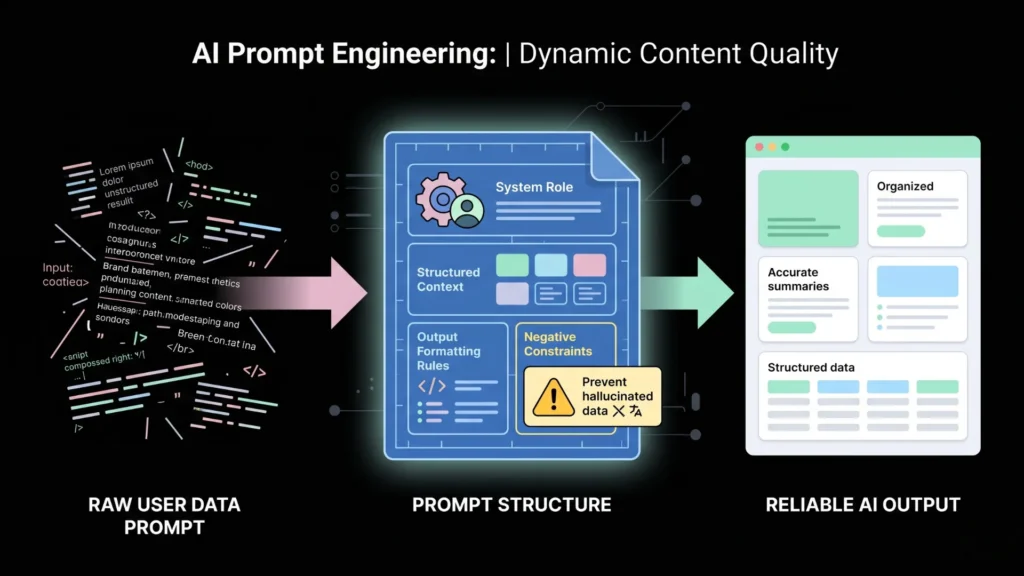
Prompt design is where dynamic content quality is won or lost. The model itself matters less than most builders assume. GPT-4o, Claude 3.5 Sonnet, and Gemini 1.5 Pro all produce comparable quality for standard dynamic content tasks. What produces dramatically different quality is the structure and completeness of the context passed into the prompt.
The three most common prompt design mistakes in production apps are: passing raw user data without formatting it into a meaningful narrative, using static prompts that don’t change based on user state, and not defining the output format precisely enough for reliable UI rendering.
A well-structured prompt for dynamic content includes a system role that defines the app’s persona and tone, a user context block formatted as a structured summary rather than raw JSON, the specific generation task stated as a concrete output requirement, a format instruction that defines the exact shape of the output (length, structure, field names if JSON), and a constraints block that prevents hallucination on factual claims about the user’s account.
The most underused prompt pattern in dynamic content apps is the “negative constraint.” This is a prompt instruction that tells the model what not to generate: “Do not mention features the user has not yet accessed. Do not speculate about their goals. Only summarize what is factually present in their account data.” Without this, AI-generated content frequently invents plausible-sounding but false claims about what the user has done, which destroys trust immediately when the user reads it.
According to IDC (2024) research cited in imagine.bo’s own content research, the real cost driver in production AI applications is maintenance overhead when product changes break prompt logic. Parameterized prompts, ones where the variable content is cleanly separated from the structural instructions, prevent the most common version of this problem.
For founders thinking through the full product strategy behind prompt-driven apps, see why prompt-driven development is a startup advantage.
How Should Non-Technical Founders Think About Generative AI Content Architecture?
Non-technical founders should think about generative AI content architecture in terms of three decisions, not ten technical components. The decisions are: what data feeds the AI, when the AI runs, and where the output appears. Everything else is implementation detail that the right platform handles.
What data feeds the AI is the most important decision. The quality of dynamic content is directly proportional to the relevance of the user context passed to the model. Before writing a single prompt or selecting a tool, map out what you actually know about each user at the moment you want to generate content. If your data model is thin, your dynamic content will be thin regardless of which model you use.
When the AI runs determines whether your content feels timely or stale. Real-time generation on page load is the most immediate but the most expensive. Background generation triggered by behavioral events, generated and cached before the user even opens the relevant screen, is often a better pattern for content-heavy apps. Batch generation for weekly reports, summaries, or digests is the most cost-effective and works well for email or notification-driven content.
Where the output appears sounds obvious but often gets underspecified. The same generated text that works well in a full-screen card looks broken in a compact widget. Define the output format requirements before you design the generation pipeline. This means specifying maximum character counts, structural requirements like bullet lists versus prose, and any embedded data that must link back to real records in your system.
According to Sensor Tower (2025), global downloads for generative AI apps reached nearly 1.7 billion in the first half of 2025, with in-app purchase revenue approaching $1.9 billion in the same period. The market signal is clear: users pay for AI-native app experiences.
For a broader view of how businesses are putting this to work today, see 5 businesses using generative AI for productivity.
Frequently Asked Questions
What is dynamic AI content in an app?
Dynamic AI content is any text, image, recommendation, or UI element generated at runtime by an AI model based on a specific user’s data and context, rather than pre-written copy stored in a database. According to Segment (2024), 89% of business leaders say this kind of personalization is essential to competitive success in the next three years.
How much does it cost to add generative AI content to an app?
API costs for text generation with GPT-4o run approximately $0.01 to $0.03 per 1,000 tokens as of 2025, depending on context length and model version. For most SaaS apps, a fully dynamic content layer generating personalized text on each user session costs between $20 and $150 per month at moderate usage volumes. Platforms like imagine.bo build this API integration into the app by default, so there’s no separate infrastructure cost.
Can a non-technical founder build AI-generated dynamic content without a developer?
Yes. Platforms like imagine.bo use the Describe-to-Build feature to implement dynamic content pipelines from plain English descriptions. The no-code AI platform market is valued at $6.56 billion in 2025 (Fortune Business Insights), indicating broad infrastructure now exists for non-technical builders. The constraint is not technical access but rather the quality of user data and the clarity of the content requirements specified.
What’s the difference between a chatbot and dynamic AI content?
A chatbot is a conversational interface, one specific type of dynamic content. Dynamic AI content is broader: it includes personalized dashboards, adaptive copy, AI-generated recommendations, real-time summaries, and image generation. Chatbots require a conversation turn to generate output. Other dynamic content types can generate automatically based on behavioral triggers without any user prompt.
How do I prevent AI-generated content from making factual errors about user data?
The most effective technique is negative constraint prompting: explicitly instructing the model not to infer, speculate, or extrapolate beyond the data provided in the context object. According to IDC (2024), maintenance overhead from broken prompt logic is the primary cost driver in production AI applications, so parameterized, defensively constrained prompts reduce both errors and maintenance burden over time.
Conclusion
Three things matter most when building generative AI content into an app. First, data quality determines content quality, more than model choice, more than prompt creativity. Get your user context structured before you touch an API. Second, trigger architecture determines whether your AI content feels relevant or random. Build content around behavioral moments, not generic page loads. Third, non-technical founders have genuine access to this entire stack in 2025. The tools exist. The market is moving fast, with the generative AI market at $103.58 billion globally and growing at nearly 40% annually (Fortune Business Insights, 2025).
The window to differentiate your app with dynamic AI content is open, but it closes as competitors catch up. If your current app serves the same experience to every user regardless of what they’ve done, that’s the gap to close first.
Start by describing the one AI content moment in your app that would have the most impact on retention. Take it from description to deployed feature using imagine.bo‘s Describe-to-Build workflow, starting on the free plan and scaling up once the pattern proves out.
Read the step-by-step walkthrough for building your first AI-powered feature in how to build an app by describing it.
Launch Your App Today
Ready to launch? Skip the tech stress. Describe, Build, Launch in three simple steps.
Build