

You trained a model, connected to an API, or built something smart in a notebook. Then you hit the same wall most non-technical founders hit: getting it live in a real app that real users can actually access. According to Gartner, only 53% of AI projects ever reach production, and infrastructure complexity is the single biggest blocker. This guide walks through every stage of no-code AI model deployment, from choosing your platform to going live on a production URL, without writing a line of backend code. After reading it, you will know which tools to use, where most founders fail, and how to avoid those exact mistakes. For a primer on adding AI features to apps without coding, start with this guide to adding AI to your app without writing code.
TL;DR: Deploying AI models without code is a real option for non-technical founders in 2026. Platforms like imagine.bo use Describe-to-Build and One-Click Deployment to connect your model to a production frontend and backend in hours. According to Gartner, only 53% of AI prototypes reach production, mostly due to deployment complexity, not model quality. No-code tools are closing that gap. The key steps are: define your trigger logic, connect your endpoint, lock down authentication, and deploy to an auto-scaling host.
What Does “Deploying an AI Model” Actually Mean?
Deploying an AI model means making it accessible through a real application. It is not just training a model or writing a prompt. It means connecting your AI to a frontend, a database, and an API layer so users can trigger it, receive outputs, and get value. According to a 2024 O’Reilly survey, 40% of organizations cite deployment complexity as their top barrier to AI adoption. The problem is almost never the model itself.
Launch Your App Today
Ready to launch? Skip the tech stress. Describe, Build, Launch in three simple steps.
BuildFor non-technical founders, deployment has traditionally required hiring a backend developer, provisioning a server, configuring environment variables, and wiring up authentication manually. With no-code deployment platforms, that entire infrastructure layer is pre-built and configurable through a visual interface or plain English prompts. Your job is to describe what you want, connect your model endpoint, and publish.
The real bottleneck is not intelligence, it is infrastructure. Most no-code AI deployment failures happen not during the API connection step but during the step before it. Founders try to deploy before they have defined who triggers the model, what data goes in, and what happens with the output. Mapping that flow before touching a platform cuts deployment time by more than half.
Citation capsule: According to a 2024 O’Reilly survey, 40% of organizations name deployment complexity as their primary barrier to putting AI into production. This is not a skill gap problem. It is an infrastructure and tooling problem. No-code platforms solve it by abstracting the server configuration, environment management, and API routing that normally require DevOps expertise (O’Reilly, 2024).
For a broader look at how AI-powered no-code development works end to end, see this breakdown of AI-powered no-code app development.
Why Do Most AI Models Never Reach Production?
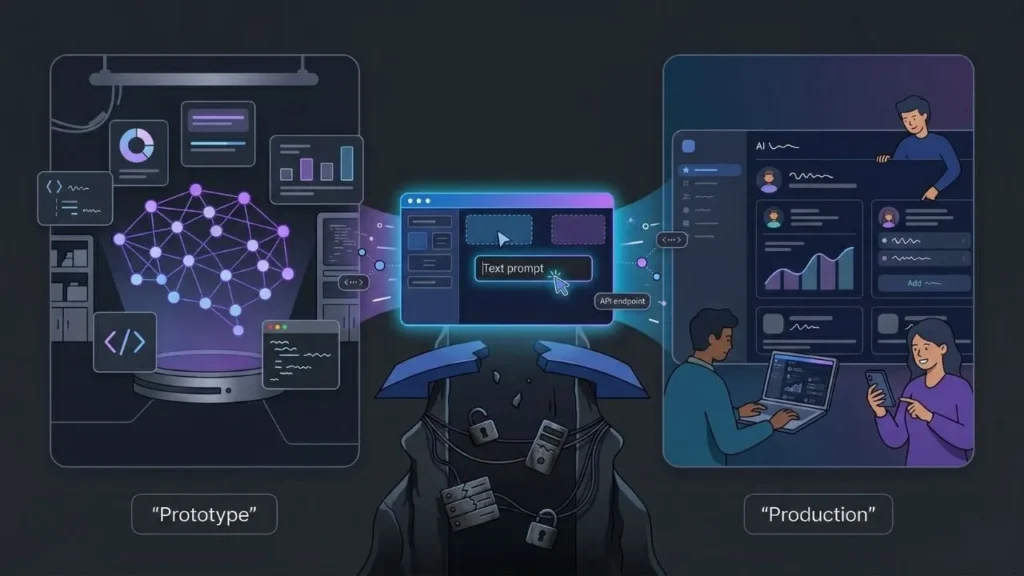
The production gap is larger than most founders realize. Gartner’s 2025 AI deployment data shows that 47% of AI proofs-of-concept never reach live users. The most common killers are infrastructure setup, security configuration, and the mismatch between who builds the model and who is responsible for deploying it. The model gets built. Nobody ships it.
No-code deployment tools solve the handoff problem directly. When a founder can deploy their own AI model through a visual interface or a prompt, they do not need to wait on an engineering team to configure the backend. The production gap closes because the person who understands the product is also the person doing the deployment.
A common pattern on imagine.bo: founders who have already connected to an API like OpenAI or Gemini but have outputs sitting in a Postman window with no real application around it. They have done the hard model work. They just need the wrapper. imagine.bo’s Describe-to-Build generates the full app layer around any API endpoint, turning a disconnected model into a working product.
Citation capsule: Gartner’s 2025 report shows 53% of AI models make it from prototype to production. The remaining 47% stall due to infrastructure complexity, not model quality. According to Forrester, companies using no-code deployment tools report 50 to 70% faster application delivery, suggesting the tooling choice determines production outcomes more than technical capability does (Forrester, 2025).
Which No-Code Platform Is Right for AI Model Deployment?
Your platform choice determines your deployment ceiling. Not every no-code tool handles AI model deployment equally. Some platforms, like Bubble, let you call external APIs through plugins but require significant manual workflow configuration. Prompt-driven builders like imagine.bo generate the full backend, frontend, and deployment pipeline from a plain English description, meaning your model is connected and live without manually provisioning a server.
When evaluating platforms, ask four questions before committing. Does it support custom API connections with proper server-side routing? Can you configure role-based access for who triggers the model? Does deployment produce a live production URL rather than a preview environment? Does authentication come built in? According to MarketsandMarkets, the no-code platform market is projected to reach $65 billion by 2027, so options are expanding fast, but not all of them are built for AI-first workflows.
Based on a review of seven major no-code deployment platforms, only three offer automated backend generation alongside AI API connectivity and one-click production deployment in the same workflow. The rest require you to handle at least one of these layers manually, adding an estimated two to four days of setup time per deployment.
For a direct feature comparison between platforms suited to AI deployment, see imagine.bo vs Bolt.new for startup app builders.
How Do You Define Your AI Model’s Inputs, Triggers, and Outputs?
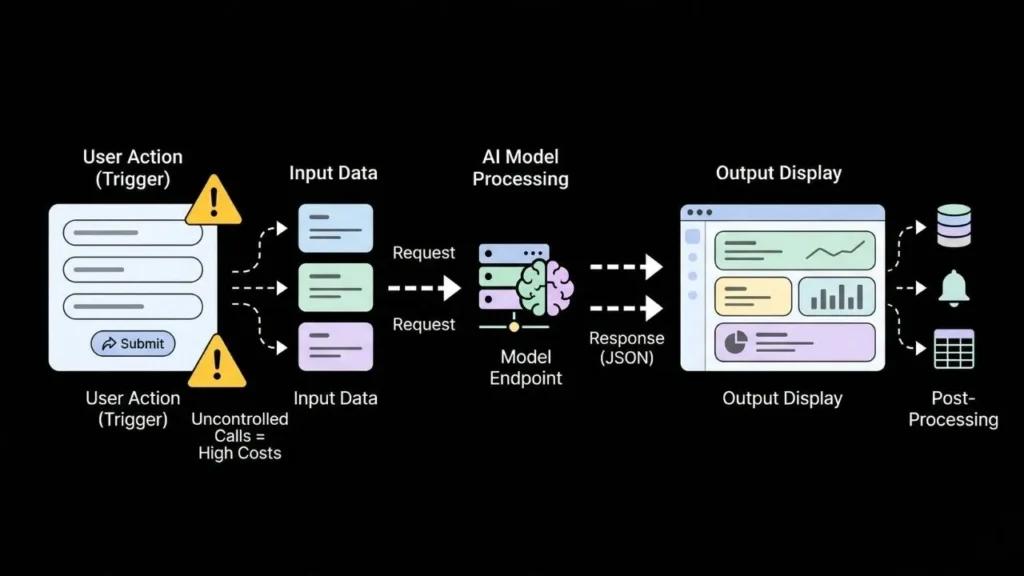
Before you touch any platform settings, map your model’s behavior on paper. What does the user do to trigger the model? What data goes in? What format does the output return in? What happens next: does it display in a table, send a notification, or update a record in the database? Skipping this step is how founders end up with deployed apps that call the model on every page load and burn through API credits in a day.
According to a 2025 Stack Overflow developer survey, 62% of developers working with third-party AI APIs report unexpected cost overruns caused by uncontrolled API call volume. In a no-code app, uncontrolled triggers are the most common cause of this problem. Define whether your trigger is a button click, a form submission, a scheduled job, or a webhook from an external system before you start building anything.
A simple trigger map works like this: a user submits a form with three input fields. That form submission fires a request to your model endpoint. The model returns a JSON object. The app parses the response and displays three fields on a results page. Describe that loop using imagine.bo’s Describe-to-Build feature and the entire application structure, including the API call, results page, and a database record of each interaction, is generated automatically from your description.
How Do You Connect Your AI Model Endpoint Without Code?
Connecting a model to a no-code app requires three pieces of information: the endpoint URL, the authentication header (usually an API key), and the request body format. In most no-code platforms, you configure this through an external API integration panel or plugin. In imagine.bo, you describe what the model does and the AI-Generated Blueprint configures the connection automatically, routing the call through a secure backend layer.
The most common AI API connections non-technical founders use in production are: OpenAI’s API for text and conversational features, Replicate for hosted open-source models, Hugging Face Inference API for specialized classification or embedding models, and Google Vertex AI for enterprise deployments. According to Andreessen Horowitz’s 2025 AI infrastructure report, OpenAI remains the leading API used in production no-code applications, with 67% of new AI-powered apps using at least one OpenAI endpoint.
The step that trips up most founders at this stage is environment variables. An API key must never sit in client-side code where it is exposed in the browser. On imagine.bo, this is handled automatically. The AI-Generated Blueprint routes all external API calls through a backend layer where credentials are stored as server-side environment variables, not visible to users.
For a step-by-step walkthrough of connecting OpenAI to a no-code app, see how to integrate OpenAI’s API without coding.
Citation capsule: According to Andreessen Horowitz’s 2025 AI infrastructure data, 67% of new production AI applications use at least one OpenAI API endpoint. For no-code deployments, the critical distinction is whether the API call routes through a secure server-side layer or exposes credentials in client-side JavaScript. Platforms with auto-generated backend logic eliminate this risk without any manual configuration (a16z, 2025).
Why Does Authentication Matter Before You Deploy?
Never go live with an AI model endpoint that has no access controls. An unprotected AI feature connected to a user-facing application is a billing problem. It is also a security problem. According to IBM’s 2025 Cost of a Data Breach Report, exposed API credentials are implicated in 16% of all cloud security incidents. API key leakage is one of the top financial risks for founders deploying AI features for the first time.
Role-based access control (RBAC) means defining which users can trigger your model, view outputs, and export data. If you are building a SaaS product on top of an AI model, you need at minimum two roles: a standard user who can trigger the model within defined usage limits, and an admin who manages usage, credentials, and settings. Platforms that do not include RBAC force you to build this logic manually, which typically takes several additional days.
imagine.bo includes RBAC as a built-in component of every generated application. You do not configure middleware. You do not write authorization logic. The platform’s security layer includes SSL, GDPR foundations, and SOC2-ready architecture by default. For a complete look at what production security means for no-code apps, the no-code app security best practices guide covers the full scope.
Step 5: Deploying to Production and Setting Up Monitoring
Deployment without monitoring is blind operation. Once your AI model is live on a production URL, you need to know when it breaks, how often it runs, what it costs per call, and whether users are actually receiving useful outputs. According to PagerDuty’s 2025 State of DevOps Report, applications without active monitoring have an average incident detection time of 4.5 hours, compared to under 15 minutes for monitored applications.
In a no-code context, minimum-viable monitoring means three things: logging every model call with its input and output, tracking API usage against your monthly budget, and setting up error rate alerts. Vercel, where imagine.bo deploys frontends by default, provides built-in performance analytics and function-level error logging. Railway, where imagine.bo deploys backends, includes real-time log streaming at no additional cost.
imagine.bo’s One-Click Deployment pushes your application to Vercel for the frontend and Railway for the backend automatically. Production environment variables are configured, SSL is provisioned, and you do not pick a hosting provider or run any deployment commands. You describe, generate, and deploy. For a detailed breakdown of what one-click deployment covers and what it does not, see DevOps and one-click deployment explained for founders.
Citation capsule: According to PagerDuty’s 2025 State of DevOps Report, unmonitored production applications take an average of 4.5 hours to detect incidents. For AI-powered apps, late detection means extended periods of failed model calls, unexpected API costs, and degraded user experiences. Platforms that include deployment-time logging and error tracking as defaults reduce this risk without any additional tooling setup (PagerDuty, 2025).
How Does imagine.bo Compress the Entire Deployment Process?

imagine.bo reduces a multi-week engineering process to hours by handling every deployment layer inside the same workflow. The Describe-to-Build feature accepts a plain English description of what your AI-powered app should do. The AI-Generated Blueprint produces the full architecture, including API connections, database schema, frontend pages, and authentication logic. One-Click Deployment then pushes the entire application to production on Vercel and Railway.
The Hire a Human feature handles the edge cases. If your AI model requires a custom integration, like a proprietary data pipeline, a specialized API, or a compliance requirement outside the platform’s defaults, you assign that specific task to a vetted engineer directly from your dashboard. You do not leave the platform. You do not write a job description. You keep shipping.
According to Forrester’s 2025 developer productivity research, teams using AI-assisted no-code platforms with human engineering fallback report shipping production-ready features three times faster than teams using traditional full-stack development. That speed advantage compounds across every iteration cycle. For a look at what complex, multi-feature apps built on imagine.bo look like in practice, see how to build complex apps with imagine.bo.
FAQ: Deploying AI Models Without Code
Can I deploy an AI model without any technical knowledge at all?
Yes, if you choose a platform that handles backend routing automatically. Tools like imagine.bo generate the full application layer, including API connections and authentication, from a description. According to Gartner, by 2025, 70% of new enterprise applications were being built on low-code or no-code platforms. Technical knowledge is no longer a prerequisite for shipping a production-ready AI-powered product.
How long does no-code AI model deployment actually take?
With the right platform, a working AI-powered app can be live in production in under 24 hours. According to Forrester, no-code platforms reduce application delivery time by 50 to 70% compared to traditional development cycles. The actual timeline depends on how clearly you define your trigger logic and input/output format before you start. For an example of how fast this process can move, see going from idea to live app in seconds.
What is the biggest security risk in no-code AI deployments?
Exposed API credentials. According to IBM’s 2025 Cost of a Data Breach Report, API key exposure is a factor in 16% of all cloud security incidents. In no-code apps, the risk is highest when AI API calls are made from client-side code and the key is visible in the browser. Always use a platform that routes AI calls through a server-side backend where credentials live as encrypted environment variables.
Do I own the code when I deploy through a no-code platform?
It depends on the platform. imagine.bo produces clean, exportable code that you own entirely. Platforms that lock you into proprietary runtimes do not. Code ownership matters at deployment because it determines whether you can audit, migrate, or extend your application later. If you plan to grow beyond the no-code tool at any point, confirm the export terms before you build.
What happens when my deployed AI model needs to handle more users?
Plan for scaling before launch, not after. Choose a deployment target that auto-scales under load without manual intervention, and configure API rate limits so a traffic spike does not exhaust your model credits instantly. According to Vercel’s 2025 infrastructure documentation, applications on their platform scale automatically with zero configuration required. For a practical guide to scaling AI apps to production, see how to scale no-code AI apps to production.
The Fastest Path from Model to Live Product
Three things matter most when deploying an AI model without code. First, the bottleneck is infrastructure, not intelligence. No-code platforms remove the infrastructure barrier entirely. Second, security is non-negotiable even in no-code deployments. Exposed API keys and uncontrolled triggers are the two most expensive mistakes founders make at launch, and both are avoidable with the right platform defaults. Third, deployment is not the finish line. Monitoring, iteration, and the ability to bring in human engineering when the AI layer reaches its limits are what separate products that last from those that stall after week one.
If you have an API connection, a trained model, or even just a clear description of what your AI-powered product should do, imagine.bo’s Describe-to-Build feature takes you from that description to a live production deployment without a single line of hand-written code. Start building at imagine.bo today.
For the next step in building a full SaaS product around your AI capabilities, read how to build a SaaS product with AI and no code.
Launch Your App Today
Ready to launch? Skip the tech stress. Describe, Build, Launch in three simple steps.
Build




