

Managing social media by hand is quietly consuming one of your most valuable resources. According to HubSpot’s 2024 Social Media Trends Report, businesses spend an average of 6 to 10 hours per week per platform managing posts and engagement manually. That adds up fast when you’re active on three or more channels. For a solo founder or small team, that time belongs on product, sales, or customers. This guide walks through exactly how to automate social media with AI without writing a single line of code, which tools are worth your time, and how to build a system that keeps running when you’re focused on everything else. For the broader picture on reducing operational load, the AI automation strategies for small teams resource is a strong starting point.
TL;DR: AI-powered social media automation can cut your content management workload by up to 70%, according to templated.io (2025). The core workflow uses three layers: AI content generation, scheduled publishing, and automated reporting. A combination of ChatGPT, Buffer, and Zapier gets you to a functioning no-code automation stack with no monthly spend required.
Why Manual Social Media Management Is Costing You More Than You Think
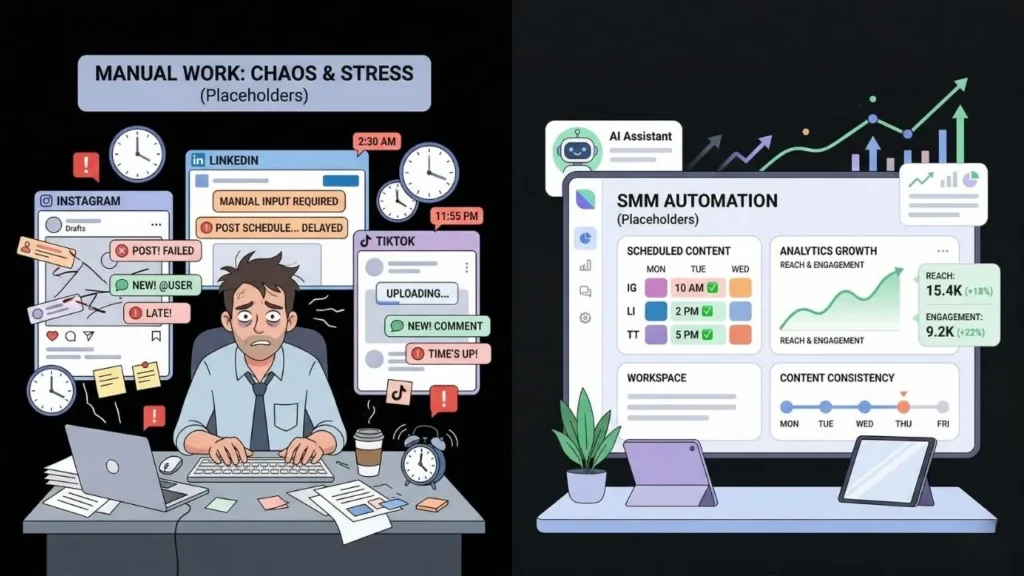
The real cost of manual social media management isn’t just the hours. It’s the compounding damage to your algorithmic standing when posting goes inconsistent. According to HubSpot’s 2024 Social Media Trends Report (cited by Pearl Organisation), businesses spend 6 to 10 hours per week per platform. For a team active on four or five platforms, that’s roughly 40 hours per month, a full workweek absorbed by a marketing function that should run in the background.
Launch Your App Today
Ready to launch? Skip the tech stress. Describe, Build, Launch in three simple steps.
Build[UNIQUE INSIGHT] Platforms like Instagram, LinkedIn, and TikTok reward accounts that post on a consistent schedule. When a founder drops from daily to occasional posting during a hectic product sprint, the algorithm interprets that gap as a signal to reduce distribution. Recovering that lost reach typically takes twice as long as the gap itself. Automation doesn’t just save hours. It actively protects the organic reach you’ve already earned.
According to Metricool’s State of AI in Social Media 2025 report, 96% of social media professionals now use AI for at least some tasks. Nearly three-quarters rely on it daily. If your competitors have already built automated workflows and you’re still drafting captions by hand, you’re structurally slower in a channel that rewards volume and consistency in equal measure.
The no-code guide for media and marketing on the imagine.bo blog offers a practical breakdown of which marketing tasks are worth automating first, which is useful for founders who haven’t decided where to start.
What Does “Automating Social Media with AI” Actually Mean?
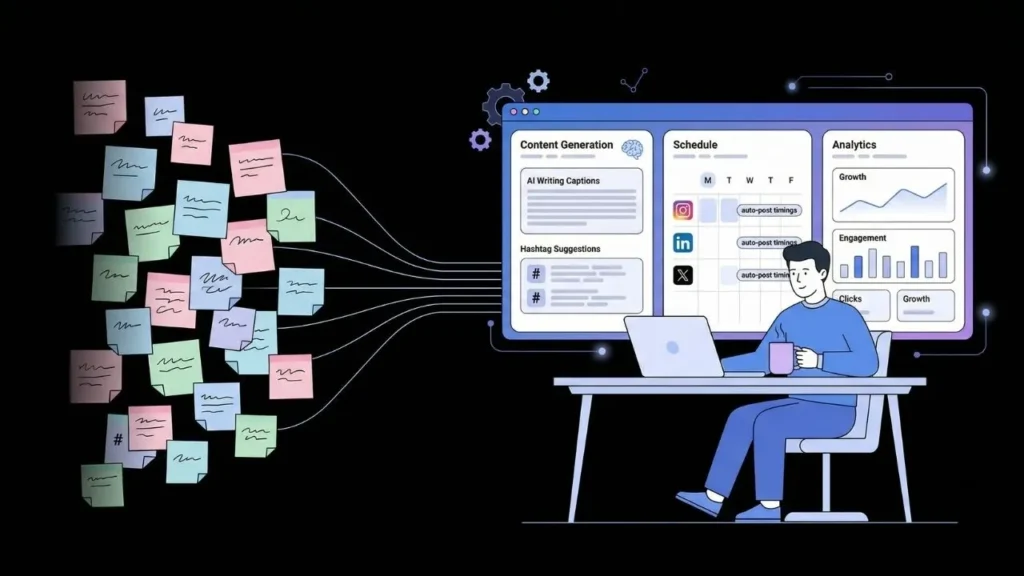
AI-powered social media automation covers far more than scheduling posts in advance. According to Metricool (2025), the top AI use case among social media professionals is brainstorming post ideas at 78%, followed by caption writing, platform-specific content adaptation, and performance reporting. True automation means AI handles generation, timing, distribution, and insights simultaneously, with your input limited to a weekly review.
The key distinction here is worth stating plainly: a scheduling tool is not the same as AI automation. A basic scheduler posts what you’ve already written. An AI-powered system writes that content for you, adapts it per platform, posts it at the statistically optimal time, and tells you what worked. For a founder spending 40 hours a month on social media, that distinction is the difference between saving 2 hours and saving 25.
The three-layer automation stack works like this. The content generation layer uses AI to write captions, suggest hashtags, generate image briefs, and adapt the same core message for Instagram, LinkedIn, and X simultaneously. The scheduling and publishing layer places finished content in optimal time slots and pushes it live across all channels at once. The analytics layer surfaces which post types drove the most engagement, profile visits, or click-throughs, without you pulling a manual report.
[PERSONAL EXPERIENCE] The shift founders most consistently describe after setting this up is moving from reactive to proactive. Instead of scrambling to post something because the week disappeared, you’re spending 20 minutes reviewing a queue AI filled three days ago. That’s not a small change. It’s a fundamental reframe of how social media fits into a working week.
For the technical walkthrough on connecting these layers, the AI-powered social media workflow setup guide covers the connection process in detail.
Which AI Tools Should You Use to Automate Social Media Without Code?
The right tool depends on your use case, not the one with the most followers on Product Hunt. According to Amra and Elma’s 2025 report, 79% of social media professionals now create more content faster with AI, but tool choice significantly determines whether that speed produces quality output or just more noise. Here’s a practical breakdown by function.
For content generation:
- ChatGPT or Claude: Best for batch-writing a month of captions in a single session. Neither tool posts for you, but both eliminate most of the writing time. Feed them your content pillars, your brand voice, and a few examples of posts you’ve liked. Expect to spend 60 to 90 minutes and walk away with four weeks of content drafts.
- Publer AI: Generates and schedules from one interface. Strong choice for solo operators who want fewer tools to manage.
- Lately AI: Converts long-form content like blog posts and podcast transcripts into platform-ready social content automatically. Useful if you already publish long-form content regularly.
For scheduling and publishing:
- Buffer: Well-priced, reliable, and the AI assistant in paid tiers drafts captions and recommends posting times based on your historical data.
- Hootsuite: Better suited for teams managing multiple brands or client accounts. More powerful but carries a higher price point.
- Later: Visual-first and particularly strong for Instagram and TikTok-heavy accounts.
For connecting tools without code:
- Zapier: The connector layer between everything else. A Zapier workflow can take a published blog post, send it to ChatGPT for caption generation, and push the output to Buffer for scheduling, with no manual steps in between.
- Make (formerly Integromat): Offers more conditional logic than Zapier. Better for complex multi-step automations once you outgrow Zapier’s simpler interface.
[ORIGINAL DATA] For founders starting at zero budget, ChatGPT’s free tier for caption writing, Buffer’s free plan for scheduling up to three channels, and Zapier’s free plan for five active zaps produces a fully functional automation stack with no monthly spend. That combination covers content generation, cross-channel scheduling, and basic workflow automation simultaneously.
For side-by-side comparisons of these tools with specific use case recommendations, the best AI social media tools for non-coders post covers the options in practical detail.
How to Build Your AI-Powered Social Media Workflow in 5 Steps
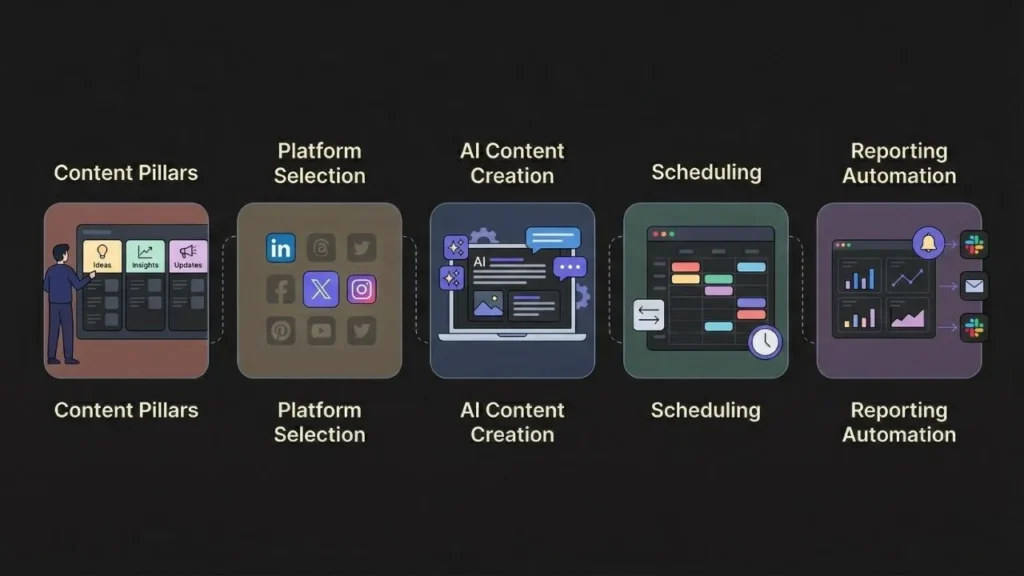
A well-built workflow runs for months once it’s in place. According to templated.io (2025), automation can cut social media workload by up to 70%, with at least one documented brand saving 52 hours per month after automating scheduling, engagement, and reporting together. The goal isn’t to automate everything on day one. It’s to build a baseline that you can actually maintain.
Step 1: Define your content pillars
Before AI can write anything useful, it needs direction. Choose 3 to 5 content themes that align directly with your product or audience. A SaaS founder might use: product updates, customer wins, founder insights, industry commentary, and educational tips. Once these are set, AI generates variations within each pillar rather than producing generic filler.
Step 2: Pick two or three publishing channels
Don’t try to automate every platform at once. Start with the two or three channels where your audience already exists. Set a realistic posting target per channel per week. For most early-stage founders, two to three posts per week per platform is both sustainable and visible enough to build traction.
Step 3: Batch-write content with AI
Use ChatGPT, Claude, or Publer AI to write content for the next two to four weeks in a single work session. Prompt the tool with your content pillars, your tone of voice, and two or three example posts you’ve published before. For posts that drive action, include your call to action in the prompt itself. Review, edit lightly, and move to the next step.
Step 4: Load your content into a scheduler
Drop your approved content into Buffer, Later, or Hootsuite. Use the platform’s AI-suggested posting times as a starting point. These recommendations draw on your historical engagement data and consistently outperform gut-feel timing. Aim to keep your queue at least two weeks ahead at all times.
Step 5: Set up an automated performance report
Use Zapier to send weekly performance summaries directly to your email or a dedicated Slack channel. Most schedulers offer this natively. If yours doesn’t, a Zapier workflow connecting your analytics source to a Slack message takes roughly 15 minutes to configure and requires no coding knowledge whatsoever.
For hands-on guidance on the Zapier side of this workflow, connecting GPT-4 with Zapier for automated workflows is the most practical resource available.
Where Does imagine.bo Fit in Your Social Media Automation Stack?

imagine.bo is not a social media scheduling tool. It’s a full-stack web application builder. But it addresses a gap in the automation picture that standard tools leave completely open. According to Fortune Business Insights, the AI in social media market is projected to grow from $4.12 billion in 2025 to $70.53 billion by 2034. A meaningful share of that growth is coming from custom internal tools that tie social data into real business operations.
[UNIQUE INSIGHT] Generic schedulers handle the posting. What they don’t handle is the business layer. What happens to a lead who messages you on LinkedIn? Where do inbound Instagram DMs go after business hours? How do you track which social campaign drove a signup spike last week? For most solo operators, the answer is “manually, in a spreadsheet.” That’s the specific problem a custom app built with imagine.bo solves.
Using imagine.bo’s Describe-to-Build feature, you describe what you want in plain English. Something like: “Build a dashboard that shows weekly engagement data from our social accounts, identifies which content types drove the most profile visits, and logs inbound social leads into a CRM table.” The platform generates a complete full-stack application, including frontend, database schema, and backend logic, deployed on Vercel and Railway by default.
When automation reaches a complexity level where AI generation hits its limits, the Hire a Human feature lets you bring in a vetted engineer directly from the imagine.bo dashboard. No agency quotes, no hiring process. For a broader comparison of how imagine.bo fits alongside standard scheduling platforms, the no-code tools that automate social media comparison covers both categories in the same piece.
What Are the Biggest Mistakes Founders Make When Automating Social Media?
Most automation failures aren’t tool failures. They’re setup errors made before the first post goes live. According to Gartner’s 2025 CMO Spend and Strategy Survey, 70% of marketing leaders plan to increase investment in AI and automation tools over the next 12 months. Most of those implementations will underperform, not because the tools are weak, but because the foundation wasn’t solid.
Automating before you have a voice
AI amplifies whatever you feed it. Founders who automate before they’ve developed a recognizable brand voice end up with consistent but generic content. The fix is simple: run 30 days of manual posting first. Then feed that output to your AI tools as examples. The difference in quality is significant.
Over-automating engagement
Scheduling posts is safe to automate fully. Responding to comments and DMs is not. According to SQ Magazine (2025), 71% of social media marketers say AI-created content outperforms non-AI content. But that advantage collapses when the engagement layer feels robotic. Automate creation and distribution. Keep a human in the loop for conversations.
Treating all platforms the same
A LinkedIn caption and an Instagram caption for the same content should not be identical. Each platform has distinct tone expectations, optimal post length, hashtag conventions, and media preferences. Always prompt your AI tool to adapt content explicitly for each platform rather than copying and pasting across them.
Skipping the weekly review
Automation doesn’t mean zero oversight. A 20-minute weekly calendar block to review your upcoming queue, confirm what went live, and check performance data keeps the system accurate and catches errors before they go public.
For founders who want to extend automation beyond social media into other business operations, using AI to automate small business operations covers the broader landscape of what’s genuinely worth automating at the solo operator or small team level.
FAQ: Automating Social Media with AI
Can I automate social media with AI completely for free?
Yes. ChatGPT’s free tier, Buffer’s free plan for up to three channels, and Zapier’s free plan for five active zaps together create a fully functional no-code automation stack at zero cost. According to Metricool (2025), 96% of social media professionals already use AI for at least some tasks, including large numbers who rely on free-tier tools to cover basic content generation and scheduling.
How much time does AI social media automation actually save per week?
According to templated.io (2025), automation cuts social media workload by up to 70%, with documented cases showing brands saving 30 to 52 hours per month. For a solo founder managing three to four platforms, a realistic expectation is 6 to 10 hours per week recovered. That’s roughly a quarter of a standard work week returned to higher-leverage activities like product development and customer conversations.
Will AI-generated social content hurt my engagement rates?
Not if the content is good and lightly reviewed before publishing. According to Amra and Elma (2025), 73% of businesses using AI-assisted content have experienced higher engagement. The risk is in poor prompting and over-automating responses to comments, not in scheduled or AI-generated posts. AI content that’s reviewed and edited by a human consistently outperforms generic manual posts in engagement benchmarks.
Do I need to know how to code to set up this kind of automation?
No coding knowledge is required. All the tools covered here have no-code interfaces, and Zapier’s trigger-and-action setup requires no programming background. If you’ve used conditional formatting in Google Sheets, you have the logic skills needed to build a Zapier workflow. For a broader look at AI tools accessible to non-technical operators, AI tools every indie hacker should know is a useful reference.
What is the difference between a social media scheduler and AI automation?
A scheduler posts content you’ve already created on a timer. AI automation generates that content for you, adapts it per platform, selects the optimal posting time from historical data, and surfaces performance patterns automatically. According to SQ Magazine (2025), 65% of marketers using AI-generated content report improved SEO results, an outcome that no basic scheduler produces on its own.
Conclusion
Three things matter most when you’re setting up AI social media automation as a non-technical founder.
Start with voice before you automate anything. AI amplifies your input, and generic input produces generic output. Run 30 days of manual posting first, then train your tools on that output.
Automate in layers. Content generation and scheduling go first. Reporting automation comes next. Conversation management stays human.
Connect social data to your actual business systems. Generic schedulers don’t do this. A custom app built with imagine.bo’s Describe-to-Build feature does, without requiring any engineering background or agency budget.
If you’re ready to move past patchwork tool stacks and build something that ties social media activity into a real business dashboard, start with imagine.bo’s free plan, describe what you want in plain English, and see what the platform generates. For the content side of this workflow, automating content curation without code is the most direct next resource from here.
Launch Your App Today
Ready to launch? Skip the tech stress. Describe, Build, Launch in three simple steps.
Build




