
Most founders who want to add image recognition to their product hit the same wall fast. The machine learning tutorials assume Python fluency. The cloud APIs require backend infrastructure they do not have. The no-code tools that claim “AI-ready” barely scratch the surface past uploading a photo. If you have been searching for a practical path from “I want my app to analyze images” to a working feature in production, this guide is written specifically for you.
You will learn how image recognition actually works, which integration paths make sense without writing ML code, how to connect capable vision APIs into a full-stack app, and where imagine.bo fits into that workflow. By the end, you will have a clear, actionable roadmap instead of a pile of half-useful tutorials.
Launch Your App Today
Ready to launch? Skip the tech stress. Describe, Build, Launch in three simple steps.
BuildCheck out the AI image recognition tools overview for no-code developers for a quick vendor comparison before diving into the implementation details below.
TL;DR: AI image recognition is now accessible to non-technical founders through vision APIs from Google, AWS, and OpenAI that require no model training. The global AI image recognition market was valued at $27.33 billion in 2025 and is growing at a 10.89% CAGR, according to 360iResearch. Using imagine.bo’s Describe-to-Build feature, you can wire these APIs into a production-ready full-stack app without writing backend infrastructure from scratch.
What Is AI Image Recognition and Why Does It Matter for App Builders?
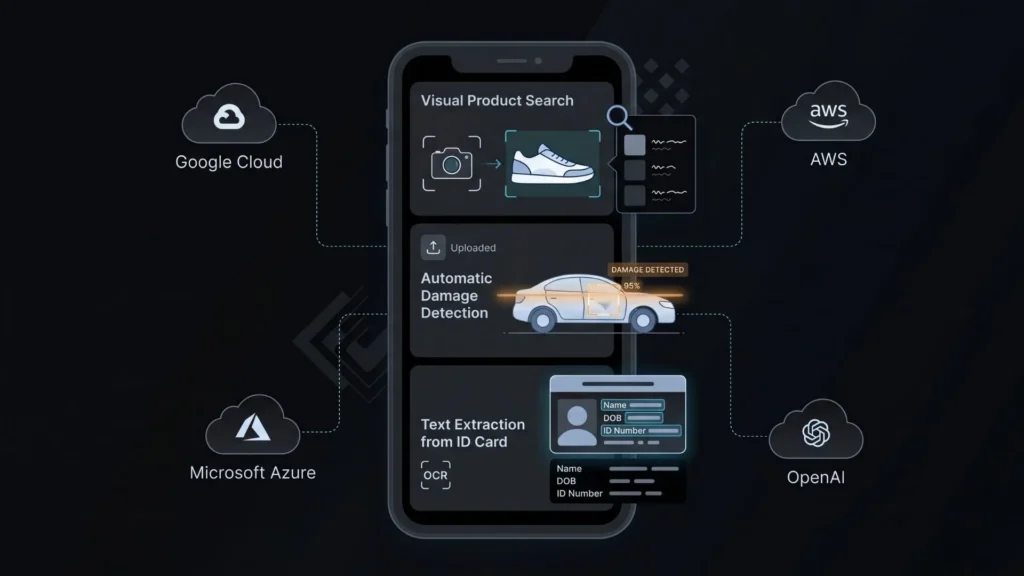
AI image recognition is the capability that lets software interpret the content of an image, identifying objects, faces, text, scenes, or patterns with accuracy that now exceeds human performance on many benchmark tasks. For app builders without ML backgrounds, what matters is this: you do not need to train a model. The hard work has been done by Google, AWS, Microsoft, and OpenAI. You consume it through an API.
The AI image recognition market reached $27.33 billion in 2025, growing at a 10.89% compound annual growth rate toward $45.98 billion by 2030, according to 360iResearch. 360iResearch That growth is not happening because enterprises are all hiring ML engineers. It is happening because APIs and no-code tooling have made vision capabilities consumable by product teams of any technical level.
The practical implication for founders is significant. An e-commerce app can let users search by photo rather than keyword. A property management platform can auto-flag maintenance issues from tenant-submitted images. A healthcare intake tool can extract data from insurance cards without manual entry. None of these require a single line of TensorFlow.
What gets missed in most “no-code AI” coverage is the distinction between consuming a vision model and training one. Founders do not need the latter for 95% of real product use cases. The trained models from major cloud providers handle general object recognition, OCR, face detection, and label classification out of the box. Custom training is only necessary for niche domains like specialized medical imagery or proprietary industrial inspection. That distinction alone eliminates the biggest perceived barrier to entry.
For a broader foundation on the underlying technology, the machine learning beginners guide covers the core concepts without assuming a computer science background.
What Are the Main Types of AI Image Recognition You Can Actually Use?
Image recognition is not one thing. It is a family of capabilities, and understanding which one your product needs saves weeks of going down the wrong path. The major categories, each available through API today, are object detection, image classification, facial recognition, optical character recognition, and scene understanding.
The facial recognition segment held the largest technique share at 22.5% in 2023, while the retail and e-commerce sector dominated end-use segments at 21.0%, reflecting where adoption is most mature, according to Grand View Research. Grand View Research Those two data points tell you something useful: face-based features and product-visual search have the most mature tooling ecosystems to build on.
Object detection identifies what is in an image and draws bounding boxes. It is the right choice for inventory apps, safety monitoring tools, or anything that needs to know “what is here and where is it?”
Image classification assigns a label to the whole image without locating specific items. Useful for content moderation, routing customer uploads to the right support queue, or auto-tagging media libraries.
OCR (optical character recognition) extracts printed or handwritten text from images. If your app needs to process invoices, business cards, ID documents, or forms submitted as photos, this is the capability you want. The no-code AI OCR guide covers this specific use case in detail.
Scene understanding goes broader, describing the overall context of an image. Google Vision’s “safe search” feature is one example. Another is auto-generating alt text for accessibility compliance.
A common mistake is reaching for the most sophisticated API when a simpler one would work. A founder building a food-logging app does not need a custom model for meal detection. Google Vision’s label detection returns food categories with confidence scores in a single API call. Starting there, then escalating to a specialized model only if accuracy is insufficient, is the correct sequencing.
Which Vision APIs Should No-Code Developers Know About?
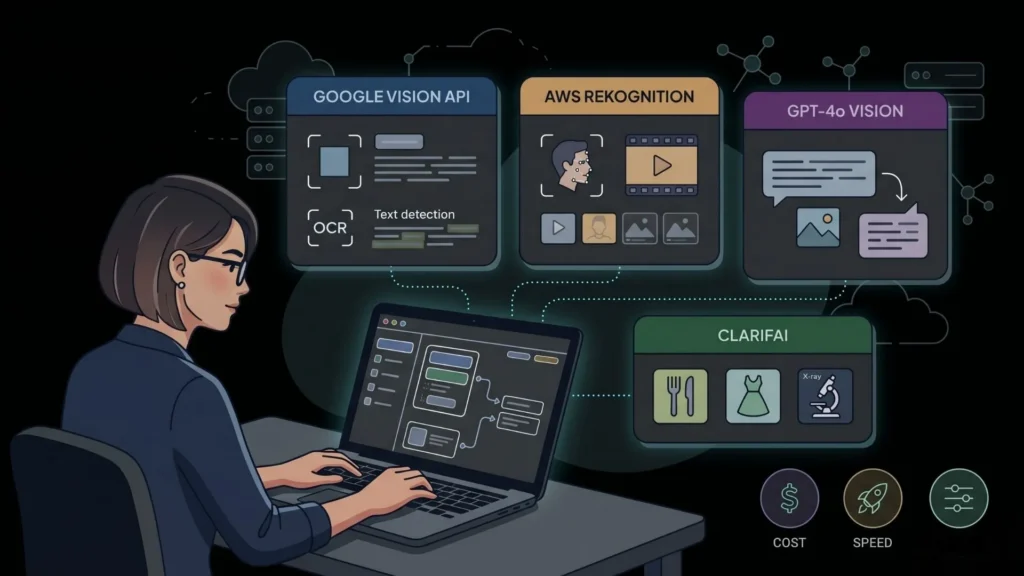
The API ecosystem for image recognition in 2026 is mature, well-documented, and priced at a scale that makes experimentation free. The three dominant providers are Google Cloud Vision, AWS Rekognition, and OpenAI’s GPT-4o vision capability, each with a distinct strength.
Cloud workloads in the AI image recognition space are expanding at a 16.37% CAGR as hyperscale elasticity and managed model services gain favor, even though on-premises solutions still captured 67.95% of revenue in 2025, according to Mordor Intelligence. Mordor Intelligence For product builders, that cloud trend is good news: the APIs that power enterprise deployments are the same ones accessible on a pay-per-call pricing model.
Google Cloud Vision API handles label detection, text extraction, face detection, landmark identification, and explicit content flagging. The free tier covers 1,000 units per month per feature. Response latency is typically under 500 milliseconds. It is the fastest API to integrate for general-purpose vision tasks.
AWS Rekognition is stronger for facial analysis and comparison, celebrity recognition, and video analysis. If your app needs identity verification or moderation at scale, Rekognition’s confidence scoring is well-calibrated. AWS’s pricing model rewards volume better than Google’s for high-traffic applications.
OpenAI GPT-4o with vision is the most flexible option because you can write a natural language instruction for what the model should analyze. “Describe the damage visible in this photo and estimate severity” is not something a label-detection API can do but GPT-4o handles reasonably well. The tradeoff is cost and latency: it is more expensive per call and slower than specialized vision APIs.
Clarifai is worth knowing for founders building apps that need industry-specific models. Their model marketplace includes pre-trained models for food recognition, apparel classification, and medical imaging that outperform generic APIs in those domains.
Based on public pricing as of April 2026, processing 10,000 images monthly costs approximately $1.50 on Google Cloud Vision (label detection), $10 on AWS Rekognition (object and scene detection), and roughly $25 to $75 on GPT-4o vision depending on image resolution and prompt length. For most early-stage products, Google Vision represents the lowest cost-to-value ratio for standard classification tasks.
How Do You Build an App With Image Recognition Without Writing Backend Code?
This is the practical question. You understand what the APIs do. Now you need to know how to wire them into an actual product without standing up a Node.js server, writing API authentication middleware, and managing environment variables. The answer is that you describe what you want and let imagine.bo’s Describe-to-Build feature generate the application structure for you.
By 2025, 70% of new applications are expected to use no-code or low-code tools, according to Gartner, up from less than 25% in 2020, a shift driven by the maturation of platforms that can handle real integrations, not just simple forms. CodeConductor
Here is the practical workflow for a founder building an image-analysis feature with imagine.bo:
Step 1: Describe the feature in plain English. Write a prompt like: “Build a web app where users can upload a product photo and receive an auto-generated label, category, and description based on Google Cloud Vision’s label detection API.” The Describe-to-Build feature generates a blueprint including the frontend upload interface, backend API handler, and database schema.
Step 2: Review the AI-Generated Blueprint. Before any code is written, imagine.bo produces a structured plan you can inspect. You can specify the vision API you want to use, the data you want stored, and the output format you need. This is the right moment to catch mismatches between what you described and what you actually need.
Step 3: Inject your API key securely. The generated backend handles authentication. You add your Google Cloud Vision or AWS Rekognition key as an environment variable. The production deployment on Railway keeps those credentials out of your frontend code entirely.
Step 4: Test with real images and iterate. Use the conversational refinement interface to adjust the output. “Show the confidence score alongside each label” or “Only display results with a confidence above 75%” are instructions you give in plain text, not code.
Step 5: Deploy to production. One-Click Deployment pushes the frontend to Vercel and the backend to Railway. Your image recognition feature is live, with SSL, and scalable from the first request.
For reference on how complex the alternative path is, compare this to what it costs and how long it takes to build an app without AI assistance in 2026.
What Real Use Cases Can Non-Technical Founders Ship With Image Recognition?
Image recognition sounds abstract until you map it to specific problems founders are actually solving. The use cases below are all achievable within a single imagine.bo session using standard vision APIs, no model training required.
The global no-code AI platforms market was estimated at $4.28 billion in 2024 and is projected to reach $44.15 billion by 2033, growing at a 30.2% CAGR, according to Grand View Research, driven largely by computer vision integration that enables tasks like image recognition and object detection without extensive coding. Grand View Research
E-commerce product upload and auto-tagging. A small retailer uploads product photos. The app calls Google Vision’s label detection, auto-generates a product title, category, and three SEO-friendly tags, and saves them to the database. The seller reviews and approves rather than typing everything manually. That eliminates 80% of the catalog management labor.
Property damage intake for insurance or property management. Tenants photograph an issue. The app runs image classification to identify the damage type (water, structural, appliance), routes it to the right repair category, and stores the timestamp and metadata. No staff triage needed for first-pass categorization.
ID and document verification for onboarding. A user uploads a photo of their driver’s license. OCR extracts the name, date of birth, and expiry. The app pre-fills the registration form and flags discrepancies for manual review. This is a common requirement for rental platforms, financial tools, and healthcare intake flows.
Visual content moderation for user-generated content platforms. Any platform where users upload photos needs a filter. Google Vision’s safe search detection returns probability scores for adult, violent, and medical content in a single call. The app auto-hides flagged images before a human moderator reviews them.
Food logging and nutrition apps. A user photographs their meal. The Vision API returns food labels. The app cross-references a nutrition database and logs the approximate calorie count. Not perfectly accurate, but accurate enough to provide value for habit tracking, and shippable in a single sprint.
For a deeper look at building apps that combine multiple AI capabilities, the guide to building complex apps with imagine.bo walks through multi-feature applications step by step.
What Are the Limitations Founders Should Know Before Committing?
Honest coverage of image recognition for no-code developers requires acknowledging what does not work as well as what does. Pretending the APIs are perfect would be a waste of your planning assumptions.
Enterprises now demand transparent decision pathways in image recognition, with explainability and ethical AI becoming a key requirement rather than an afterthought, according to 360iResearch’s 2025 analysis of the AI image recognition market. 360iResearch
Accuracy drops in niche domains. Google Vision’s general object detection is impressive for everyday items. For specialized categories like specific machinery parts, rare plant diseases, or proprietary product lines, accuracy can fall sharply. If your use case is highly specialized, you will need a custom model or a domain-specific provider like Clarifai.
Latency is real and affects UX. A Vision API call adds 200 to 800 milliseconds to a user interaction depending on the provider and image size. For a background job, that is fine. For a real-time experience where the user is waiting, you need to design the UX around it: show a loading state, process asynchronously, or pre-compress images.
Privacy and data residency matter. When your app sends a user’s uploaded photo to a third-party API, that data leaves your infrastructure. For health, legal, or financial apps, you need to verify the provider’s data handling policies and your own privacy disclosures. AWS Rekognition and Google Cloud both offer data residency options, but they require configuration.
Credit costs scale with usage. Imagine.bo credits cover the application generation and deployment. The Vision API call itself is billed by the provider. At low volumes this is negligible, but at 100,000 image analyses per month, you need to model the per-call cost into your product pricing.
When you hit technical complexity that exceeds what conversational iteration can solve, imagine.bo’s Hire a Human feature lets you assign that specific task to a vetted engineer from inside the dashboard. You stay in control without needing to find and vet a freelancer externally.
The no-code vs. low-code comparison for startups addresses how to think about when you need more engineering depth and when the no-code path is genuinely sufficient.
How Does imagine.bo Handle Image Recognition Compared to Other Builders?

Most no-code platforms treat API integration as a configuration task: you paste a key, drag a trigger, and hope the visual editor handles the request correctly. That works for simple webhooks. It breaks down fast when you need a backend that resizes images before sending them to an API, stores structured results in a relational database, and applies business logic to the response.
According to Gartner, 70% of enterprise-developed new applications will be driven by low-code and no-code initiatives, more than double the less than 25% rate of 2023, reflecting a shift toward platforms that can handle production-grade complexity, not just prototypes. All Things Open
Bubble and Adalo can call an API endpoint. They cannot generate the backend infrastructure that handles file uploads securely, manages API rate limiting, or stores image metadata in a structured schema. Webflow does not have a backend at all. Lovable and Bolt.new generate frontend code reasonably well but require you to handle backend logic separately.
The real differentiator for image recognition workloads is not whether a platform can make an API call. It is whether the generated architecture is sound enough to handle real user behavior: concurrent uploads, image size validation before the API call, graceful error handling when the Vision API returns an unexpected result, and a database schema that stores the structured output usefully. Imagine.bo’s Describe-to-Build generates a full-stack architecture that addresses these concerns from the first prompt. Other tools leave those design decisions to you.
The production deployment stack matters too. Railway’s backend hosting, which imagine.bo uses by default, handles the environment variables, automatic HTTPS, and horizontal scaling that a vision-processing endpoint needs. Vercel handles the frontend. You do not assemble this stack. It is the default.
For a direct comparison of what imagine.bo delivers versus a specific competitor in this space, the Lovable vs. imagine.bo 2026 comparison covers the architectural differences in detail.
FAQ
Can I add image recognition to an existing app built on another platform?
Not directly through imagine.bo’s Describe-to-Build, which generates new full-stack applications. However, if you describe your existing app’s requirements from scratch, imagine.bo can rebuild it with image recognition features included. For adding a vision endpoint to an existing codebase, imagine.bo’s Hire a Human feature connects you with engineers for targeted integrations. According to Grand View Research, the service segment holds 39.1% of the image recognition market, reflecting how much demand there is for integration work specifically.
Which vision API is most accurate for general product photo classification?
Google Cloud Vision leads for general-purpose label detection and is the most cost-effective option for standard use cases. AWS Rekognition outperforms it for facial analysis and identity-related features. OpenAI’s GPT-4o vision is the strongest for tasks requiring natural language interpretation of an image. According to Mordor Intelligence, cloud-based vision services are growing at a 16.37% CAGR, driven largely by enterprises standardizing on these major providers for their reliability and support infrastructure.
How long does it take to build an image recognition feature with imagine.bo?
A working prototype with a file upload interface, Vision API integration, and results displayed to the user takes one to two hours using Describe-to-Build. A production-ready version with user authentication, stored results, and a dashboard to review past analyses typically takes one focused session of three to four hours, including testing with real images. For context, companies using low-code tools complete projects 50 to 75% faster than traditional coding methods, according to a survey referenced by Bubble IO Developer. Bubble Developer
Do I need to train my own model or can I use pre-built ones?
For most product use cases, pre-built models from Google, AWS, or OpenAI are sufficient. Custom training is necessary only for specialized domains where off-the-shelf models underperform, such as proprietary industrial components or niche medical imagery. Synthetic data engines are shrinking labeling budgets and broadening participation for mid-sized firms that previously lacked annotated imagery, according to Mordor Intelligence’s January 2026 analysis Mordor Intelligence, but for the majority of founders, consuming pre-built APIs through a no-code platform remains the faster and more cost-effective path.
What happens if the Vision API returns an incorrect classification?
Design your application to treat the API output as a suggestion rather than a definitive answer. Show the result to users with a confidence score and a simple correction mechanism. Store both the API output and any user corrections in your database. Over time, those corrections become valuable signal if you ever need to fine-tune a custom model. This is standard UX practice for AI-augmented workflows and should be part of your blueprint from the start.
Conclusion
Three takeaways stand out from everything above. First, AI image recognition is genuinely accessible to non-technical founders in 2026. The hard part, training the models, has been done by Google, AWS, and OpenAI. Your job is connecting those capabilities to a useful product interface. Second, the barrier is not the technology. It is the backend infrastructure needed to handle file uploads, API calls, structured storage, and error handling correctly. That is exactly what imagine.bo’s Describe-to-Build generates from a plain English prompt. Third, honest scoping matters. Pre-built vision APIs handle 90% of real product use cases well. Niche domains may require custom models or specialized providers, and knowing that upfront saves weeks of wasted effort.
If you are ready to test this, start with a one-paragraph description of the image recognition feature your product needs. imagine.bo will generate an AI-Generated Blueprint you can review before any code is written. Start building at imagine.bo.
For more on extending your app with additional AI capabilities, the guide to prompt-driven development for startups is the logical next read.
Launch Your App Today
Ready to launch? Skip the tech stress. Describe, Build, Launch in three simple steps.
Build




