

A custom real estate platform from a development agency costs $60,000 to $180,000 and takes five to nine months to deliver. By that time, the market has shifted, the leads you wanted to capture have gone to a competitor with a faster digital experience, and the budget you spent on software could have funded two years of marketing. According to the National Association of Realtors, 97% of homebuyers use the internet during their home search, and 76% of buyers say that website quality directly influences which agent or brand they choose to work with (NAR, 2024). The digital platform is not a nice-to-have for real estate brands. It is the first impression. AI-generation tools have made building that platform without a development agency both fast and financially viable. This guide covers five specific ways real estate brands are building smart platforms without developers in 2026. For the dedicated guide to real estate CRM architecture and costs, this post on real estate CRM features, costs, and how to build one is the most relevant companion resource.
TL;DR Real estate brands are building property listing portals, agent CRMs, client onboarding platforms, rental management tools, and lead capture dashboards without developers using imagine.bo’s Describe-to-Build interface. The platform generates full-stack applications from plain English, starting at $0. According to NAR, 76% of buyers judge agent credibility by website quality (NAR, 2024). Custom builds on imagine.bo cost under $325 in year one versus $60,000 to $180,000 from a development agency, with built-in RBAC, SSL, and GDPR foundations on every deployment.
Why Generic Real Estate Platforms Fall Short
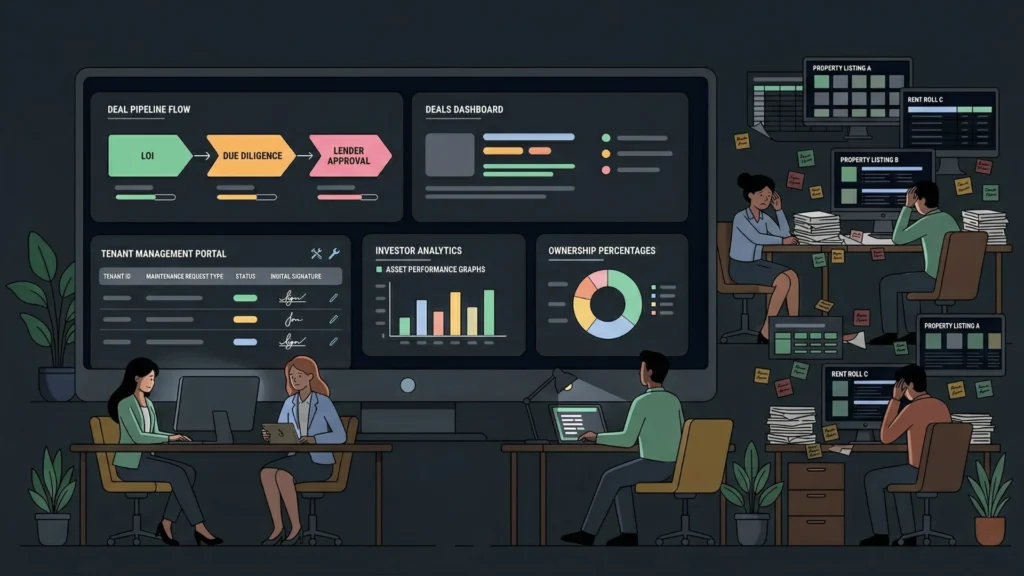
Zillow, Rightmove, and generic listing plugins solve the average real estate business’s workflow. They do not solve a specific agency’s workflow. A boutique commercial property firm needs a deal pipeline structure that tracks letter of intent status, due diligence stages, and lender requirements. A property management company needs a tenant portal that handles maintenance requests with photo uploads, lease renewals with digital signature, and rent payment history in one place. A PropTech startup building a fractional investment platform needs a custom investor dashboard that tracks ownership percentage, distributions, and property performance metrics.
Launch Your App Today
Ready to launch? Skip the tech stress. Describe, Build, Launch in three simple steps.
BuildNone of these match a generic WordPress real estate theme or a Zoho CRM configured for residential sales. The workarounds, the spreadsheets, the manual email sequences, the disconnected tools, add up to administrative overhead that reduces the time agents spend with clients and the data quality that managers use to make decisions.
According to Deloitte’s 2024 Global Real Estate Technology Report, real estate firms that implement custom digital platforms see 34% higher client conversion rates from initial inquiry to signed agreement, compared to those using generic listing tools and manual follow-up (Deloitte, 2024). The platform is the workflow, and a workflow that matches your specific business model produces better outcomes than one you adapt your business to fit.
Way 1: Custom Property Listing and Search Portals
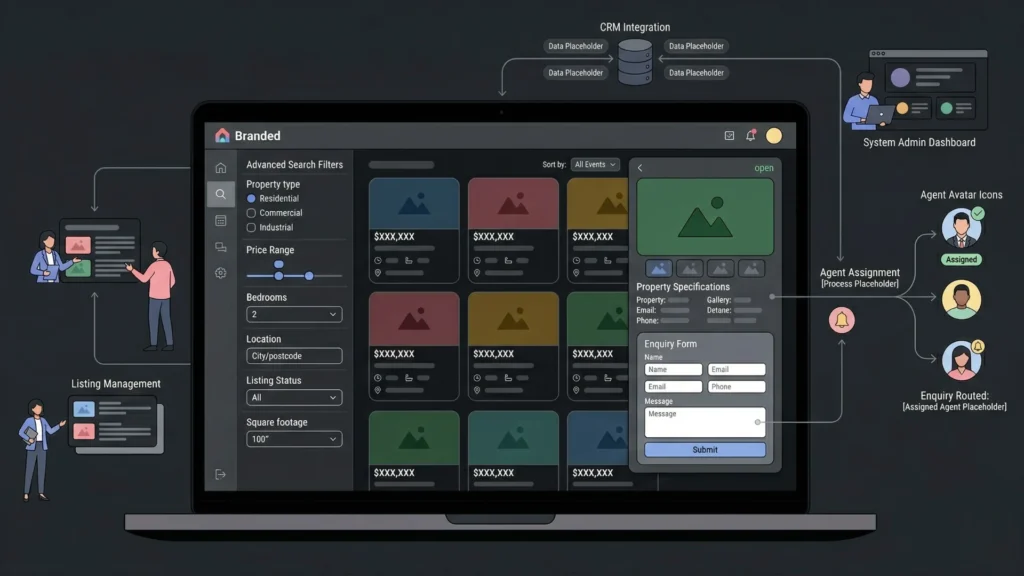
A branded property listing portal that shows only your inventory, enforces your search filters, and captures buyer leads directly into your CRM is the most foundational smart platform for any real estate brand. Generic portals put your listings alongside competitors. A custom portal puts your brand at the centre of the search experience.
The listing portal prompt element that most affects generation quality is the search filter specification. “Users can search for properties” generates a generic keyword search. “Users can filter properties by type (residential, commercial, industrial), price range, number of bedrooms, location by city or postcode, listing status (available, under offer, sold), and square footage range. Results update in real time as filters change without a page reload.” That specification generates the filter interface with the correct database queries behind each filter, rather than a single search box that queries only the title field.
A complete listing portal prompt: “Build a property listing portal for a residential real estate agency. Each listing has a property type, address, price, number of bedrooms and bathrooms, square footage, description, status: available, under offer, or sold, and up to ten photos. Buyers can search and filter listings by type, price range, bedrooms, and location. Each listing page has an enquiry form where buyers submit their name, email, phone, and a message. Enquiries route to the agent assigned to that listing. Agents log in to manage their own listings, add new ones, and view all enquiries on their listings. The agency admin sees all listings, all agents, and all enquiries across the portal. Featured listings appear at the top of search results.”
Review the AI-Generated Blueprint specifically for the enquiry routing logic. The blueprint should show a Listings table with an assigned agent field, an Enquiries table linked to both the listing and the submitting contact, and a notification event that fires when a new enquiry is created. If the blueprint shows enquiries going to a general inbox rather than the assigned agent, correct that before confirming the build.
Citation capsule: According to the National Association of Realtors, listings with professional photos and a dedicated property detail page receive 118% more online views than listings without dedicated pages, and buyer enquiry rates are 32% higher when contact forms are embedded on the listing page rather than linked to a separate contact page (NAR, 2024). Both elements are generated by default in an imagine.bo listing portal.
Way 2: Agent and Deal CRM Platforms
Real estate CRMs are among the most over-engineered software categories. Salesforce Real Estate Cloud costs $300 per user per month. Follow Up Boss costs $69 to $499 per month. Both are built for generic sales workflows and require significant configuration to match a specific agency’s pipeline stages, lead sources, and communication templates. A custom agent CRM built on imagine.bo generates the exact pipeline, the exact fields, and the exact reporting structure your agency uses, without the per-seat fees that compound with every hire.
A deal pipeline CRM prompt: “Build a real estate deal management CRM for a commercial property agency with eight agents. Each deal has a property address, deal type: sale or lease, estimated value, assigned agent, lead source, pipeline stage: prospect, qualified, viewing, negotiating, under offer, completed, or lost, and a notes log where any team member can add a dated note. Agents see only their own deals on their dashboard. Managers see all deals across all agents with a pipeline view showing deal counts and total value by stage. Each deal has a contacts section linking multiple contacts with roles: buyer, seller, solicitor, or lender. Managers receive a weekly automated email every Monday showing deals that have not had a note added in the past seven days.”
A real estate agency paying $69 per user per month for Follow Up Boss across eight agents spends $6,624 per year on CRM software with no custom fields and no pipeline structure that matches commercial deal flow. A custom CRM built on imagine.bo’s Pro plan at $25 per month costs $300 per year and implements the exact pipeline stages, the exact field set, and the exact reporting the agency uses. The $6,324 annual saving funds six months of a junior agent’s salary at a typical entry-level rate.
For the full CRM architecture guide including data model design and the prompt structure that generates accurate pipeline logic, this dedicated post on real estate CRM features, costs, and how to build one covers the implementation in detail.
Way 3: Buyer and Seller Client Portals
The client experience between instruction and completion is where most real estate agencies lose repeat business and referrals. A buyer who cannot see their offer status without calling the agent, or a seller who does not know whether viewings are booked without chasing for updates, has a poor experience regardless of how the transaction ultimately goes. A custom client portal built on imagine.bo gives buyers and sellers a self-service view of their transaction without requiring agents to answer the same status update calls repeatedly.
A client portal prompt: “Build a client transaction portal for a residential estate agency. Buyers and sellers register via an invitation email from their assigned agent. Each client sees their own transaction page showing the property address, current stage: valuation, listed, viewing scheduled, offer accepted, under offer, exchange, or completion, the name and contact details of their assigned agent, a timeline of key milestones with dates, and a documents section where the agent uploads contracts, survey reports, and correspondence for the client to view and download. Clients can send a message to their agent through the portal. Agents see all their clients’ transactions and can update stages, add timeline entries, and upload documents. Clients cannot see other clients’ transactions or agent-only documents marked as internal.”
The client portal feature that generates the highest repeat business and referral rate is not the transaction timeline or the document vault. It is the milestone notification. A client who receives an automatic email the moment their transaction moves from “offer accepted” to “under offer” does not need to call their agent. They feel informed without requiring effort from anyone. That notification, built into the portal as an automatic event trigger, costs one additional prompt line and produces a qualitative improvement in the client experience that generic platforms cannot replicate because they do not know your stage names or your milestone logic.
For the full client portal architecture including data isolation patterns and the onboarding flow for new clients, this post on launching a client portal without code covers the implementation in detail.
Way 4: Rental and Property Management Tools
Property management companies handling multiple landlords, multiple tenants, and multiple properties need operational tools that track rent payments, maintenance requests, lease renewals, and tenancy compliance in one system. Generic property management software like AppFolio costs $1.40 per unit per month minimum, with mandatory onboarding fees. For a portfolio of 50 units, that is $840 per year before the $400 onboarding fee, for software built around American compliance requirements that may not match the local regulatory framework.
A property management portal prompt: “Build a property management platform for a lettings agency managing 40 residential properties. Each property has a landlord owner, an address, a current tenancy record with tenant name, monthly rent, tenancy start and end dates, and deposit amount. Tenants log in to a portal where they can view their tenancy details, submit maintenance requests with a description and photo upload, and see their rent payment history. Maintenance requests have a status: submitted, in progress, scheduled, or resolved, and the agent can add an update note visible to the tenant. Landlords log in to a separate portal where they can see all their properties, current tenancy status, upcoming renewals in the next 90 days, and a summary of open maintenance requests. Agents see all properties, all tenancies, and all maintenance requests and can update all records.”
The rent payment history section should connect to your Stripe integration for automated rent collection if required. For a detailed guide to replacing manual rental tracking with a smart platform, this post on replacing manual rental ledger templates with a smart app covers the data model and operational workflow specifically.
For the full overview of modern property management software options and where custom-built tools fit in the landscape, this post on modern property management software for US businesses covers the market context.
Way 5: Lead Capture and Analytics Dashboards
Real estate brands running paid advertising, content marketing, or referral programs need a central dashboard that shows where leads come from, how quickly they are followed up, and which lead sources convert to completed transactions. Generic analytics tools like Google Analytics show traffic. They do not show lead-to-completion pipeline data. A custom lead analytics dashboard built on imagine.bo connects lead source data to pipeline stage and transaction outcome in one view.
A lead analytics prompt: “Build a lead capture and analytics dashboard for a real estate agency. Each lead record contains name, email, phone, property interest type, lead source from a dropdown: website, referral, portal, social media, or direct, date of first contact, assigned agent, and current status: new, contacted, qualified, in pipeline, completed, or lost with reason. The main dashboard shows total leads by source this month and last month as a comparison, average days from first contact to qualified for each source, and conversion rate from lead to completed transaction by agent. Agents see only their own leads. Managers see all leads with filter by agent, source, and date range. The dashboard exports filtered lead data as CSV.”
The dashboard metric that most directly improves agency revenue per lead is days from first contact to first response, broken down by lead source and assigned agent. Agencies consistently find that lead sources they consider low quality are actually high quality with slow response times. A lead captured from a portal at 9pm on a Friday that does not receive a response until Monday morning has a dramatically lower conversion rate than the same lead type responded to within two hours. Building that response time metric into the dashboard creates visibility that drives behavior change without requiring a management intervention.
For the full prompt-to-dashboard build workflow and the data model that makes analytics dashboards accurate from the first generation, this post on building internal analytics dashboards with AI prompts covers the architecture in detail.
FAQ
Can a non-technical real estate professional build these platforms without help?
Yes. imagine.bo requires describing your workflow clearly in plain English. A real estate agent who knows their pipeline stages, their client communication touchpoints, and their lead source tracking structure produces a more accurate first generation than a developer who has never listed a property. According to Gartner, non-technical professionals now build more applications than trained developers at many organisations (Gartner, 2022). This post on non-technical founders building products with AI covers what the first-build experience looks like for domain experts with no coding background.
How does imagine.bo handle data security for client and property data?
Every imagine.bo deployment includes SSL on all connections, RBAC enforced at the API layer, data encryption in transit and at rest, and GDPR readiness foundations by default. For real estate platforms handling client personal data, tenancy records, and financial information, these defaults meet baseline data protection requirements without additional configuration. Role separation at the API layer means a tenant who guesses a landlord portal URL receives a server-level rejection, not just a frontend redirect. For the full security audit checklist, this post on no-code app security best practices covers every layer.
What is the fastest real estate platform to build without developers?
A lead capture and analytics dashboard with no payment integration is the fastest, typically reaching a first deployed version in under a day. Client transaction portals and property listing portals reach a working first version in two to three days. Rental management tools with Stripe rent payment integration take three to four days including the Hire a Human task for the payment webhook. For the full workflow of building a real estate digital platform from a single plain English prompt, this post on launching digital products for real estate brands covers the build process with real estate-specific examples.
Conclusion

Real estate brands that build custom smart platforms without developers gain three advantages over those using generic tools. Their platforms match their specific pipeline structure, their client communication workflow, and their lead management rules rather than requiring the business to conform to a generic template. They eliminate the per-seat and per-unit fees that compound with every hire and every property added to the portfolio. And they own clean, exportable code that a developer can extend without a full rebuild when the business grows past what prompts handle alone.
imagine.bo’s free plan provides 10 credits to build and deploy a first version at zero cost. The Pro plan at $25 per month adds 150 rollover credits, private projects, and a one-hour expert pre-launch session. Start with the platform that addresses the most immediate client experience or operational gap, typically the client portal or the agent CRM, and deploy your first version this week. For the dedicated resource on smart platform building specifically for real estate brands, this post on real estate smart platforms built without developers covers the platform-specific steps in detail.
Launch Your App Today
Ready to launch? Skip the tech stress. Describe, Build, Launch in three simple steps.
Build




