

The average custom app development quote in 2026 is $75,000 to $150,000 for a mid-complexity product, with a timeline of four to eight months before a single user touches it (Clutch, 2025). Most people with a good idea never build it because that number ends the conversation before it begins. That is a broken market for ideas, and no-code tools exist specifically to fix it. According to Gartner, 70% of new applications will be built using low-code or no-code technologies by 2025 (Gartner, 2021), and AI-generation platforms have accelerated that shift dramatically. This guide is a complete workflow for turning an idea into a deployed, working app without writing code or hiring a developer. Every step is actionable, every tool recommendation is specific, and nothing requires a technical background. If you want a direct walkthrough of building an app purely by describing it, this post on building an app by describing it in plain English shows the process in practice.
TL;DR The path from idea to no-code app has six stages: sharpen the idea, scope the MVP, validate demand, build with AI generation, deploy and test, then iterate on real feedback. The entire cycle from first prompt to deployed product takes days, not months. According to Gartner, 70% of new apps will use no-code or low-code by 2025, and AI-generation tools like imagine.bo now produce a complete full-stack application including database, backend logic, authentication, and deployment from a plain English description in a single session. No coding required at any step.
Why Can You Build a Real App Without Developers Now?
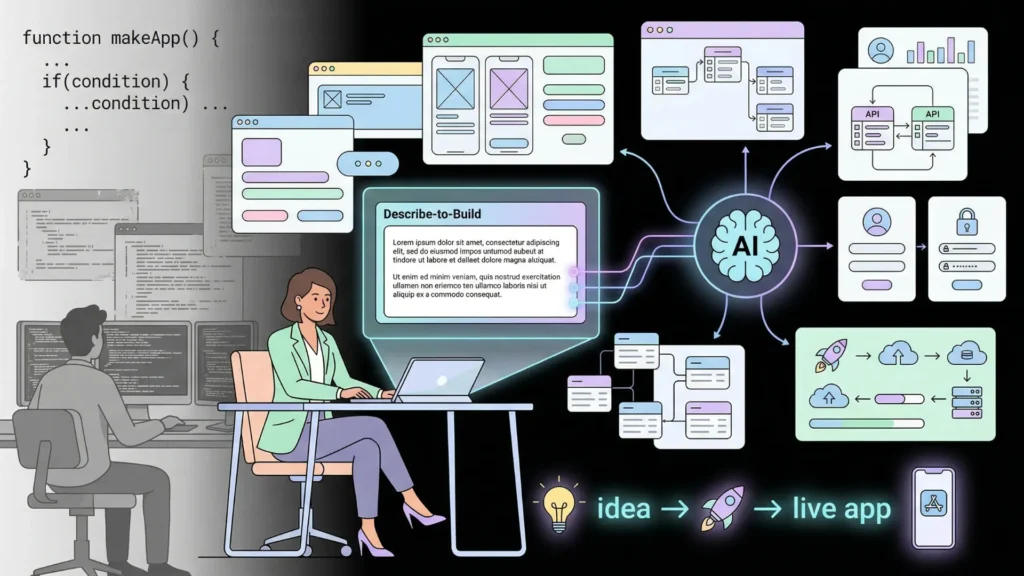
You can build a real app without developers now because AI-generation platforms have crossed the threshold from prototype tools to production-ready builders. Earlier no-code tools, the ones that came before 2022, produced templates and visual drag-and-drop layouts. They could not generate backend logic, database schemas, or authentication systems. That ceiling is what drove founders back to developers whenever the product needed to do anything genuinely complex.
Launch Your App Today
Ready to launch? Skip the tech stress. Describe, Build, Launch in three simple steps.
BuildThe current generation of AI app builders crosses that ceiling. imagine.bo’s Describe-to-Build interface takes a plain English description and generates the complete full-stack application: frontend components, database schema, backend API endpoints, role-based authentication, and deployment configuration. The AI-Generated Blueprint maps the full architecture before a line of code is written, giving you visibility into the structure before committing to the build. According to McKinsey, AI adoption in software development increased by 55% between 2022 and 2024, with the largest gains in automated code generation for non-specialist users (McKinsey, 2024).
The practical consequence is this: the bottleneck in app development is no longer technical. It is conceptual. The founders who build the best apps fastest are not the most technical. They are the clearest thinkers about the problem they are solving and the most specific in how they describe it. This post on going from idea to live apps in seconds shows how quickly that gap between idea and deployed product has closed.
Step 1: Sharpen Your Idea Into a Buildable Spec
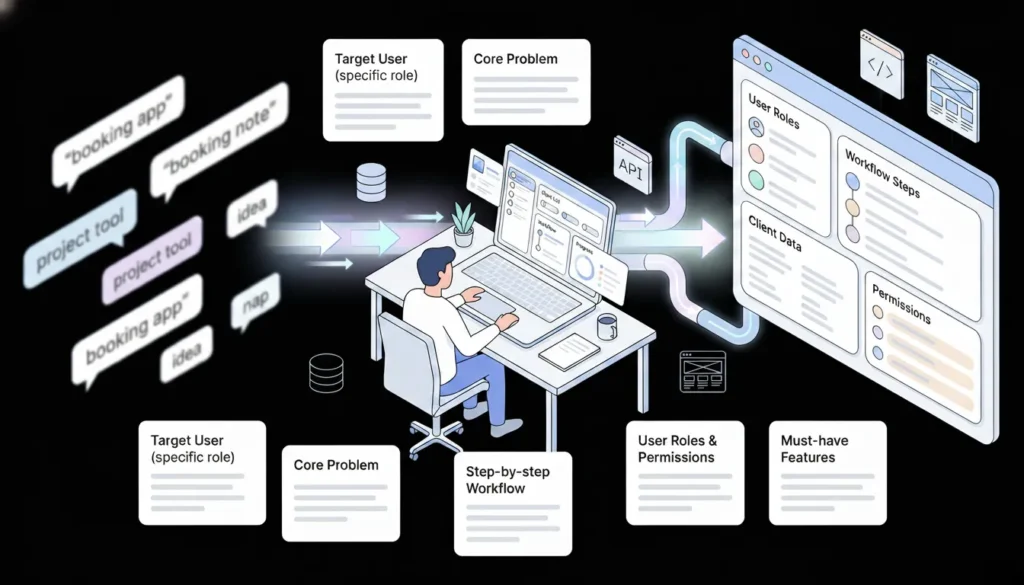
The most common reason a no-code app generation produces a generic or misaligned output is that the idea going in was vague. An AI generator is not a mind reader. It builds what you describe, and if your description is abstract, the output will be too. The sharpening step converts a loose concept into a buildable specification before you open any tool.
There is a specific cognitive shift that separates founders who ship from those who spend months refining before building anything. They stop describing their app as a category, “a booking app,” “a project management tool,” “something like Notion but for X,” and start describing it as a workflow. A workflow description names the actors, the actions, the data those actions produce, and the rules that govern who can do what. That description maps directly onto a database schema, a set of API endpoints, and a set of UI screens. It is also exactly what imagine.bo’s Describe-to-Build interface needs to generate a useful first output rather than a generic one.
Work through these five questions before writing a single prompt:
Who is this app for, specifically? Not “small businesses.” Not “freelancers.” Name a role and a context: “independent personal trainers managing five to fifteen clients remotely.”
What is the single most important problem it solves? One problem, not three. The problem that, if solved, makes everything else better. “Trainers have no structured way to assign workouts, track client progress, and collect payment in one place. They use three separate apps and a spreadsheet.”
What does the core workflow look like, step by step? Walk through one user session from login to logout. “Trainer logs in, sees client list, opens a client profile, assigns a workout plan for the week, marks which exercises the client has completed, checks outstanding invoices.”
What user roles exist and what can each role do? Define every type of user and their permission boundary. “Trainer: full access. Client: can view assigned workouts, log completions, and view their own payment history. No client can see another client’s data.”
What are the non-negotiables for launch? List three to five features that must exist for the app to be useful. Everything else is Version 2. “Workout assignment, progress tracking, invoice generation, and client login. Not: video upload, AI coaching, community features.”
These five answers produce the spec your first prompt is built from. The more specific each answer, the better the generated output. This guide to turning ideas into apps with AI prompts covers the four-element prompt structure that converts this spec into a generation-ready input.
Step 2: Define Your MVP Scope Before You Build Anything
An MVP is not a rough version of your full product. It is a precisely defined product that tests exactly one hypothesis: does this core workflow deliver enough value for a specific person to pay for it? Everything that does not directly test that hypothesis is out of scope.
According to Y Combinator, the most common reason early-stage products fail is building too much before confirming demand, not building too little (Y Combinator, 2023). The founders who ship fastest treat the MVP as a constraint, not a compromise. They are not cutting corners. They are choosing the sharpest possible test of their idea.
A practical MVP scope for the personal trainer app from Step 1 covers four screens: a client list, a client profile with workout assignment, a workout log for the client, and an invoice view. That is enough for a trainer to manage one client through a complete week and for the client to use the product without guidance. It is not enough to replace all three tools and the spreadsheet the trainer currently uses. That is fine. The MVP does not need to replace everything. It needs to replace enough to be worth paying for.
The clearest signal that an MVP scope is too large is when a single prompt covers more than one page of description. A prompt that lists twelve features, four user roles, three notification types, a reporting dashboard, and two integration requirements will generate a bloated first output that requires extensive correction. A prompt that covers three screens, two user roles, and one core workflow generates a focused first output you can refine in a single session. Start smaller than feels right. You can always add with a follow-up prompt. You cannot un-generate a bloated first version without starting over.
For a structured framework on scoping and validating an MVP before investing build time, this guide on low-code MVP strategies and the validation feedback loop covers the scope-validation sequence in depth.
Step 3: Validate Demand Before You Build
Building first and validating later is the most expensive sequencing mistake in early-stage product development. According to CB Insights, 35% of startups fail because there was no market need for their product (CB Insights, 2023). Validation before building does not require weeks of customer interviews. It requires evidence that a specific person will pay for a specific solution before you build it.
The fastest validation method is a landing page with a clear value proposition and an email capture or pre-purchase option. Build it in under a day using Carrd, Ghost, or a plain HTML page. Drive 100 to 200 targeted visitors through paid social, a Reddit post in a relevant community, or a direct outreach email to people who have the problem you are solving. If 5% or more sign up for early access, you have enough signal to build. If fewer than 2% sign up, the problem framing or the audience targeting needs adjustment before you spend a week building.
Three validation methods ordered by signal strength:
Pre-sale: Offer founding member pricing before the product exists. If someone gives you money before the product is built, that is the strongest possible market signal. Stripe accepts payment for a product that does not exist yet. Use this for SaaS products with a clear subscription offer.
Landing page with email capture: Collect email addresses from people who want early access. A 5% conversion rate from targeted traffic is meaningful signal. A 2% rate from untargeted traffic is not.
Manual concierge: Do the work by hand before building the tool. If you are building a job board, post five jobs manually and see if anyone applies. If you are building a client portal, create one manually for one client and see if they use it. This tells you whether the core value is real before you automate it.
This guide on validating startup ideas with no-code tools covers the validation process for different product types and how to interpret the signals you collect.
Citation capsule: According to CB Insights’ post-mortem analysis of 110 startup failures, 35% cite no market need as a primary cause. The analysis found that startups that validated demand before building were significantly more likely to reach initial revenue milestones than those that built first and marketed second (CB Insights, 2023).
Step 4: Write Your First imagine.bo Prompt
With a sharpened idea, a scoped MVP, and validated demand, you are ready to build. The quality of your first generation depends almost entirely on the quality of this prompt. A good prompt uses the four-element structure: Persona, Problem, Features, and Rules.
The four-element prompt structure:
Persona tells the AI who the app is for. Be specific about the user type and context.
Problem tells the AI what the app solves. One sentence, one problem.
Features lists what the app must do. Explicit, specific, and limited to MVP scope.
Rules defines access control, edge behaviours, and constraints. Who can see what. What triggers which action. What is restricted.
Full example prompt using the personal trainer use case:
“Build a client management app for independent personal trainers. Trainers manage clients remotely and need one place to assign workouts, track client progress, and send invoices. Features: trainer dashboard showing all clients with their current week’s workout plan and completion status; individual client profile page where the trainer can assign weekly workout plans with exercise name, sets, reps, and notes; client-facing view where the client can log completed exercises; invoice section where the trainer can generate and send invoices to clients. Roles: Trainer has full access to all clients, workouts, and invoices. Client can only see their own profile, workout assignments, and invoices. Clients cannot see other clients. Include secure email-based login for both roles.”
After submitting, imagine.bo displays the AI-Generated Blueprint before building anything. This is a complete map of the application architecture including the database schema, user role structure, page list, and backend endpoints. Review it carefully. Confirm the data models, the page count, and the role separation match your spec. Use a follow-up prompt to correct anything before confirming the build: “The blueprint is missing a workout history page where trainers can see all past workouts for a specific client. Add that screen.”
This 40-prompt copy-paste library by app type is a direct resource for adapting proven prompt structures to your specific app type.
Step 5: Review the Blueprint and Refine Before Building
Reviewing the AI-Generated Blueprint is the step most first-time builders skip, and it is the step that determines whether the first generation requires one round of refinement or four. The blueprint shows you the full structure of what the AI is about to build. Catching a misaligned database model or a missing user role at this stage takes one follow-up prompt. Catching it after the full build has run requires rebuilding from the structure up.
What to check in the blueprint before confirming:
Data models: Do the database tables match the data your app actually needs? For the trainer app, you need tables for Users, Clients, WorkoutPlans, Exercises, CompletionLogs, and Invoices. If the blueprint shows User and Workout but nothing for exercises or completion tracking, the generation will produce a structurally incomplete app.
User roles: Are the role boundaries exactly as you specified? Check that clients are not granted admin permissions and that trainers cannot accidentally see each other’s client lists in a multi-trainer setup.
Page structure: Does the page list cover every screen in your MVP scope? Check that both the trainer-facing and client-facing views are present as separate page groups.
Core workflow: Trace your core workflow through the page list. Can a trainer create a client, assign a workout, and generate an invoice through the pages in the blueprint? If a step in the workflow does not map to a page, add it before confirming.
The follow-up prompt that fixes more blueprint issues than any other is this pattern: “Walk me through how a [user role] would [complete the core workflow] using this blueprint, and identify any missing screens or data fields.” This forces the AI to trace the user journey through its own output and surface gaps it generated but did not flag. It consistently catches one to three missing elements before the build begins, saving time equivalent to a complete rebuild on roughly one in three initial generations.
Step 6: Build, Deploy, and Get Real Users Fast
Once the blueprint is confirmed, imagine.bo builds the complete application automatically. The frontend deploys to Vercel for global edge performance, ensuring fast load times for users anywhere in the world. The backend and database deploy to Railway for automatic scaling. SSL applies by default. The entire infrastructure runs without any DevOps configuration from you.
One-Click Deployment makes your app live on a public URL the moment you click deploy. Before sharing it with users, run through this specific test sequence to catch any issues the generation introduced:
Create a test account in each user role. Go through the core workflow as the primary user. Confirm every form submits without error. Confirm role-based access controls are working by attempting to access restricted pages while logged in as a lower-permission user. Confirm the app is fully functional on a mobile screen, not just a desktop browser.
A solo founder building the personal trainer client management app on imagine.bo’s Pro plan at $25 per month, from first prompt to deployed product, spends approximately eight to twelve hours across two to three days of iterative building, compared to an industry-average custom development timeline of twelve to sixteen weeks for equivalent functionality at $75 to $150 per hour. The cost difference is approximately $22,475 to $89,975 for the same functional outcome. The time difference is ten to fifteen weeks of additional product learning the no-code founder accumulates while the custom-built version is still in development.
Getting real users in quickly matters more than making the app perfect before launch. Your first ten users will tell you more about what your app actually needs than any amount of additional building based on assumptions. Share the URL directly with five people who have the problem you identified in Step 1. Watch one of them use it without guidance. Write down every question they ask and every place they hesitate. That session shapes your next prompt more accurately than anything else.
Citation capsule: According to Stripe’s Startup Atlas research, SaaS products that deploy to their first paying user within 90 days of starting development have a four times higher probability of reaching $10,000 in monthly recurring revenue than products that take longer than six months to reach their first user (Stripe, 2023). Time from idea to first user is not just a vanity metric. It is the strongest predictor of early commercial success.
Step 7: Iterate With Prompts and Scale With Engineers
Launching is not the finish line. It is the start of the real build. Every user session, every piece of feedback, and every feature request that comes in after launch is a prompt waiting to be written. imagine.bo’s Describe-to-Build interface handles post-launch iteration exactly like the initial build: describe what needs to change in plain English, review the impact on the existing structure, confirm, and deploy.
Effective post-launch iteration prompts are specific about the current behaviour and the desired behaviour. “The invoice section is not showing the client’s name on the generated invoice. Add the client’s full name and email address to the invoice header above the line items.” That prompt generates a targeted fix without rebuilding the surrounding system.
As your app grows, some features will go beyond what conversational prompts can address efficiently. Complex third-party integrations, custom algorithm logic, performance optimisation under real traffic, and security-sensitive features all benefit from human engineering. imagine.bo’s Hire a Human feature connects you with a vetted engineer directly from your dashboard for $25 per page. There is no hiring process, no equity negotiation, and no ongoing commitment. You bring in precise engineering for a specific scoped task, then return to independent building.
The Pro plan at $25 per month includes rollover credits, private projects, and a one-hour expert session before launch. That session is specifically designed for catching structural issues before you drive real traffic to the app. Use it. A one-hour structural review before your first marketing push is the highest-leverage hour in the entire build process.
For founders who want to understand what iteration looks like in practice across the full lifecycle from side project to launched SaaS, this post on what founders learn from their first no-code MVP covers the real experience without the glossy version.
What Types of Apps Can You Build Without Developers?

The practical ceiling of no-code and AI-generation tools in 2026 is higher than most founders realise. imagine.bo produces real, production-grade full-stack web applications, not demos or prototypes. The types of apps that consistently generate well include:
SaaS products: Subscription-based tools with user accounts, role-based access, dashboards, and billing. The personal trainer app above is one example. CRM systems, project management tools, client portals, and internal workflow automation tools all fall in this category.
Marketplaces and directories: Two-sided platforms connecting suppliers and buyers with listing management, search and filter, inquiry systems, and booking flows. Think job boards, service directories, rental platforms, and contractor marketplaces.
Internal business tools: Custom databases, approval workflows, reporting dashboards, and inventory systems built specifically for a team’s internal process rather than a public user base. These are often the fastest to build because the user base is small and the requirements are well-defined.
Consumer web apps: Social platforms, content feeds, community tools, and productivity applications designed for end consumers. These work well when the core interaction is well-defined and does not require real-time features like live video or instant messaging.
For a list of proven, buildable app ideas with validated market demand, this post on ten profitable no-code app ideas you can build today covers ten specific ideas with enough detail to take directly into Step 1 of this workflow.
How Much Does Building a No-Code App Cost Compared to Hiring Developers?
The cost difference between no-code and custom development is not marginal. It is structural. According to Clutch’s 2025 software development survey, the average custom web application development project costs between $75,000 and $150,000 and takes four to eight months to complete (Clutch, 2025). imagine.bo’s Pro plan at $25 per month generates the same functional scope, including full-stack logic, authentication, and deployment, at a cost of $25 to $300 for a complete first version depending on build complexity and credit usage.
| Build approach | Typical cost | Typical timeline | Code ownership |
|---|---|---|---|
| Custom developer | $75,000 to $150,000 | 4 to 8 months | Yes |
| Freelance developer | $15,000 to $50,000 | 2 to 5 months | Yes |
| imagine.bo (Pro plan) | $25 to $300 | Days to weeks | Yes |
| imagine.bo Done For You | $499 one-time | 1 to 2 weeks | Yes |
| Traditional no-code (Bubble) | $29 to $119/month | Weeks to months | No |
imagine.bo produces clean, exportable code you own outright. There is no platform lock-in and no proprietary format preventing you from taking the codebase to a developer for future work. That code ownership is meaningfully different from platforms like Bubble where your product lives inside a closed ecosystem.
For a detailed breakdown of costs across these build approaches including the long-term maintenance and scaling implications, this 2026 cost comparison across developer, AI, and no-code approaches covers the full picture.
FAQ
Can a complete beginner with no technical background build a real app using no-code tools?
Yes, and the specific reason is that AI-generation tools require thinking skill rather than technical skill. imagine.bo’s Describe-to-Build interface needs you to articulate your app clearly in plain English. You do not configure databases, write API endpoints, or manage deployments. The platform handles the full technical stack from your description. According to Gartner, citizen developers, meaning non-technical professionals building their own applications, now represent the fastest-growing category of software builders globally (Gartner, 2022). No-code tools have made this shift practical, and AI-generation tools have made it fast. This post on no-code apps and how the rise of citizen developers is changing software covers that broader shift in detail.
How long does it take to build an app without coding from scratch?
For a scoped MVP with three to five core screens, most founders complete their first generation review and initial refinements in under a day. A complete first version ready for real users typically takes two to five days including the validation, prompting, blueprint review, refinement, and testing steps. This compares to four to eight months for a custom-built equivalent. According to Stripe, products that reach their first paying user within 90 days are four times more likely to reach $10,000 in monthly recurring revenue (Stripe, 2023). No-code tools make that 90-day window achievable even for solo founders with no development background.
What happens when my no-code app needs a complex feature the AI cannot generate?
Imagine.bo’s Hire a Human feature connects you with a vetted engineer directly from your dashboard for $25 per page. You submit a task ticket describing the specific feature, expected outcome, and any relevant constraints. An engineer writes the custom code, pushes it to your project repository, and the feature is live. There is no hiring process, no retainer, and no ongoing commitment. Use it for third-party API integrations, custom algorithm logic, performance tuning, and security-sensitive implementations. The Pro plan includes a 20% discount on Hire a Human tasks and a guaranteed 24-hour turnaround, making it a practical tool for specific engineering tasks rather than a fallback for a broken build.
Do I own the code that imagine.bo generates?
Yes. imagine.bo produces clean, exportable code following modern standards that you own entirely. You can download the codebase, hand it to a developer for future work, deploy it independently, or sell the product without any platform dependency. This is a fundamental difference from traditional no-code platforms where your application lives inside a proprietary system and cannot be extracted. Code ownership matters commercially because potential acquirers, investors, and technical partners can inspect, audit, and build on the codebase rather than inheriting a platform dependency they cannot evaluate.
What is the difference between no-code and low-code for building an app?
No-code tools require zero programming and are designed entirely for non-technical users. Low-code tools provide a visual interface for most functionality but allow or require code for advanced customisation. imagine.bo sits at the AI-generation layer above both, generating production-ready code from a description without requiring the user to interact with visual editors or write any code directly. For founders choosing between these approaches, this post on no-code versus low-code for startups covers the specific use cases that favour each approach and the scenarios where AI generation outperforms both.
Conclusion
Three things determine whether you ship an app or stay stuck in the planning phase. First, the quality of your idea description before you open any tool. The founders who ship fastest are not the most technically skilled. They are the most specific about the problem they are solving, the user they are solving it for, and the workflow the solution enables. Second, MVP scope discipline. Every feature you add to the initial scope adds a week to your feedback loop and a layer of complexity to your first generation. Smaller scope generates better first outputs, faster. Third, validation before building. Spending one day confirming that real people want your product before spending five days building it is the most leveraged hour you will invest in the entire process.
imagine.bo’s free plan gives you 10 credits per month to build, review the AI-Generated Blueprint, and deploy a first version at zero cost. The Pro plan at $25 per month adds 150 credits with rollover, private projects, and a one-hour expert session before launch. Start with the free plan, follow the six steps in this guide, and deploy your first version to real users this week. For a practical, real-world account of what the first ten days of building a no-code app from scratch actually looks like, this post on going from idea to no-code app in ten days is the most honest companion to everything covered here.
Launch Your App Today
Ready to launch? Skip the tech stress. Describe, Build, Launch in three simple steps.
Build




