

Traditional no-code tools gave non-technical builders visual editors and templates. They were fast for simple sites and painfully limited for anything complex. AI-code tools are something fundamentally different: they take a plain English description and generate the actual code, the full stack, the database schema, the backend logic, the authentication, and the deployment configuration. You do not configure a template. You direct a system that writes real, exportable software. According to GitHub’s 2024 Octoverse report, AI-assisted development has already reduced the time required to build common software patterns by an average of 55% among experienced developers, with even larger gains for non-technical builders using generation-first tools (GitHub, 2024). This guide covers the seven steps that take you from the mental model of no-code configuration to the mental model of AI-code generation, and what changes practically at each step. For the broader context of why AI tools are fundamentally reshaping how software gets built, this post on how AI tools are replacing traditional web development workflows covers the structural shift behind this transition.
TL;DR The shift from no-code to AI-code is not a tool swap. It is a mental model change from configuring a visual editor to directing a system that generates real software. Seven steps bridge that gap: understanding what AI-code actually generates, learning to think in systems not screens, writing prompts as specifications, reviewing the generated architecture before accepting it, iterating by conversation, deploying with infrastructure already built in, and knowing when to bring in human engineers. According to GitHub, AI-assisted development reduces build time for common software patterns by 55% (GitHub, 2024). These seven steps make that reduction accessible to non-technical builders.
What Is the Real Difference Between No-Code and AI-Code?
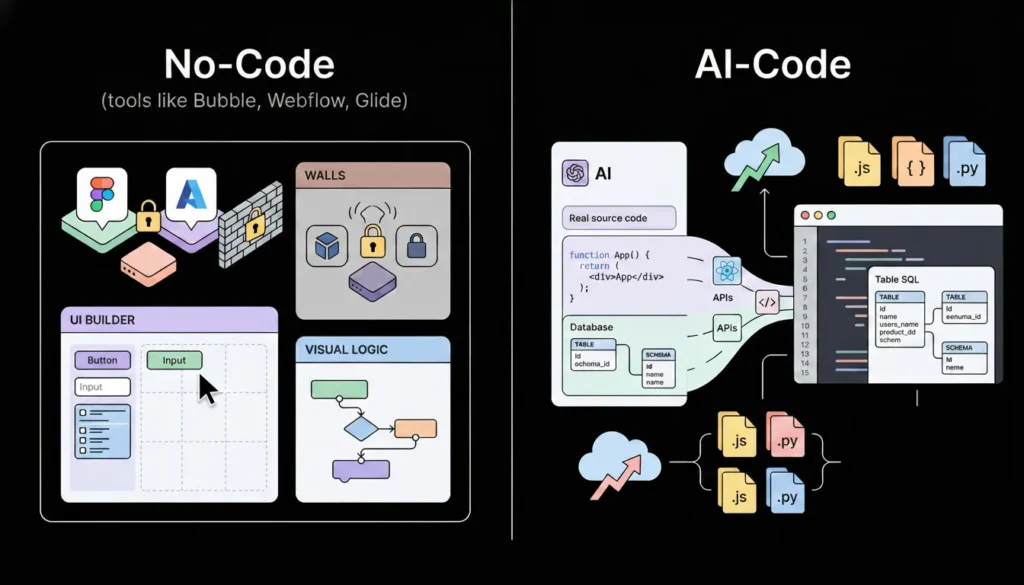
The real difference between no-code and AI-code is what gets produced and who owns it. No-code tools like Bubble, Webflow, and Glide produce configurations inside their own proprietary systems. The “app” you build lives inside the platform. You cannot export it as source code, hand it to a developer, or deploy it outside the platform’s infrastructure. When the platform changes its pricing or shuts down, your product is affected.
Launch Your App Today
Ready to launch? Skip the tech stress. Describe, Build, Launch in three simple steps.
BuildAI-code tools like imagine.bo generate actual source code from your description. The output is real React components, a real database schema, real API endpoints, real authentication logic, and a real deployment configuration. You own that code. You can export it, modify it, hand it to a developer, and deploy it anywhere. The platform is the generator, not the host of your product.
According to Gartner, 70% of new applications will be built using no-code or low-code technologies by 2025, but within that category, AI-generation tools are growing at more than twice the rate of traditional visual builders (Gartner, 2021). The distinction matters because founders who understand what they are actually building with each type of tool make better decisions about which tool to use, when to switch, and when to bring in engineering support.
Most comparisons of no-code versus AI-code focus on speed and cost, which are real advantages. The more important difference is architectural ceiling. No-code platforms have a fixed ceiling defined by the features the platform vendor has built. When you need something above that ceiling, you are stuck. AI-code generation has a higher and less predictable ceiling because the output is real code, and real code can be extended by a developer without rebuilding from scratch. This means AI-generated apps can be handed to engineers for advanced feature work, while no-code apps typically cannot. That ceiling difference is the reason AI-code tools are the correct choice for any product that will need to scale technically, not just in user volume.
This post on the rise of citizen developers in the AI era covers how this architectural shift is changing who builds software and what they can build without a traditional engineering background.
Step 1: Stop Thinking in Screens and Start Thinking in Systems
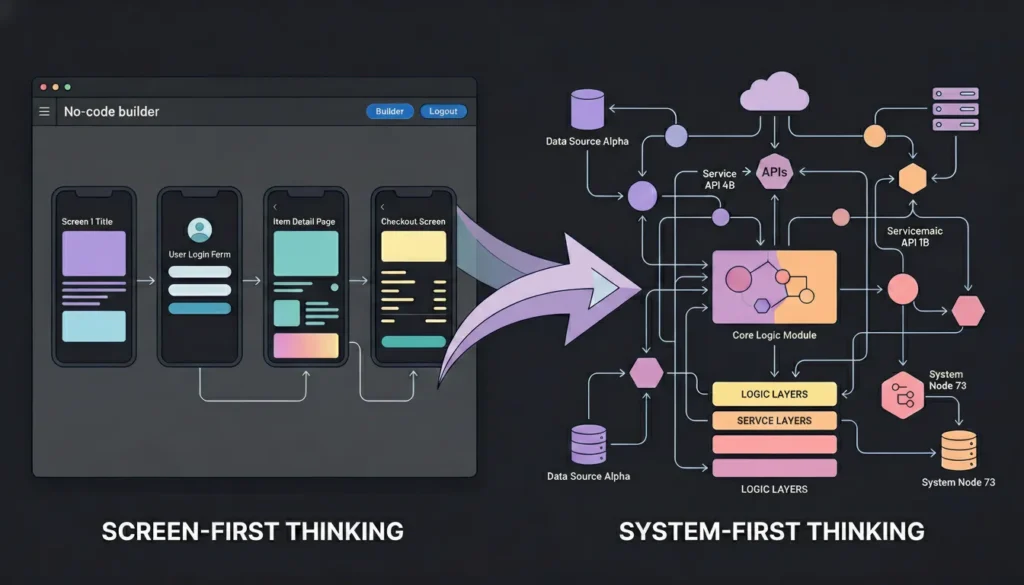
The first mental model shift that unlocks AI-code generation is moving from screen-first thinking to system-first thinking. No-code builders are trained to think in screens because visual editors show you screens. You drag components onto a canvas, connect them to a data source, and publish. The mental model is visual and sequential: screen one leads to screen two.
AI-code generation works from a system description, not a screen layout. The system has actors who perform actions on data, rules that govern who can do what, and workflows that connect actions across time. When you describe that system clearly, the generator produces the right screens automatically. When you describe screens directly, the generator often misses the underlying data model, produces the screens but generates incorrect backend logic to support them, or creates a frontend with no coherent data layer behind it.
System-first thinking starts with three questions before any other planning. What entities exist in this system and what data does each entity hold? What actions can each type of user perform on each entity? What rules govern those actions, who can perform them, what triggers them, and what they produce?
For a subscription-based course platform: the entities are Users, Courses, Lessons, Enrollments, and Progress records. A Student can enrol in a course, complete a lesson, and view their progress. An Instructor can create courses, add lessons, and view enrollment data. An Admin can manage all users and all courses. A Student cannot access courses they have not enrolled in. An Instructor cannot see another Instructor’s student data.
That description produces a complete system specification. It maps directly to a database schema, a set of API endpoints, a role-based access control configuration, and a coherent set of UI screens. Submit it as a prompt and the generator has everything it needs to produce a well-structured first output. Submit “build me an online course platform” and the generator guesses everything it is not told, usually incorrectly.
Citation capsule: According to imagine.bo’s documentation on prompting best practices, the four elements that consistently produce the best generation results are actor or persona definition, problem to solve, explicit feature list, and edge behaviours or constraints. Prompts that include all four elements produce structurally complete outputs. Prompts that omit edge behaviours, specifically access control rules and exception handling, consistently generate apps with permission logic errors that require extensive correction (imagine.bo, 2026).
Step 2: Write Prompts as Engineering Specifications
A prompt for an AI-code generator is not a search query and not a chatbot message. It is closer to a requirements document for a junior engineer who will implement everything you describe and nothing you do not. The quality of the generated output is a direct function of the specificity and completeness of the prompt. Vague prompts produce generic outputs. Specific prompts produce usable first versions.
The single most reliable improvement to generation quality is making implicit assumptions explicit. Every product idea contains hundreds of unstated assumptions about how data is structured, what users can and cannot do, and how edge cases should be handled. The AI generator fills those gaps with its own assumptions, which are sometimes correct and often not. Writing a prompt that explicitly states the things you take for granted produces outputs that match your mental model on the first generation rather than requiring correction prompts to bring the output back to your intent.
The four-element prompt structure that produces consistently strong outputs:
Persona: Define every user type with a specific job title and context. Not “users” but “freelance graphic designers managing five to twenty client projects simultaneously.”
Problem: State the core problem in one sentence. The problem, not the solution. “Designers have no structured way to track project scope, client feedback, and invoice status in one place.”
Features: List every feature with enough specificity that a developer could implement it unambiguously. “Project dashboard showing all active projects with client name, status, deadline, and unpaid invoice count. Project detail page with scope notes, file attachments, client feedback log, and revision history. Invoice generation with line items, totals, and PDF export. Client portal where the client can view their projects, submit feedback, and pay invoices.”
Rules: Define every access control rule and every edge behaviour. “Clients can only view their own projects. Clients cannot see other clients. Clients cannot edit scope or invoice data. A project cannot be marked complete while an invoice is unpaid. Feedback cannot be submitted after a project is marked complete.”
That prompt, submitted to imagine.bo’s Describe-to-Build interface, generates an AI-Generated Blueprint mapping the full database schema, user flow architecture, and page structure before any code is written. The blueprint is your opportunity to review the system design before committing. For a complete library of proven prompts across twelve app categories, this 40-prompt copy-paste library by app type is the most direct resource for building your first prompt from a proven structure.
Step 3: Read the AI-Generated Blueprint Before Accepting the Build
The AI-Generated Blueprint is the most important step in the imagine.bo workflow and the one most first-time builders skip. It is a complete map of what the generator is about to build: the database schema, the user role structure, the full page list, and the backend endpoint architecture. Reviewing it before confirming the build is the difference between getting a well-structured first output and spending two sessions correcting structural problems that would have been visible in the blueprint.
What to audit in the blueprint:
Database schema: Does every entity from your system description appear as a table? Are the relationships between tables correct? A course platform needs a junction table for Enrollments that connects Users to Courses, a Progress table that connects Users to Lessons with a completion status, and an Invoices table. If the blueprint shows only Users and Courses, the data architecture cannot support the features you described.
Role structure: Are the access boundaries in the blueprint exactly what you specified? Check that student-facing pages do not grant instructor-level permissions, that the client portal is a separate section from the admin dashboard, and that each role’s visible data is correctly scoped.
Page inventory: Map every page in the blueprint to a screen in your product spec. Every required screen should have an entry. If the blueprint lists twelve pages but your spec requires fifteen, use a follow-up prompt to add the missing screens before confirming.
Workflow logic: Trace the primary user workflow through the page structure. For a course platform: student registers, enrolls in a course, completes lessons, and views progress. Every step in that workflow should map to a page or an action in the blueprint. If a step has no corresponding page, the generated app will not support that workflow.
Based on the imagine.bo documentation’s troubleshooting guidance, the most common cause of multi-session correction work is confirming the build without reviewing the blueprint. Applications where the blueprint review step is skipped require an average of three to five additional correction prompt sessions to reach the same functional quality as applications where blueprint issues are caught before the initial build. Each correction session consumes one to three credits. A five-minute blueprint review before confirming saves an estimated five to fifteen credits in correction work on a typical mid-complexity application.
For a practical guide to building complex, multi-entity applications on imagine.bo and understanding what the blueprint review catches, this post on building complex apps with imagine.bo covers the structural review process in detail.
Step 4: Iterate by Conversation, Not by Restart
The second mental model shift that distinguishes effective AI-code builders from ineffective ones is understanding that iteration happens through conversation, not through restarting the generation. When something in the generated output is wrong, the instinct for many first-time builders is to edit the original prompt and regenerate from scratch. This discards everything that was generated correctly along with the things that need fixing.
The correct approach is a targeted correction prompt that identifies the specific issue, describes the current behaviour, and specifies the expected behaviour. imagine.bo’s conversational interface understands the full context of the existing application and applies corrections surgically without rebuilding unrelated parts of the system.
Correction prompt patterns that work:
Missing feature: “The application is missing a notification centre. Add a page accessible from the main navigation where users can see the last thirty notifications, each showing the notification text, the time, and a read or unread status. Mark notifications as read when the user opens the notification centre.”
Wrong behaviour: “The project dashboard is showing all projects regardless of which user is logged in. It should only show projects belonging to the currently authenticated user. Projects belonging to other users should not be visible or accessible.”
Access control error: “Clients can currently access the /admin/projects route by typing it directly into the browser. This route should redirect unauthenticated users to the login page and redirect authenticated clients to their own portal at /client/projects.”
Data structure gap: “The invoice table is missing a line items structure. Each invoice should support multiple line items, each with a description, quantity, unit price, and calculated total. The invoice total should sum all line item totals automatically.”
Each of these prompts fixes one specific thing. Combining multiple corrections into a single prompt reduces accuracy because the generator applies all changes simultaneously and interactions between them can produce unexpected results. One prompt, one fix, then review.
According to imagine.bo’s prompting best practices documentation, the most effective correction prompt structure is: current state, expected state, and any relevant constraint or context. This three-part structure gives the generator everything it needs to apply the correct fix without touching unrelated functionality (imagine.bo, 2026).
This guide on designing workflows with conversational prompts covers the full conversational iteration methodology for refining AI-generated applications through targeted prompt sequences.
Step 5: Handle the Full-Stack Reality of AI-Generated Apps

AI-code generation produces a full stack, not just a frontend. This means the generated application includes a database with real tables and relationships, backend API endpoints that handle authentication and data access, frontend components that call those endpoints, and deployment configuration for both the frontend and backend environments. Understanding what each layer does and how to extend it through prompts makes the difference between a builder who gets stuck at basic functionality and one who ships production-grade applications.
The frontend layer: imagine.bo generates React components deployed to Vercel for global edge performance. Every page is a component with state management, routing, and API calls built in. When you want to change the UI, prompt conversationally: “Move the analytics chart from the bottom of the dashboard to the top. Make it full width. Add a date range selector above it.”
The database layer: The AI generates a database schema with tables, columns, relationships, and indexes appropriate for your app’s data model. When your data requirements evolve, use prompts to extend the schema: “Add a tags field to the Projects table. Tags should be stored as an array. Add a filter on the project list page that filters by tag.”
The backend layer: API endpoints are generated to match your user roles and your data access patterns. The endpoints enforce the access control rules you defined in your prompt. When you need a new endpoint, prompt for it: “Add an endpoint that returns all projects created in the last thirty days, accessible only to admin users. Include the project name, client name, status, and total invoice value.”
The authentication layer: imagine.bo generates secure email-based authentication with role-based access control by default. Session management, password reset flows, and role enforcement at the route level are included in every generated application. For additional authentication requirements, use prompts: “Add Google OAuth as an optional login method alongside email and password authentication.”
The full-stack reality of AI-generated apps creates a specific debugging challenge: when something does not work, the failure could be in the frontend component, the API endpoint, the database query, or the authentication middleware. The most effective diagnostic approach is to test one layer at a time. Does the frontend call the correct API route? Does the API endpoint return the expected data? Does the database query return the correct records? Tracing the failure to its layer and prompting a correction at that specific layer produces more reliable fixes than describing the symptom and hoping the generator identifies the root cause. This post on AI code review and debugging for beginners covers the systematic diagnostic approach for layered AI-generated applications.
Citation capsule: According to imagine.bo’s platform documentation, every generated application includes role-based access control enforced at the data layer rather than only at the UI layer. This means that even if a frontend component incorrectly renders a restricted page, the backend API will refuse to return data that the authenticated user’s role is not permitted to access. This architectural decision prevents a common security failure in manually built no-code applications where access control is enforced only by hiding UI elements (imagine.bo, 2026).
Step 6: Deploy to Production Infrastructure With One Click
One-Click Deployment is one of the most practically significant features in the AI-code workflow because it eliminates the infrastructure configuration step that historically required DevOps expertise. For traditional no-code tools, deployment happens inside the platform’s own hosting. For AI-code generation on imagine.bo, deployment means pushing your application to production-grade infrastructure: Vercel for the frontend and Railway for the backend.
Vercel’s global edge network serves your frontend from CDN nodes closest to each user, producing fast load times globally without any CDN configuration from you. Railway provides automatic backend scaling that handles traffic from ten users to one million without manual capacity planning. SSL certificates apply automatically on every deployment. There is no server provisioning, no environment setup, and no hosting account to configure separately from the build tool.
What One-Click Deployment handles for you:
Infrastructure provisioning: servers, containers, and networking are configured automatically based on your application’s requirements.
SSL and HTTPS: every deployed application gets an SSL certificate applied automatically. No manual certificate generation or renewal.
Environment variables: your API keys, database credentials, and application secrets are injected into the deployment environment securely without being hardcoded in source code.
Automatic scaling: Railway’s backend infrastructure scales automatically when traffic increases. You do not set capacity limits or configure auto-scaling rules.
Continuous deployment: every time you make changes through the conversational interface and confirm a new build, the deployment updates automatically without a manual deploy step.
According to Vercel’s published performance data, applications deployed on their edge network achieve an average Time to First Byte under 100 milliseconds for users within 50 kilometres of an edge node, which covers the majority of users in most global markets (Vercel, 2024). That performance baseline is the starting point for every imagine.bo deployment, without any additional configuration. For a technical deep-dive into how no-code and AI-generated apps scale on this infrastructure, this post on scaling no-code AI apps to production covers the infrastructure layer in detail.
Step 7: Know Exactly When to Bring In Human Engineers
The final step in the no-code to AI-code transition is developing accurate judgment about which tasks the AI generator handles well and which tasks benefit from a human engineer. This judgment is not about the AI being good or bad at a category. It is about the difference between tasks where approximate implementation is acceptable and tasks where precision is non-negotiable.
Tasks where AI generation handles the full implementation reliably:
Standard authentication flows including login, signup, password reset, and role-based access control. CRUD operations on well-defined data models. Dashboard and reporting pages that display aggregated data. Form-based workflows with validation and submission logic. Standard payment integration using Stripe Checkout or the Payment Element.
Tasks where human engineering produces more reliable outcomes:
Complex third-party API integrations with non-standard authentication, rate limiting, and custom webhook handling. Custom algorithm logic with specific performance or accuracy requirements. Payment integrations requiring PCI compliance configurations beyond standard Stripe Checkout. Multi-tenant data isolation where a misconfiguration exposes one customer’s data to another. Real-time features including WebSocket connections, live notifications, and collaborative editing.
imagine.bo’s Hire a Human feature addresses the engineering tasks directly. From your project dashboard, you submit a task ticket to a vetted engineer who writes the specific code, pushes it to your repository, and the feature is live. The cost is $25 per page for targeted tasks. No hiring process, no retainer, no ongoing commitment.
The Pro plan includes a one-hour expert session before launch specifically designed for reviewing the architecture of your generated application before real users arrive. Use this session to audit the authentication configuration, confirm the access control rules are correctly enforced at the API layer, and check the data model for any structural issues that would require a rebuild after launch. An hour of expert review before launch is worth more than ten hours of debugging after it.
The most effective use of the Hire a Human feature is not as a fallback when the AI fails. It is as a precision tool for the specific 20% of functionality where human engineering produces materially better outcomes than generation alone. Founders who think of Hire a Human as a fallback use it reactively after multiple failed correction prompts. Founders who treat it as a precision tool use it proactively for the specific integrations and architectural decisions where they know upfront that precision matters more than speed. The distinction changes both the cost of engineering support and the quality of the final implementation. This post on how vibe coding is reshaping product management covers how product builders are integrating AI generation and human engineering into the same workflow.
For real-world examples of the types of applications founders have built using the AI-code generation workflow, this post on real-world apps built with prompt-based tools shows what production applications look like at the end of this seven-step process.
How Does AI-Code Compare to Traditional No-Code in Practice?
The practical differences between traditional no-code and AI-code generation are most visible in three areas: the complexity of what you can build, the quality of what gets produced, and the exit options when you outgrow the platform.
| Dimension | Traditional no-code (Bubble, Glide) | AI-code generation (imagine.bo) |
|---|---|---|
| What it generates | Platform configurations | Real exportable code |
| Backend logic | Platform-defined limits | Full custom backend |
| Database flexibility | Platform schema limits | Custom relational schema |
| Authentication | Template-based | Generated and configurable |
| Deployment | Platform hosting only | Vercel + Railway (yours) |
| Code ownership | No | Yes |
| Developer handoff | Not possible | Full codebase export |
| Learning curve | Visual editor learning | Prompt skill development |
| Starting cost | $29 to $119/month | $0 to $25/month |
| Human engineering | Plugin ecosystem | On-demand via Hire a Human |
The column that matters most for product decisions is code ownership. A no-code configuration cannot be extended by a developer because there is no code to extend. An AI-generated codebase can be handed to a developer who adds complex features, optimises performance, or implements integrations that would be impossible through prompts alone. This means AI-code generation is not just a faster starting point. It is a product foundation that remains useful as the product grows. For founders comparing the full build stack for a SaaS product, this post on the best stack for building SaaS without code covers how AI-generation tools fit into the broader technical architecture.
FAQ
Is AI-code generation the same as vibe coding?
They overlap significantly but are not identical. Vibe coding describes the broader practice of using AI tools to write and refine code through natural language, often in tools like Cursor or GitHub Copilot where a developer is still in the loop reviewing and editing the output. AI-code generation with imagine.bo goes further: the platform generates the full application architecture, database, and deployment from a description without the user needing to read, edit, or understand the generated code directly. The distinction matters for non-technical founders because vibe coding still assumes some technical context for reviewing output. AI-code generation does not. This post on how to vibe code and build apps with AI covers the full spectrum of AI-assisted development approaches and how they differ in practice.
Can AI-generated apps scale to thousands of users?
Yes. imagine.bo deploys to Vercel for the frontend and Railway for the backend, both of which scale automatically based on traffic without manual configuration. According to Vercel, their edge network handles hundreds of billions of requests per month across millions of deployed applications (Vercel, 2024). The infrastructure ceiling is not the constraint for most early-stage products. Data model design and API efficiency are the more common scaling limits, and those are addressable through targeted engineering via Hire a Human if they become relevant. For most applications, the generated infrastructure handles tens of thousands of users before any scaling concern becomes practical.
How is prompting for AI-code different from searching Google?
A search query retrieves existing information. A prompt for AI-code generation specifies what you want to be created. The quality of a search query affects whether you find the right result. The quality of a generation prompt affects the functional correctness, architectural soundness, and completeness of what gets built. Search queries benefit from keywords. Generation prompts benefit from specificity, structure, and completeness. The four-element structure of persona, problem, features, and rules provides that structure and consistently produces better outputs than unstructured prompts of the same length. This guide to prompt engineering for AI app development covers the specific techniques that make prompts generate better applications.
What types of apps are best suited for AI-code generation?
AI-code generation produces its best results for web applications with well-defined data models, clear user roles, and standard functional patterns. SaaS platforms, client portals, internal business tools, marketplaces, and booking systems all generate well. Applications with real-time collaboration features, complex data visualisation, machine learning inference at the edge, or highly custom interactive experiences benefit from AI generation as a foundation with targeted engineering on specific features. According to imagine.bo’s platform overview, the generated applications cover SaaS and business applications, marketplaces and directories, internal tools and ERPs, and consumer web apps, all of which follow the standard patterns that AI generation handles reliably (imagine.bo, 2026).
How do I handle features that the AI cannot generate correctly after multiple attempts?
Three correction prompts on the same feature without resolution is the signal to stop prompting and use the Hire a Human feature instead. This applies specifically to complex third-party API integrations, custom business logic with unusual conditional rules, performance optimisations at the database query level, and security-sensitive features where precision is non-negotiable. Submit a clear task ticket: what the feature should do, what it is currently doing, and any relevant constraints or API documentation. A vetted engineer implements the specific module and pushes it to your repository. Using engineering support for the 20% of functionality that benefits from precision is faster and cheaper than spending hours on correction prompts that produce progressively worse outputs. This post on how AI tools are changing developer roles covers how human engineering and AI generation work as complements rather than substitutes.
Conclusion
Three things separate founders who ship production-grade applications using AI-code generation from those who produce demos they cannot ship. First, the mental model shift from screen thinking to system thinking. Describing the data, the actors, and the rules before thinking about screens produces generation outputs that are structurally correct from the first build. Second, the habit of reviewing the AI-Generated Blueprint before confirming every build. Five minutes of blueprint review prevents five hours of correction work. Third, accurate judgment about when to use Hire a Human rather than sending another correction prompt. Precision engineering for the specific 20% of functionality that requires it is the difference between a working app and a perpetually almost-working one.
imagine.bo’s Pro plan at $25 per month includes 150 credits with rollover, private projects, a 20% discount on Hire a Human tasks, and a one-hour expert session before launch. The free plan with 10 credits gives you enough to build and deploy a scoped first version at zero cost. Start with the free plan, apply the seven steps in this guide, and review the blueprint before you confirm your first build. For a practical reference on the full library of prompt types that generate working applications across every major app category, this guide to building apps from ideas using AI prompts is the most useful companion resource to the seven-step workflow covered here.
Launch Your App Today
Ready to launch? Skip the tech stress. Describe, Build, Launch in three simple steps.
Build




