
TL;DR — Key Takeaways
- The global no-code/low-code market reached $26.9 billion in 2023 and is projected to hit $65 billion by 2027 (Gartner, 2023).
- AI app builders now handle frontend, backend, and database generation from a plain-English description — no code required.
- A simple MVP typically takes 3–7 days on a modern AI builder vs 4–8 months with a traditional developer team.
- All leading platforms offer a meaningful free tier. You only pay when you scale past a threshold (typically 100–500 MAU) or need a custom domain.
- The five most widely used platforms in 2026 are Imagine.bo, Bubble, Glide, Adalo, and Softr — each suited to different use cases.
For years, turning a product idea into working software meant hiring a developer (median US rate: $105,090/year according to the Bureau of Labor Statistics, 2024) or spending months learning to code. That bottleneck has collapsed. In 2026, a category of tools called AI app builders lets anyone describe what they want in plain English — and receive a working, deployable application in return.
Launch Your App Today
Ready to launch? Skip the tech stress. Describe, Build, Launch in three simple steps.
BuildThis guide explains what these tools actually do, how they differ from each other, what they cost, and how to use one professionally to get a working product in front of real users.
What Is a Free AI App Builder? A Plain-English Definition
An AI app builder is a web-based platform that uses large language models (LLMs) and visual logic engines to translate a natural-language description into functional application code. The output is not a mockup — it is a working application with a user interface, server logic, and a database.
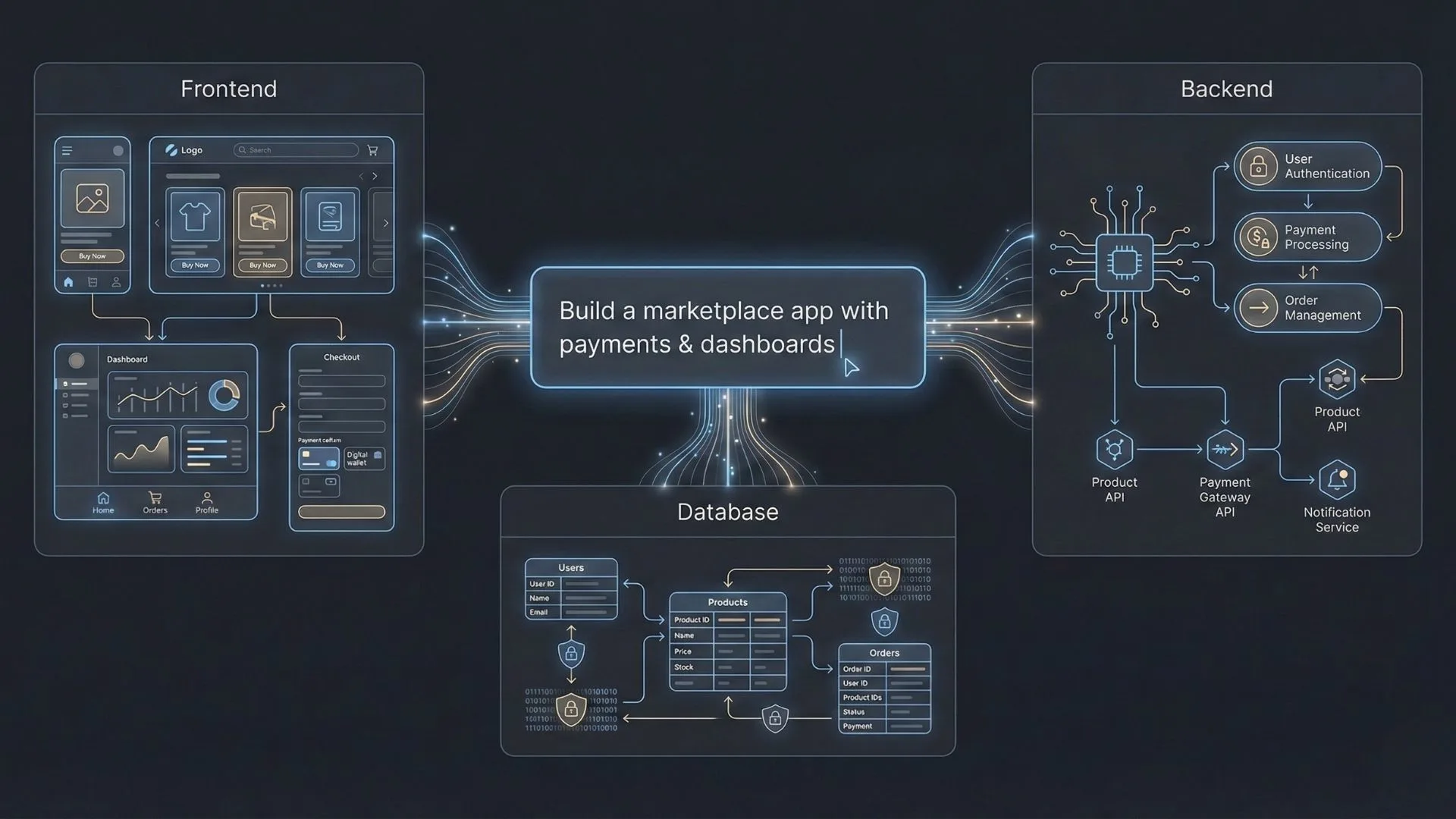
This is meaningfully different from earlier no-code tools like WordPress page builders or early Wix. Those required you to learn a proprietary drag-and-drop system and were limited to mostly presentational pages. Modern AI builders generate the actual logic layers of an application:
- Frontend: The buttons, screens, forms, and responsive layout that users interact with.
- Backend: Server-side logic, user authentication, business rules, and API connections to third-party services.
- Database: Structured storage where user accounts, orders, content, or any other data lives.
The AI layer — the differentiator from older no-code tools — handles the architectural decisions. When you say “build me a marketplace for freelance designers,” the system reasons through questions a developer would ask: how do clients book and pay? Where are escrow funds held until work is approved? How does the mobile layout differ from the desktop admin panel?
Why 2026 Is the Right Moment to Build Without Code
The core argument for waiting on an idea — “I’ll build it when I have a developer” — is weaker than ever. Three structural shifts make 2026 the most accessible moment in history to launch an app as a non-technical founder.
1. AI Reasoning Has Crossed a Capability Threshold
Early no-code tools could assemble pre-built components. Modern AI builders do something qualitatively different: they reason about business intent. Describing “a subscription coaching platform with session scheduling, video calls, and progress tracking” no longer returns a generic form template — it returns an opinionated architecture that maps out user roles, notification triggers, and payment flows.
2. Cloud Infrastructure Costs Have Fallen Dramatically
According to Andreessen Horowitz’s 2023 cloud pricing analysis, the cost of compute, storage, and bandwidth has fallen by roughly 30% every two years since 2010. AI builders pass those savings on through free tiers and cheap starter plans that include managed hosting, SSL certificates, and auto-scaling on AWS or GCP.
3. Validation Before Investment Is Now the Default Strategy
The leading cause of startup failure is building a product nobody wants — cited by 35% of failed startups in CB Insights’ 2023 post-mortem analysis. Using a free AI builder to put a working product in front of real users within 7 days dramatically compresses the validation loop. If users don’t engage, you have lost days, not months and tens of thousands of dollars.
The Five Leading Free AI App Builders in 2026: An Honest Comparison
There is no single “best” platform — the right choice depends on your use case, technical comfort level, and whether you need native mobile, a custom domain, or team collaboration on the free tier.
| Platform | Best For | Free Tier | Mobile App | Custom Domain (Free?) | Paid Plan From |
|---|---|---|---|---|---|
| Imagine.bo | SaaS products, marketplaces, internal tools | Yes — build + deploy | Responsive PWA | Paid only | ~$29/mo |
| Bubble | Complex web apps, marketplaces | Yes — Bubble subdomain | Via wrapper (paid) | Starter $29/mo | $29/mo |
| Glide | Mobile-first apps from spreadsheet data | Yes — 500 rows data | Native iOS & Android | Pro $49/mo | $49/mo |
| Adalo | Simple mobile consumer apps | Yes — 200 records limit | App Store + Play Store | Starter $36/mo | $36/mo |
| Softr | Client portals, directories, member sites | Yes — 5 users + 1 app | Responsive PWA | Basic $49/mo | $49/mo |
Pricing verified April 2026 from each platform’s published pricing pages. Prices are USD per month billed monthly. Annual billing typically offers a 20–25% discount.
Which platform should you choose? If your app requires complex business logic — multi-role dashboards, escrow payments, or API-heavy integrations — start with Bubble or Imagine.bo. If you are building a mobile-first consumer app from existing data (e.g. a spreadsheet of inventory or contacts), Glide and Adalo are faster to launch. For client portals or membership sites built on top of Airtable or Google Sheets, Softr is the most efficient starting point.
How to Launch Your App: A Professional 5-Step Workflow
Using an AI builder well is not just clicking “generate.” Professional founders who consistently ship working products follow a structured workflow that separates discovery, architecture, build, QA, and launch into distinct phases.
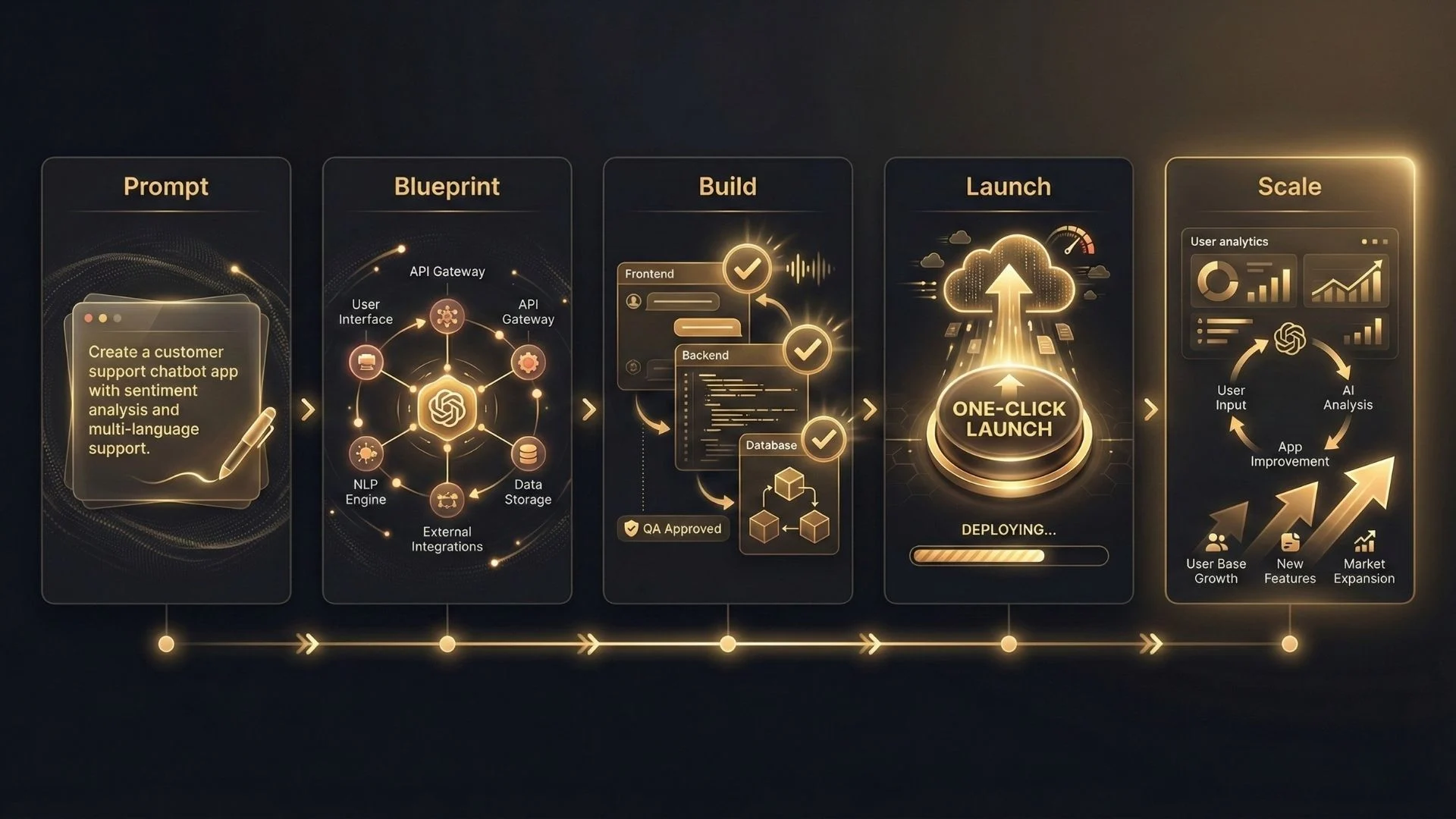
Step 1: Write a Precise Problem Statement — Not a Feature List
The quality of AI-generated output scales directly with the quality of your input. A vague prompt like “I want a food app” produces a generic result. A precise problem statement produces a targeted architecture.
Use this format: “I am building [X] for [target user] who currently struggles with [specific problem]. The core workflow is [user does A → system does B → outcome C].”
Step 2: Review and Refine the AI Blueprint Before Any Code Is Generated
Modern AI builders produce an architecture map — a visual or written summary of the user flows, data models, and API connections they plan to build — before generating any code. Spend 20–30 minutes reviewing this. Catching a wrong assumption here costs nothing. Discovering it after the app is built costs hours of rework.
Step 3: Build the MVP With a Single Core Workflow Only
The most common mistake on AI builders is trying to build too much at once. Define your MVP as: one user type, one core workflow, working end-to-end. A booking app MVP is: user searches → selects time → pays → receives confirmation. Everything else — reviews, referrals, analytics — is version 2.
Step 4: Run a Structured QA Checklist Before Any User Sees It
Test each critical path: (a) happy path — does the core workflow complete without errors? (b) edge cases — what happens if a user submits an empty form, enters an invalid card, or loses internet mid-transaction? (c) mobile — does it render correctly on a 375px-wide screen? Most builders include automated QA; treat it as a floor, not a ceiling.
Step 5: Launch to 10 Users, Measure, Then Scale
Your first launch audience should be small and known — 10 people who have the problem you are solving. Observe them using the app directly if possible. The goal is not traffic; it is one clear signal: does this workflow actually solve their problem? Only after that answer is “yes” should you invest in SEO, ads, or feature expansion.
Pro tip: Set up a simple analytics tool (Plausible or PostHog both have free tiers) from day one. Understanding where users drop out of your core workflow is more valuable than any feature you could add in the first month.
What Free AI Builders Can Do — and Where They Have Real Limits
No tool is without trade-offs. Making an informed choice requires understanding both the genuine strengths and the honest limitations of this category.
Genuine Strengths
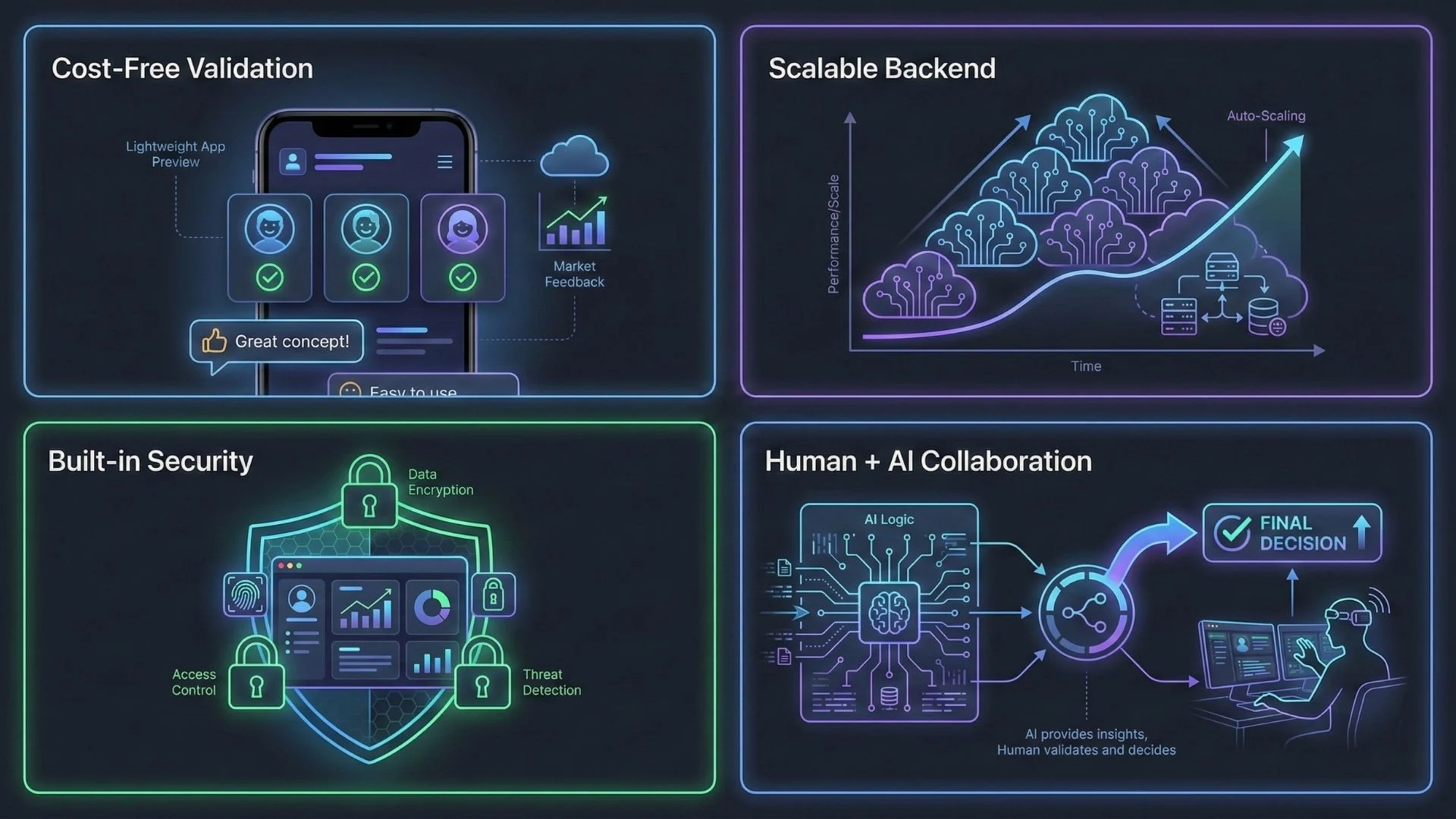
- Speed to MVP: 3–7 days for a simple app versus 4–8 months with a traditional development team (Stack Overflow Developer Survey, 2024).
- Cost-free validation: Test an idea for $0 before committing to a $30,000–$100,000+ development contract.
- Cloud-native infrastructure: Hosting on AWS or GCP with auto-scaling is included. Your app can absorb a spike in traffic without manual server configuration.
- Built-in security baseline: Reputable platforms handle SSL, OWASP top-10 protections, and database access controls — reducing the surface area a non-technical founder would otherwise leave exposed.
- Standard integrations included: Stripe, PayPal, Twilio, SendGrid, and Google OAuth are available on most platforms without custom API code.
Real Limitations to Plan Around
- Vendor lock-in: Migrating a Bubble or Adalo app to a custom codebase is expensive and time-consuming. Evaluate each platform’s data export policies (JSON, CSV, API access) before committing.
- Logic ceilings: Highly complex algorithms — custom machine learning models, real-time multiplayer game logic, low-latency financial trading — are genuinely difficult to implement on most no-code platforms.
- Cost at scale: Free tiers are designed for validation, not production scale. At 1,000+ monthly active users, platform costs often range from $99–$500/month depending on the platform and feature set.
- Performance limits: Generated code may not be as optimised as hand-written code for CPU-heavy operations. For most B2B SaaS and consumer apps, this is not a practical issue.
Important: Before launching any app that handles user data, confirm the platform’s data processing agreement (DPA) and whether it supports GDPR compliance for your user geography. Most enterprise-tier plans include DPAs; free and starter plans may not.
Real-World Use Cases: Who Is Building What
The range of applications being built on AI app builders in 2026 is wider than most people expect:
- E-commerce and marketplace founders building custom buying experiences that require logic beyond standard Shopify themes — particularly for B2B ordering, rental markets, and service marketplaces.
- Service businesses launching booking and scheduling apps for salons, clinics, fitness studios, and legal consultancies — replacing generic booking tools with branded, custom-logic workflows.
- Corporate teams building internal tools: CRM dashboards, inventory trackers, HR onboarding portals, and approval workflow apps that would otherwise require months of IT involvement.
- Content creators and educators launching subscription-based membership platforms with gated content, cohort learning tools, and community features.
- Solopreneurs and consultants building client portals: secure document sharing, project status dashboards, and feedback collection tools that replace fragmented combinations of Google Drive, email, and spreadsheets.
The Economics: Understanding Freemium Models in 2026
Imagine.bo offers transparent pricing with four tiers designed to match different user needs:
Imagine.bo Pricing: What You Actually Get at Each Tier
Imagine.bo uses a credit-based system where credits are consumed each time the AI generates or modifies part of your application. Larger changes cost more credits than small edits. Unused credits roll over on Lite and Pro plans, so you never lose accumulated value as long as your subscription stays active.
Free Plan ($0/month)
10 credits per month, 5 prompts free, basic prompt-to-build flow. Public projects only with community support and limited AI generations. Credit capacity covers 2 to 3 simple pages. Best for testing the platform and understanding how the Describe-to-Build workflow operates before committing to a paid plan.
Lite Plan ($6/month)
30 credits per month, enough to build and deploy up to 8 high-speed mobile-optimized pages. Covers typical business pages like Home, Services, About, and Contact. Includes enterprise-grade hosting with reliable uptime, professional photo and video hosting, 2GB high-resolution storage, monthly update credits for editing content or services, and a 20% discount on Hire a Human engineering tasks. Credit rollover is active on this plan. Best for small businesses that need a fast, professional web presence such as landing pages or service sites.
Pro Plan ($25/month) — Recommended
150 credits per month, enough to build 40 to 60 simple pages or one complete multi-page application of 10 to 15 pages with authentication, forms, and workflows. Includes no Imagine.bo watermark, private projects, guaranteed deployment, 5GB high-resolution storage, rollover credits, SDE support with a 24-hour response guarantee, and a 1-hour expert session with a seasoned engineer before your launch. Best for founders and builders creating real SaaS products or advanced web applications.
Done-For-You ($499 one-time)
A fully managed engineering service where the imagine.bo team builds your product for you from start to finish. Includes complete expert-led architecture, development, and deployment by experienced engineers. Infrastructure is optimized for high traffic and capable of supporting up to 1,000 transactions per second. Managed DevOps, hosting, security, and risk-free delivery terms are included. No credits required. Best for startups and founders who want a production-ready product without managing any part of the development process themselves.
| Plan | Price | Monthly Credits | Storage | Projects | Support |
|---|---|---|---|---|---|
| Free | $0 | 10 | Limited | Public only | Community |
| Lite | $6/month | 30 | 2GB | Public | Standard + 20% off Hire a Human |
| Pro | $25/month | 150 | 5GB | Private | Expert session + Priority (24hr) |
| Done-For-You | $499 one-time | Unlimited | Managed | Fully built | Dedicated engineers |
Frequently Asked Questions
Is it really free to build an app with AI in 2026?
Yes. The leading platforms — Imagine.bo, Bubble, Glide, Adalo, and Softr — all offer free tiers that let you build, test, and deploy a working app without paying anything. Limitations on free tiers typically include a platform subdomain instead of your custom domain, platform branding visible to users, and caps on monthly active users (usually 100–500) or database rows (200–5,000). You typically need to upgrade to a paid plan (starting at $25–$50/month) when you want a custom domain, to remove branding, or when you exceed user or data limits. The strategic approach is to validate your product entirely on the free tier before upgrading.
Can I build a mobile app for iOS and Android without coding?
Yes. Most AI builders generate responsive web apps using Progressive Web App (PWA) technology, which provides a near-native mobile experience — including home screen installation, push notifications, and offline support — without needing a separate native codebase. For true App Store and Google Play Store listings, platforms like Adalo and Glide provide native wrappers that package your app for submission. Note that App Store review typically takes 1–3 days and requires meeting Apple’s guidelines, which include having a functional privacy policy and appropriate content ratings.
How long does it actually take to build an app with an AI builder?
A simple MVP — one core workflow, user authentication, and a basic database — typically takes 3 to 7 days on a modern AI builder when you have a clear product specification. More complex apps with multi-role dashboards, payment flows, third-party API integrations, and custom reporting commonly take 2 to 4 weeks. For comparison, the Stack Overflow Developer Survey (2024) found that traditional custom development of a comparable MVP typically takes 4 to 8 months. The iteration advantage compounds further: changing a workflow in a no-code environment takes hours rather than days of developer time.
Will an AI-built app handle real traffic and payments?
Yes — with the right platform and plan. Cloud-native builders like Imagine.bo deploy on AWS or GCP infrastructure with auto-scaling enabled by default, meaning your app can handle sudden traffic spikes without manual server configuration. Stripe and PayPal integrations for one-time payments and subscription billing are standard features on most paid tiers. Always verify the platform’s uptime SLA (look for 99.9% or better) before launching a revenue-critical product. Free tiers typically do not include SLA guarantees.
What are the main limitations and risks of no-code AI builders?
Vendor lock-in is the most significant risk — migrating an app off a no-code platform to custom code is expensive, often costing 2–4× the original build cost. Logic ceilings exist for genuinely complex requirements: custom machine learning inference, real-time multiplayer, or high-frequency financial data processing are difficult on most no-code platforms. Cost at scale can surprise founders — free tiers are designed for validation, and at 1,000+ monthly active users, platform costs often reach $99–$500/month. Compliance requirements (GDPR, HIPAA, SOC 2) may require enterprise-tier plans that include DPAs and dedicated infrastructure.
Related Articles
- The Ultimate Guide to No-Code AI App Development in 2025
- Unlock AI Power: Your Guide to Free No-Code AI App Builders
- Unlock Android AI Power: Your Guide to the Best AI App Builders
- AI App Builder App Builder No Code: Build World-Class Apps Without Writing a Single Line of Code
- Unlock AI App Building Power: Your Guide to Free No-Code Platforms
Launch Your App Today
Ready to launch? Skip the tech stress. Describe, Build, Launch in three simple steps.
Build




