
If you run a Discord community, you already know the grind: manually welcoming new members, answering the same three questions every day, moderating spam before it poisons the conversation. It eats hours you do not have. The good news is that you do not need to hire a developer or learn Python to fix it. AI-powered bots can handle all of it, and this guide shows you exactly how to build one from scratch without writing a single line of code.
You will finish this article knowing which no-code approach fits your community size and goals, what features are worth setting up first, and how platforms like imagine.bo let you go further than a basic bot when you are ready to build a full web app around your community. If you have been looking at AI tools to automate your community operations, this is where to start.
Launch Your App Today
Ready to launch? Skip the tech stress. Describe, Build, Launch in three simple steps.
BuildTL;DR: Discord now has over 259 million monthly active users and more than 12 million active bots across its servers (Co-op Board Games, 2025). A no-code AI Discord bot handles moderation, onboarding, and member questions automatically. Most community owners can set up a functional bot in under 30 minutes using tools like BotGhost, Zapier, or SCNX with zero coding required.
What Can a No-Code Discord AI Bot Actually Do?
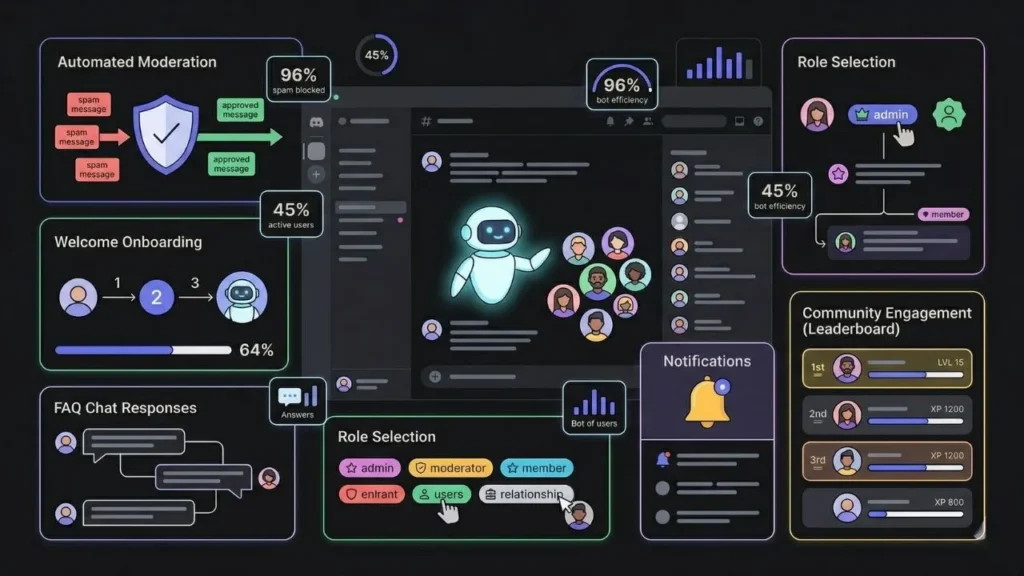
A no-code Discord bot can handle a surprising amount of real work for your server. Server bots currently handle 64% of routine moderation tasks in Discord text channels SQ Magazine, and server automation through bots has reduced admin time by 45% on average across the platform IconEra. That is not a marginal improvement. For a community manager spending five to ten hours a week on repetitive tasks, that is time back in your life.
Here is what a no-code AI bot can realistically handle without you writing any code:
- Auto-moderation: Detecting spam, filtering banned words, issuing warnings, and kicking repeat offenders automatically.
- Welcome flows: Greeting new members, assigning onboarding roles, and directing them to the right channels.
- FAQ responses: Answering common questions with AI-generated natural language replies instead of scripted exact-match commands.
- Role assignment: Letting members self-select roles via reaction menus or slash commands.
- Notifications: Posting alerts when you publish a new video, launch a product, or add a new event to your calendar.
- Community engagement: Running XP systems, level rewards, leaderboards, and economy features to keep members active.
The shift from scripted command bots to AI-powered conversational bots changes how members experience your server. An older bot that only responds to /help feels like a vending machine. An AI bot that understands context and responds in full sentences feels like a mod who actually read the question. That difference drives measurable retention.
Citation capsule: According to SQ Magazine (2025), 96% of moderation actions on Discord are now automated using AI-driven bots. This means the question for community owners is not whether to automate moderation, but which tool to use and how to configure it for their specific community culture.
Which No-Code Tool Should You Use?
The right tool depends on what you actually need. There is a spectrum from simple automation to fully custom AI behavior, and they are priced accordingly.
If you want a quick, template-based bot with pre-built commands covering moderation, welcome messages, economy features, and XP systems, BotGhost is the most approachable starting point. BotGhost lets you make your own Discord bot for free in 5 minutes with no coding required, offering over 300 commands covering moderation, utilities, economy, and more. BotGhost It works well for gaming servers and hobby communities where standard functionality is sufficient.
If you want AI chat channels where your bot holds genuine conversations with members, not just scripted responses, SCNX goes further. SCNX supports AI chat channels with custom personalities and image generation, offering five built-in AI personalities or custom system prompts, with multiple trigger modes including all messages, mentions, or keywords. SCNX This is meaningful for communities where members expect real-time answers to complex questions, like a SaaS product’s support server or an educational community.
If you want to connect Discord to external apps, like posting to your server whenever someone fills out a form, buys a product, or registers for an event, Zapier is the fastest path. With Zapier’s automated workflows, you can connect your favorite apps to Discord without any code Zapier, covering cases like new form submissions, Twitch stream alerts, and calendar events. It is not a standalone bot builder but it is ideal for notification and trigger-based automations.
For advanced custom command logic without touching code, Kite offers a visual scripting interface. Kite is an open-source platform for building and hosting Discord bots without the need to write a single line of code, powered by an advanced no-code editor and free to use for everyone, supporting slash commands, message components, and event listeners. Kite
Where most community owners get stuck is trying to force a single tool to do everything. The smarter approach is layering: use BotGhost or SCNX for the bot itself, Zapier for external app connections, and a custom dashboard built with imagine.bo if you need member-facing features that Discord cannot natively support. More on that below.
For a broader picture of what no-code tools can do for your operations, read AI automation for small teams.
How to Build Your Discord AI Bot Step by Step
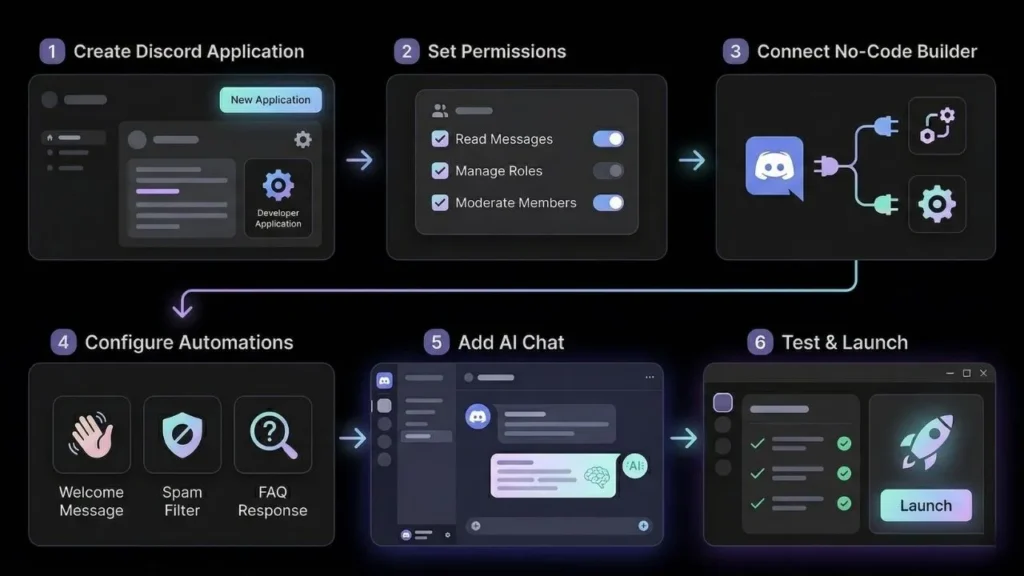
This process works whether you pick BotGhost, SCNX, or a combination. The steps are the same at the foundation level.
Step 1: Create your Discord application
Go to the Discord Developer Portal and click “New Application.” Give it a name, then navigate to the “Bot” section in the left sidebar. Click “Add Bot.” This is where Discord registers your bot as an entity on the platform. Copy the token it generates because you will need it in the next step.
Step 2: Set permissions correctly
Before inviting the bot to your server, go to “OAuth2” in the developer portal and then “URL Generator.” Select the “bot” scope, then check the permissions your bot needs: Send Messages, Manage Roles, Kick Members, Ban Members, and Read Message History are the most common starting set. Copy the generated URL and open it in a browser to invite the bot to your server.
Step 3: Connect your no-code builder
Open your chosen tool (BotGhost, SCNX, Kite, etc.) and paste in the bot token from Step 1. This is the handshake that lets the platform control your bot’s behavior. Follow the platform’s setup guide to authorize it fully.
Step 4: Configure your first three automations
Start with the highest-value actions: a welcome message for new members, an auto-moderation rule for spam detection, and one FAQ response for your most common question. These three alone cut the most repetitive admin work immediately.
Step 5: Add AI conversational responses
If your tool supports it (SCNX does, as does Neura AI), configure an AI chat channel where the bot uses a language model to answer free-form questions. Write a system prompt that defines your bot’s personality, what topics it covers, and what it should redirect to a human moderator.
Step 6: Test before going live
Create a private test channel, invite only yourself and a trusted mod, and run every command and scenario you have configured. Bots behave differently at scale than in testing, so watch the first 48 hours after launch closely.
This process pairs well with the broader framework covered in designing workflows with conversational prompts.
When a Bot Alone Is Not Enough: Building a Full App

Here is where most guides stop, and where the real opportunity starts. A Discord bot lives inside Discord. It cannot send emails, process payments, display a member portal, or give you analytics on your community’s health over time. For that, you need a web application.
The most effective community builders in 2025 treat Discord as the front door and a custom web app as the back office. The bot handles real-time interaction. The app handles everything that needs a database, a login, or a structured interface. Combining the two is not hard when you use AI-powered tools correctly.
This is where imagine.bo fits in. Using the Describe-to-Build feature, you can describe a community dashboard in plain English and get a working full-stack web application generated for you, no developers required. Think: a member directory with filtered search, a resource library your members log into, a public roadmap your community votes on, or an onboarding quiz that assigns Discord roles based on answers via a webhook.
Discord currently has over 200 million monthly active users Resourcera, and communities that build loyalty do it by creating value that extends beyond the chat window. A custom web app connected to your Discord through webhooks or the Discord OAuth login system turns a chat community into a genuine product.
Imagine.bo’s One-Click Deployment puts your app live on Vercel for frontend and Railway for backend by default, with built-in RBAC, SSL, and GDPR foundations. If you reach a point where you need something outside what the AI can generate, the Hire a Human feature lets you assign that specific task to a vetted engineer directly from the dashboard without spinning up a separate project or contract.
For founders thinking about monetizing what they have built around a community, monetizing prompt-built apps without coding covers the practical paths in detail.
Citation capsule: According to Quantumrun Foresight (2025), nearly 3 million Discord servers have already integrated AI applications to enhance moderation, content creation, and user experience. Community owners who extend their AI stack beyond the bot itself and into web applications are building the infrastructure that transforms a casual server into a platform with real retention and revenue potential.
What Are the Limits of No-Code Discord Bots?
No-code bot builders are powerful, but they have real constraints worth knowing before you commit. Understanding the ceiling helps you plan the right architecture from day one.
API rate limits: Discord enforces rate limits at the API level. Many bots suffer from API rate limits, causing delayed counter updates, and stateless architectures mean bots lack long-term memory regarding community sentiment. Skypage For small and mid-sized servers this is rarely a problem, but high-volume servers processing thousands of messages per hour may see lag.
Context window: Most no-code AI bots do not maintain memory between sessions. Each message is treated as a fresh conversation. This means your bot cannot say “as we discussed earlier” or build on previous interactions unless the platform specifically offers persistent context features.
Complex logic: If you need conditional workflows that branch across more than three or four steps, visual no-code editors become hard to manage. At that point, a light-touch approach using imagine.bo to build a small backend service that handles the logic, then connects to Discord via webhooks, is cleaner than forcing complex logic into a visual bot builder.
Data ownership: Most hosted no-code bot platforms retain your bot’s conversation data on their servers. If your community discusses sensitive topics or you operate in a regulated industry, check the platform’s data policy before deploying.
Based on the publicly available pricing for major no-code Discord bot platforms in 2025, a community owner running a mid-sized server of 500 to 5,000 members can automate effectively for $0 to $30 per month using free tiers of BotGhost or SCNX, compared to an estimated $3,000 to $8,000 for a custom developer-built bot with equivalent features. That is a 99% cost reduction for the core use case.
If your community has graduated beyond basic bots and you are thinking about building productized tools, how to build and sell micro-tools using AI is a useful next read.
FAQ: Discord AI Bots Without Coding
How long does it take to build a Discord bot without coding?
Most community owners can configure a functional no-code Discord bot in 20 to 45 minutes for basic moderation and welcome flows. Adding AI conversational responses and custom commands takes another one to two hours depending on how complex your FAQ and role logic are. Over 1.7 billion slash commands are executed monthly across Discord, with server automation reducing administrative time by 45% on average Quantumrun, so the time investment pays back quickly.
Do I need a Discord Developer Portal account to use no-code bot builders?
Yes, for most platforms you still need to create a bot application in the Discord Developer Portal to get a bot token, even if the builder itself requires no coding. The process takes about five minutes. Some fully hosted platforms handle token creation for you, but they have less flexibility for customization.
What is the difference between a Discord bot and an AI Discord bot?
A standard Discord bot responds to pre-set commands with scripted replies. An AI Discord bot uses a large language model to understand natural language and generate contextual responses. Unlike traditional bots that operate on predefined commands, AI bots leverage machine learning and natural language processing to understand context, learn from interactions, and provide more human-like responses. Neura AI The practical difference is that members can ask your AI bot a question in their own words and get a useful answer, rather than needing to know the exact command syntax.
Can a no-code Discord bot handle a server with thousands of members?
Yes, with caveats. MEE6, the most installed Discord bot, is active in approximately 21.3 million servers IconEra and runs on a no-code-friendly setup. For very large servers, the bottleneck is usually Discord’s API rate limits rather than the no-code platform itself. If you are managing a server above 10,000 active members, evaluate premium tiers of your chosen platform to ensure reliable uptime.
What should I build if I want to go beyond what Discord bots can do?
When you need member logins, payment processing, a searchable knowledge base, analytics dashboards, or any feature that requires persistent data and a dedicated interface, you need a web application alongside your bot. Imagine.bo’s Describe-to-Build lets you generate that full-stack application from a plain English description without hiring a developer, and it connects to Discord via webhooks or OAuth for a seamless member experience.
Conclusion
Building an AI Discord bot without coding is genuinely straightforward in 2025. The tools are mature, the setup is quick, and the impact on your community’s experience is immediate. Start with BotGhost or SCNX for the bot itself, use Zapier to connect external apps and triggers, and configure AI conversational responses for your most common member questions.
Three things to take away: first, automation cuts admin time by up to 45%, which is not a minor efficiency gain. Second, no-code bot builders have real ceilings around context, complex logic, and data ownership, so plan your architecture before you need to rework it. Third, the most capable community platforms combine a Discord bot with a custom web application, and that combination is now within reach for any founder using AI app builders.
If you are ready to build the web application layer that makes your community a real product, start with imagine.bo’s Describe-to-Build feature. Describe what you need in plain English and get a deployable, full-stack app in minutes. Explore real-world apps built with prompt-based tools to see what is actually possible, then go build yours.
Related Articles
- Revolutionize Teamwork: Your No-Code Guide to Building AI-Powered Slack Bots
- Effortlessly Add AI Chatbots to Your Website: The No-Code Guide
- Revolutionizing App Development: Your Expert Guide to AI-Assisted No-Code Builders (2026)
- Ignite Your AI Journey: 25+ App Ideas for Beginners (No Code Required!)
- Build Your Dream App for FREE with AI: The Ultimate No-Code Guide
Launch Your App Today
Ready to launch? Skip the tech stress. Describe, Build, Launch in three simple steps.
Build




