AI-powered development is no longer a speculative concept of the distant future. It is here, and it is fundamentally rewriting the playbook on how software products are built. The promises are bold: Faster execution. Less friction. Fewer dependencies.
For years, the barrier to entry for building software was technical literacy. Today, that barrier is dissolving, replaced by a new metric: Intent clarity.
Launch Your App Today
Ready to launch? Skip the tech stress. Describe, Build, Launch in three simple steps.
BuildIn this rapidly evolving landscape, two tools have emerged as the standard-bearers for this shift—Bolt.new and Cursor. While other contenders like Windsurf and Claude Code are making waves, Bolt and Cursor currently dominate the conversation. Both are heavily powered by artificial intelligence. Both promise to accelerate the journey from “idea” to “deployed app.”
However, to treat them as competitors is to misunderstand them. They solve fundamentally different problems for fundamentally different people.
This guide clarifies the actual differences, stripping away the marketing hype to expose the workflow realities. Whether you are a founder validating a startup or a senior engineer optimizing a pipeline, understanding this distinction is key to your strategy.
Quick Comparison: Bolt.new vs Cursor
For the busy builder, here is the high-level breakdown of Bolt.new vs Cursor to help you decide instantly.
| Feature | Bolt.new | Cursor |
|---|---|---|
| Primary Type | In-Browser AI Web App Builder | AI-Native Code Editor (IDE) |
| Best For | Founders, No-Code Builders, MVPs | Professional Developers, Large Codebases |
| Setup Required | None (Zero-Config) | Minimal (Install App + Node/Docker) |
| Core Tech | StackBlitz WebContainers (Browser-based) | Fork of VS Code (Local-based) |
| Code Ownership | Generated for you (Exportable) | You own & edit every line |
| Pricing Model | Token-based (pay per generation) | Subscription (Free & Pro tiers) |
| Sweet Spot | “Zero to One” (Idea to App) | “One to Ten” (Refactoring & Scaling) |
The Paradigm Shift: From Syntax to Intent
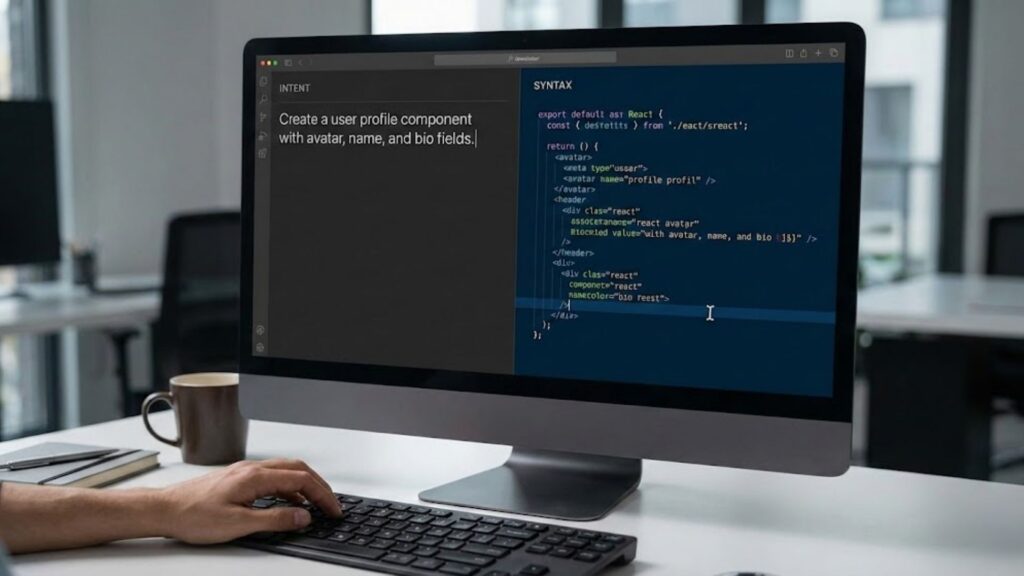
To understand the battle between Bolt.new and Cursor, we must first understand the environment they were born into.
Traditional development was historically slow, heavy on setup, and prone to “boilerplate fatigue.” Developers often spent 30% of their time configuring environments, setting up linters, and managing dependencies before writing a single line of unique business logic. It was a process of translation: taking a human idea and painstakingly translating it into machine syntax, line by line.
AI changed the story effectively overnight. We have moved from an era of Syntax-First Development to Intent-First Development.
Today’s builders demand tools that:
- Understand Context: They shouldn’t just autocomplete a line; they should understand the whole feature.
- Reduce Repetition: They should handle the boilerplate, leaving the creative logic to the human.
- Ship Faster: They should bridge the gap between localhost and production.
Bolt.new and Cursor are the two dominant answers to this demand, but they approach the solution from opposite ends of the spectrum.
What Is Bolt.new? The “Idea-to-Reality” Engine

Bolt.new is an in-browser development environment built for instant execution. Powered by StackBlitz’s revolutionary WebContainers technology, it allows Node.js servers to run entirely inside your browser tab.
The premise is deceptively simple: You visit a URL, describe what you want to build in plain English, and the AI takes over. It acts as a full-stack engineer. It scaffolds the project, installs dependencies, writes the frontend (React/Vite), sets up the backend, and handles styling—all in a single, continuous flow.
This approach is similar to other emerging tools in the space. For a direct comparison of this “prompt-to-app” philosophy, check out our breakdown of Lovable vs Bolt, which explores how different platforms handle speed and security.
Core Strengths of Bolt.new
- Zero-Config Environment: There is no
npm install. There is no fighting with local Node versions. You open the tab, and the environment is live. - Prompt-Driven Architecture: You don’t need to know how to set up a Tailwind config or an Express server. You simply tell Bolt, “Make the button blue and connect the form to a database,” and it executes.
- Rapid MVP Creation: For a hackathon, a client demo, or a startup prototype, Bolt is unmatched. You can go from a blank screen to a shareable link in 15 minutes.
- Democratized Creation: It effectively removes the technical ceiling. If you can articulate your logic, you can build the app.
It feels magical because it abstracts away the “computer science” part of coding, leaving only the “product building” part.
What Is Cursor? The “Professional’s Supercharger”
If Bolt.new is a magic wand, Cursor is a bionic exoskeleton.
Cursor is an AI-native code editor, built as a fork of VS Code. This is a critical distinction: it is designed to live where developers already live—inside real, local projects, with full access to the terminal, local file systems, and Git history.
Instead of replacing the developer, Cursor collaborates with them. It uses advanced RAG (Retrieval-Augmented Generation) to index your entire codebase. When you ask Cursor a question, it doesn’t just guess based on general training data; it looks at your specific utility functions, your component architecture, and your database schema to provide a context-aware answer.
For those considering other advanced assistants, it is worth comparing Claude Max vs Cursor to see how different models handle complex reasoning versus speed.
Key Strengths of Cursor
- Deep Codebase Understanding: Cursor knows your code better than you do. It can refactor legacy files or explain complex logic across dozens of files instantly.
- Composer Mode: This feature allows you to edit multiple files simultaneously via natural language, acting as an orchestrator for complex refactors.
- Safe, Controlled Edits: Unlike a “black box” generator, Cursor suggests changes (diffs) that you must review and accept. You remain the gatekeeper of quality.
- Long-Term Viability: Because it is a fork of VS Code, it supports all the extensions, themes, and workflows professional teams rely on.
Cursor respects the structure of software engineering. It doesn’t try to hide the code; it helps you master it.
Core Difference: Speed vs. Control
This is the real showdown. The choice between Bolt.new and Cursor is essentially a trade-off between Velocity and Precision.
Bolt.new: The Sprint
Bolt.new prioritizes getting from zero to one. It is optimized for the “Greenfield” phase—when nothing exists, and you need something to exist immediately. It handles the “how” so you can focus on the “what.” However, because it manages the environment for you, you have less granular control over the underlying infrastructure.
Cursor: The Marathon
Cursor prioritizes code clarity, maintainability, and developer ownership. It assumes that “getting it built” is only 10% of the lifecycle; the other 90% is maintaining, debugging, and scaling it. Cursor ensures that the code you write today is code you can live with six months from now.
The Verdict: Ease favors Bolt.new. Depth favors Cursor.
Pricing and Accessibility
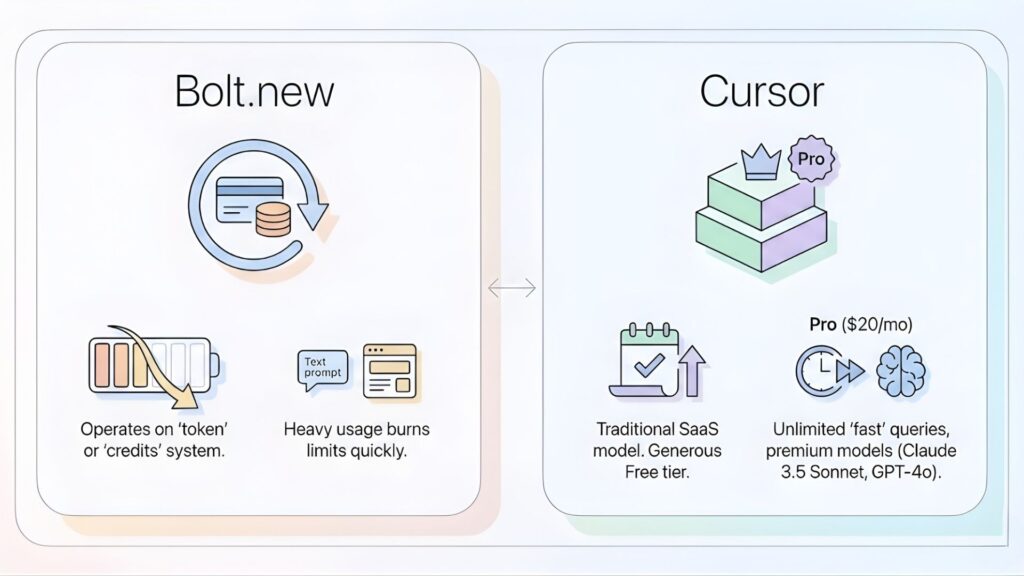
When comparing Bolt.new vs Cursor pricing, the models differ significantly based on usage.
- Bolt.new Pricing: Operates heavily on a “token” or “credits” system. You consume credits every time you generate or modify a prompt. Heavy usage (regenerating entire apps) can burn through limits quickly.
- Cursor Pricing: Follows a traditional SaaS model with a generous Free tier. The Pro plan ($20/mo) offers unlimited “fast” queries and access to premium models (Claude 3.5 Sonnet, GPT-4o).
Understanding these costs is crucial. For a detailed analysis of how token-based models can surprise you, read our guide on hidden costs and value gaps.
Bolt.new is built for the visionaries. The barrier to entry is linguistic, not technical. If you can explain your idea clearly, you can build it.
Cursor is built for the mechanics. It assumes you understand the basics of programming. If the AI hallucinates a bad import, you need the knowledge to spot it.
The Verdicts: Choosing Your Weapon
Best Choice for No-Code Builders: Bolt.new
If you identify as a no-code or low-code builder, Bolt.new is currently unbeatable. It enables:
- Fast validation of startup ideas.
- Solo product creation without hiring a freelancer.
- Pitch-ready demos that actually work.
- Winner: Bolt.new
Best Choice for AI Developers: Cursor
AI developers and software engineers need flexibility. They care about custom logic, API rate limits, model experimentation, and unit testing. Cursor fits naturally into this workflow, turning the AI into a co-pilot rather than the pilot.
- Winner: Cursor
Handling Complex and Scalable Projects
Simple products? Either tool works. But for complex systems with microservices, heavy backend logic, or strict security requirements, Cursor pulls ahead. It offers easier debugging, better architectural control, and safer refactoring.
- Winner: Cursor
The Hybrid Workflow: It’s Not About Winning
The industry loves a “versus” narrative, but the smartest builders are already moving past it. They are finding ways to use both.
A potent workflow emerging in 2026 involves starting in Bolt and finishing in Cursor.
- Use Bolt.new to hallucinate the boilerplate, set up the UI, and get the core functionality working in minutes.
- Export the codebase to a GitHub repository.
- Clone it locally and open it in Cursor to refine the logic, secure the backend, and prepare for production scaling.
This approach leverages Bolt’s speed for initialization and Cursor’s control for maturation.
Frequently Asked Questions (FAQ)
1. Is Bolt.new free to use? Bolt.new typically offers a limited free tier or trial usage, but heavy daily usage often requires a paid subscription to access higher token limits and cloud features.
2. Can I export code from Bolt.new? Yes, Bolt.new allows you to export your project to GitHub or download the files locally, meaning you are not locked into their platform forever.
3. Does Cursor work with my existing VS Code extensions? Yes. Since Cursor is a fork of VS Code, you can one-click import all your existing themes, keybindings, and extensions (like Prettier, ESLint, etc.).
4. Which is better for beginners, Bolt or Cursor? Bolt.new is significantly better for absolute beginners who do not know how to code. Cursor is better for beginners who want to learn how to code by reading and understanding the AI’s suggestions.
Conclusion
This is not a battle with one winner. Bolt.new empowers creators to become builders. Cursor empowers developers to become architects.
- Start fast with Bolt.new.
- Build deep with Cursor.
That balance is where real innovation happens.
Still Overwhelmed? A Third Option.
If reading this made you excited to build but overwhelmed by the choice between prompting environments and code editors, there is a third path.
Sometimes, you don’t want to be the coder or the prompter — you just want the business result. That is where Imagine.bo steps in.
Imagine.bo goes a step further than Bolt or Cursor. You simply describe your startup idea, and Imagine.bo’s AI-powered code generator builds, deploys, and scales your app for you. It handles the infrastructure, the code, and the deployment, delivering launch-ready software without the setup stress. It is the fastest path from concept to revenue, letting you focus entirely on growth while the engineering is handled in the background.
For more insights on building software without coding, explore our comprehensive guide to AI-powered no-code app development.
Launch Your App Today
Ready to launch? Skip the tech stress. Describe, Build, Launch in three simple steps.
Build