Most home organizers win clients through word of mouth until the referrals slow down, and then they realize they have no web presence to fall back on. According to Stanford Web Credibility Research, 75% of consumers judge a business’s credibility based on its website design alone. For a home organizer trying to charge professional rates, a weak or nonexistent website is not just a missed opportunity. It is a trust problem. The right website converts curious visitors into booked consultations without you having to lift a finger. This article covers what a home organizer website needs to actually generate clients, why imagine.bo is the best AI website builder for home organizers in 2026, and exactly how to build yours in under an hour without writing a single line of code. If you want to see how other local service businesses approach this, the AI website builder for consultants guide covers similar ground for comparison.
TL;DR: Home organizers need a website that builds local trust, shows real results, and makes booking frictionless. According to BrightLocal’s 2024 Local Consumer Review Survey, 98% of consumers read online reviews before choosing a local service provider. imagine.bo’s Describe-to-Build feature generates a complete, mobile-ready, SEO-friendly home organizer website from a single prompt, starting at $0. A professional site with booking, services pages, and before-and-after galleries can be live in under 60 minutes.
What Does a Home Organizer Website Actually Need to Convert Visitors into Clients?
A home organizer website needs to answer three questions within the first ten seconds: do you serve my area, what does working with you look like, and how do I book you? According to BrightLocal’s 2024 Local Consumer Review Survey, 98% of consumers read online reviews before choosing a local service provider, and 87% of those searches happen on Google. If your website does not address trust, specificity, and a clear next step immediately, visitors leave before they read a single sentence about your services.
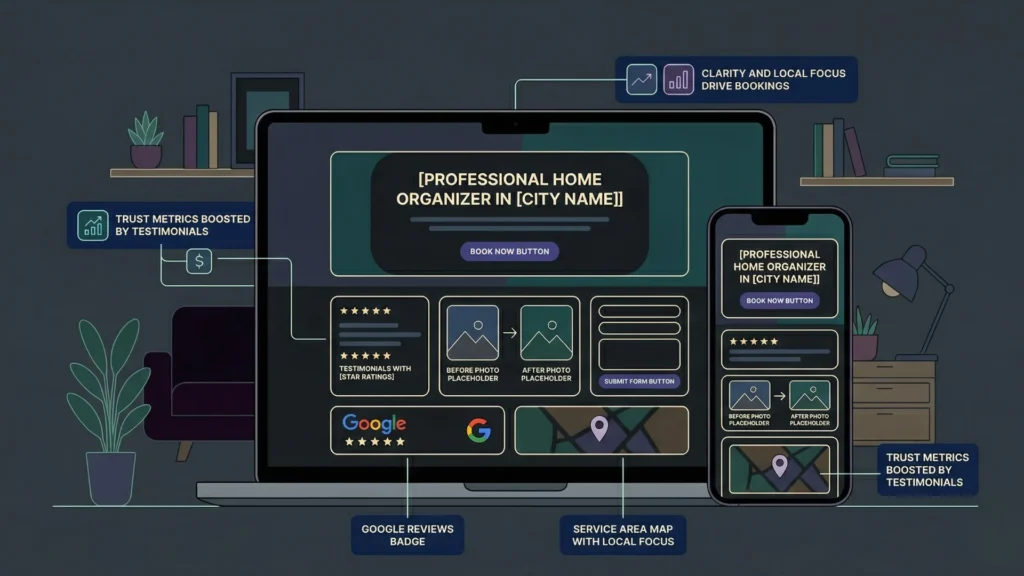
The structure that converts is not complicated. A clear hero section naming your location and specialty, social proof in the form of client testimonials and results photos, a services page that explains what each package includes and how it is priced, and a booking or contact form that requires no more than three fields. Every extra step between a visitor’s interest and their ability to book you is a conversion you lose.
Home organizing is a hyper-local service in a way that most generic website advice fails to account for. A wedding photographer can attract clients from three states away. A home organizer cannot. This means local SEO signals, specifically your city and neighborhood name in your page title, your service descriptions, and your meta tags, matter far more than overall traffic volume. A home organizer website with 200 targeted monthly visitors from the right zip code is worth more than one with 5,000 generic visitors who are not in the service area. imagine.bo generates SEO-ready architecture by default, and you can specify local keywords directly in your Describe-to-Build prompt to ensure they are woven into the page structure from the start. For more on building local SEO into your site from the beginning, the SEO-friendly website builder guide covers the technical foundations that support local search visibility.
Why Is imagine.bo the Best AI Website Builder for Home Organizers?
Imagine.bo is the best AI website builder for home organizers because it builds a complete, production-ready website from a plain English description, deploys it on enterprise-grade infrastructure, and requires no design skills, no coding knowledge, and no agency budget. According to Clutch, hiring a web design agency to build a small business website typically costs between $3,000 and $10,000. imagine.bo’s Lite plan starts at $6 per month and covers everything a home organizer needs to go live with a professional site.
The Describe-to-Build interface is the core differentiator. You type your business name, your service area, your offerings, and your target client, and the AI generates the full page structure, copy scaffolding, visual layout, and navigation hierarchy automatically. You are not choosing from templates. You are generating a custom site built around your specific business. That is a meaningful difference for a service business where generic presentation costs you the trust you need to book high-ticket clients.
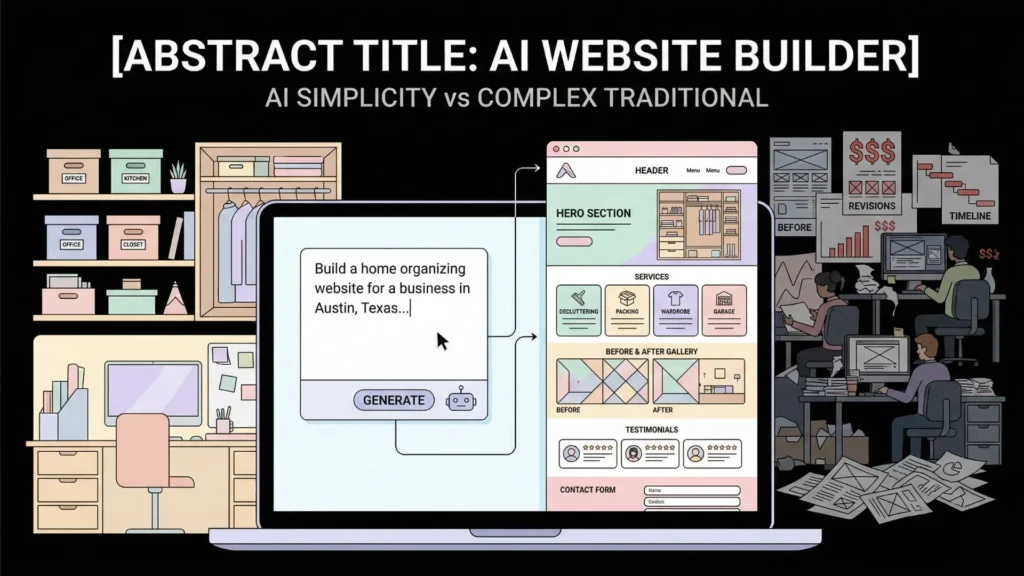
A practical example of what this looks like in action: a home organizer in Austin, Texas who serves busy families and downsizing seniors would write a prompt like: “Build a professional home organizing website for [Business Name] in Austin, Texas. Services include whole-home decluttering, kitchen organization, garage cleanouts, and move-in setup. Target clients are families with young children and adults aged 55-plus downsizing into smaller homes. Include a services page with three package tiers, a before-and-after gallery section, a testimonials block, a FAQ section, and a contact form with fields for name, email, phone, and a message. Style should be clean, warm, and professional.” That single prompt produces a structured, styled, multi-page website ready for customization. What a freelance designer would charge $2,500 to produce takes under five minutes to generate. The make a website with one prompt walkthrough shows this exact workflow in detail.
How Does imagine.bo Compare to Wix, Squarespace, and Canva?
The key difference is starting point. Wix, Squarespace, and Canva all provide templates you fill in. imagine.bo starts from your description and builds toward your business, not toward a generic placeholder. For a home organizer who has never built a website, spending two hours on a Squarespace template that still looks like every other cleaning service site is a worse outcome than a twenty-minute prompt session on imagine.bo that produces something structured around your specific niche, location, and client type.
Template-based builders also require you to make dozens of design decisions you may not feel qualified to make: font pairings, color schemes, section order, image placement. imagine.bo makes those decisions based on your prompt and lets you refine through conversation. You are directing, not designing, which is the correct division of labor for a business owner whose expertise is in organization, not web design.
What Pages Should a Home Organizing Website Include?
A home organizer website needs five core pages to convert visitors into booked clients effectively. Each page serves a specific job in the decision-making process, and missing any one of them creates a gap that costs you consultations.
The homepage is your first impression and your trust signal. It must include your value proposition, your service area, one or two standout testimonials, a clear CTA above the fold, and a photo that shows real results or a real person. Generic stock images of tidy shelves damage credibility with clients who can recognize them. According to a 2023 study by Edelman, 81% of consumers say they need to be able to trust a brand before they will do business with them. Your homepage is where that trust is established or lost.
The services page is where browsers become buyers. Each service should be described in terms of the client outcome, not just the task. “Kitchen Organization Session” tells a client what you do. “Walk away from your kitchen knowing exactly where everything lives and how to keep it there” tells them why it matters. List what is included, how long it takes, and what the investment is or how to get a quote. Transparent pricing or a clear quote process removes the friction that causes potential clients to choose a competitor who makes the decision easier.
A portfolio or results gallery converts skeptical visitors by showing proof. According to Nielsen Norman Group, users spend five times longer looking at images than reading text on a service business website. Before-and-after photos of closets, kitchens, garages, and offices are the most persuasive content a home organizer can publish. Request permission from past clients and document every project from your first session onward.
A dedicated testimonials or reviews page amplifies the social proof from your homepage. A single testimonial on a homepage creates a data point. A full page of detailed, specific client reviews creates a pattern of evidence. About and contact pages round out the five, with the about page serving as a second trust-building moment where your background, certifications, and approach give potential clients a reason to choose you over a competitor. The AI website builder for coaches covers a similar service-business page structure in more detail.
How Do You Build a Home Organizer Website with imagine.bo in Under an Hour?

Building a home organizer website on imagine.bo follows a clear sequence. Done in order, it takes most users under 60 minutes from blank prompt to published site.
Start by writing your prompt before you open the platform. Spend ten minutes answering these questions in writing: What is your business name? What city and neighborhoods do you serve? What are your three to five core services? Who is your ideal client in one sentence? What do you want a visitor to do first, call, fill out a form, or book a consultation? What tone do you want, warm and approachable, clean and professional, or bold and energetic? Those answers become the foundation of your Describe-to-Build prompt.
Open imagine.bo and submit your prompt. The AI-Generated Blueprint will produce your full site structure within minutes, including page layout, navigation, section order, and copy scaffolding. Review the blueprint before clicking through to the visual editor. Check that all five core pages are present, that your service area appears in the homepage headline, and that the CTA is above the fold on the homepage.
Use the visual editor to replace placeholder copy with your real content and upload your before-and-after photos. This is the step most users spend the most time on. Real photos and specific client language transform a generated site into one that feels personal and credible. Avoid launching with any placeholder content visible to visitors.
Use One-Click Deployment to publish when you are satisfied. imagine.bo deploys your frontend to Vercel’s global edge network, meaning your site loads fast regardless of where your visitors are. According to Google, 53% of mobile users abandon a site that takes more than three seconds to load. Speed is a booking variable for local service businesses, not a technical detail.
Total cost comparison for a home organizer launching a professional website in 2026: web design agency, $3,000 to $10,000 plus $150 to $300 annually for hosting; freelance designer, $800 to $2,500 with similar ongoing costs; Squarespace or Wix DIY, $16 to $49 per month with 8 to 20 hours of setup time; imagine.bo Lite plan, $6 per month with under one hour of setup time. The gap in setup time and cost is significant enough to represent a real business decision, not just a preference. For a solo home organizer, those savings compound directly into time you spend with clients instead of fighting a website builder. The AI website builder for small businesses guide compares platform costs in more detail across business types.
How Do SEO and Local Visibility Work for Home Organizer Websites?
Local SEO determines whether your home organizer website appears when someone in your service area searches “home organizer near me” or “professional organizer in [city name].” According to Google, 46% of all searches have local intent, and according to BrightLocal, 88% of local mobile searches result in a call or visit within 24 hours. For a service business that books by consultation, ranking locally is the single highest-return thing your website can do.
imagine.bo generates SEO-ready page architecture by default. All public-facing pages are structured for search engine crawling and indexing, HTTPS is applied automatically, and Vercel’s edge deployment ensures fast load times that support Core Web Vitals scores. Those are the technical foundations. Your job is to supply the local content that search engines use to understand where you operate and who you serve.
Three specific things move the needle most for home organizer local SEO. First, include your city and neighborhood names in your homepage H1, your services page title, and your meta descriptions. Not awkwardly, but naturally: “Home Organizing Services in Austin, TX” as an H1 is both readable and searchable. Second, embed a Google Maps block or clearly state your service radius on a dedicated service area page. Search engines use geographic signals throughout a page, not just in the address field. Third, collect and display Google reviews from verified clients. Review volume and recency are ranking factors for local search results.
Citation capsule: According to BrightLocal’s 2024 Local Consumer Review Survey, 98% of consumers read online reviews before choosing a local business, and businesses with a higher number of recent, detailed reviews consistently outrank competitors with older or fewer reviews in local search results (BrightLocal, 2024). For home organizers, review acquisition is not a marketing nice-to-have. It is a direct input to search ranking and client conversion simultaneously.
For scheduling features that reduce friction between website discovery and consultation booking, the AI scheduling assistant for small businesses guide covers how to integrate booking flows into a no-code site.
What Features Separate a Good Home Organizer Website from a Great One?
The difference between a functional home organizer website and one that consistently books premium clients comes down to three features that most service websites skip entirely: a clear intake process, a pricing transparency strategy, and a follow-up mechanism that does not require you to remember to send an email.
An intake process communicated on the website reduces friction and sets client expectations before the first call. A short explanation of what happens after someone submits the contact form, “I respond within 24 hours to schedule a free 20-minute discovery call,” removes the ambiguity that causes potential clients to submit a form and then accept a quicker response from a competitor. Clients who know exactly what to expect convert at higher rates than those who submit a form into a void.
Pricing transparency, even if it is just “packages start at $X” or “hourly rate available, contact for a quote,” filters out clients who cannot afford your rates and attracts those who are ready to book. According to HubSpot, 80% of consumers prefer transparency around pricing before they contact a service business. Hiding your rates entirely rarely produces better leads. It just produces more conversations that do not close.
A follow-up mechanism automates the nurture process for leads who are interested but not ready to book today. For a home organizer, this might be as simple as an email confirmation that includes a link to your FAQ page or a before-and-after gallery. It keeps your business top of mind without requiring manual follow-up on every inquiry. imagine.bo’s Hire a Human feature is the right tool for setting up a custom email workflow when the default form notification is not enough. For more on automating client intake and communication, the best AI tools to automate client service portals covers the full automation layer available to service businesses.
FAQ
What should I include on my home organizer website to get more bookings?
Include five core pages: homepage with a local-specific value proposition and CTA, services page with package descriptions and pricing or quote process, portfolio with real before-and-after photos, testimonials from verified clients, and a contact or booking form. According to BrightLocal, 98% of consumers read reviews before choosing a local service provider. Social proof is not optional for a home organizing business where trust is the primary buying signal. A clear booking path on every page reduces the decision friction that causes visitors to leave without acting.
How long does it take to build a home organizer website with an AI builder?
With imagine.bo, most home organizers can go from prompt to published site in under 60 minutes. The Describe-to-Build feature generates your full page structure in minutes. The remaining time is spent uploading real photos, replacing placeholder copy, and reviewing the layout before deploying. According to Clutch, a comparable agency-built website takes four to eight weeks and costs $3,000 to $10,000. The AI-built version deploys the same day for $6 per month on the Lite plan.
Does an AI-built home organizer website rank on Google?
Yes, if you include local SEO signals from the start. imagine.bo generates SEO-ready architecture with clean page structure, fast load times via Vercel, and HTTPS by default. According to Google, 46% of all searches have local intent. To rank for those searches, include your city name in your homepage H1 and page titles, specify your service neighborhoods in your service descriptions, and collect Google reviews from clients. The technical foundation is automatic. The local content is your responsibility to add.
Do I need coding skills to build a home organizing website with imagine.bo?
No coding is required at any stage. You describe your business in plain English, the AI generates the full site structure, and you edit through a drag-and-drop visual interface or follow-up conversation prompts. If you ever need a feature beyond AI generation capacity, like a custom booking integration, imagine.bo’s Hire a Human feature brings in a vetted engineer at $25 per page without you leaving the platform. For a complete walkthrough of building without code, the no-code web app with imagine.bo guide covers every step.
What is the best pricing plan on imagine.bo for a home organizer just starting out?
The Lite plan at $6 per month is the right starting point for most home organizers. It includes 30 credits, covers up to eight pages, enterprise-grade hosting, and professional image hosting. That is enough for a homepage, services page, portfolio, testimonials page, contact page, and a few additional pages like FAQ or an about section. Once you want private projects, custom authentication, or a full booking and client management system, the Pro plan at $25 per month adds 150 credits, rollover credits, and a one-hour expert session before launch.
Conclusion
A home organizing business runs on trust, local reputation, and the ability to show clients what transformation looks like before they commit. Your website is the place all three of those things either come together or fall apart. The good news is that building a professional, conversion-ready home organizer website no longer requires a designer, a developer, or a large budget. imagine.bo’s Describe-to-Build workflow generates a complete, SEO-ready, mobile-optimized site from a single plain English prompt, deploys it on production infrastructure, and lets you refine through conversation rather than code. The three things that will make your site generate bookings are a clear local value proposition above the fold, real before-and-after photos that prove your work, and a frictionless path from visit to consultation request. Build those three things well and your website works for you while you are busy working for clients. Start on imagine.bo for free today, and have your home organizing website live before the end of the day. For more on what other service-based businesses are building with AI website tools, the AI website builder for spas covers a closely related use case worth reviewing.