
Choosing between AI coding assistants can be overwhelming. This comprehensive guide compares Claude Code and Cursor’s pricing models, core features, and real-world limitations—plus introduces a purpose-built alternative for founders who need complete products, not just code assistance.
TL;DR: Quick Comparison
Claude Code ($10-100+/month via API usage) – Command-line AI agent for experienced developers. Handles complex coding tasks autonomously but requires technical expertise and doesn’t address deployment or infrastructure.
Cursor ($20-40/month subscription) – AI-powered code editor with seamless autocomplete and generation. Great for developers who want IDE-integrated assistance, but assumes coding knowledge and doesn’t solve architecture or deployment challenges.
Imagine.bo (Free-$249/month Credit based) – Complete AI no-code platform built for founders. Delivers end-to-end product development including frontend, backend, database, and deployment—no coding required.
Bottom Line: Claude Code and Cursor accelerate coding for developers. Imagine.bo enables non-technical founders to ship complete, production-ready products without learning to code.
The landscape of AI-powered development tools has exploded in 2026, with developers and founders alike searching for solutions that can accelerate software creation. Two names dominate conversations around AI coding assistants: Claude Code and Cursor. Understanding Claude Code and Cursor AI tools pricing and features is critical for anyone considering these platforms, but the question goes deeper than simple feature lists. For founders building products without traditional engineering teams, these tools promise speed and efficiency, yet they come with assumptions about technical knowledge, workflow complexity, and hidden cost structures that aren’t immediately obvious.
This comprehensive comparison examines what Claude Code and Cursor actually offer, how their pricing models work in practice, and where they excel or fall short. More importantly, we’ll explore why many founders discover that AI coding tools, while powerful, represent only one piece of the product development puzzle, and introduce an alternative approach built specifically for non-technical teams who need to ship complete products, not just generate code.
What Is Claude Code?
Claude Code is Anthropic’s CLI (Command Line Interface) tool designed to bring the deep reasoning capabilities of the Claude 3.5 and 3.7 models directly into your terminal. Unlike a standard chatbot, it is an “agentic” tool that lives in your codebase, capable of reading thousands of files, planning complex architectures, and executing multi-step refactors autonomously.
Core Features
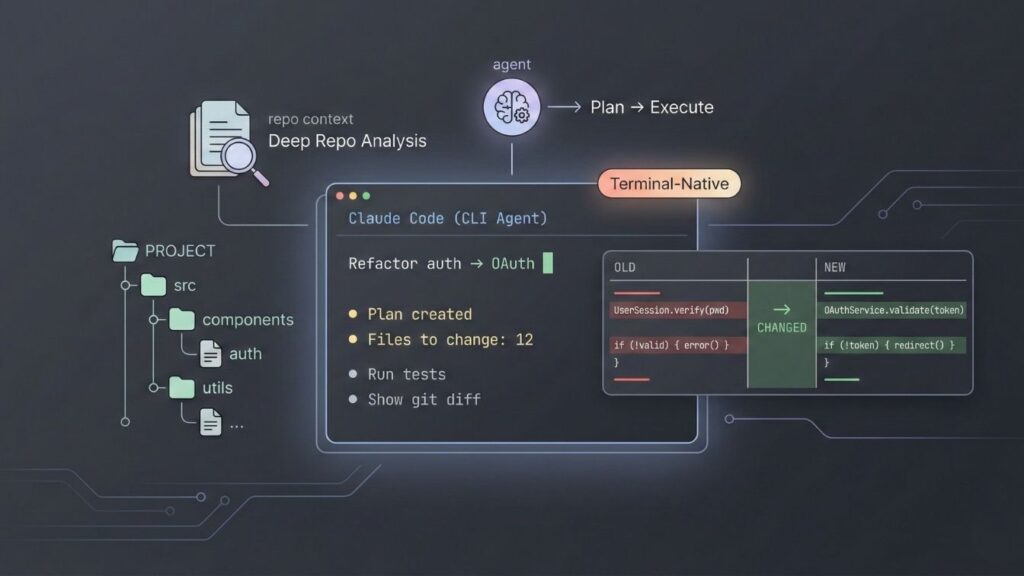
- Agent-Based Workflow: It doesn’t just autocomplete; it plans. You can give it a high-level command like “Refactor the authentication module to use OAuth,” and it will map out the necessary file changes before asking for permission to execute.
- Deep Repo Analysis: It excels at “context awareness,” ingesting your entire repository to understand dependencies that standard chat interfaces miss.
- Terminal-Native: It runs right where developers work—in the terminal—allowing it to run tests, check git diffs, and execute shell commands.
Pricing Model & Limitations
Claude Code is tied to Anthropic’s subscription tiers, but heavy usage reveals complex limits:
- Pro Plan (~$20/mo): Includes access to Claude Code but is subject to a strict 5-hour rolling message limit (often around 45 messages per window).
- Max Plan ($100–$200/mo): Designed for power users, offering 5x to 20x the usage volume.
- Usage Caps: Even on paid plans, developers hit “active compute hour” limits. If the agent is thinking for too long, you get throttled.
- Hidden Friction: Because it is a CLI tool, it lacks a visual interface (GUI). You must be comfortable with terminal commands to use it effectively.
Ideal For: Senior engineers who need an “architect” partner to solve complex logic problems or refactor messy legacy code.
If you’re comparing different approaches, understanding the difference between no-code and low-code platforms becomes crucial when deciding which path fits your skill level and goals.
What Is Cursor?

Cursor is a fork of VS Code (Visual Studio Code) that integrates AI native features into the editor itself. If Claude Code is a thoughtful architect, Cursor is a speed-obsessed pair programmer. It focuses on keeping you in the “flow state” by predicting your next move and editing code in real-time.
Core Features
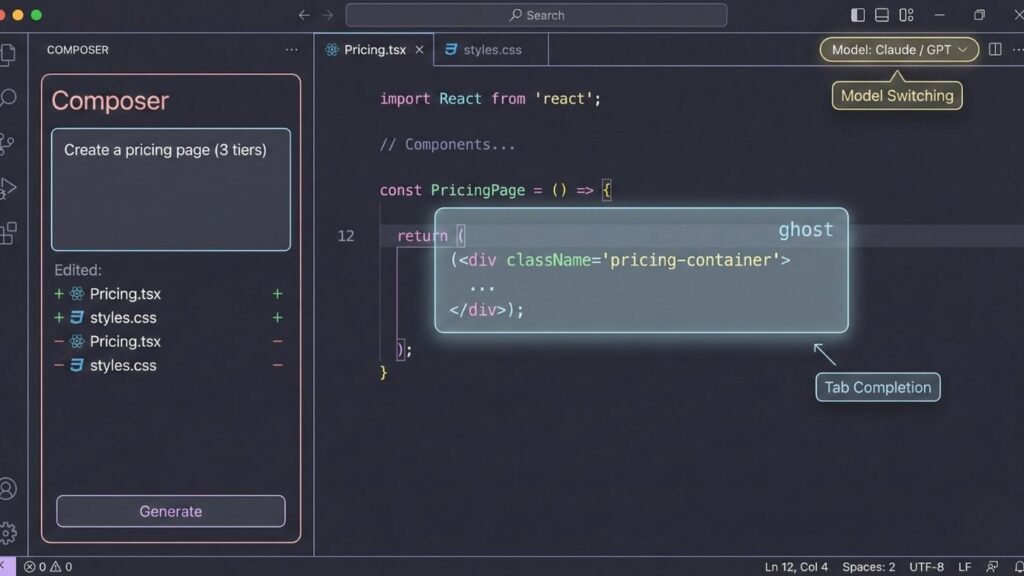
- Tab Completion: A supercharged autocomplete that predicts not just the next word, but entire blocks of logic based on recent edits.
- Composer: A feature that allows you to write a prompt (e.g., “Create a pricing page with three tiers”) and watch it generate and edit multiple files simultaneously in a diff view.
- Model Switching: Users can toggle between Claude 3.5 Sonnet, GPT-4o, and other models depending on the task.
Pricing Tiers
- Hobby (Free): Basic access with limited “fast” requests.
- Pro ($20/mo): Unlimited “tab” completions and ~500 fast premium requests per month.
- Business ($40/user/mo): Adds centralized billing, admin dashboards, and privacy controls (SSO).
Constraints
Cursor is fundamentally an IDE (Integrated Development Environment). To use it, you must know how to code. If it generates a React component with a syntax error, you need to know enough JavaScript to debug it or prompt it correctly to fix it. It speeds up developers but does not replace the need for engineering knowledge.
For those wondering how to build apps without coding, tools like Cursor still require fundamental development knowledge that goes beyond just writing code.
Claude Code vs Cursor: Pricing Comparison
Understanding the true cost of these tools requires looking beyond monthly subscription prices to consider usage patterns, scaling behavior, and hidden costs that emerge in real-world use.
| Aspect | Claude Code | Cursor |
|---|---|---|
| Base Cost | Free tool + API usage | $20/month (Pro), $40/month (Business) |
| Usage Model | Pay-per-token (API calls) | Monthly subscription with usage caps |
| Typical Monthly Cost | $10-$100+ depending on intensity | $20-$40 per developer per month |
| Usage Limits | No hard limits, but costs scale linearly | Caps on premium model requests, fallback to weaker models |
| Hidden Costs | Large context windows = higher token costs | Additional charges when exceeding caps, per-seat team pricing |
| Best For | Occasional intensive tasks | Consistent daily development work |
| Scalability Impact | Costs increase directly with usage volume | Team costs multiply by developer count |
Both pricing models have advantages and drawbacks. Claude Code’s pay-per-use structure means you only pay for what you use, but complex tasks on large codebases can produce surprising bills. Cursor’s subscription model provides predictability until you hit usage caps, at which point either your productivity throttles or you incur overage charges.
For founders evaluating costs, consider that neither tool includes hosting, database services, deployment infrastructure, or the architectural expertise needed to make scalable technology decisions. The coding assistance is only one line item in the total cost of building a product. Many founders find that building SaaS without code offers more predictable economics and faster time-to-market.
Claude Code vs Cursor: Feature Comparison
Comparing features reveals fundamentally different philosophies about how AI should assist with software development.
Setup Complexity: Claude Code requires API key configuration and terminal comfort. Cursor is essentially install-and-go for anyone familiar with code editors, making it more accessible for developers transitioning to AI-assisted workflows.
AI Reasoning Depth: Claude Code’s agentic approach allows for deeper reasoning about complex tasks, with the AI developing and executing multi-step plans. Cursor focuses on immediate, context-aware assistance rather than autonomous task completion, keeping humans more directly in the loop.
End-to-End Product Support: Neither tool provides comprehensive product development support. Both excel at code generation but remain silent on architecture decisions, database design, API structure, authentication implementation, deployment configuration, performance optimization, security hardening, or the hundreds of other decisions required to ship production software.
Deployment Readiness: Generated code still requires integration, testing, infrastructure setup, and deployment configuration. Both tools assume you’ll handle these aspects through traditional development workflows or additional tools.
Maintenance and Iteration: Claude Code can help refactor and extend existing code, understanding repository context to make coordinated changes. Cursor excels at incremental improvements and quick iterations during active development. Both require human oversight to ensure changes align with product goals and maintain code quality over time.
The reality is that both tools assist developers rather than replace development workflows. They accelerate coding tasks but don’t eliminate the need for technical expertise in architecture, infrastructure, security, and product engineering. For a deeper comparison of similar tools, see our analysis of Cursor vs Bolt.new and Claude Code vs Cursor hidden costs.
The Missing Piece: Why Founders Need More Than AI Coding Tools
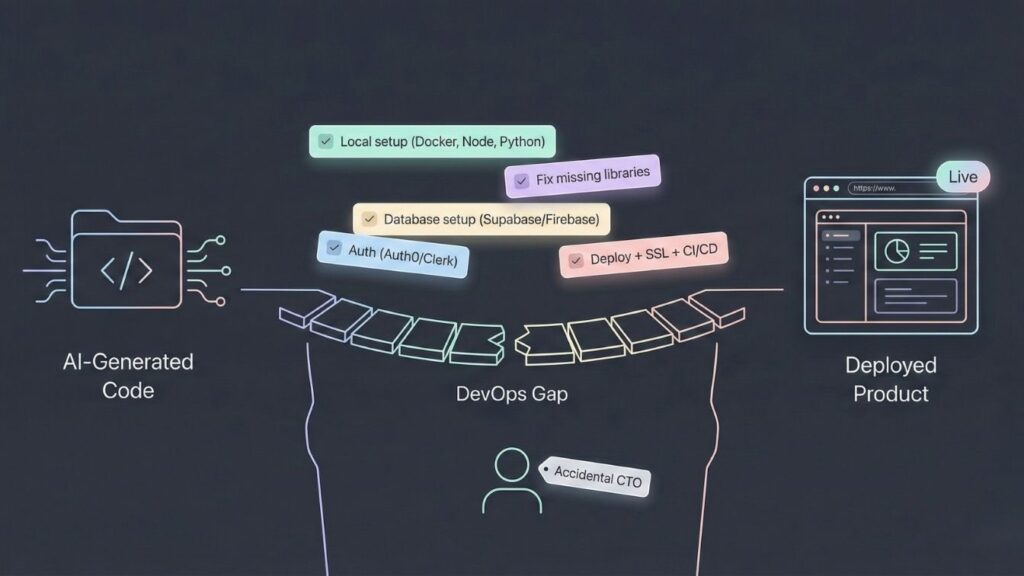
If you are a founder, a product manager, or a non-technical creative, buying Claude Code or Cursor does not give you a product. It gives you code. And code is a liability until it is deployed.
To ship a functional application using these tools, you are signing up for the role of “CTO.” You must:
- Set up a local environment: Install Docker, Node.js, Python, and resolve version conflicts (e.g., “Error: Python 3.11 is not compatible with…”).
- Debug hallucinated libraries: AI often suggests libraries that are deprecated or don’t exist. You need the skill to recognize this and find alternatives.
- Provision a database: You must set up Supabase, Firebase, or AWS RDS, manage the connection strings, and secure the credentials.
- Handle Authentication: Integrating Auth0 or Clerk is code-heavy and security-critical. One mistake here leaves your user data exposed.
- Deploy to the cloud: Buying a domain is easy. Configuring DNS records, setting up SSL certificates, and managing a CI/CD pipeline to push updates is a full-time job.
For 90% of founders, the bottleneck isn’t generating code—it’s integrating and deploying it. This is the “DevOps Gap” where developer assistants fail and where Imagine.bo enters the picture.
The gap between “I have AI-generated code” and “I have a working product that real users can access” remains enormous. Most founders using Claude Code or Cursor still end up hiring developers, paying for consulting, or spending months learning infrastructure and deployment concepts while their idea remains unrealized. Understanding common mistakes in no-code SaaS development can help avoid similar pitfalls in traditional development approaches.
The market needed something different—a solution that understands founders need business outcomes, not just code files.
Introducing Imagine.bo: AI No-Code App Builder for Founders

Imagine.bo takes a fundamentally different approach to AI-powered product development, built from the ground up for founders, creators, and teams who want to ship complete products without requiring traditional development expertise.
Rather than assisting with coding tasks, Imagine.bo handles the entire product development lifecycle through a combination of advanced AI reasoning and systematic software engineering practices. You describe what you want to build in plain English—the business logic, user experience, and functionality—and Imagine.bo translates that into a complete, production-ready application including frontend, backend, database, and deployment. This approach represents what many call “vibe coding” where you build through conversational prompts rather than technical specifications.
How It Works
The platform employs AI that reasons like a senior software engineer, making architectural decisions, choosing appropriate technologies, structuring data models, and implementing features according to industry best practices. But unlike pure AI coding tools, Imagine.bo wraps this intelligence in a systematic development process that ensures reliability, security, and scalability.
You’re not managing code files or terminal commands. Instead, you work at the level of features and business logic. The platform handles technical complexity—database schemas, API design, authentication flows, state management, error handling, responsive design, and deployment configuration—while you focus on what your product should do and how users should experience it.
Learn more about how this works in our guide on building apps by describing them and turning ideas into apps with AI prompts.
Complete Product Development
Imagine.bo delivers genuinely end-to-end development. You get a working frontend interface, a properly architected backend with API endpoints, a configured database with appropriate relationships, hosting and deployment infrastructure, and ongoing support for iterations and improvements. This is not a prototype or proof-of-concept—it’s production-grade software ready for real users.
The platform supports complex functionality that traditionally requires experienced developers: user authentication and permissions, payment processing integration, real-time features, data visualization, third-party API connections, file uploads and management, complex business logic, and multi-step workflows. See examples of real applications built this way in our real-world apps showcase and learn about building SaaS from a single prompt.
Human + AI Support Model
While AI handles the technical implementation, Imagine.bo includes human expert support to ensure your product meets your goals. This hybrid model gives you the speed of AI with the judgment and creativity of experienced product developers. When you need guidance on how to structure a feature, what’s technically feasible, or how to optimize your product for specific use cases, you’re not alone with a chatbot—you have access to people who understand both the technology and business contexts.
This is particularly valuable for non-technical founders building products who need strategic guidance alongside technical execution.
Imagine.bo vs Claude Code vs Cursor: Complete Comparison
| Criteria | Claude Code | Cursor | Imagine.bo |
|---|---|---|---|
| Target User | Experienced developers | Developers and technical teams | Founders, creators, non-technical teams |
| Coding Required | Yes – terminal proficiency | Yes – development knowledge | No – plain English product descriptions |
| End-to-End Development | No – coding tasks only | No – code editing assistance | Yes – frontend, backend, database, deployment |
| Architecture Decisions | You decide | You decide | AI + best practices handle this |
| Deployment Included | No | No | Yes – fully hosted and deployed |
| Database Design | You implement | You implement | Included and optimized |
| Scaling Support | Not addressed | Not addressed | Built-in with infrastructure guidance |
| Pricing Model | Pay-per-API-use | Monthly subscription + caps | Credit-based plans with predictable costs |
| Support Model | Documentation only | Documentation only | Human + AI hybrid support |
| Learning Curve | Requires dev experience | Requires coding knowledge | Designed for non-technical users |
| Time to Production | Depends on your skills | Depends on your skills | Days to weeks vs months |
The comparison reveals fundamentally different value propositions. Claude Code and Cursor accelerate what developers already do. Imagine.bo enables people without development expertise to ship complete products.
Pricing Comparison: Imagine.bo vs Developer Tools
Imagine.bo’s pricing model reflects its focus on business outcomes rather than technical consumption metrics. The platform uses a credit-based system where credits correspond to development complexity rather than arbitrary usage limits.
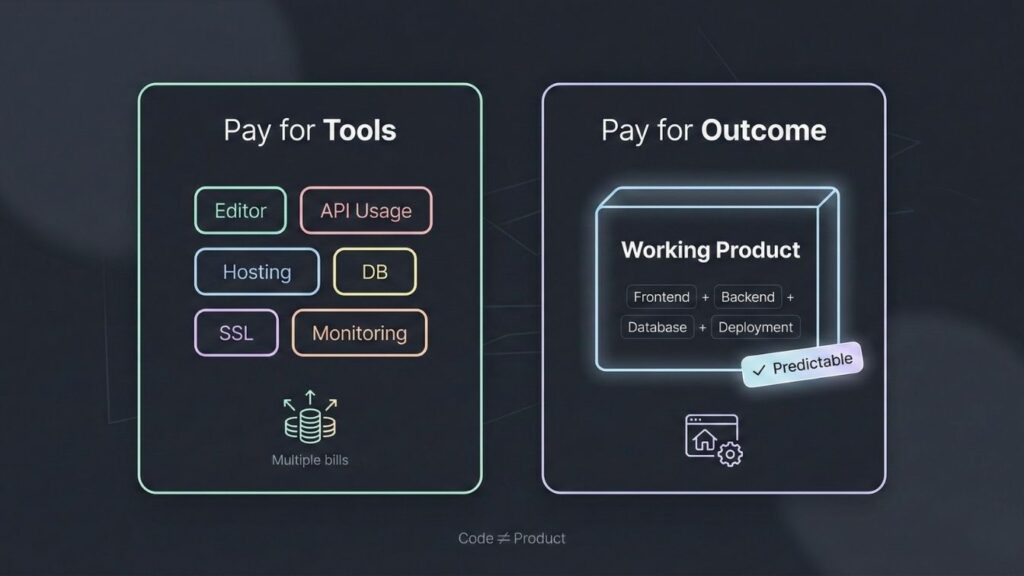
A credit-based approach means you pay for meaningful product development—implementing features, building interfaces, creating workflows—rather than paying separately for compute time, API calls, hosting, databases, SSL certificates, CDN bandwidth, and the dozen other line items that accumulate with traditional development tools.
What’s included in Imagine.bo pricing:
- Complete application development (frontend, backend, database)
- Hosting and deployment infrastructure
- SSL certificates and security configurations
- Ongoing maintenance and updates
- Human + AI support for guidance and optimization
- Iterations and feature additions within your plan
Compare this to the actual cost of building with developer tools. You might pay $20-40 monthly for Cursor or variable costs for Claude Code API usage, but you still need hosting ($10-100+ monthly depending on scale), database services ($10-50+ monthly), SSL certificates, CDN services, monitoring tools, error tracking, and either your own development time or contractor fees ($50-150+ per hour) to actually build, deploy, and maintain your product.
Imagine.bo consolidates these costs into transparent, business-aligned pricing. You know what you’re paying and what you’re getting—a working product, not a collection of code files you still need to deploy and maintain. For startups specifically, explore our guide on launching your startup with no-code tools and building tech startups without developers.
Who Should Use Which Tool?
Choosing between these options depends on your technical background, what you’re trying to accomplish, and how you want to spend your time.
Use Claude Code if:
- You’re an experienced developer comfortable with terminal workflows
- You have well-defined coding tasks to delegate to an AI agent
- You already know your architecture and just need help implementing features
- You’re working within an existing codebase that you understand deeply
- You want to experiment with agentic AI capabilities in your development workflow
- You’re comfortable with pay-per-use pricing and managing API costs
Use Cursor if:
- You’re a developer who lives in VS Code and wants seamless AI integration
- You want real-time coding assistance while maintaining full control
- Your development workflow involves frequent, incremental changes
- You prefer subscription pricing with predictable monthly costs (within usage limits)
- You have the expertise to evaluate and refine AI-generated code
- You’re building something where you already understand the technical architecture
Use Imagine.bo if:
- You’re a founder who wants to ship a complete product without learning to code
- You need end-to-end development including deployment and infrastructure
- You prefer focusing on business logic over technical implementation
- You want predictable pricing that includes hosting, support, and maintenance
- You need architecture and scaling decisions handled by experts
- You value speed to market and want to avoid hiring a full development team
- You want a working product, not code files that still need extensive work to deploy
- You need ongoing support for iterations and improvements as your business evolves
For specific use cases, check out success stories of launching apps without developers and learn about building micro-SaaS in 48 hours.
Conclusion: Matching Tools to Your Actual Needs
Claude Code and Cursor represent impressive achievements in AI-assisted development, making experienced developers more productive at specific coding tasks. For their target users—people who already possess deep technical expertise—they deliver genuine value by accelerating implementation work.
But understanding Claude Code and Cursor AI tools pricing and features reveals a fundamental constraint: these tools assist with coding, not product creation. They help people who know how to build software build it faster, but they don’t eliminate the need for architectural knowledge, infrastructure expertise, or the countless decisions required to ship production-ready products.
For founders without technical backgrounds, the promise of AI coding tools often leads to disappointment when reality sets in. Generating code is only the beginning. Turning that code into a deployed, secure, scalable product that real users can access requires expertise these tools simply don’t provide.
Imagine.bo addresses this gap by treating product development as a complete outcome rather than a collection of technical tasks. By handling architecture, implementation, deployment, and ongoing support through a combination of AI reasoning and human expertise, Imagine.bo enables founders to focus on what matters—building businesses, serving customers, and bringing ideas to life—without getting lost in technical complexity. Discover more about how Imagine.bo revolutionizes app development and explore the broader landscape of AI no-code app builders.
If you’re a developer looking to accelerate your coding workflow, Claude Code and Cursor offer compelling capabilities. If you’re a founder who needs to ship complete products without becoming a developer, Imagine.bo provides a fundamentally different approach designed specifically for your needs.
Ready to turn your idea into a working product? Explore Imagine.bo and discover how AI-powered no-code development can help you ship faster, scale smarter, and focus on your business instead of technical complexity.
Frequently Asked Questions
Can Claude Code or Cursor build a complete app without any coding knowledge?
No. Both tools are designed to assist people who already understand software development. They help with code generation and editing but assume you know how to structure applications, configure deployment, design databases, and handle the many technical decisions required for production software.
What’s the main difference between AI coding assistants and no-code platforms?
AI coding assistants help developers write code faster. No-code platforms like Imagine.bo handle the entire development process, making architectural decisions, implementing features, and deploying complete products without requiring users to write or understand code.
Are there usage limits with Claude Code and Cursor?
Yes. Claude Code costs scale with API token usage more complex tasks and larger codebases consume more tokens and cost more. Cursor has monthly limits on premium model usage, after which you either use weaker models or pay additional fees.
How long does it take to build a product with Imagine.bo vs traditional coding?
Traditional development or using AI coding tools typically takes months for a complete product when factoring in learning curves, architecture decisions, and deployment. Imagine.bo can deliver working, deployed products in days to weeks depending on complexity, because it handles the entire stack rather than just assisting with coding tasks.
Is Imagine.bo more expensive than using AI coding tools?
When comparing total costs including hosting, databases, deployment infrastructure, maintenance, and the value of your time or contractor fees Imagine.bo often proves more cost-effective for founders because it consolidates all development and infrastructure costs into transparent, predictable pricing while delivering complete, production-ready products.
Related Articles
- This No-Code Platform Changed How I Build Products (For the Better)
- How Non-Technical Founders Are Building Products in Days
- Open-Source AI Models in No-Code: A Professional Guide
- Build Apps with AI: The 2025 Enterprise-Ready Playbook (No-Code to Production in Days)
- Build 10 Awesome AI Apps with No Code: The Ultimate Beginner’s Guide


