

Google’s Gemini 3 has just permanently changed the landscape of Vibe Coding. By treating “Vibe code” as a core feature, this new model prioritizes creative velocity over boilerplate. With exceptional zero-shot generation for web apps and deep multimodal reasoning, Gemini 3 allows developers to bypass syntax struggles and focus purely on intent. Whether you are building in Google AI Studio or via the API, this is the engine that finally understands the “feeling” of your application.
Here is a deep dive into what Gemini 3 brings to the table and why it is the upgrade our workflow has been waiting for.
Launch Your App Today
Ready to launch? Skip the tech stress. Describe, Build, Launch in three simple steps.
BuildThe Core Promise: “Vibe Code” is Now a Feature
Usually, when tech giants release new LLMs, they talk about benchmarks, MMLU scores, and abstract reasoning. While Gemini 3 boasts state-of-the-art reasoning, Google highlighted something very specific in their launch announcement that jumped right out at me:
“Vibe code: Build web apps with exceptional zero-shot generation and richer UI.”
This is significant. They are explicitly acknowledging “Vibe Code” as a capability.
For the uninitiated, Vibe Coding relies heavily on zero-shot generation. You don’t want to spend hours prompt-engineering examples just to get a button to look right. You want to say, “Make it look retro-futuristic,” and have the model understand the vibe.
Gemini 3 promises exceptional performance here. This means we can move from the “ideation” phase to the “prototype” phase in seconds, not hours. The “richer UI” capability suggests that the model understands modern design systems, CSS frameworks, and interactivity much better than its predecessors. It isn’t just spitting out raw HTML; it’s crafting experiences.
Multimodality: The End of Text-Only Context
Vibe coding is rarely just about text. It is about images, sketches, interactions, and audio. We live in a multimedia world, and our code generation tools need to live there too.
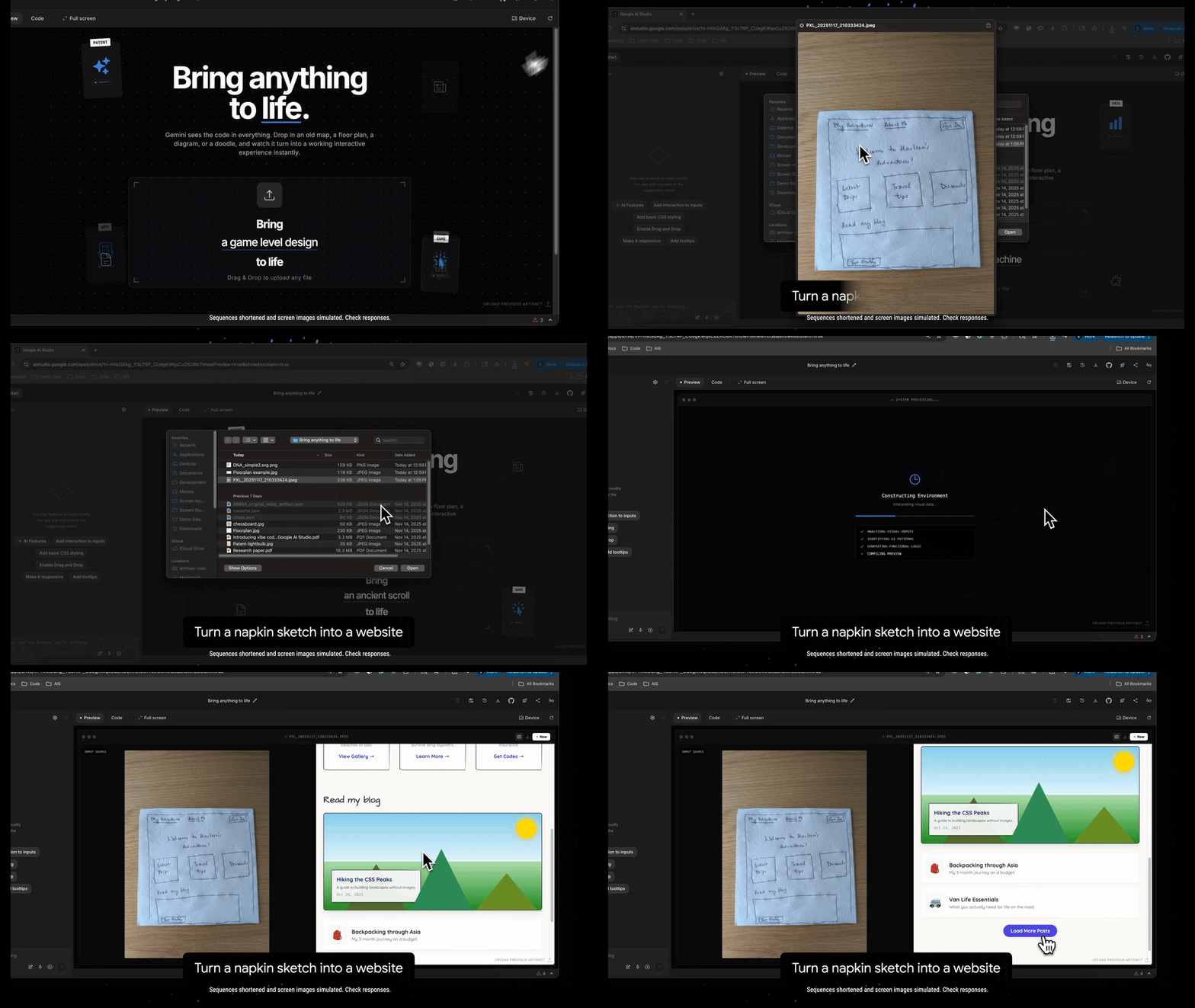
Gemini 3 introduces the ability to “Reason across modalities.” It is designed to handle complex multimodal inputs. This is a game-changer for frontend development. Imagine sketching a wireframe on a napkin, snapping a photo, and feeding it to Gemini 3 with the prompt: “Build this, but make it responsive and use a glassmorphism aesthetic.”
With improved agentic coding and tool use, the model can look at the input, understand the spatial relationships, and generate the code structure that matches your visual intent. This bridges the gap between the designer’s eye and the developer’s editor.
The Toolbox: Remixable Open Source Apps
One of the best ways to understand a new model’s “vibe” is to see what it has already built. Google didn’t just drop a model weights file; they dropped a gallery of open-source apps that serve as the perfect starting point for remixing.
These aren’t your standard “Hello World” examples. They are creative, interactive, and complex:
- Bring Anything to Life: This appears to be the flagship capability. It turns static images into interactive experiences. For game devs or UI designers, this is the holy grail of prototyping.
- Visual Computer: A tool where you “draw to control a virtual OS.” This screams creative coding. It implies a level of reasoning where the model interprets drawing strokes as system commands.
- Shader Pilot: Building complex 3D worlds with customizable shaders. Shaders are notoriously difficult to write by hand. If Gemini 3 can vibe-code WebGL and GLSL, it opens up high-end graphics programming to a massive audience.
- Tempo Strike: A game that uses your webcam and hands to slash sparks to a beat. This demonstrates real-time interaction and computer vision integration, proving the model can handle logic that requires low latency and sensory input.
- Research Visualization: Transforming dense papers into interactive sites.
The message here is clear: Don’t start from scratch. These apps are available in Google AI Studio. You can clone them, remix them, and apply your own vibe. This aligns perfectly with the modern developer’s desire to “deploy directly” or save to GitHub without friction.
Under the Hood: Control Knobs for Your AI
For those of us building directly with the API, Gemini 3 introduces new parameters that give us granular control over how the model “thinks.” In Vibe Coding, sometimes you want a quick, intuitive answer, and sometimes you want deep, architectural reasoning.
Google has introduced three critical new API parameters:
1. thinking_level
This allows you to configure the model’s internal reasoning depth.
- Low Level: Perfect for UI generation, CSS tweaks, and rapid iteration where speed is key.
- High Level: Essential for debugging complex race conditions (like the C++ multi-threading example provided in their docs) or architectural planning.
2. media_resolution
This defines per-part vision token usage.
- If you are analyzing a UI screenshot for pixel-perfect recreation, you crank this up to ensure high visual fidelity.
- If you are just getting the gist of a layout, you can lower it to save on costs and latency.
3. thought_signature
This preserves agentic reasoning in multi-tool workflows.
- In the Vibe Coding era, we often use “Agents”—AI instances that can use tools (search, code execution, etc.). This parameter ensures stricter validation, meaning your AI agent won’t hallucinate a tool usage; it stays grounded in the workflow you designed.
The Developer Experience: Python, Go, and cURL
The barrier to entry has been obliterated. You can start building immediately via the google-genai SDK. The code is clean, pythonic, and intuitive:
from google import genai

client = genai.Client()

# The Vibe Coding Prompt
prompt = "Find the race condition in this multi-threaded C++ snippet: [code here]"

response = client.models.generate_content(
  model="gemini-3-pro-preview",
  contents=prompt
)

print(response.text)
This snippet represents the simplicity we crave. No complex setup, just import, instantiate, and generate.
“I’m Feeling Lucky”
There is a delightful button mentioned in the launch: “I’m feeling lucky.”
In the context of AI Studio, this encapsulates the spirit of Vibe Coding. It is the willingness to let the model take the wheel, to surprise you, and to generate something you might not have explicitly thought of but perfectly captures the essence of what you wanted. It adds serendipity back into the development process.
Conclusion: The Era of the “Vibe Architect”
With Gemini 3, the role of the developer shifts further from “syntax writer” to “system architect” and “creative director.”
The features outlined—from zero-shot web apps to deep reasoning controls—suggest that Google understands the new workflow. We want to build agents that work for us. We want to turn sketches into sites. We want to slash sparks with our webcams and control virtual operating systems with our drawings.
The friction is disappearing. The tools are sharpening.
If you have been waiting for a sign to dive fully into Vibe Coding, this is it. Go to Google AI Studio, grab an API key, check out the “Shader Pilot” or “Visual Computer” demos, and start remixing.
Bring your ideas to life. The vibe is right.
Launch Your App Today
Ready to launch? Skip the tech stress. Describe, Build, Launch in three simple steps.
Build




