

Customer service teams in 2025 are operating under measurably more pressure than they were a year ago. According to Salesforce (2025), 77% of customer service representatives say their workload and the complexity of customer issues have both increased compared to the prior year. At the same time, 88% of customers say response times should be faster than last year (AmplifAI, 2026). When a customer support team decides to launch a new support app a ticketing system, a client portal, a CRM, or a custom workflow tool they are entering that pressure-cooker environment with a new tool that is not yet proven. The risks are predictable, they compound, and they are largely avoidable if the team understands them before launch day rather than after. This article covers the five most consequential risks support teams face when launching apps, why each risk occurs, and the specific fixes that prevent each one from derailing the launch. For a broader view of how support teams are using no-code tools to solve these problems, the guide to customer support teams launching apps covers the full category.
TL;DR: The five risks customer support teams face when launching apps are: ticket volume spikes that the new system cannot handle, slow response times caused by process gaps during the transition, integration failures that disconnect the app from existing tools, data inconsistency from siloed records, and agent adoption failures that prevent the team from actually using the new tool. According to AmplifAI (2026), 88% of contact centers use AI in some capacity, yet only 25% have fully integrated automation into daily workflows the integration gap is where most launch risks originate.
Why Launching a Support App Is Riskier Than It Looks
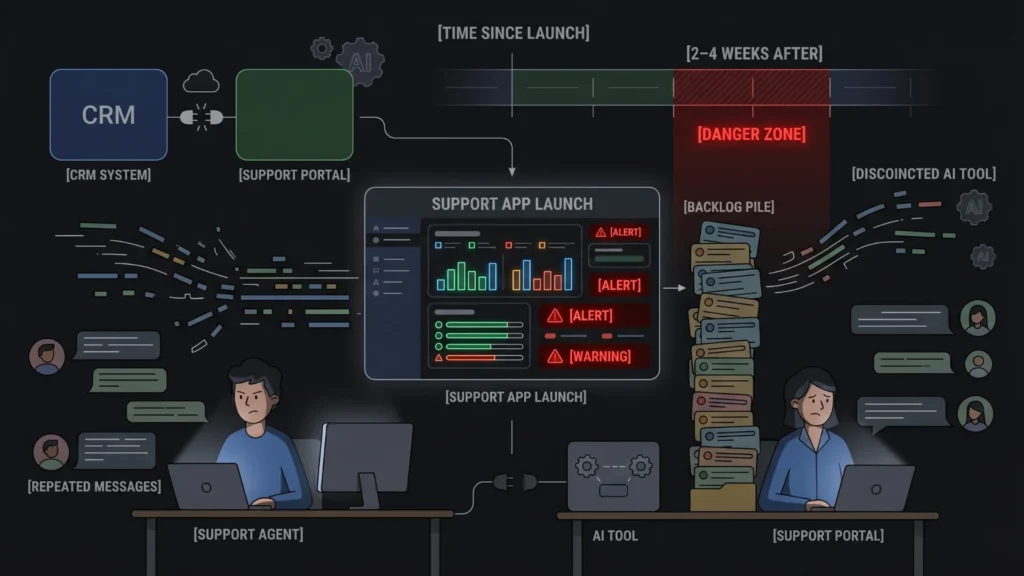
Launching a support app looks like a technology project. It is actually an operational project with a technology component. The technology rarely fails in ways that cause the most damage. The operational failures processes that were not thought through, integrations that were not configured, agents who were not trained, data that was not migrated cleanly are where launches go wrong.
Launch Your App Today
Ready to launch? Skip the tech stress. Describe, Build, Launch in three simple steps.
BuildThe compounding dynamic makes this worse. A ticket volume spike at launch creates backlog. Backlog slows response times. Slow response times frustrate customers who contact the team again, increasing ticket volume further. That increased volume gets routed through a system that is not yet integrated with the CRM, so agents lack context and take longer on each ticket. The longer resolution times cause agent burnout. Burned-out agents make shortcuts, creating data inconsistency. The inconsistent data makes reporting unreliable, so leadership cannot tell whether the launch is succeeding or failing. Each risk feeds the next.
Understanding these five risks in sequence and mitigating them in the right order is the difference between a launch that improves support operations and one that disrupts them for months.
The most dangerous moment in a support app launch is not go-live day. It is the two to four weeks after go-live, when the initial enthusiasm has worn off, the team has found the gaps in the setup, and the volume of unresolved issues starts to reveal what was not built correctly. Teams that invest heavily in pre-launch preparation and light on post-launch monitoring are the most likely to have a delayed failure. Build the monitoring discipline before you press launch, not after problems emerge.
Citation capsule: According to AmplifAI’s 2026 customer service statistics analysis, 88% of contact centers use AI in some capacity, yet only 25% have fully integrated automation into daily workflows. This 63-percentage-point gap between adoption and integration defines the competitive landscape in 2026 and is the primary source of launch risk for support teams deploying new tools (AmplifAI, 2026).
Risk 1: Ticket Volume Spikes That Overwhelm the New System
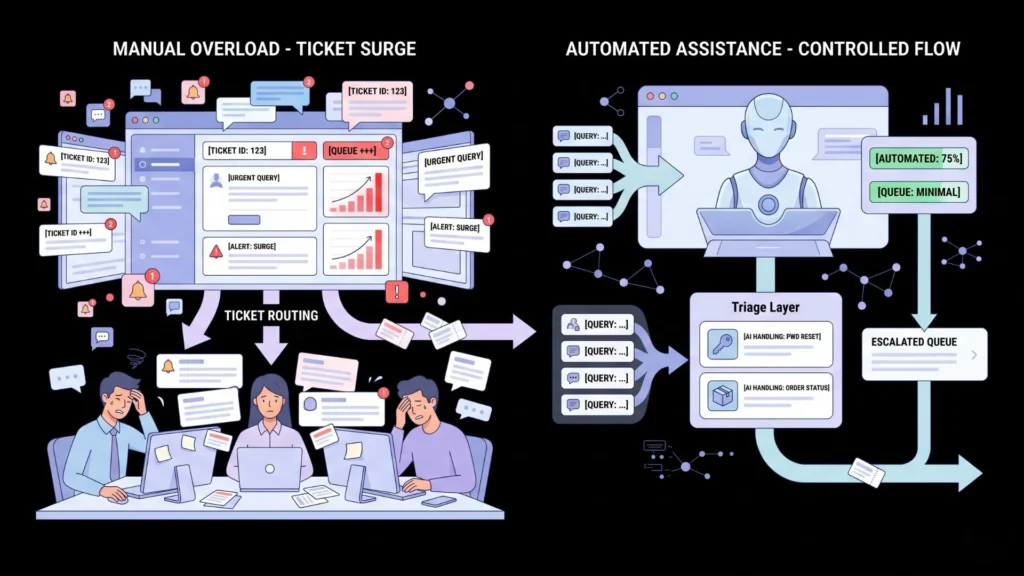
The most immediate risk when launching a support app is a volume surge the system was not designed to handle. Volume spikes happen at launch for two reasons that teams consistently underestimate: first, customers who had been deterred from reaching out by a difficult prior support process now find it easier and contact the team in larger numbers; second, the new app itself generates confusion during the transition, and confused customers create support tickets about the support system.
According to EasyDesk (2026), support ticket volume can double or triple in just hours during seasonal spikes. Launch days behave like compressed seasonal spikes. The system is new, configurations are still being refined, and the team is running at reduced effective capacity while learning the tool. If the app was not tested at realistic volume before launch, this combination produces backlogs that can take weeks to clear.
How to avoid it:
Run a volume simulation before launch. Most no-code and AI-powered support app builders let you test workflows with injected test data. Create 50 to 100 test tickets covering your most common ticket types and run them through the system before live traffic arrives. Identify where the workflow breaks under volume.
Build a triage buffer. Configure automated routing for the highest-volume ticket types password resets, order status queries, basic account questions so that routine volume is handled without agent involvement. According to Pylon (2025), companies report a reduction of up to 70% in call, chat, and email inquiries after implementing a virtual customer assistant. Even a basic auto-response with self-service resources for the top five ticket types removes the majority of routine load before it reaches an agent.
Stage the launch. Instead of migrating all customers to the new system on day one, migrate a cohort a specific product line, geographic region, or customer tier and run the new and old systems in parallel for two to four weeks. Volume in the new system scales up gradually as the team builds confidence in the configuration.
The guide to deploying AI chatbots on your website without coding covers how to configure automated first-response handling that deflects routine ticket volume before it reaches the team.
Citation capsule: According to Pylon (2025), citing Gartner data, companies report up to a 70% reduction in call, chat, and email inquiries after implementing a virtual customer assistant. The AI customer service market is projected to reach $15.12 billion in 2026 (ChatMaxima, 2026), driven by the proven ability of AI-first support workflows to absorb ticket volume that would otherwise require proportional headcount growth (Pylon / ChatMaxima, 2025–2026).
Risk 2: Slow Response Times from Process Gaps During Transition
Response time expectations from customers have tightened to a point that leaves almost no margin for operational disruption. According to AmplifAI (2026), 88% of customers say response times should be faster than last year, and 74% now require 24/7 availability. Launching a new support app introduces a transition period where agents are learning new workflows, and that learning curve almost always produces a temporary response time regression.
The problem is not that agents are slow. It is that the new app has process gaps undefined routing rules, missing ticket templates, unclear escalation paths that make agents slower on individual tickets. An experienced agent who resolves a standard billing ticket in 3 minutes on the old system may take 10 minutes on the new system until the workflow is configured correctly. Multiplied across the team and the ticket volume, that slowdown is visible in CSAT scores within days.
How to avoid it:
Map your five highest-volume ticket types before build. For each ticket type, define the exact steps from intake to resolution: what information is needed, who handles it, what the resolution looks like. This mapping becomes the specification for the app’s routing rules and response templates. An app built from this specification produces a workflow that mirrors how the team actually works, rather than a workflow they have to adapt to.
Pre-build response templates for every mapped ticket type. Every common ticket category should have a template in the new system before the first live ticket arrives. Templates reduce per-ticket resolution time by eliminating the time agents spend writing responses from scratch. According to Nextiva (2026), fast response times are the single biggest influence on CSAT scores, citing Freshworks data. Templates are the lowest-friction way to maintain response speed during a transition.
Define escalation rules explicitly. Every ticket category should have a defined escalation path: if the agent cannot resolve within X minutes or the ticket meets Y criteria, it routes to a senior agent or manager automatically. Undefined escalation is one of the most common sources of delayed responses on new systems.
The guide to the best AI tools to automate client service portals covers the automated routing and response configuration that eliminates process gaps from the first deployment.
Citation capsule: According to LTVplus (2026), citing 2025 customer service industry statistics, speed is now expected by customers as a baseline requirement. 31% of companies currently use four to seven tools to manage their customer service operations, and tool-switching between these systems is cited by 74% of CRM leaders as slowing ticket resolution and hurting overall efficiency (LTVplus / Nextiva, 2025–2026). Consolidating tools and pre-building response templates directly addresses this efficiency loss.
Risk 3: Integration Failures That Disconnect the App from Existing Tools
A support app that does not connect to the team’s CRM, billing system, order management tool, or communication channels is not an improvement. It is an additional tool in an already fragmented stack. According to Salesforce (2025), six in ten customer service agents say a lack of sufficient customer data or context often leads to negative service experiences. That data and context typically lives in the tools the new app fails to integrate with.
Integration failures at launch fall into three categories. First, the integration was not configured before launch, and agents switch between the new app and the old tools manually to find customer context. This is the most common and most damaging scenario. Second, the integration was configured but only partially it pulls basic customer data but not order history, previous ticket history, or account status. Third, the integration creates data sync issues: updates in the CRM do not reflect in the support app, or vice versa, leading to agents working from stale information.
How to avoid it:
Identify your integration dependencies before you build. Map every external system your support team currently accesses during a ticket: CRM, billing, order management, knowledge base, communication tools. Each of these is a potential integration requirement. Build the integration list before generating your app specification, not after.
Test integrations before live traffic. Configure all integrations in a staging environment and run test tickets through the complete workflow, including data lookups from integrated systems. Confirm that each integration returns accurate, current data. Do not launch until every integration test passes cleanly.
Use the Hire a Human feature for complex integrations. Payment systems, ERP connections, and proprietary CRM integrations require engineering precision that goes beyond default integration capabilities. On imagine.bo, the Hire a Human feature connects you with vetted engineers who implement these specific integrations in your existing codebase without requiring you to rebuild the application. The guide to why Hire a Human is the feature that makes complex integrations production-ready explains when and how to trigger this.
The guide to connecting your app to CRM systems covers the specific integration patterns for the most common CRM platforms that support apps typically need to connect with.
Citation capsule: According to Nextiva (2026) citing HubSpot research, 74% of CRM leaders say constant tool-switching slows down ticket resolution and hurts overall efficiency. 56% of customers say they have to repeat themselves during support interactions because channels are disconnected (Salesmate, 2026). The disconnected-tools problem is not a customer perception issue it is a documented agent productivity constraint that integration planning at launch directly eliminates (Nextiva / Salesmate, 2026).
Risk 4: Data Inconsistency from Siloed Customer Records
Data inconsistency is the risk that builds slowly and damages severely. At launch, it shows up as minor annoyances: a ticket that does not have the customer’s account details, an escalation that lacks the previous ticket history, a report that does not match the numbers the manager sees in the CRM. Two months after launch, these annoyances have accumulated into a dataset that cannot be trusted for operational decisions.
The root cause is usually one of three things: the data migration was not complete (some records were not moved from the old system), the integration was not bidirectional (updates in the support app do not write back to the CRM), or multiple channels are creating duplicate customer records that never get reconciled.
According to Salesmate (2026), 73% of consumers use multiple channels in a single interaction. Each channel that creates a separate ticket or customer record without connecting to a unified customer view is a data inconsistency source.
How to avoid it:
Define a single source of truth for customer identity before you build. Decide which system holds the definitive customer record typically the CRM and ensure every other system, including the new support app, reads customer identity from that source rather than creating its own. Duplicate customer records are created when each system maintains independent identity records.
Implement bidirectional sync for critical data fields. At minimum, ticket status, resolution notes, and customer contact information should sync bidirectionally between the support app and the CRM. An agent updating a customer’s email address in the support app should update it everywhere. An agent resolving a ticket in the CRM should update ticket status in the support app.
Audit data quality at two weeks post-launch. Run a manual audit of 50 tickets two weeks after launch. Check whether each ticket has complete customer data attached, whether resolutions are reflected in the CRM, and whether any customer records show duplicates. Catching data inconsistency at two weeks costs a few hours. Catching it at six months costs weeks.
Building a custom CRM that integrates directly with your support workflow eliminates many of these inconsistency risks by design. The guide to building a custom CRM without coding covers how to generate a CRM with the exact field structure and integration logic your support workflow requires.
Citation capsule: According to Salesmate (2026), 56% of customers say they have to repeat themselves during support interactions because channels are disconnected. According to LTVplus (2026), the majority of customer service failures in 2025 stemmed from automation scaling operations but not relationships a gap that data inconsistency directly widens by removing the customer context that makes interactions feel personal and informed (Salesmate / LTVplus, 2025–2026).
Risk 5: Agent Adoption Failures That Prevent the Team from Using the New Tool
The most elegantly built support app does nothing if the agents do not use it. Agent adoption failure is the risk that most technology-focused teams are least prepared for, because it is not a technical problem. It is a change management problem. According to Salesforce (2025), over half of service agents (56%) already report experiencing burnout in their jobs. Introducing a new tool without adequate onboarding is adding cognitive load to a team that is already stretched.
Adoption failure manifests in three ways. First, agents use the new app for some tickets and the old system for others, creating split records and inconsistent data. Second, agents use the new app but work around its features ignoring routing rules, skipping template fields, manually handling tickets the system was designed to automate reducing the ROI to near zero. Third, agents actively resist the new tool, escalating every issue to management and creating pressure to revert to the old system.
How to avoid it:
Involve agents in the design process. Before building, interview three to five agents about their most common ticket types, their biggest workflow frustrations, and the features they wish their current tools had. Build what they described. Agents who helped design the tool adopt it because it solves their problems, not because management mandated it.
Create a hands-on training session, not a documentation drop. One two-hour session where agents process test tickets through the new system is worth more than twenty pages of documentation. The session should cover the five most common ticket workflows end-to-end, with agents doing the work rather than watching a demonstration. Questions that arise during the session reveal configuration gaps that need to be fixed before launch.
Designate two or three internal champions. Identify the agents who adapt to new tools most quickly and give them early access to the system two weeks before launch. They become the internal experts other agents turn to with questions. Peer-to-peer knowledge transfer produces faster adoption than manager-directed training.
Measure adoption behavior, not just adoption rate. An agent who logs into the new system but processes all tickets in under one minute by ignoring all fields and using no templates is technically “adopted” but functionally not using the system. Track meaningful adoption metrics: template usage rate, average ticket field completion percentage, routing rule adherence. The guide to 10 critical mistakes to avoid when building a no-code app covers the adoption-related build mistakes that make agents less likely to engage with a new tool.
The fastest adoption wins on support app launches consistently come from the same decision: letting agents see the before-and-after comparison on a ticket type they find genuinely frustrating. A billing dispute that takes 12 minutes to resolve in the old system because the agent has to switch between four tools takes 4 minutes in a well-integrated custom support app with direct CRM access and pre-built response templates. When agents experience that difference on a ticket they process twenty times per week, adoption is not a change management challenge. It is obvious.
Citation capsule: According to Salesforce (2025), 77% of customer service reps say their workload and the complexity of customer issues have increased compared to a year ago, and 69% of customer service decision-makers say agent attrition is a major challenge. Salesmate (2026) cites a 30 to 45% average annual turnover in call centers, with replacement costs running $10,000 to $20,000 per departure. Tool adoption that reduces friction and workload directly reduces the burnout and attrition costs that make poor support app launches among the most expensive operational failures in customer-facing teams (Salesforce / Salesmate, 2025–2026).
FAQ
How long should a customer support app rollout actually take?
Staged rollouts consistently outperform big-bang launches. A realistic timeline: four weeks of pre-launch preparation (workflow mapping, integration configuration, training), two weeks of parallel running with a pilot cohort, then full migration. Skipping the pilot stage is the most common source of post-launch crises. The guide to launching client portals without code covers the deployment sequence for customer-facing portals specifically.
What integrations should a customer support app have on day one?
At minimum: the primary CRM for customer context, the billing or order management system for account history, and the primary communication channel (email or live chat). Secondary integrations analytics, reporting dashboards, internal communication tools can follow in a second wave. Launching without the primary CRM integration is the single highest-risk technical decision a support team can make.
How do you handle ticket volume spikes after launch?
Build automated deflection for your highest-volume ticket types before launch. According to Pylon (2025), companies reduce inquiry volume by up to 70% after implementing virtual customer assistants. Configure auto-responses with self-service links for common queries, and set escalation rules that route complex tickets immediately to senior agents. The guide to using AI to automate customer onboarding covers the automation patterns that reduce first-contact load.
What does a custom support app built with imagine.bo include by default?
Imagine.bo generates full-stack custom support applications with role-based access control, database schema, API endpoints, authentication, and One-Click Deployment to Vercel and Railway. Default security includes SSL, data encryption at rest and in transit, and GDPR readiness foundations. Complex integrations proprietary CRMs, specialized billing systems are handled through the Hire a Human feature, which connects you with vetted engineers who implement specific integrations in your codebase. The guide to AI agents for customer support automation covers the AI-powered automation layer that can be layered on top.
How do you measure whether a support app launch was successful?
Track five metrics for the first 90 days: first response time (should improve from day 30 onward), ticket resolution time, first-contact resolution rate (percentage of tickets resolved without escalation or repeat contact), CSAT score on tickets processed through the new system, and agent workflow completion rate (percentage of tickets closed with all required fields completed). Improving all five is the definition of a successful launch. Improving speed while declining CSAT means the team is cutting quality to hit response time targets a pattern that requires immediate intervention.
Conclusion

The five risks are preventable. Volume spikes are manageable with staged rollouts and automated deflection. Response time regression is avoidable with pre-mapped workflows and pre-built templates. Integration failures are eliminated with dependency mapping before build and full integration testing before go-live. Data inconsistency is controlled with a single source of truth and bidirectional sync. Agent adoption failures are addressed with early involvement, hands-on training, and meaningful adoption measurement rather than login metrics.
The underlying pattern across all five is the same: the risks are not created by the launch they are exposed by it. Teams that do the pre-launch preparation work discover these gaps in controlled conditions and fix them. Teams that rush to launch discover them under live pressure, with customers watching.
For customer support teams ready to build a custom support app, imagine.bo’s Pro plan at $25 per month generates a production-ready, full-stack application with integrated authentication, role-based access control, and one-click deployment. The guide to the best AI tools to automate client service portals is the practical next step for support teams ready to move from understanding these risks to designing the application that avoids them from the first deployment.
Launch Your App Today
Ready to launch? Skip the tech stress. Describe, Build, Launch in three simple steps.
Build




