Three years ago, building a web app without coding meant dragging pre-built blocks onto a canvas and accepting whatever the template allowed. Today it means describing a complete full-stack application in plain English and watching a production-ready product deploy to global infrastructure in the same session. That shift has changed who can build software. According to Gartner, 70% of new applications will use no-code or low-code technologies by 2025, up from less than 25% in 2020 (Gartner, 2021). This guide covers the complete process for building a web app without coding in 2025 and 2026: what tools exist, which to choose for which purpose, how to write prompts that generate useful outputs, and how to go from blank page to deployed product in days rather than months. For context on how AI tools have shifted the ceiling of what non-technical builders can produce, this post on how AI tools are replacing traditional web development workflows covers the structural change behind this guide.
TL;DR Building a web app without coding in 2025 means choosing between template-based no-code builders for simple sites and AI-generation tools for full-stack applications. imagine.bo generates a complete web app including database, backend logic, authentication, and deployment from a plain English description, starting at $0. According to GitHub, AI-assisted development reduces build time for common software patterns by 55% (GitHub, 2024). The complete process: define your app, scope your MVP, validate demand, write a specific prompt, review the generated blueprint, deploy, and iterate.
What Is the Difference Between No-Code and AI-Code in 2025?
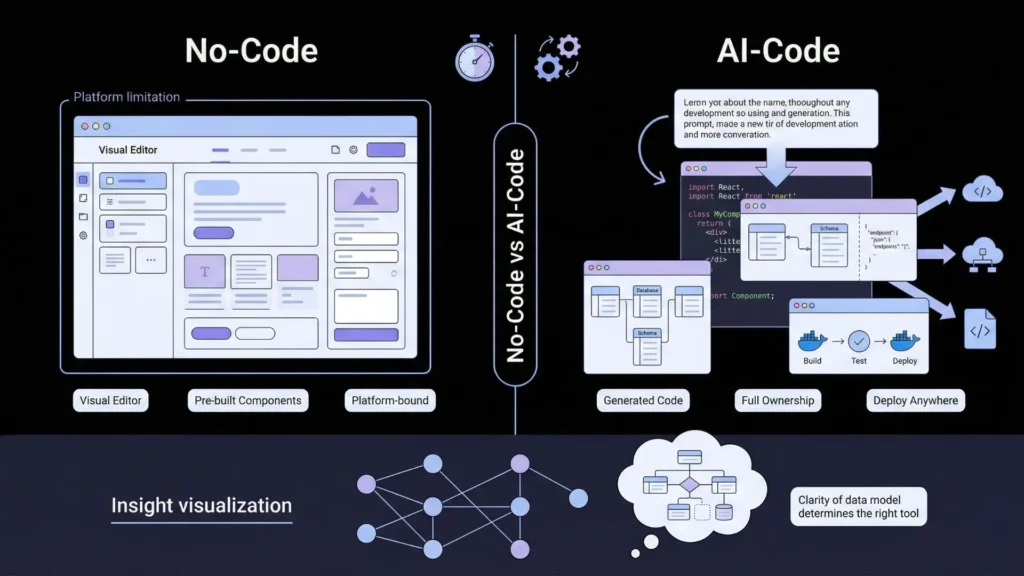
No-code tools and AI-generation tools are different categories that people often use interchangeably. Getting clear on the distinction determines which one you should use for your specific web app.
Launch Your App Today
Ready to launch? Skip the tech stress. Describe, Build, Launch in three simple steps.
BuildNo-code tools like Bubble, Webflow, and Glide provide visual editors where you configure pre-built components into an application. The output lives inside the platform’s infrastructure. You cannot export it as code, hand it to a developer, or deploy it outside the platform. The ceiling is defined by the features the platform supports.
AI-generation tools like imagine.bo take a plain English description and generate actual source code: React components, database schema, backend API endpoints, authentication, and deployment configuration. You own the code. You can export it, modify it with a developer, and deploy it anywhere. The output is a real web app, not a platform configuration.
For a simple marketing site or a database-backed internal tool with standard features, no-code is faster. For a web app with custom business logic, specific user roles, payment processing, and multi-page workflows, AI-generation produces a more complete and extensible result. This guide on no-code vs low-code for startups covers when each approach fits.
The practical test for which category your web app belongs in is whether you can describe its data model and its access rules in two paragraphs. If you can, it likely generates well from a prompt. If you cannot yet articulate the data model clearly, the problem is not the tool. It is the app definition. Clarifying the data model before choosing the tool is the most productive investment of time at the start of any web app build.
Step 1: Define What Your Web App Actually Does
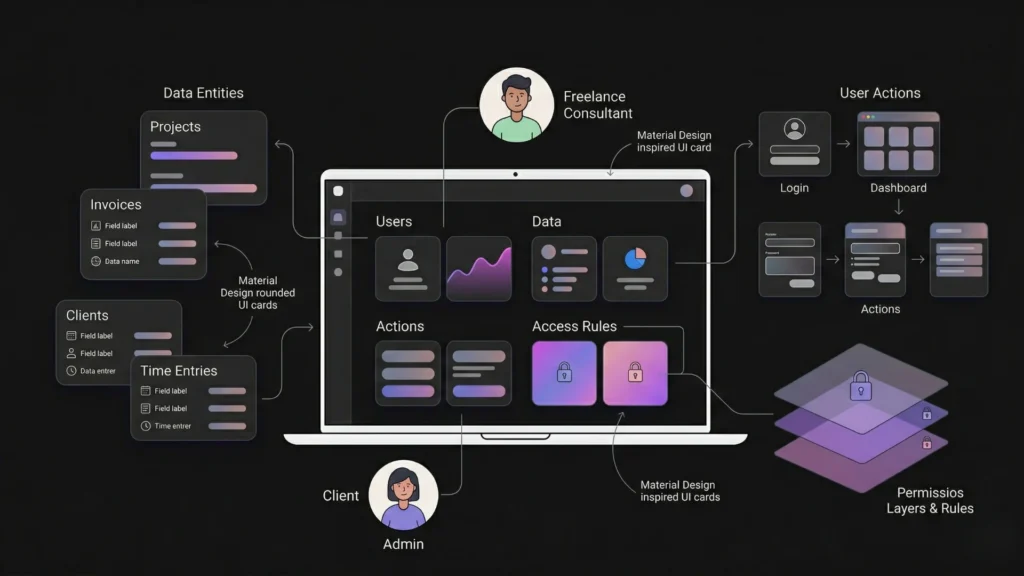
The single most important step in building a web app without coding is not opening a tool. It is writing a clear, specific definition of what the app does before you open anything.
Every web app has four components: the users who interact with it, the data those users create and consume, the actions they take on that data, and the rules that govern who can do what. Defining all four before you write a prompt determines whether the first generation is accurate or generic.
Work through these four questions until each answer is specific enough to implement without asking a follow-up question.
Who are the users? Name every user type. Not “users” but “freelance consultants, their clients, and an admin.” Each user type has different screens, different data access, and different permissions.
What data does the app store? List every entity: Projects, Invoices, Clients, Time Entries. Name the key fields for each. This is your data model, and the AI generator uses it to create your database schema.
What actions does each user take? Walk through one session for each user type from login to logout. Every action maps to a page, a form, or a button in the generated app.
What are the access rules? Who can see whose data. What triggers what. What one role can do that another cannot. Access rules, stated explicitly in the prompt, prevent the most common generation errors.
For a practical library of proven prompt structures across twelve app types, this 40-prompt copy-paste library by app type has ready-to-adapt starting points for the most common web app categories.
Step 2: Scope Your MVP Ruthlessly
An MVP is not a rough version of your full product. It is a precisely scoped product that tests one specific hypothesis. The founders who ship fastest treat MVP scope as a constraint, not a compromise.
According to Y Combinator, the most common reason early products fail is building too much before confirming demand, not building too little (Y Combinator, 2023). A web app with fifteen features that nobody uses is worse than a web app with three features that solve a real problem clearly.
A practical MVP scope for any web app has three parts: the core loop (the single workflow that delivers the primary value), the support structure (authentication, navigation, and the data model required for the core loop to function), and nothing else. Every feature that is not required for the core loop to work is Version 2.
The clearest signal that an MVP scope is too large is when the initial prompt exceeds one paragraph. A focused prompt produces a focused first generation. An ambitious prompt produces an inconsistent first generation where some features are complete, some are shallow, and some are missing entirely. Start with the smallest describable version of your app that a real user could use to accomplish the core task. Everything else builds from there with follow-up prompts.
For the methodology behind scoping and validating before building, this guide on low-code MVP strategies and the validation feedback loop covers the full scope-to-validation sequence.
Step 3: Validate Demand Before Building
Building first and validating later is the most expensive sequencing mistake in early-stage product development. A one-day validation experiment before a week of building is the highest-leverage time investment in the process.
The three fastest validation methods in order of cost and signal strength:
Pre-sale: Collect payment before the product exists. If someone pays for something that does not exist yet, that is the strongest possible demand signal. Use Stripe and a simple landing page.
Email capture with paid traffic: Build a one-page description of the problem and solution, run $30 to $50 in targeted ads, and measure the sign-up rate. Above 5% from a targeted audience is a meaningful signal.
Manual concierge: Do the job by hand before automating it. If you are building a scheduling tool, schedule manually for five clients first. If nobody values the manual version, they will not value the automated one.
For the full validation methodology with specific tools and conversion benchmarks, this guide on validating startup ideas with no-code tools covers the process in detail.
Step 4: Choose the Right Tool for Your Web App

Choosing based on which tool has the most marketing visibility is the most common mistake. Choose based on what your specific app requires.
| Your web app needs | Best tool |
|---|---|
| Custom full-stack logic, database, auth, deployment | imagine.bo |
| Visual web app with complex database rules | Bubble |
| Marketing site or content-driven product | Webflow |
| Mobile app from existing spreadsheet data | Glide |
| Client portal over Airtable data | Softr |
| Landing page for validation | Carrd |
For most founders building a real web application with user accounts, custom workflows, and production deployment, imagine.bo is the right starting point. The Describe-to-Build interface generates the full stack from a description. One-Click Deployment sends the frontend to Vercel and the backend to Railway. You own the code. The free plan with 10 credits lets you build and deploy a first version at zero cost.
For a comprehensive breakdown of each tool’s strengths and which use cases each fits, this guide on the best no-code tools to launch your startup fast covers the full tool comparison with specific use case recommendations.
Step 5: Write a Prompt That Generates a Useful First Version
The prompt is the specification. Its quality determines the quality of the first generation. A prompt that includes the four elements, persona, problem, features, and rules, consistently produces accurate first outputs. A prompt that omits rules, particularly access control rules and edge case handling, consistently produces outputs that require multiple correction sessions.
The four-element prompt structure:
Persona: Name every user type and their context. “Freelance graphic designers managing client projects” is specific. “Users” is not.
Problem: One sentence describing what the app solves. The problem, not the solution.
Features: Every feature the MVP requires, stated explicitly enough that a developer could implement it without asking a follow-up question.
Rules: Every access control rule, every edge behavior, every constraint. “Clients can only see their own projects. Clients cannot see invoices until the designer marks them as sent. Designers cannot delete a project with an unpaid invoice.”
A complete example prompt for a freelance project management web app: “Build a project management platform for freelance graphic designers managing client projects. Each project has a client name, project name, status, deadline, and a files section. Designers can create projects, add tasks with due dates, upload deliverables, and generate invoices with line items and totals. Clients log in via a separate portal and can view their projects and approved deliverables. Clients cannot see other clients’ projects. Clients can request a revision on a deliverable with a comment. Designers receive an email notification when a client requests a revision. Invoices are only visible to the client after the designer marks them as sent.”
For a full guide to prompt structure and the techniques that produce consistently strong first generations, this post on turning ideas into apps with AI prompts covers every element in detail.
Step 6: Review the Blueprint Before You Build
imagine.bo displays the AI-Generated Blueprint before any code is written. This is the most important step in the build process and the one most first-time builders skip.
The blueprint shows the complete database schema, the user role structure, the page list, and the backend architecture. Reviewing it before confirming takes five minutes. Catching a misaligned data model or a missing user role at this stage costs one follow-up prompt. Catching it after the full build has run costs a complete rebuild.
What to check in the blueprint:
Database tables: Does every entity you named appear as a table? Are the relationships between tables correct? A project management app needs tables for Designers, Clients, Projects, Tasks, Deliverables, RevisionRequests, and Invoices. If the blueprint shows only Designers and Projects, the generated app will not support the workflows you described.
Role separation: Are client-facing pages separate from designer-facing pages? Check that clients cannot access designer dashboard routes and that the access rules in your prompt are reflected in the blueprint’s permission structure.
Page completeness: Map every screen in your MVP spec to a page in the blueprint. Every required screen should have an entry. Missing screens mean missing functionality in the generated output.
Applications where the blueprint review step is completed before confirming the build require an average of one to two correction prompt sessions to reach production quality. Applications where the blueprint is skipped require an average of four to six correction sessions. At one to three credits per correction session on a typical mid-complexity app, blueprint review saves five to fifteen credits on the average build. That saving is worth the five minutes.
Step 7: Deploy, Test, and Iterate
One-Click Deployment in imagine.bo sends your frontend to Vercel’s global edge network and your backend to Railway for automatic scaling. SSL applies by default. No DevOps configuration is required. Your web app is live and publicly accessible the moment deployment completes.
Before sharing the URL, run through this test sequence every time:
Create an account in each user role. Complete the core workflow as the primary user. Attempt to access a restricted page while logged in as a lower-permission user and confirm the redirect is correct. Submit a form with invalid data and confirm validation errors display correctly. Open the app on a mobile screen and confirm layout is functional.
Use targeted correction prompts for anything that needs fixing. Describe the current behavior and the expected behavior specifically. One prompt, one fix, then review. After confirming the app functions correctly in your test, share it with five real users who have the problem you built the app to solve. Their first session tells you more than any amount of additional building based on assumptions.
For the post-launch iteration approach and what real founders learn from their first deployed version, this post on what founders learn from their first no-code MVP is the most honest account of what that experience produces.
FAQ
What types of web apps can you build without coding?
AI-generation tools like imagine.bo build SaaS products, client portals, marketplaces, internal business tools, booking systems, community platforms, and consumer web apps without coding. The practical limit is not the category of app but the clarity of the description. Apps with well-defined user roles, clear data models, and explicit access rules generate accurately. Apps with vague requirements or highly unusual real-time features benefit from targeted engineering via Hire a Human for specific modules. According to Gartner, citizen developers now build more applications than trained developers at many large organisations (Gartner, 2022), driven specifically by AI-generation tools that convert domain expertise into working software. This post on building a no-code web app with imagine.bo shows specific examples of what generates well.
How long does it take to build a web app without coding?
A scoped MVP with three to five core screens typically reaches a first deployed version in two to four days of iterative building with imagine.bo. This compares to four to eight months for a custom-built equivalent at a development agency. The build time depends primarily on scope clarity and prompt quality, not on tool complexity. According to Stripe, web applications that deploy to their first paying user within 90 days of starting development have a four times higher probability of reaching $10,000 in monthly recurring revenue (Stripe, 2023). Building without coding removes the primary constraint on reaching that 90-day threshold.
Do I own the web app I build without coding?
With imagine.bo, yes. The generated code is clean, exportable, and follows modern standards. You own it entirely and can export it, hand it to a developer, deploy it on any infrastructure, or sell the product without any platform dependency. This is different from traditional no-code platforms like Bubble, Webflow, or Glide, where the application lives inside the platform’s proprietary system and cannot be extracted as source code. Code ownership matters when the product grows, when you raise investment, when you want a developer to extend specific features, or when you consider an acquisition.
When do I need a developer even if I build without coding?
Three scenarios consistently warrant engineering support beyond prompt iteration. Complex third-party API integrations with non-standard authentication or webhook handling, specifically payment integrations beyond standard Stripe Checkout, OAuth connections, and ERP system data feeds. Custom algorithm logic with specific performance or accuracy requirements. GDPR and compliance-sensitive data workflows requiring precise data export, deletion, and audit logging. imagine.bo’s Hire a Human feature handles these as scoped engineering tasks at $25 per page without a retainer or ongoing commitment. For a detailed guide to building a full SaaS product on this foundation, this post on how to build a SaaS with AI and no-code covers the full architecture from prompt to production.
Conclusion
Building a web app without coding in 2025 is not a shortcut. It is a different development model with a different skill requirement: domain clarity instead of technical fluency. The founders who build the best apps without coding are not the ones who spent the most time learning the tool. They are the ones who defined their problem most specifically, scoped their MVP most ruthlessly, and described their system most precisely before opening anything.
The seven-step process in this guide, define, scope, validate, choose the right tool, write a specific prompt, review the blueprint, then deploy and iterate, is the complete workflow. None of the steps can be skipped without paying the cost somewhere in correction work or wasted build time.
imagine.bo’s free plan provides 10 credits to build and deploy a first version at zero cost. The Pro plan at $25 per month adds 150 rollover credits, private projects, and a one-hour expert pre-launch session. Start with the definition step today. Write the four-element description of your app before you open any tool. Then build from that description rather than from a vague concept. For a step-by-step account of building a complete web app from a single plain English prompt, this guide on building an app by describing it is the most direct companion to everything covered here.
Launch Your App Today
Ready to launch? Skip the tech stress. Describe, Build, Launch in three simple steps.
Build