
Real estate is a dynamic and relationship-driven industry. Success hinges on effective lead management, client nurturing, and streamlined operations. In this competitive landscape, a robust Customer Relationship Management (CRM) system is not just a tool, but a strategic imperative for real estate professionals . It serves as the central nervous system for managing all interactions and data throughout the client lifecycle, from initial inquiry to post-sale follow-up.
This comprehensive guide will delve into the intricacies of real estate CRMs, exploring their functionalities, benefits, and how they empower real estate founders, brokers, team leads, and operators to optimize their businesses. We will also examine the factors influencing CRM development costs, key performance indicators (KPIs), and the best approaches to building a tailored solution.
Launch Your App Today
Ready to launch? Skip the tech stress. Describe, Build, Launch in three simple steps.
BuildWhat you’ll learn:
- What a real estate CRM is and why it’s crucial.
- The fundamental workflow of the real estate business.
- Key features and functionalities of real estate CRMs.
- Cost considerations and KPIs for real estate CRM software.
- An overview of frontend and backend architecture.
- Different approaches to acquiring a real estate CRM.
- How Imagine.bo can facilitate building a custom real estate CRM.
Understand How Real Estate Works
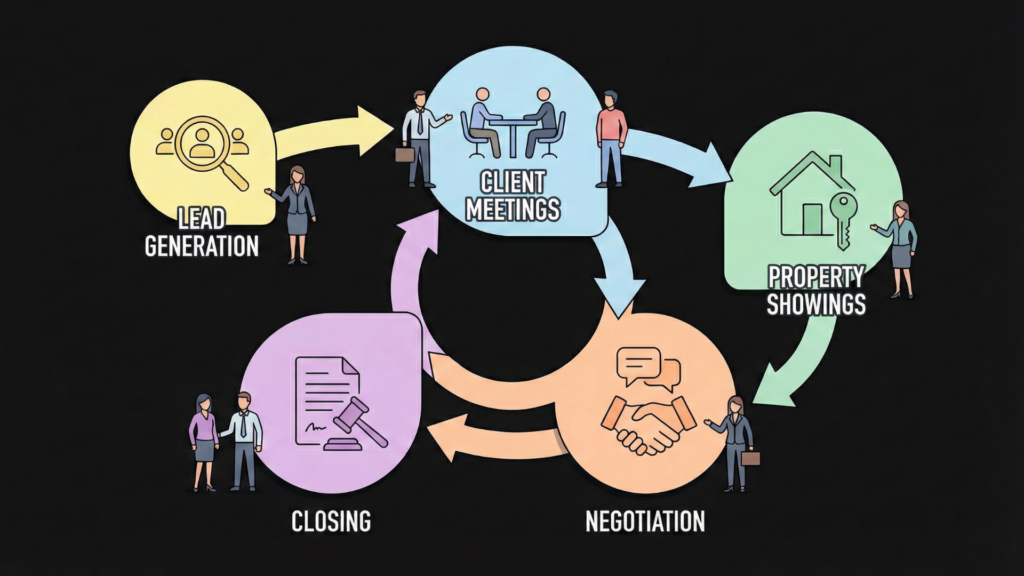
The real estate business operates on a cyclical process centered around client engagement and transaction management. This journey typically begins with lead generation and progresses through several distinct stages, culminating in a successful closing and often extending into long-term client relationships for referrals and repeat business
Components of Real Estate Business
Understanding the core components of the real estate business is essential to appreciate how a CRM system integrates and optimizes these processes. These components include:
- Lead Sources: Various channels through which potential clients are identified, such as online portals, referrals, open houses, and marketing campaigns.
- Listings: Properties available for sale or rent. Many agencies now use an AI website builder for real estate listings to manage this data effectively.
- Pipelines: The structured progression of a client or deal through various stages, from initial contact to closing.
- Documents: A multitude of legal and transactional documents that need to be generated, managed, signed, and stored securely.
- Compliance: Adherence to local, state, and federal real estate regulations and legal requirements.
- Commissions: Calculation and management of agent and broker commissions based on sales.
- Teams: Collaboration among agents, brokers, administrative staff, and other stakeholders involved in a transaction.
- Marketing: Strategies and activities to attract and engage potential clients and promote listings.
Here’s a simplified representation of a real estate pipeline:
Inquiry → Qualification → Showing → Offer → Negotiation → Close → Post-saleHow Real Estate CRM Works
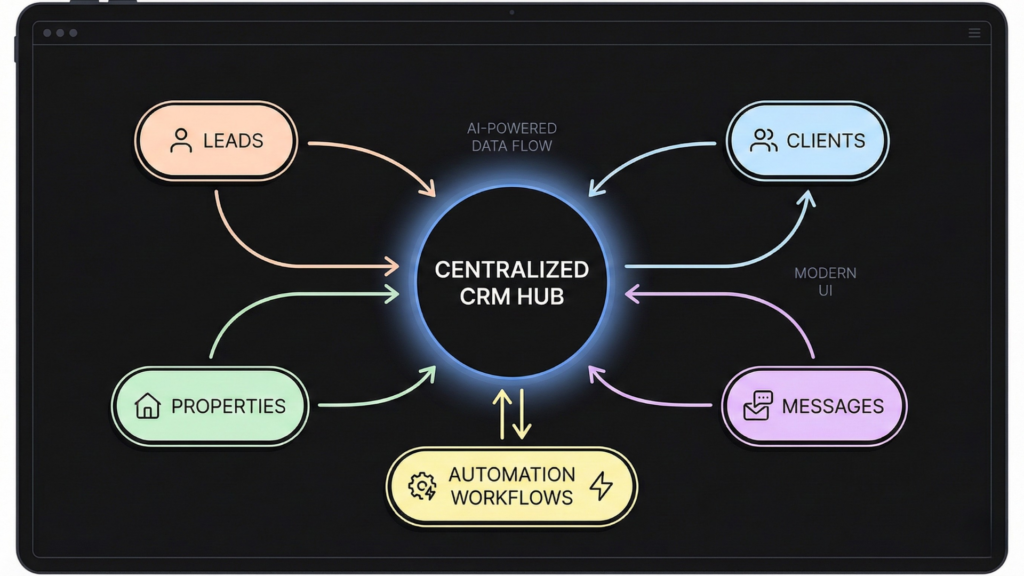
A real estate CRM acts as a central hub, integrating and automating workflows with AI many of the tasks involved in the real estate lifecycle. It streamlines client management by tracking interactions, managing leads, and scheduling follow-ups, ultimately helping agents close deals quicker and reducing missed opportunities .
The best real estate CRM software to build,health signals for the success and effective utilization of a real estate CRM. These indicators reflect how well the CRM is adopted and integrated into daily operations
- Adoption Rate: The percentage of agents actively using the CRM. A high adoption rate indicates successful implementation and perceived value.
- Data Completeness: The thoroughness and accuracy of information entered into the CRM. Complete data ensures reliable reporting and personalized client interactions.
- Automation Usage: The extent to which agents leverage CRM automation features (e.g., automated emails, task reminders). High usage signifies efficiency gains.
- Contact Activity Recency: How recently contacts have been engaged. Regular engagement indicates active client nurturing.
- Deliverability: The success rate of emails and SMS messages sent through the CRM. High deliverability ensures effective communication.
- Duplicate Rate: The percentage of duplicate contact or lead entries. A low duplicate rate indicates good data hygiene.
- Time-to-Update: The speed at which client or deal information is updated in the CRM. Timely updates ensure accurate and current data.
- Reporting Usage: The frequency and depth of agents and managers utilizing CRM reporting features. Active reporting indicates data-driven decision-making.
Features of Real Estate CRM
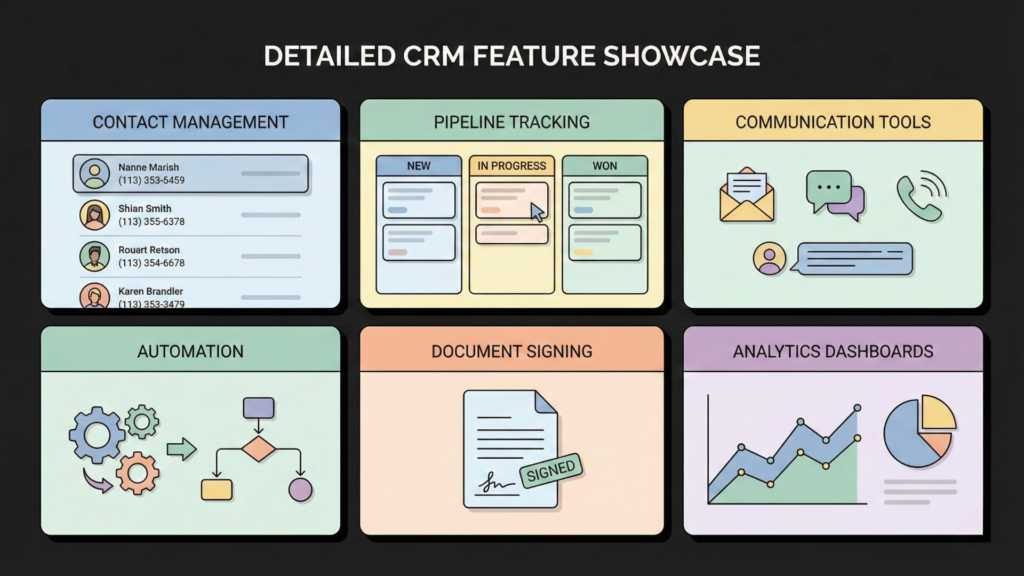
A comprehensive real estate CRM offers a suite of features designed to support every stage of the real estate lifecycle. These features can be broadly categorized as follows:
- Contact & Lead Management: Centralized database for all client and prospect information, including contact details, communication history, preferences, and lead scoring. This allows for personalized interactions and efficient lead prioritization.
- Pipeline/Deal Tracking: Visual representation of the sales pipeline, enabling agents to track deals from lead to close, monitor progress, identify bottlenecks, and forecast sales. This often includes customizable stages and automated alerts.
- Communication (email/SMS/calls): Integrated tools for managing all client communications within the CRM. This includes email templates, bulk SMS capabilities, call logging, and sometimes even integrated VoIP for direct calling.
- Automation & Reminders: Automating repetitive tasks such as follow-up emails, task creation, and appointment reminders. This frees up agents’ time to focus on high-value activities and ensures no critical step is missed.
- Property/Listing Matching: (If relevant) Advanced functionality to match client preferences with available properties, streamlining the search process and improving client satisfaction. This often integrates with MLS data .
- Document Management & E-sign: Secure storage and management of all transaction-related documents, including contracts, disclosures, and agreements. Integrated e-signature capabilities expedite the signing process and ensure compliance.
- Team Roles & Permissions: Defining different user roles (e.g., agent, team lead, administrator) with specific access levels and permissions, ensuring data security and efficient team collaboration.
- Reporting & Dashboards: Customizable reports and dashboards that provide insights into key performance metrics, lead conversion rates, agent productivity, and overall business health. This supports data-driven decision-making.
- Integrations (portals, calendars, marketing): Seamless integration with other essential real estate tools and platforms, such as real estate portals (Zillow, Realtor.com), calendar applications (Google Calendar, Outlook), and marketing automation platforms.
Cost, KPIs and Indicators of a Software
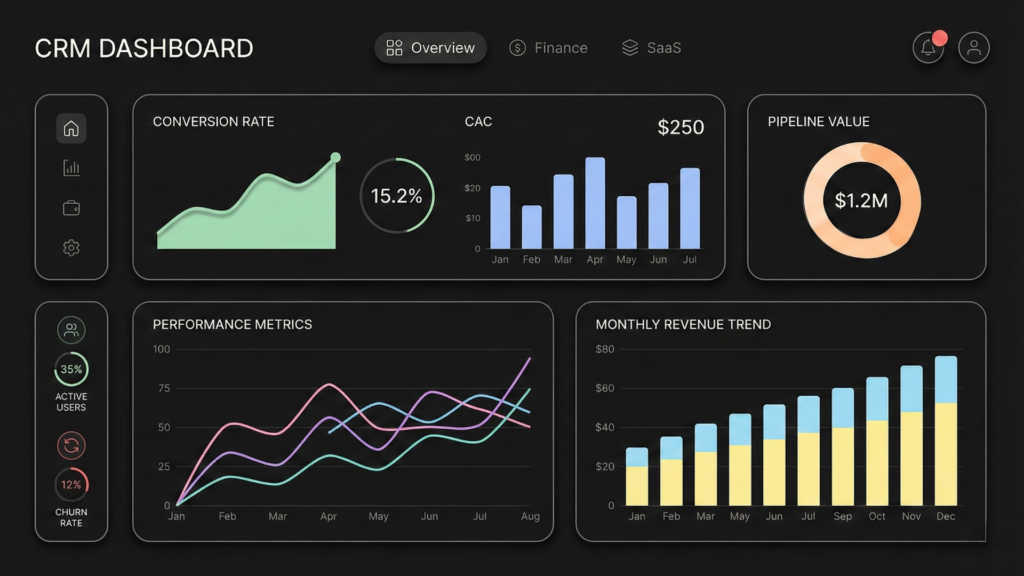
The cost of a real estate CRM, whether off-the-shelf or custom-built, varies significantly based on its scope, the complexity of integrations, compliance requirements, and the scale of operations it needs to support. Understanding these factors is crucial for budgeting and selecting the right solution.
Cost to Build
Building a custom real estate CRM involves various cost drivers. Instead of providing specific numbers, which can fluctuate rapidly, it’s more practical to understand the framework that influences the cost
| Cost driver | Why it increases cost | Examples |
|---|---|---|
| Features & Functionality | More features, especially complex ones (AI, advanced analytics), require more development time and expertise. | Basic contact management vs. AI-driven lead scoring and predictive analytics. |
| Design Complexity (UI/UX) | A highly customized, intuitive, and responsive user interface requires significant design and development effort. | Simple, template-based UI vs. bespoke, interactive dashboards and mobile-optimized layouts. |
| Platform Choice | Developing for multiple platforms (web, iOS, Android) or specific technologies can increase complexity and cost. | Web-only application vs. cross-platform mobile app with native features. |
| Integration Requirements | Connecting with numerous external systems (MLS, marketing tools, accounting software) adds development time and complexity. | Basic email integration vs. real-time data sync with multiple third-party APIs. |
| Team Size & Location | The number of developers, designers, and project managers, as well as their hourly rates (which vary by region), impact the total cost. | In-house team vs. outsourced development from different geographical regions. |
| Maintenance & Support | Ongoing updates, bug fixes, security patches, and technical support are recurring costs. | Basic bug fixing vs. 24/7 dedicated support and continuous feature enhancements. |
For a general idea, a Minimum Viable Product (MVP) for a custom CRM might range from $15,000 to $120,000+, while a more comprehensive mid-market CRM could be $75,000 – $200,000. Enterprise-level solutions with extensive features and integrations can exceed $250,000.
KPIs of Real Estate CRM
Key Performance Indicators (KPIs) are quantifiable metrics that help real estate professionals assess the effectiveness of their CRM and overall business operations. Defining and tracking these KPIs is essential for identifying areas of strength and opportunities for improvement.
| KPI | Definition | Formula | Why it matters | How CRM tracks it |
|---|---|---|---|---|
| Speed-to-Lead | The time taken to contact a new lead after initial inquiry. | (Time of first contact – Time of lead inquiry) | Faster response times significantly increase lead conversion rates. | Automatically logs lead inquiry time and first contact time. |
| Lead-to-Appointment Rate | The percentage of leads that result in a scheduled appointment. | (Number of appointments / Number of leads) * 100 | Indicates the effectiveness of initial lead qualification and nurturing. | Tracks lead status changes and appointment scheduling. |
| Appointment-to-Showing Rate | The percentage of appointments that lead to a property showing. | (Number of showings / Number of appointments) * 100 | Measures the quality of appointments and client engagement. | Records scheduled appointments and actual showings. |
| Showing-to-Offer Rate | The percentage of property showings that result in an offer. | (Number of offers / Number of showings) * 100 | Reflects the effectiveness of property presentation and client interest. | Logs property showings and submitted offers. |
| Offer-to-Close Rate | The percentage of offers that successfully close. | (Number of closed deals / Number of offers) * 100 | The ultimate measure of sales team effectiveness and negotiation skills. | Tracks offer status and final closing status. |
| Customer Acquisition Cost (CAC) | The total cost of acquiring a new customer. | (Total marketing & sales expenses / Number of new customers) | Helps evaluate the efficiency of marketing and sales efforts. | Consolidates marketing spend and new client data. |
| Lifetime Value (LTV) & Referral Rate | The total revenue a customer is expected to generate over their relationship with the business, and the rate at which existing clients refer new ones. | LTV: (Average purchase value * Average purchase frequency * Average customer lifespan); Referral Rate: (Number of referred clients / Total clients) * 100 | High LTV and referral rates indicate strong client satisfaction and loyalty. | Tracks repeat business, referral sources, and client history. |
| Pipeline Value & Win Rate | The total potential revenue of all active deals in the pipeline, and the percentage of deals won. | Pipeline Value: Sum of all active deal values; Win Rate: (Number of won deals / Total deals) * 100 | Provides an overview of future revenue potential and sales team success. | Aggregates deal values and tracks deal outcomes. |
| Agent Activity Metrics | Measures of agent productivity, such as calls made, texts sent, and emails exchanged. | Number of calls, texts, emails per agent per day/week. | Helps monitor agent engagement and identify training needs. | Automatically logs agent communication activities. |
Indicators of CRM
Beyond quantifiable KPIs, there are several qualitative and quantitative “indicators” that serve as
real estate CRM works by providing a centralized platform for managing client information, automating routine tasks, and offering insights into sales performance. This leads to improved efficiency, better client relationships, and ultimately, increased sales.
Here’s a table illustrating how CRM automation supports various stages of the real estate workflow:
| Stage | What happens | CRM helps by | Key data captured |
|---|---|---|---|
| Lead Generation | Identifying potential clients through various channels. | Captures leads from multiple sources, automatically assigns them, and initiates welcome sequences. | Lead source, contact information, initial inquiry details. |
| Lead Nurturing | Building relationships with potential clients through consistent communication. | Automates email campaigns, schedules follow-up calls, tracks communication history, personalizes outreach. | Communication logs, lead engagement scores, preferred contact methods. |
| Property Showing | Arranging and conducting property viewings. | Schedules appointments, manages showing feedback, provides property details to agents on the go. | Showing dates, property viewed, client feedback, agent notes. |
| Offer & Negotiation | Presenting offers and negotiating terms between parties. | Manages offer documents, tracks negotiation progress, stores counter-offers and amendments. | Offer details, negotiation history, key terms, deadlines. |
| Closing | Finalizing the transaction and transferring ownership. | Guides through closing checklists, manages document signing, integrates with escrow and title companies. | Closing date, transaction value, commission details, signed documents. |
| Post-Sale/Referrals | Maintaining relationships after the sale for future business and referrals. | Schedules post-sale follow-ups, tracks client satisfaction, identifies referral opportunities, automates anniversary greetings. | Client satisfaction ratings, referral sources, past transaction history. |
Frontend and Backend Overview of Real Estate CRM
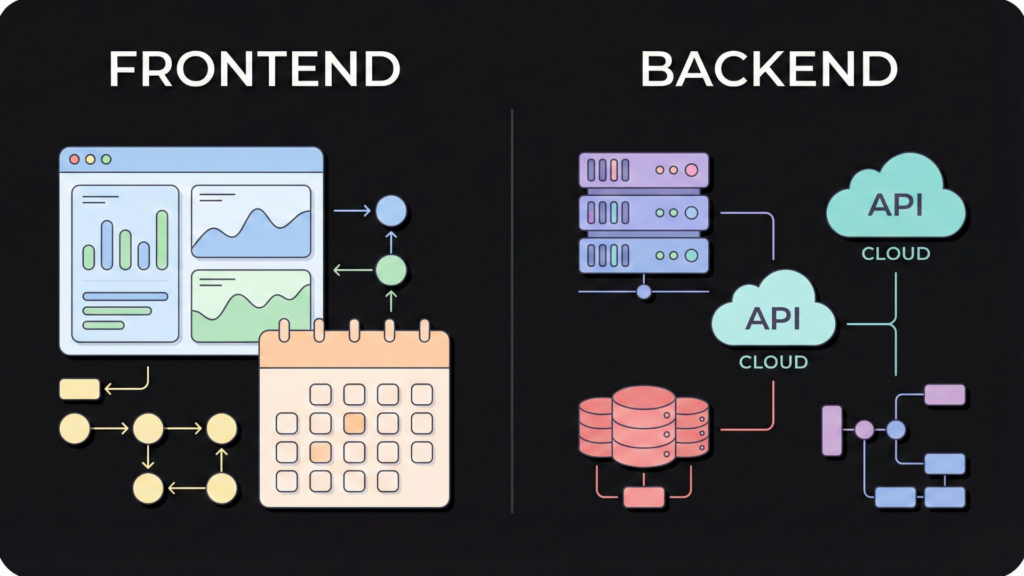
Understanding the distinction between the frontend (what users see and interact with) and the backend (the underlying infrastructure that powers the system) is crucial for comprehending how a real estate CRM functions.
Frontend: This is the user interface, designed for intuitive navigation and efficient task management. Key frontend components often include:
- Contact Timeline: A chronological view of all interactions with a client.
- Pipeline Board: A visual, drag-and-drop interface for managing deals through different stages.
- Tasks: A dashboard for managing daily tasks, appointments, and follow-ups.
- Messaging Inbox: Centralized inbox for emails, SMS, and internal communications.
- Listing View: Detailed display of property information, photos, and virtual tours.
- Calendar: Integrated calendar for scheduling appointments, showings, and deadlines.
Backend: This is the server-side infrastructure, databases, and APIs that handle data storage, processing, and business logic. Key backend components typically include:
- Database Schema: Structured storage for critical data entities like contacts, deals, properties, activities, and users.
- Permissions: Role-based access control to ensure data security and regulate user actions.
- Audit Logs: Records of all system activities, crucial for compliance and troubleshooting.
- Automation Engine: The core logic that triggers automated workflows and tasks.
- Integrations: APIs and connectors for seamless data exchange with external systems (e.g., MLS, marketing platforms).
- Analytics Events: Tracking and processing of user interactions and system events for reporting and insights.
Reference Architecture (Simplified)
- Client-side: Web browser / Mobile app
- API Gateway: Handles requests and routes them to appropriate services
- Microservices: Dedicated services for Contact Management, Deal Management, Property Management, Communication, Automation, Reporting
- Databases: Relational (PostgreSQL/MySQL) for structured data, NoSQL (MongoDB) for flexible data
- Caching: Redis/Memcached for faster data retrieval
- Message Queue: Kafka/RabbitMQ for asynchronous communication between services
- Cloud Infrastructure: AWS/Azure/GCP for scalability and reliability
Best Real Estate CRM Software to Build
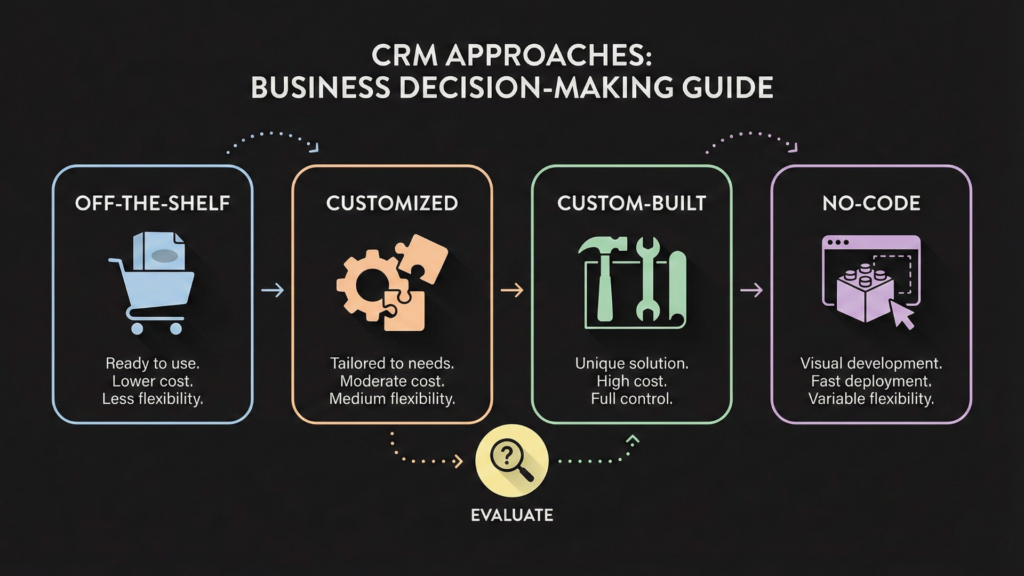
When considering the “best” real estate CRM software to build, it’s less about a single product and more about the approach to creating a solution that perfectly aligns with specific business needs. The ideal CRM should be tailored to the unique workflows, team structure, and client base of a brokerage or team.
Here are the primary approaches to acquiring a real estate CRM, along with their pros and cons:
| Approach | Pros | Cons |
|---|---|---|
| Buy off-the-shelf | Quick deployment, lower initial cost, established features, ongoing support. | Limited customization, may include unnecessary features, vendor lock-in, may not perfectly fit unique workflows. |
| Customize existing CRM | Tailored to some extent, leverages existing platform stability, potentially faster than building from scratch. | Customization limitations, can be expensive, reliance on platform vendor, upgrades can be challenging. |
| Build custom from scratch | Complete control over features and design, perfect fit for unique needs, intellectual property ownership, scalability. | High initial cost, long development time, requires significant technical expertise, ongoing maintenance responsibility. |
| No-code/AI-assisted build (Imagine.bo) | Rapid development, significant cost savings, high customization, business users can build, iterative development. | Because Imagine.bo gives you so much freedom, the best results come when you spend a little time clarifying your workflow first. |
Top Real Estate CRM in Market
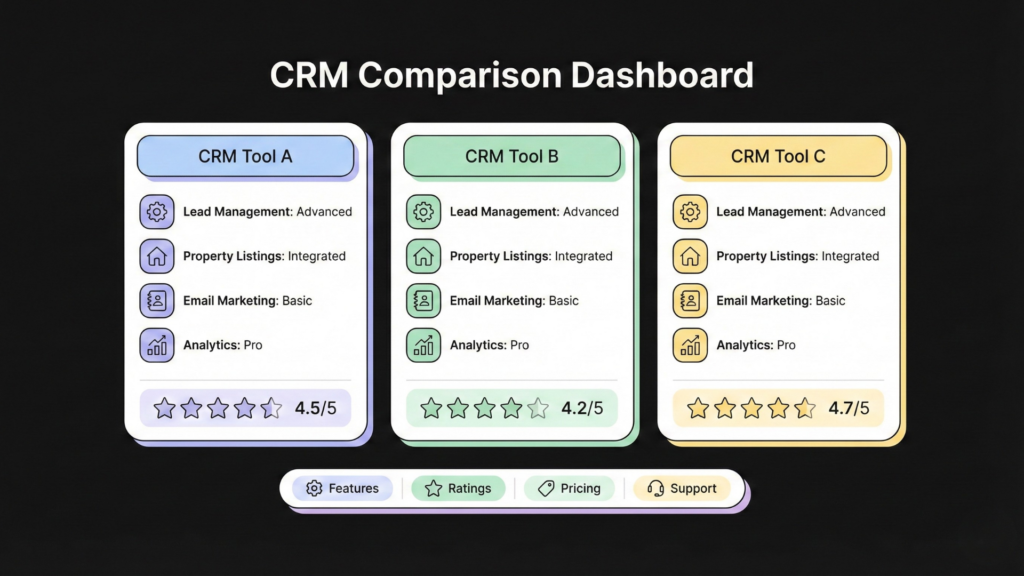
The real estate CRM market offers a variety of solutions, each with its strengths and ideal user base. Here’s a comparison of some of the top CRMs, based on verifiable information from official sites and reputable reviews.
| CRM | Best for | Notable strengths | Limitations | Pricing model |
|---|---|---|---|---|
| Follow Up Boss | Teams focused on lead conversion and follow-up. | Excellent lead routing, robust action plans, strong integrations, mobile functionality. | Can be more expensive for small teams, may require additional integrations for full functionality. | Subscription-based (tiered) |
| LionDesk | Agents and teams seeking an all-in-one solution with marketing features. | Video messaging, AI-powered lead follow-ups, customizable drip campaigns, integrated dialer. | Interface can be overwhelming for new users, some advanced features require add-ons. | Subscription-based (tiered) |
| Wise Agent | Agents and brokers looking for a comprehensive yet affordable CRM. | Transaction management, marketing automation, robust contact management, good customer support. | User interface can feel dated, some integrations may be less seamless than competitors. | Subscription-based (flat fee) |
| BoomTown | Large teams and brokerages with high lead volume and advanced marketing needs. | Powerful lead generation tools, IDX website integration, advanced reporting, coaching. | High cost, steep learning curve, primarily designed for high-volume operations. | Subscription-based (enterprise) |
DATA + STATS: How Building Real Estate CRM Is Profitable
Investing in a real estate CRM can yield significant returns by enhancing operational efficiency, improving client relationships, and ultimately driving sales growth. While real estate-specific ROI studies can be scarce, general CRM ROI research provides compelling evidence of the profitability of such systems
Chart 1: Global CRM market growth
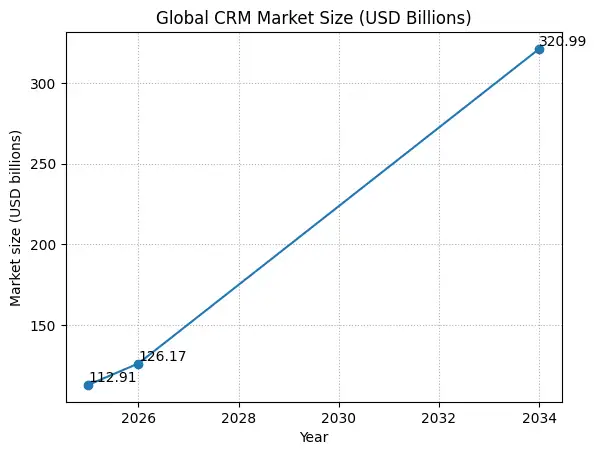
Data points used (USD billions):
- 2025: 112.91
- 2026: 126.17
- 2034: 320.99
Chart 2: Real estate software market growth
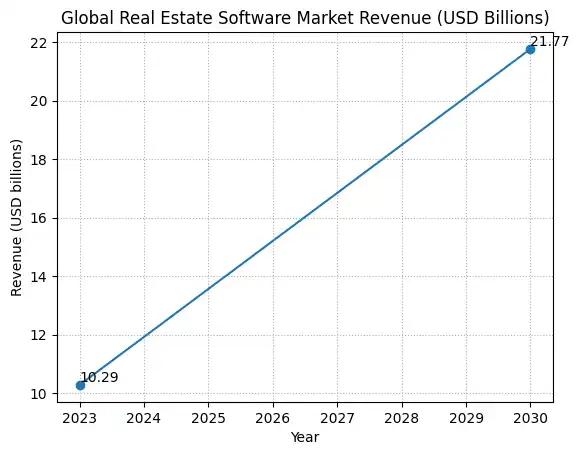
Data points used (USD billions):
- 2023 revenue: 10.2857
- 2030 revenue (forecast): 21.7669
- Forecast CAGR (2024–2030): 11.3%
Chart 3: REALTORS’ lead-generation tech usage (CRM is a core tool)
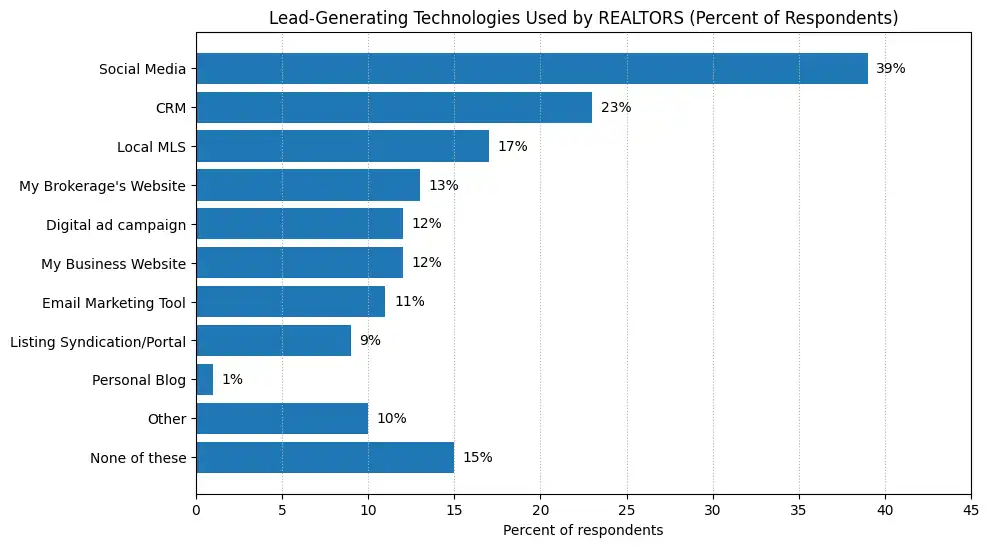
Chart 4: Pie Chart: Monthly Technology Spend by REALTORS
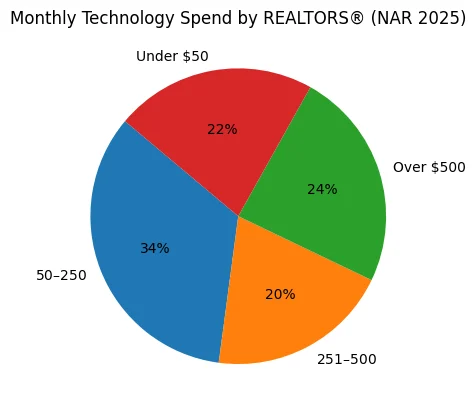
This chart visualizes how much real estate professionals already spend every month on technology tools such as CRM, marketing software, transaction tools, and analytics.
Key data points
- 34% spend $50–$250/month
- 20% spend $251–$500/month
- 24% spend over $500/month
- 22% spend under $50/month
Chart 5: Typical Real Estate Sales Funnel (Value Leakage Proof)
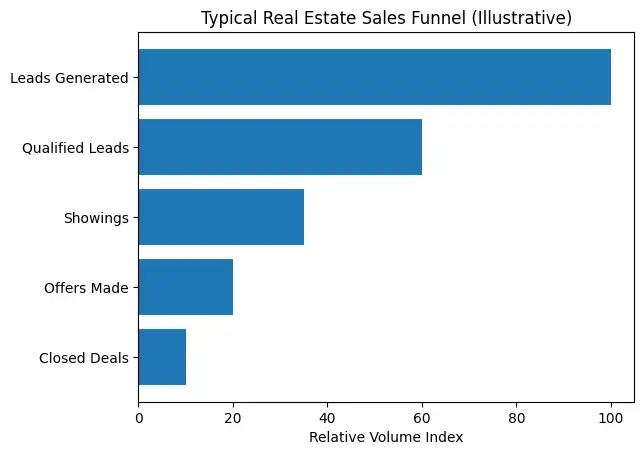
This funnel illustrates how volume drops across the real estate lifecycle:
- Leads generated
- Qualified leads
- Property showings
- Offers made
- Closed deals
Build Your Real Estate CRM Without Writing a Single Line of Code From Scratch

For real estate professionals looking to build a CRM tailored precisely to their needs without the complexities and costs associated with traditional software development, platforms like Imagine.bo offer a revolutionary approach. Imagine.bo is a no-code AI product builder that empowers users to create sophisticated real estate CRMs by simply describing their requirements in plain English.
Here’s how Imagine.bo facilitates building a custom CRM:
Define Modules: Users can define the core modules needed for their CRM, such as contacts, properties, deals, tasks, and communications.
- Describe Workflows in Plain English: By articulating desired workflows and business logic in natural language, Imagine.bo’s AI translates these descriptions into functional CRM components.
- Iterate Features: The platform allows for rapid iteration and refinement of features, enabling users to continuously adapt and improve their CRM as their needs evolve.
- Launch and Scale: Once built, the CRM can be launched and scaled to accommodate growing teams and increasing data volumes without requiring extensive technical intervention.
Imagine.bo’s 5-step workflow for building a CRM:
- Vision: Clearly articulate your vision and requirements for the real estate CRM, focusing on the problems you want to solve and the functionalities you need.
- AI Reasoning & Blueprint: Imagine.bo’s AI analyzes your vision, generates a detailed blueprint, and proposes the optimal architecture and features for your CRM.
- Generate Full-Stack System: The platform automatically generates the complete full-stack system, including frontend, backend, and database, based on the approved blueprint.
- Launch: Deploy your custom real estate CRM with ease, making it accessible to your team and ready for use.
- Ongoing Improvements: Continuously refine and enhance your CRM by providing feedback and new requirements to Imagine.bo’s AI, ensuring it remains perfectly aligned with your evolving business needs.
If you want to build a CRM tailored to your brokerage or team without engineering overhead, try Imagine.bo to transform your ideas into a powerful, custom real estate CRM solution.
Conclusion
A real estate CRM is an indispensable asset for any real estate professional aiming for sustained growth and efficiency. By centralizing client data, automating routine tasks, and providing actionable insights, a well-implemented CRM empowers agents and brokers to nurture leads more effectively, streamline transactions, and build lasting client relationships. Whether opting for an off-the-shelf solution, customization, or a no-code build, the strategic integration of a CRM is paramount to thriving in today’s competitive real estate market.
FAQ
What is the primary benefit of a real estate CRM?
The primary benefit is centralized client and lead management, leading to improved communication, streamlined workflows, and ultimately, increased sales and client satisfaction.
How does a real estate CRM help with lead management?
A real estate CRM helps by capturing leads from various sources, tracking their journey through the sales pipeline, automating follow-ups, and providing tools for personalized communication, ensuring no lead falls through the cracks.
Can a real estate CRM integrate with other tools I use?
Yes, most modern real estate CRMs offer integrations with essential tools such as MLS, real estate portals, email marketing platforms, calendar applications, and accounting software to create a unified operational ecosystem.
Is it better to buy an off-the-shelf real estate CRM or build a custom one?
The best approach depends on your specific needs. Off-the-shelf CRMs are quicker and cheaper initially but offer less customization. Custom CRMs provide a perfect fit but require a larger investment in time and resources. No-code platforms like Imagine.bo offer a middle ground, combining customization with faster development.
What are some key KPIs to track with a real estate CRM?
Key KPIs include speed-to-lead, lead-to-appointment rate, offer-to-close rate, customer acquisition cost (CAC), and pipeline value. These metrics help assess the effectiveness of your CRM and sales processes.
Launch Your App Today
Ready to launch? Skip the tech stress. Describe, Build, Launch in three simple steps.
Build




