
AI APIs from providers like OpenAI and Anthropic have democratized technology, empowering no-code builders to create world-class apps. However, the “sticker shock” of spiraling monthly bills is a common pain point. This guide provides actionable no-code optimization strategies to reduce AI API costs by up to 80% without sacrificing quality. From mastering token efficiency to leveraging architectural platforms like Imagine.bo, we will show you exactly how to stop leaking money and start building scalable, cost-effective systems today. By implementing these strategies, you will not only enhance your applications but also reduce AI API costs effectively.
Understanding AI API Pricing Models (And Why You’re Leaking Money)
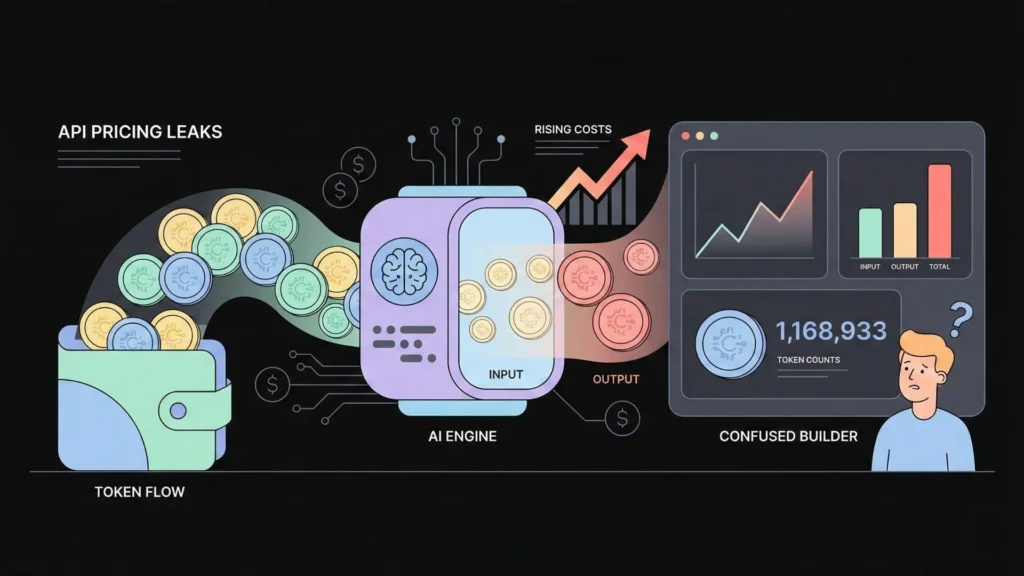
Before you can plug the financial leaks in your automations, you need to understand exactly how the meter is running. It is not always intuitive. Most AI API costs fall into three distinct categories, and misunderstanding these AI pricing models is the primary reason for inflated bills.
Launch Your App Today
Ready to launch? Skip the tech stress. Describe, Build, Launch in three simple steps.
Build1. Per-Token Pricing: The Silent Budget Killer
This is the most common model, utilized by industry leaders like OpenAI (GPT-4o, GPT-3.5-Turbo) and Anthropic (Claude 3.5 Sonnet, Haiku).
In this model, you are charged for “tokens.” A token is not a word; it is a chunk of text roughly equivalent to 4 characters or 0.75 words.
- Input Tokens: You pay for what you send the AI (your prompt, context, and instructions).
- Output Tokens: You pay for what the AI writes back.
The Trap: Most builders focus on the output, but the input is often where the money vanishes. If you paste a 2,000-word article into a prompt just to ask for a one-sentence summary, you are paying for those 2,000 words every single time the workflow runs. A long, conversational prompt costs significantly more than a short, direct one.
2. Per-Request Pricing
This is a simpler model, often used for specific, fine-tuned models or specialized APIs. For example, an image classification API might charge $0.001 per image processed, regardless of the file size. While easier to predict, it punishes high-volume, low-complexity tasks.
3. Per-Compute-Cycle (Per-Second) Pricing
This is common when running open-source models on platforms like Hugging Face or Replicate. You pay for the specific duration the GPU is active processing your request. While less common for simple serverless API calls, understanding this is key for advanced optimization (like using dedicated instances) later in your journey.
The Reality Check: For most no-code builders using standard LLMs, you are living in the per-token world. Every character counts, and efficiency is the only way to protect your margins.
Why No-Code Builders Overpay: The “Bolt-On” Trap
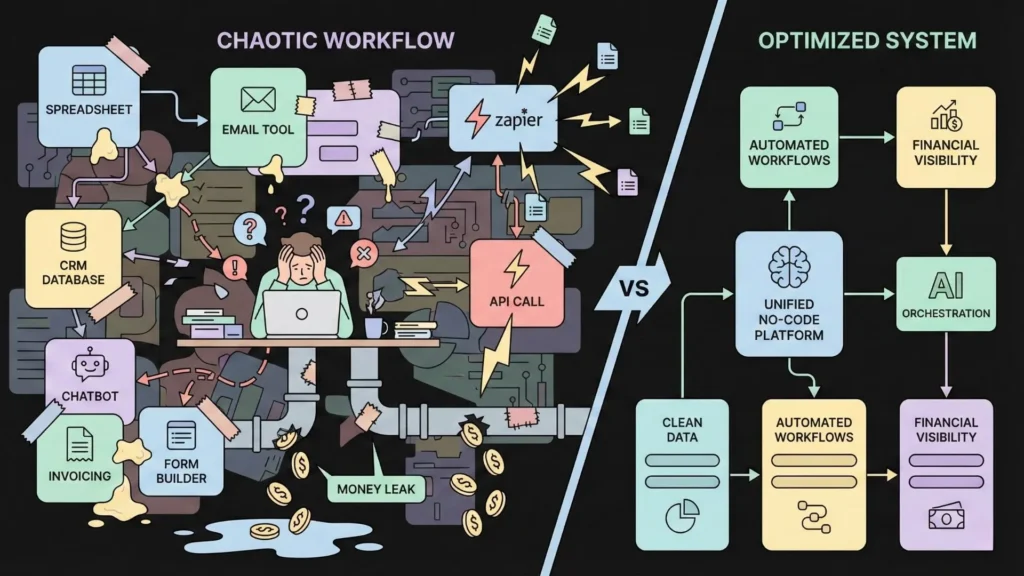
No-code tools are incredible for speed and flexibility. However, this flexibility can be a financial trap. We tend to “bolt on” AI to existing workflows without thinking like engineers. This usually leads to three major cost-sinks, especially when using automation tools like Zapier or Make.
1. Unoptimized, “Chatty” Prompt Lengths
When we prototype in the OpenAI Playground or ChatGPT, we tend to be polite and conversational.
- “Hey GPT, could you please take a look at the following customer feedback and analyze it for me? I’d like to know the main sentiment…”
We then copy-paste this 50-token prompt directly into a Make.com scenario. Every time that workflow runs, we are paying for those 50 tokens… forever. Multiply that by 10,000 workflow executions, and you have just paid for 500,000 tokens of “politeness” that added zero functional value.
2. Inefficient Automation Triggers
This is the “brute force” method of automation. A classic example is a workflow designed to summarize important emails.
- The Flaw: The builder sets the trigger to: “On Every New Email -> Send to GPT-4.”
- The Cost: This workflow triggers on spam, newsletters, calendar invites, and one-line “Thanks!” replies. You are paying for expensive GPT-4 calls to summarize emails that have no value. This is a massive drain on resources.
3. Calling APIs for Every Single Task (No Batching)
Imagine you want to categorize 100 new customer reviews. The inefficient workflow looks like a loop:
- Take review 1 -> Call OpenAI.
- Take review 2 -> Call OpenAI.
- (Repeat 100 times).
You just initiated 100 separate HTTP requests. A far more efficient method is batching: combining all 100 reviews into a single list, sending them in one API call, and asking the AI to return a structured list of categories. This minimizes network overhead and often drastically reduces input token redundancy.
Top 5 Ways to Cut AI API Costs (Without Writing Code)
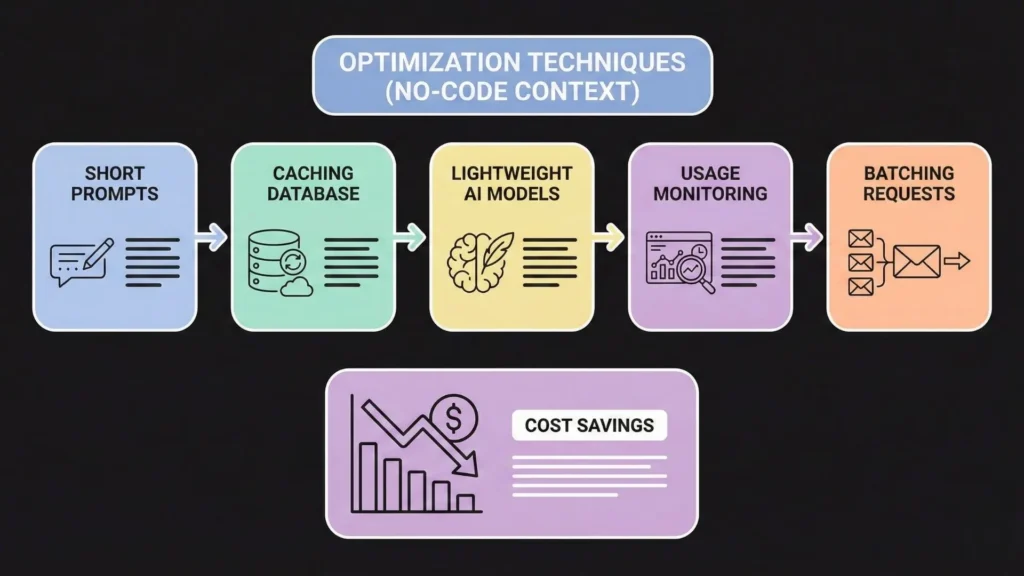
Here are the most effective strategies to stop the bleeding immediately. These can be implemented inside your existing tools like Zapier, Make, or Bubble.
1. Optimize Your Prompts: The 80/20 of Cost Savings
This is your single biggest lever. Shorter prompts equal lower input costs. Shorter, constrained instructions equal shorter, cheaper outputs.
- Be Brutally Concise: Stop being conversational. Be robotic and direct.
- Before (36 tokens): “Hey, could you please take a look at the following customer review and tell me if the sentiment is positive, negative, or neutral?”
- After (10 tokens): “Classify sentiment (positive, negative, neutral) for this review:”
- Result: A ~72% reduction in prompt cost, instantly.
- Use System Prompts: Move your core instructions to the “System” role in the API call. This separates instructions from data, often leading to better adherence and less need for repeated examples.
- Force Structured Output: Use “JSON Mode” to force the AI to return only clean data (e.g.,
{"sentiment": "positive"}). This slashes output token usage by eliminating conversational fluff like “Sure! Here is the analysis you requested…”
2. Cache Results: Stop Asking the Same Question
Are you calling an AI API for tasks that have repeatable answers?
- “Summarize this generic terms of service.”
- “What is the capital of France?”
- “Analyze the sentiment of this viral tweet (that 500 users just submitted).”
If your app asks the same question 1,000 times, you should not pay for 1,000 API calls.
The No-Code Solution: Use a simple database as a generic “cache.”
- Input Received.
- Step 1: Search your database for this specific input string.
- Step 2 (Filter): If found? Use the saved result (Cost: $0).
- Step 3: If not found? Call the AI API, save the result to the database for next time, and display it.
3. Use Lightweight Models: Tier Your Logic
You don’t use a sledgehammer to crack a nut. Stop using expensive models for every simple task. Create a “model tier” for your workflows:
- Tier 1 (Simple Tasks): Classification, simple extraction, reformatting.
- Models: Claude 3 Haiku, GPT-4o-mini.
- Cost Impact: Analyzing 1 million tokens on GPT-4o might cost $5.00. On Claude 3 Haiku, it might cost $0.25. That is a 95% saving.
- Tier 2 (Complex Tasks): Creative writing, reasoning, coding, deep analysis.
- Models: GPT-4o, Claude 3.5 Sonnet.
Add a “Router” step in your automation: “If task is ‘sentiment’, route to Haiku. If task is ‘blog post’, route to GPT-4o.”
4. Monitor Your Usage (You Can’t Optimize What You Don’t Measure)
- AI Provider Dashboard: Check your OpenAI/Anthropic “Usage” tab. Identify which specific model is eating the budget.
- Automation Logs: Look at your Make/Zapier history. Find scenarios with high “Operation” counts and cross-reference them.
- Set Hard Limits: Always set a monthly spend limit (e.g., $50 hard stop) in your API provider settings. This is your emergency brake against an infinite loop bankrupting you overnight.
5. Combine Models: The “Chain-of-Thought” Trick
Instead of one giant, expensive prompt, chain multiple AI models together to prepare the data for the expensive model.
- The Strategy: Use a cheap model (Haiku) to generate a detailed outline or structure.
- The Execution: Then, feed that structured outline into the expensive model (GPT-4) for the final polish. You use the cheap model for the “heavy lifting” of structure and the expensive model only for the high-value “voice.”
The Next Evolution: From “Bolted-On” to “Built-In” Architecture

While the strategies above are effective, they reveal a deeper truth: Manually optimizing AI workflows is hard work.
It requires constant vigilance. You have to be a part-time prompt engineer, a part-time DevOps manager, and a part-time accountant. You are spending valuable hours tweaking JSON prompts and setting up caching logic in Airtable when you should be focusing on your business.
This friction exists because we are taking traditional apps and “gluing” AI onto them. But what if the application was born from AI? What if the architecture itself was generated to be efficient, scalable, and cost-effective by default?
This is where the industry is shifting, led by platforms like Imagine.bo.
Imagine.bo: The AI No-Code App Builder

Imagine.bo represents a paradigm shift from “automating tasks” to “generating products.” It is an AI-driven platform designed for founders who want to move from concept to revenue-ready app development without the technical debt of stitching together zaps and scripts.
Unlike standard no-code tools where you are responsible for the logic (and the inefficiencies), Imagine.bo uses advanced AI reasoning to architect the software for you.
Why This Matters for Cost and Scale
When you build with Imagine.bo, you aren’t just getting an interface; you are getting SDE-level architecture.
- Efficiency by Design: Instead of you manually figuring out how to batch API calls or where to implement caching, Imagine.bo’s AI reasoning engine plans the backend logic. It generates clean, scalable code that follows engineering best practices—inherently reducing the waste associated with “brute force” no-code setups.
- End-to-End Ownership: You stop paying the “integration tax.” Imagine.bo handles the frontend, backend, databases, and integrations in one cohesive environment. You aren’t paying a premium for data to move from Typeform to Zapier to OpenAI to Airtable. It all happens within a unified, optimized ecosystem.
- Revenue-Ready Security: One of the hidden costs of “bolted-on” AI is security risks. Imagine.bo generates GDPR and SOC2-ready code, ensuring that as you scale, your data handling remains secure without you needing to hire a cybersecurity consultant.
The “Plain English” Advantage
The most profound cost-saver is time. With Imagine.bo, you describe your product vision, business goals, and target audience in plain English. The system analyzes this intent and builds the foundational architecture, core features, and system logic.
If you need to iterate, you don’t hunt through spaghetti code or complex workflow diagrams. You simply guide the AI with further natural language prompts. It effectively gives you a CTO and a Senior Dev team on demand, ensuring your product is built to handle 1,000+ transactions per second from Day 1.
Real-World Example: Reducing AI API Costs by 60%
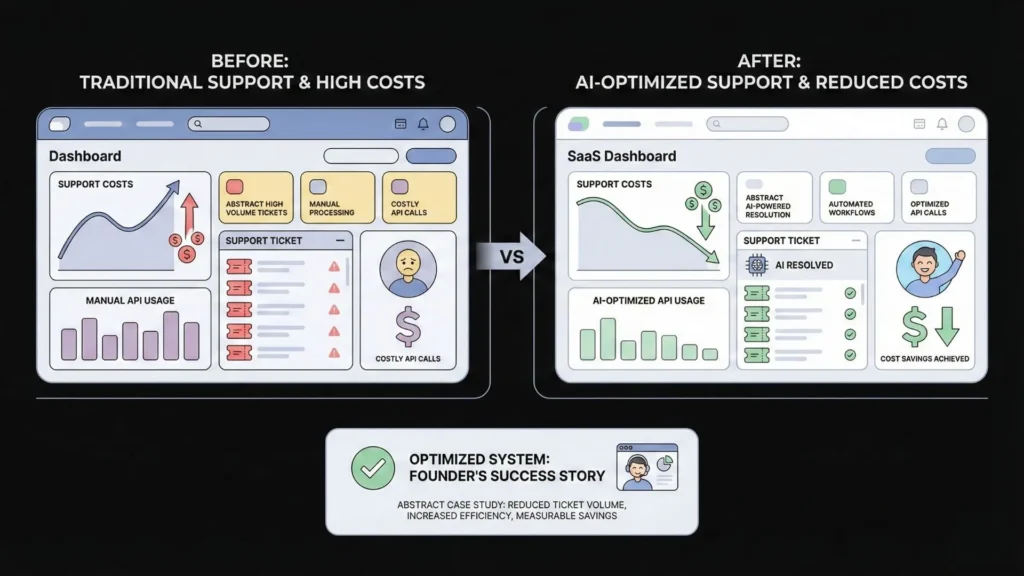
Let’s look at a realistic scenario of how optimization transforms a business model.
The App: “SupportReply,” a tool that drafts replies to customer support tickets.
The “Old” Way (Bolted-On AI):
- Setup: A Bubble app triggered by every new email.
- Workflow: New Email -> Send full text to GPT-4 -> Draft Reply -> Email Agent.
- The Cost: $500/month. The founder was paying for GPT-4 to analyze simple “Password Reset” emails and spam, using massive prompts.
The “New” Way (Optimized Architecture):
- Filter First: A logic step was added. “If text contains ‘password’ or ‘reset’, route to a pre-written template.” (Cost: $0). This eliminated 30% of API calls.
- Model Tiering: A router was implemented. “If ticket word count > 500 (complex), use GPT-4o. If < 500 (simple), use Claude Haiku.”
- Prompt Tuning: The 80-token conversational prompt was replaced with a 20-token system instruction.
The Result: The bill dropped to $200/month—a 60% reduction with zero loss in quality.
The Imagine.bo Alternative: If “SupportReply” had been built on Imagine.bo, the AI reasoning engine would have likely suggested or implemented a database structure that categorized tickets before processing, and set up the backend logic to handle high volumes efficiently, potentially saving the founder the months of trial-and-error it took to learn these lessons manually.
When to Upgrade to Paid API Plans
It sounds counter-intuitive, but sometimes paying more for a “Pro” plan saves money.
Free or low-tier API plans have strict rate limits (e.g., “3 requests per minute”). When your app hits this limit, the call fails. Your automation tool (Zapier/Make) then retries. And fails. And retries.
These retries consume “Operations” or “Tasks” in your automation tool, which costs money. You might spend more on failed retries than you would have by upgrading to a higher tier with better throughput. Stability is a form of cost savings.
The Future: Stop Leaking, Start Building
AI API costs do not have to be a black box or an unavoidable tax on innovation. By shifting your mindset from a “chatty” user to an “efficient” architect, you gain full control over your spending.
Your Action Plan:
- Audit: Look at your dashboards today. Find the leaks.
- Shorten: Cut your prompts in half.
- Cache: Don’t pay for the same answer twice.
- Tier: Downgrade simple tasks to cheaper models.
However, if you are tired of the constant maintenance, the patching together of external APIs, and the stress of optimizing “spaghetti code,” it might be time to rethink how you build.
Tools like Imagine.bo are leading the charge toward a future where the AI handles the complexity for you. By letting an AI reasoning engine handle the SDE-level architecture, deployment, and scale your no-code app, you free yourself to focus on what matters most: your vision and your customers.
Stop just calling APIs; start building intelligent systems. Whether you optimize your current stack or start fresh with a dedicated builder like Imagine.bo, the power to build affordable, scalable software is now in your hands.
Launch Your App Today
Ready to launch? Skip the tech stress. Describe, Build, Launch in three simple steps.
Build




