Stop scrubbing through hours of footage trying to find one sentence.
You know the pain. A client asks about something said in last quarter’s strategy meeting. Your legal team needs to locate a specific clause mentioned in a deposition. Your content team is searching for that perfect soundbite buried somewhere in 47 interview recordings.
Launch Your App Today
Ready to launch? Skip the tech stress. Describe, Build, Launch in three simple steps.
BuildWhat if you could search video like text? Type a keyword and jump directly to the exact moment it was spoken—no timeline scrubbing, no guesswork, no wasted hours.
This isn’t science fiction. Google Cloud has documented this exact pattern as Use Case #15 in their reference architectures. Major media companies, legal firms, and enterprises are already building searchable video libraries powered by automatic AI captioning.
This is exactly what AI-powered video archives enable—and today we’ll show you how to build one.
What Is a Searchable Video Archive?
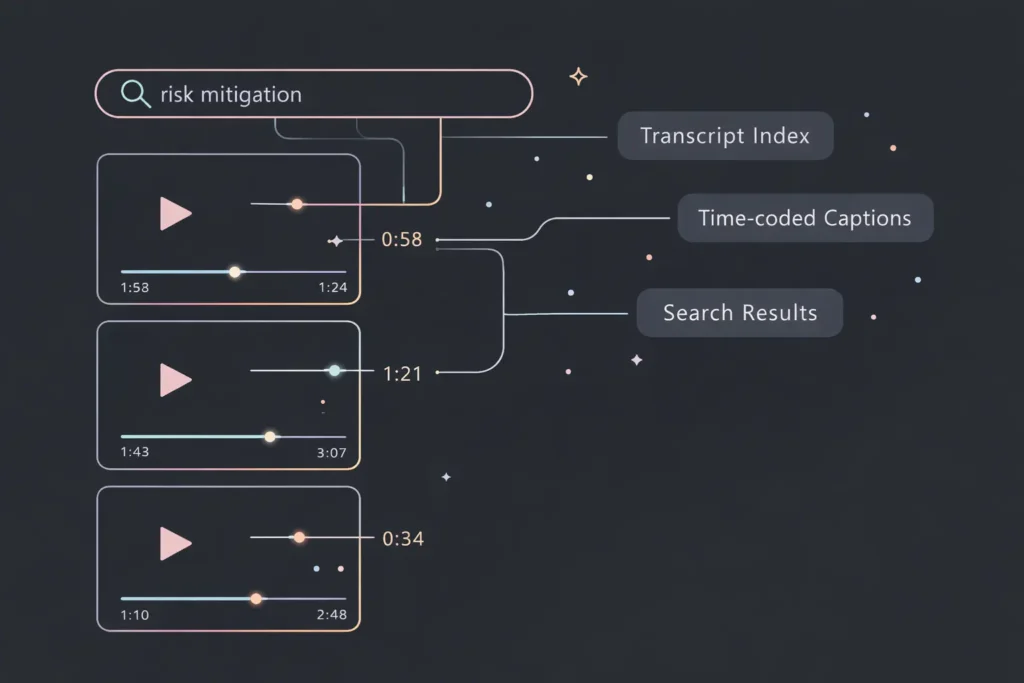
A searchable video archive transforms passive video storage into an intelligent, queryable knowledge system. Instead of organizing videos by filename or upload date, it indexes the actual spoken content—making every word searchable, discoverable, and actionable.
Automatic captioning is the engine that powers this transformation. Modern speech-to-text AI processes video audio, generates time-stamped transcripts, and creates a searchable index synchronized with your video timeline. When someone searches for a keyword, the system returns not just which videos contain that word, but the exact timestamp where it appears.
This is fundamentally different from traditional video management. You’re not searching metadata—you’re searching inside the content itself.
Core capabilities include:
- Automatic speech-to-text transcription across all uploaded videos
- Time-coded captions synchronized to video playback
- Full-text keyword search with timestamp navigation
- Metadata enrichment through transcript analysis
- Multi-language support for global content libraries
- Speaker identification and conversation tracking
Consider a university lecture portal. Professors upload semester recordings. Students type “mitochondria function” into the search bar and instantly jump to minute 34:12 of Biology 101, Lecture 8—exactly where the professor explains cellular respiration. No scrolling through course catalogs. No watching hours of video. Direct access to knowledge.
That’s the power of searchable video. And it’s now accessible to teams without massive engineering resources.
Why This Matters Now (The Business Case)
Video content production has exploded. Zoom recordings, webinars, training sessions, customer interviews, product demos—every organization is drowning in video data. By 2025, video is projected to account for over 82% of all internet traffic.
But here’s the problem: most of that video is effectively invisible to search.
AI-powered search engines favor content they can read and index. Text-based pages rank. Video files don’t—unless they include searchable transcripts. Companies investing in video captioning aren’t just improving accessibility; they’re making their content discoverable to both users and search algorithms.
The economics are compelling. Manual video tagging costs organizations between $15-50 per video hour when done by human teams. Multiply that across hundreds or thousands of videos, and you’re looking at six-figure expenses—with results that are inconsistent, incomplete, and non-searchable.
AI captioning changes the math entirely. Automated speech-to-text processes video at scale for pennies per minute, generates time-stamped transcripts, and creates searchable indexes—all without human intervention.
Every unsearchable video is locked revenue and lost productivity. Legal teams miss critical case details. Sales teams can’t find that perfect customer testimonial. Training departments rebuild knowledge that already exists in archived recordings. The cost isn’t just storage—it’s opportunity cost.
Organizations that build searchable video infrastructure gain:
- Faster knowledge retrieval across teams
- Better SEO performance for video content
- Reduced reliance on institutional memory
- Improved compliance and audit capabilities
- Competitive advantage in content-heavy industries
The question isn’t whether to build searchable video archives. It’s how fast you can deploy one.
Google Cloud Use Case #15 — The Technical Blueprint
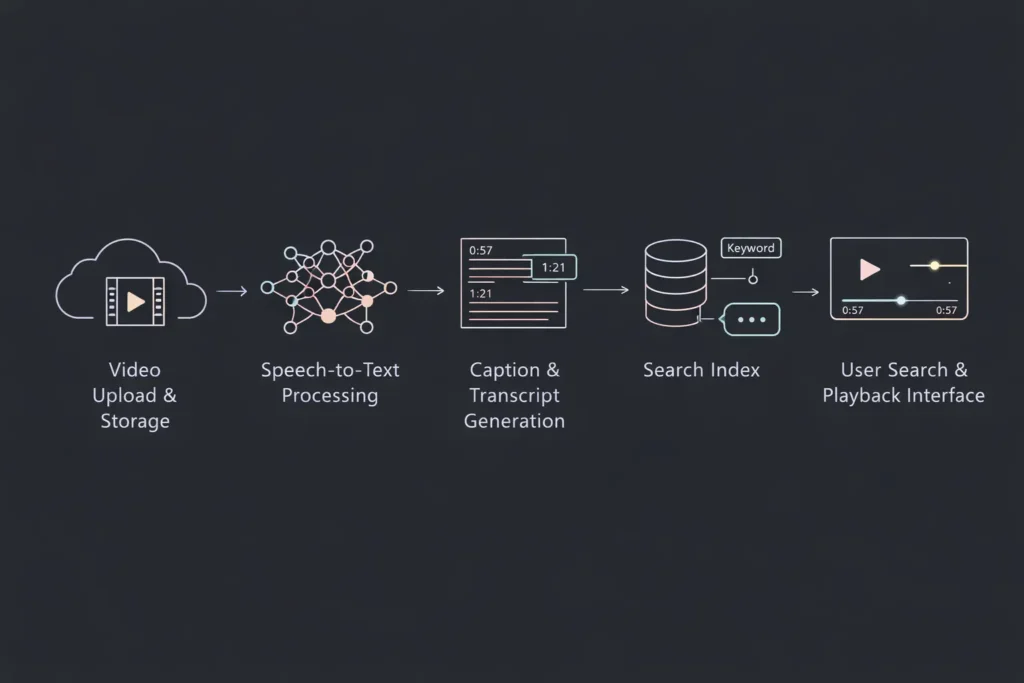
Google Cloud has documented searchable video libraries as a core enterprise architecture pattern. Their Use Case #15 outlines the technical approach major organizations use to build video search systems. Understanding this blueprint helps you make informed decisions—whether you’re building on cloud infrastructure or using no-code platforms.
Architecture Breakdown
The classic searchable video archive follows a five-stage pipeline:
Stage 1: Video Upload and Storage Users upload video files to cloud object storage. This provides durable, scalable storage for large video assets with built-in redundancy. Videos remain in their original format, accessible for playback while processing happens asynchronously.
Stage 2: Speech-to-Text Processing Once uploaded, videos enter an AI processing queue. Speech-to-text models analyze the audio track, converting spoken words into text. Modern systems process real-time or batch uploads, depending on volume and urgency requirements.
Stage 3: Caption and Transcript Generation The speech recognition output generates two key artifacts: human-readable captions synchronized to video timecodes, and full-text transcripts suitable for indexing. Each word includes timestamp data linking text to specific video moments.
Stage 4: Search Indexing Transcripts feed into a search engine or database with full-text search capabilities. The index maps keywords to video IDs and timestamps, enabling instant retrieval. Advanced implementations include semantic search, allowing users to find concepts even when exact keywords differ.
Stage 5: Retrieval Interface The user-facing application combines search results with video playback. When users click a search result, the video player loads and jumps directly to the relevant timestamp. Captions display during playback, improving accessibility and user experience.
Key technical components:
- Cloud Storage: Handles multi-gigabyte video files with 99.99% availability
- Speech-to-Text API: Processes audio with word-level accuracy and confidence scores
- AI Models: Support multiple languages, accents, and audio quality levels
- Search Infrastructure: Full-text indexing with sub-second query response times
- Content Delivery: Streams video efficiently to global users
This architecture is proven at scale. Media companies use it for archive libraries containing millions of hours. Legal firms deploy it for deposition management. Enterprises run it for corporate knowledge bases.
The challenge isn’t the architecture—it’s the implementation complexity. Building this pipeline traditionally requires backend engineers, DevOps specialists, ML expertise, and months of development time. That’s changing.
How AI Captioning Enables True Video Search
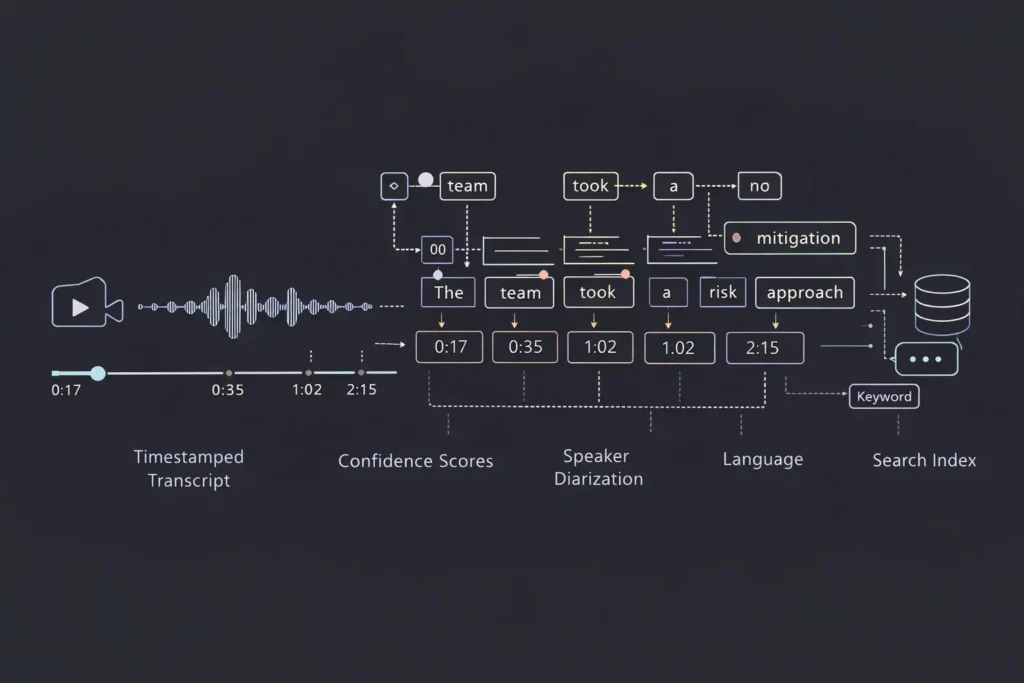
Automatic captioning is more sophisticated than simply transcribing audio. Modern AI captioning systems generate rich, structured data that transforms video from linear media into searchable, navigable knowledge assets.
Time-Stamped Transcripts Every word in the transcript includes precise timestamp data—often accurate to the millisecond. This temporal mapping is what enables jump-to-moment search. When you search for “quarterly revenue,” the system doesn’t just tell you which video contains that phrase—it takes you to 02:14 in a three-hour meeting recording where those exact words were spoken.
Word-Level Confidence Scores Advanced speech-to-text models assign confidence scores to each recognized word. High-confidence words (above 90%) typically indicate clear audio and accurate recognition. Lower scores flag potential errors for review or alternative processing. This metadata helps systems surface the most reliable search results first.
Multilingual Captioning Enterprise video libraries often contain content in multiple languages. Modern captioning AI automatically detects language and applies appropriate speech models. A global company can search across English product demos, Spanish training videos, and Mandarin customer interviews from a single interface.
Speaker Diarization Who said what? Speaker diarization identifies different voices in multi-person recordings. This enables searches like “show me everything the CFO said about budget allocation”—filtering results to specific speakers rather than returning every mention of budget across all speakers.
Understanding the difference between transcripts, captions, and searchable indexes matters:
- Transcripts are raw text outputs from speech recognition—accurate but not time-coded for playback
- Captions are formatted text synchronized to video timecodes for display during playback
- Searchable indexes are structured databases mapping keywords to video segments with timestamp precision
All three are generated from the same speech-to-text process, but each serves a different purpose. Complete video search systems generate all three, using transcripts for search queries, captions for accessibility, and indexes for performance.
The real power emerges when these capabilities combine. Imagine searching “risk mitigation strategy” across 200 board meeting recordings, filtering results to comments from your CEO, and reviewing only the 30-second clips where she discusses that specific topic. That’s not video storage—that’s video intelligence.
Build vs Buy — Why Most Tools Hit a Wall
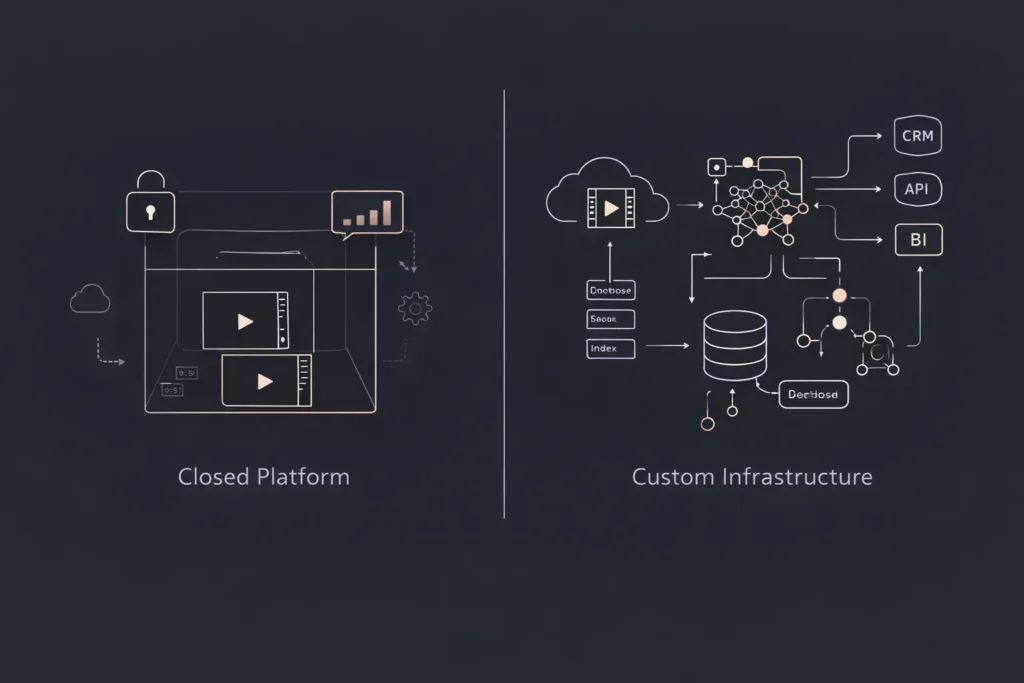
The searchable video market has attracted dozens of SaaS platforms promising simple solutions. Upload videos, get transcripts, add a search bar. On the surface, it seems straightforward.
Then you hit the wall.
Closed Platforms Most SaaS video tools lock you into their ecosystem. Your videos live on their servers, your data follows their schema, your users adapt to their interface. When you need custom workflows—integration with your CRM, specialized access controls, or unique content organization—you’re stuck filing feature requests and hoping.
Per-Minute Pricing Many platforms charge by processing time or storage volume. Five dollars per hour sounds reasonable until you’re archiving 1,000 hours monthly. Suddenly your video archive costs $60,000 annually—and that’s before bandwidth, API calls, or premium features. Costs scale linearly with usage, making large libraries financially prohibitive.
Limited Integrations Your video archive doesn’t exist in isolation. It needs to connect with your authentication system, feed data to analytics platforms, trigger workflows in project management tools, and export reports to business intelligence dashboards. SaaS platforms typically offer a handful of pre-built integrations—and building custom connections is either impossible or requires expensive enterprise plans.
No Data Ownership What happens when the platform raises prices, changes terms, or gets acquired? Your entire video library and search infrastructure is held hostage. Migrating thousands of videos and associated metadata to another platform is technically and financially devastating. You don’t own your data—you rent access to it.
Feature Limitations Want semantic search? Advanced filtering? Custom metadata fields? Multi-tenancy for client portals? Most SaaS tools offer rigid feature sets designed for broad markets, not specific use cases. Your unique requirements become impossible without moving to custom development.
The pattern is consistent: SaaS tools work well for simple use cases and small scale. Once you need control, customization, or cost-efficiency at volume, you outgrow the platform.
This is why more teams are choosing to build instead of buy. Custom-built video archives offer complete control, predictable costs, unlimited customization, and true data ownership. The traditional barrier was development complexity—until no-code AI platforms eliminated it.
How to Build a Video Archive App Without Code
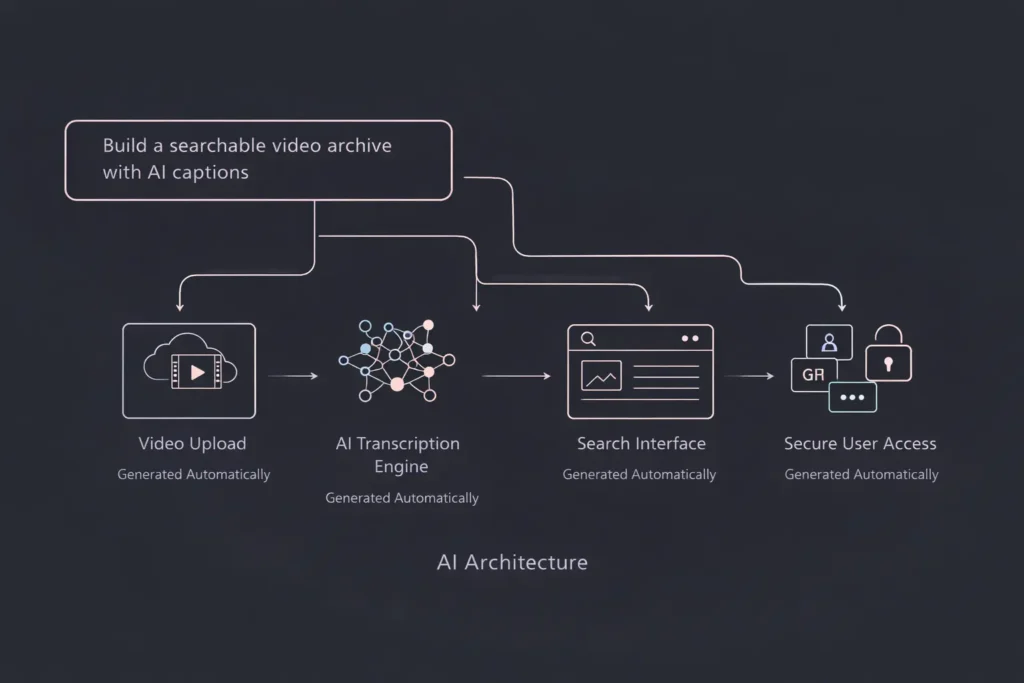
Building a searchable video archive used to require a full engineering team and months of development. No-code AI platforms like Imagine.bo have collapsed that timeline to days.
Here’s what you don’t need:
- No infrastructure decisions: Forget evaluating AWS vs Google Cloud vs Azure storage options, CDN configurations, or database architectures. The platform handles deployment automatically.
- No ML pipeline setup: No training speech models, configuring AI APIs, managing processing queues, or debugging transcription accuracy. AI captioning works out of the box.
- No backend engineering: No building REST APIs, implementing authentication, designing database schemas, or coding video upload handlers. Backend logic generates automatically.
- No DevOps: No configuring CI/CD pipelines, setting up monitoring, managing SSL certificates, or scaling server capacity. Cloud deployment is automatic.
How it works:
You describe your application in plain English. “I need a video archive where users can upload videos, automatically generate searchable captions, and find specific moments using keyword search.”
The AI reasoning engine translates that description into complete technical architecture: database schema for video metadata, storage configuration for large files, speech-to-text processing pipelines, search indexing logic, and user interface components.
The platform generates a production-ready application with:
- Secure video upload with progress tracking
- Automatic speech-to-text processing on upload
- Full-text search across all transcripts
- Timestamp-linked results that jump to video moments
- User authentication and access controls
- Responsive interface for desktop and mobile
Building a web app with AI makes managing heavy video data easier than ever—especially when storage, processing, and search are handled automatically.
You can iterate immediately. Need to add speaker identification? Update the prompt. Want to filter by upload date or video category? Add that requirement. The AI adjusts the architecture and regenerates the application.
This isn’t a simplified toy version of a video archive. It’s production-grade infrastructure deployed to cloud environments with enterprise-level security and scalability—built without writing a single line of backend code.
The speed advantage is transformative. Teams that would have spent three months planning architecture, two months building backend systems, and another month on frontend development can now launch in days—not months. That’s not iteration—that’s market entry velocity.
Imagine.bo Architecture Advantage
Imagine.bo isn’t a simplified app builder with templates. It’s an AI-powered platform that generates production-grade applications with the same architectural sophistication senior developers would create—but automatically.
AI Reasoning Engine → Correct Data Models Most no-code tools force you into pre-defined database structures. Imagine.bo analyzes your use case and generates optimized data models. For video archives, that means proper separation of video metadata, transcript data, user permissions, and search indexes—all designed for query performance and scalability.
SDE-Level Architecture → Scalable Video Pipelines Video applications have unique demands: multi-gigabyte file uploads, asynchronous processing, efficient storage, and high-bandwidth streaming. The platform generates backend logic that handles these challenges using industry-standard patterns—background job processing, chunked uploads, CDN integration, and optimized database queries.
Cloud-Native → Massive File Handling Video files are large. A one-hour 1080p recording can exceed 4GB. Traditional databases can’t store files that size efficiently. Imagine.bo automatically configures cloud object storage for video files while keeping metadata in fast-access databases—the same architecture Netflix and YouTube use, generated automatically for your application.
SEO-Ready → Indexed Transcripts Search engines can’t watch videos, but they can read transcripts. Applications built with Imagine.bo generate SEO-friendly pages where video transcripts are crawlable HTML. Your video content becomes discoverable through Google search—driving organic traffic without additional optimization work.
Analytics → Usage Insights Which videos get watched most? What search terms do users enter? Where do users drop off? The platform includes analytics infrastructure that tracks user behavior, giving you data to improve content strategy and user experience.
Imagine.bo is positioned as the fastest way to go from idea to searchable video product. The platform doesn’t just generate apps—it generates the right architecture for demanding use cases like video search, where performance, scalability, and user experience are non-negotiable.
Traditional no-code tools make you choose between simplicity and capability. Imagine.bo delivers both: the speed of no-code with the sophistication of custom development.
Real-World Use Cases
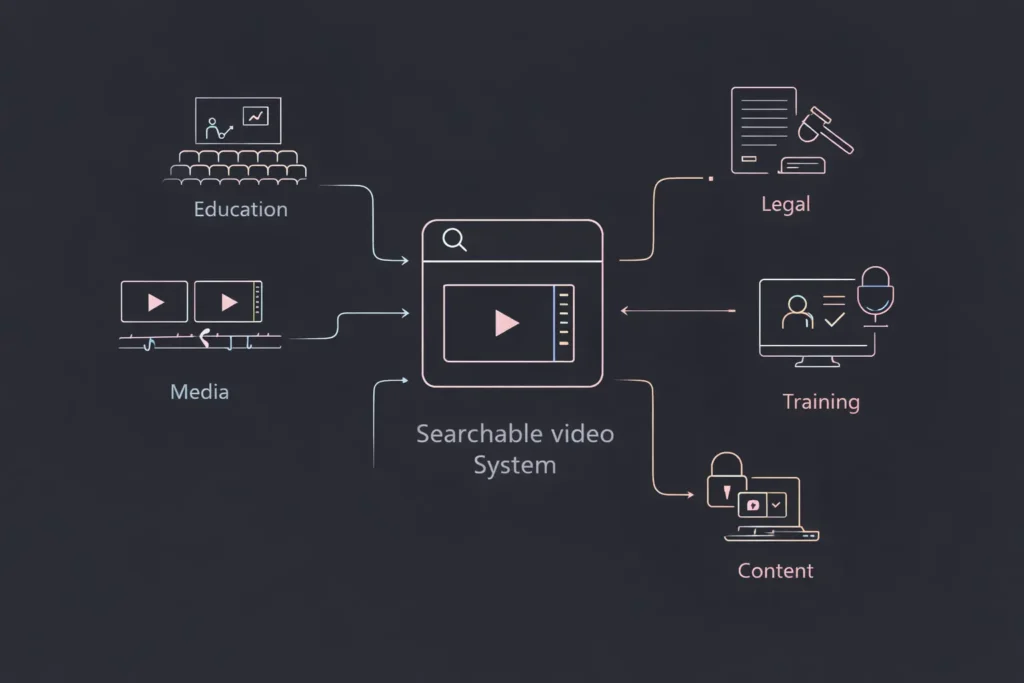
Media Production Archives Post-production teams manage thousands of hours of raw footage, interviews, and B-roll. Searchable archives let editors find specific scenes instantly without reviewing entire shoots. One documentary team reduced footage review time by 70% using keyword search.
Corporate Training Libraries Organizations with extensive training programs build internal portals where employees search recorded sessions. New hires find onboarding content. Managers locate compliance training. Sales teams reference product demos—all through natural language search.
Legal Depositions Law firms archive deposition videos with automatic transcripts. Attorneys search for specific testimony across multiple cases. Paralegals locate contradictory statements. Trial preparation that once took weeks now takes hours.
University Lecture Portals Higher education institutions provide students with searchable lecture archives. Students preparing for exams search for topics across an entire semester. Distance learning programs make content accessible globally with multilingual captions.
Podcast and Webinar Libraries Content creators build searchable show archives that drive SEO traffic. Listeners discover episodes through Google search. Creators repurpose content by finding the best clips. Marketing teams track which topics drive engagement.
Internal Knowledge Bases Companies treat recorded meetings, product demos, and strategy sessions as organizational knowledge assets. Engineers search technical discussions. Product managers find feature requirements. Leadership reviews past decisions with complete context.
Future-Proofing Your Video Library
The trajectory of video search technology points toward increasingly intelligent systems. Organizations building searchable archives today are positioning themselves for capabilities that will become standard tomorrow.
Semantic Search Beyond keyword matching, semantic search understands intent and context. Searching “how to reduce costs” would surface videos discussing “efficiency improvements” and “budget optimization”—even when those exact words weren’t used. AI models trained on language understanding make this possible.
AI Summaries Long videos become instant executive summaries. Upload a two-hour board meeting, receive a structured summary highlighting key decisions, action items, and discussion topics. The AI reads transcripts and generates concise overviews without human review.
Clip Generation Automatically extract the most important moments from long-form content. AI identifies highlights, creates short clips, and generates social media content from webinar recordings—all based on transcript analysis and engagement patterns.
Multimodal Search Future systems will search across video transcripts, presentation slides shown on screen, documents referenced during meetings, and chat messages from virtual sessions—creating unified search across all content types in your knowledge base.
AI Copilots Over Video Libraries Conversational AI interfaces will let users ask questions like “What did we decide about the Q3 product launch?” and receive answers synthesized from multiple video sources, with citations linking to specific video moments. Your video archive becomes an intelligent assistant.
The infrastructure you build today determines what’s possible tomorrow. Closed SaaS platforms control feature roadmaps and access to emerging capabilities. Custom-built archives give you ownership and flexibility to integrate new AI technologies as they emerge.
Searchable video is not a feature—it’s the future default. Organizations that treat video as passive storage will fall behind those that build intelligent, queryable video systems.
Build Your Video Archive Today
The convergence of AI captioning, cloud infrastructure, and no-code development has eliminated the barriers to building searchable video archives. What once required six-figure budgets and specialized engineering teams is now accessible to any organization with video content and a vision for making it searchable.
Every hour your video content remains unsearchable, you’re losing productivity, missing insights, and leaving knowledge locked away. Your team is already creating videos—meetings, training sessions, customer calls. The content exists. The question is whether it’s working for you or just taking up storage space.
The traditional path—hiring developers, architecting infrastructure, managing ML pipelines—still takes months and considerable budget. The modern path using no-code AI platforms takes days.
If you’re thinking about building a video archive app or an AI captioning tool, Imagine.bo lets you launch in days—not months. Describe your requirements in plain English. Let AI generate production-grade architecture. Deploy a fully functional, scalable video search system while your competitors are still writing technical specifications.
The searchable video revolution isn’t coming. It’s here. The only question is whether you’ll build your solution now or watch your competitors do it first.
Start building at Imagine.bo—where video archives go from concept to reality faster than your team can finish their next planning meeting.
Launch Your App Today
Ready to launch? Skip the tech stress. Describe, Build, Launch in three simple steps.
Build