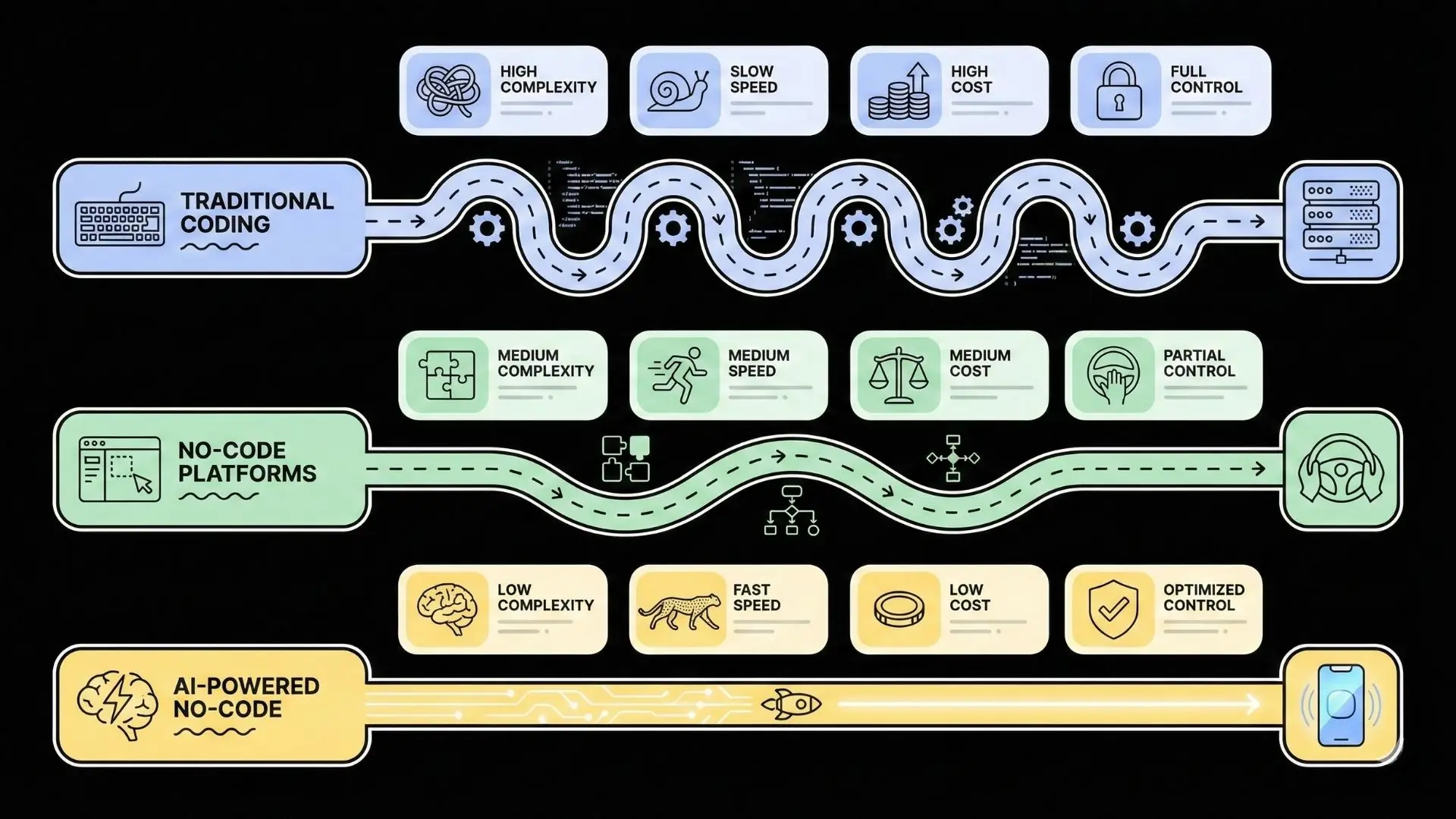
Building Android apps with AI in 2025 is no longer limited to experienced developers or large teams. This guide explains how AI is changing the entire Android development process, from idea validation and feature creation to deployment and scaling. You will learn how modern tools reduce manual coding, speed up development, and make it possible to launch reliable, production-ready Android apps faster, smarter, and with far lower cost than traditional approaches.
The Rise of AI in Android Development
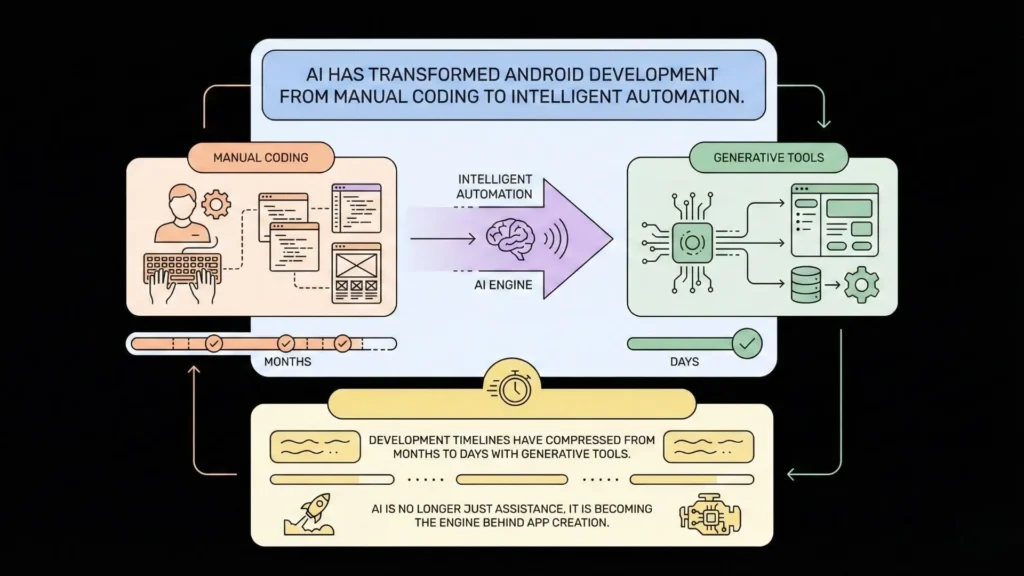
The integration of AI into software development wasn’t an overnight revolution; it was an evolution. It began subtly, with smarter Integrated Development Environments (IDEs) that offered intelligent code completion. Then came the first wave of AI-powered assistants, most notably GitHub Copilot, which acts as a “pair programmer,” suggesting entire functions and blocks of code.
Launch Your App Today
Ready to launch? Skip the tech stress. Describe, Build, Launch in three simple steps.
BuildFast forward to 2025, and the landscape is virtually unrecognizable. We are now in the era of generative AI, where AI models can understand natural language, intent, and even visual sketches to generate entire application architectures. This trend is supercharged by staggering market growth. Reports from industry analysts like Grand View Research project the global AI in software development market, valued at over $933 million in 2025, to skyrocket to over $15.7 billion by 2033, growing at an astonishing CAGR of 42.3%.
What does this mean for Android development? It means that the development lifecycle is being compressed from months to days, or even hours. Statistics show this isn’t just hype; it’s a developer-led movement. Recent surveys indicate that over 82% of developers are already using AI tools in their workflow, reporting massive gains in productivity and code quality. This rapid adoption signals a fundamental change: AI is no longer just a tool; it’s becoming the factory.
What Is AI Android App Development?
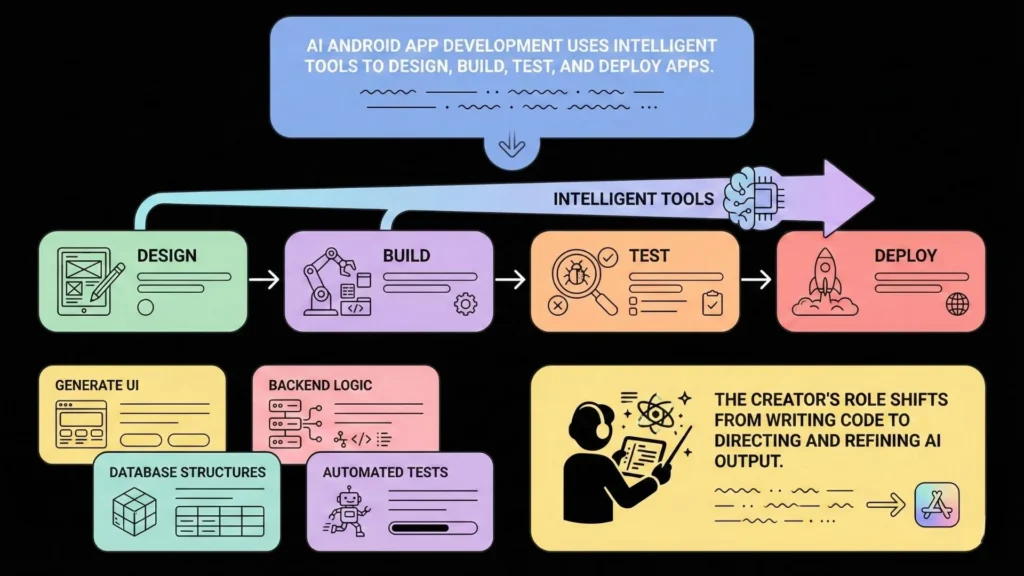
AI Android app development is a broad term that encompasses a new category of tools, platforms, and methodologies that leverage artificial intelligence to design, develop, test, and deploy Android applications.
This goes far beyond simple code assistance. A true AI app development platform can:
- Generate UI/UX: You can describe your app’s look and feel (“I want a clean, minimalist dashboard for a fitness app with a green color palette”), and the AI will generate the XML layouts, navigation, and visual components.
- Write Backend Logic: AI can scaffold your entire backend, including user authentication, database schemas (like in Firebase or a SQL database), and API endpoints.
- Automate Code Generation: Instead of just suggesting code, these platforms write the entire boilerplate for you. This includes networking code, data models, and event handlers.
- Find and Fix Bugs: AI-powered debugging tools can analyze code for potential errors, security vulnerabilities, and performance bottlenecks, often suggesting concrete fixes.
- Automate Testing: Modern AI can write unit tests and integration tests, simulate user behavior to find bugs (AI-driven QA), and ensure your app works across different Android devices and screen sizes.
- Generate Full Applications from Prompts: The most advanced platforms, often called “no-code AI builders,” can take a high-level description of your entire business idea (e.g., “Build me a job board for freelance graphic designers”) and generate a functional, multi-page application foundation.
In essence, AI development shifts the creator’s role from a “manual coder” to an “AI director.” Your primary skill becomes your ability to clearly articulate your idea and guide the AI to refine its creation.
Key Benefits of Using AI for Android App Development
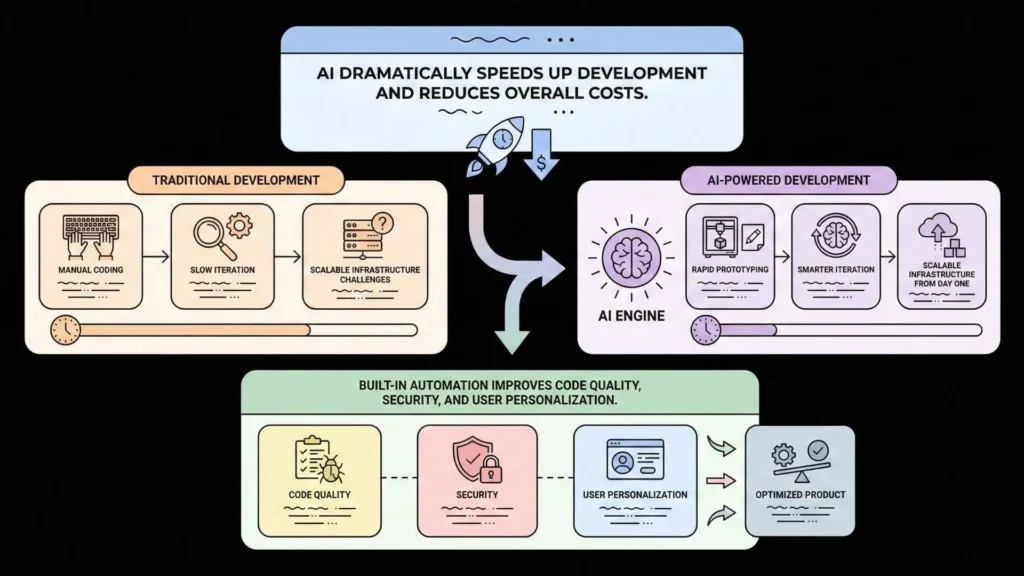
The “why” behind this shift is compelling. Using AI to build Android apps isn’t just a novelty; it offers transformative advantages for founders and businesses.
- Unprecedented Speed: The most significant benefit is the radical acceleration of the development process. Tasks that traditionally took a development team weeks—like setting up user authentication, building a settings page, or integrating a payment gateway—can often be completed by an AI in minutes. This allows you to go from idea to Minimum Viable Product (MVP) at a speed previously unimaginable, capturing market opportunities before competitors.
- Drastic Cost Reduction: By automating the most time-consuming aspects of coding, AI dramatically reduces the hours of expensive developer talent required. For startups and small businesses, this democratizes access to technology, making it possible to build a professional-grade app on a bootstrapper’s budget.
- Enhanced Creativity and Iteration: When you aren’t bogged down by syntax and boilerplate, you can focus on what truly matters: your app’s core value and user experience. AI builders allow you to experiment. Don’t like the layout? Ask the AI to regenerate it. Want to add a new feature? Prototype it in hours, not weeks. This fosters a culture of rapid iteration and creativity.
- Scalability and Security by Default: A common pitfall of early no-code tools was that they were difficult to scale and often had security limitations. Modern AI platforms are different. Revolutionary platforms, for instance, can build apps on world-class, scalable infrastructure from the start, often including essentials like GDPR and SOC2 compliance readiness. This means your app is built to handle viral traffic spikes and protect user data from day one.
- Fewer Coding Errors: Human developers, no matter how skilled, make mistakes. AI-generated code, while not perfect, is often highly consistent and based on best practices from millions of data points. When combined with AI-powered bug detection, this leads to a more stable, reliable, and secure final product.
- Hyper-Personalization: AI isn’t just for building the app; it can also be in the app. AI makes it easier to integrate powerful features like recommendation engines (like Netflix), personalized user feeds, and intelligent chatbots, creating adaptive experiences that keep users engaged.
Top AI Tools and Platforms for Building Android Apps

The AI development market is exploding, but not all tools are created equal. They generally fall into three categories, each serving a different need.
1. AI Code Assistants (For Developers)
These tools work inside your existing code editor to speed up manual coding.
- GitHub Copilot: The original AI pair programmer, it suggests code as you type.
- ChatGPT (GPT-4o): Developers use it as a powerful consultant, asking it to write functions, debug errors, or explain complex concepts.
- Pros: Massively boosts productivity for technical users.
- Cons: You must be a developer. You are still responsible for the architecture, deployment, and overall app structure.
2. AI-Powered Low-Code Platforms
These platforms offer visual, drag-and-drop builders that are supercharged with AI features.
- FlutterFlow: A popular tool for building cross-platform (iOS and Android) apps from a single codebase. It has an AI feature that can generate pages from text prompts.
- Pros: Excellent for visual-first development; good integration with services like Firebase.
- Cons: Can have a steep learning curve for complex logic. You often hit a “low-code wall” where you must write custom code (in Dart, in this case) for unique features.
3. AI-Native No-Code Platforms
These platforms aim to eliminate code entirely, allowing non-technical users to build full applications.
- Appy Pie: Known for its simple, template-based approach, allowing users to “piece together” an app.
- Builder.ai: Uses an AI-powered assembly line process, combining AI generation with a human developer network.
- Imagine.bo: A revolutionary platform in this space designed to democratize software development truly. Instead of relying on templates, Imagine.bo allows you to describe your app idea in plain English. The AI then generates the foundational architecture and features. From there, you use a simple visual, drag-and-drop interface to customize your app.
This last category, particularly platforms like Imagine.bo, represents the true “future” of AI Android app development. It’s not just about building simpler apps faster; it’s about building powerful, scalable, and professional-grade applications without the “tech stress.” It’s designed for founders who need to build and launch a real business, not just a prototype.
Here’s a quick comparison to help you choose:
| Platform Category | Example(s) | Best For | Pros | Cons |
|---|---|---|---|---|
| AI Code Assistants | GitHub Copilot, ChatGPT | Technical Developers | • Unlocks 10x developer productivity • Works in your existing environment | • Requires deep coding knowledge • Doesn’t handle architecture or deployment |
| AI Low-Code | FlutterFlow | Visually-oriented builders | • Great for UI-heavy apps • Cross-platform (iOS/Android) | • Steep learning curve for logic • “Low-code wall” requires custom code |
| Traditional No-Code | Appy Pie | Small businesses, simple needs | • Very easy to start • Template-driven | • Limited customization • Often poor scalability • Not for complex, unique ideas |
| AI-Native No-Code | Imagine.bo, Builder.ai | Founders, Entrepreneurs, MVPs | • Turns plain English into an app • Built for scalability & security • Real human engineer support • No coding required | • Less “line-by-line” control than pure coding (which is the point) |
Step-by-Step: How to Build an Android App Using AI
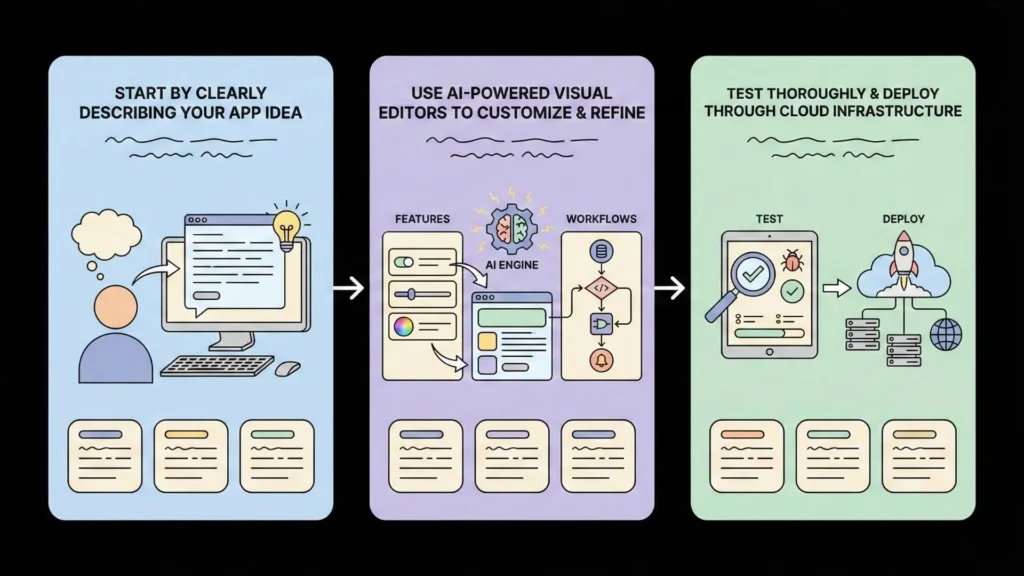
Let’s walk through the modern, AI-driven process. We’ll use the “Describe, Build, Launch” model, exemplified by platforms like Imagine.bo, as it represents the most direct path from idea to app.
Step 1: Describe Your Idea (The “Prompt”)
This is the most critical new skill. You are no longer writing code; you are writing the blueprint for the AI.
- Traditional Method: A developer would write a 50-page technical specification document.
- AI Method: You write a clear, descriptive prompt.
Bad Prompt: “I want a social media app.” Good Prompt: “I am building an Android app called ‘PlantPal.’ It’s a social network for gardeners. The main features are: 1. User profiles where they can list their garden type. 2. A ‘My Garden’ section to upload photos of their plants. 3. A community forum divided into categories like ‘Vegetables,’ ‘Flowers,’ and ‘Pest Control.’ 4. A 1-to-1 chat feature to connect with other gardeners.”
The AI will parse this natural language to generate the database schemas (a ‘Users’ table, a ‘Posts’ table, ‘Chat’ tables), the user authentication flow (login/signup screens), and the app’s core navigation.
Step 2: Build & Customize (The Visual Editor)
Once you submit your description, the AI gets to work. This isn’t a “black box.” A platform like Imagine.bo will generate the foundational app, and then drop you into a visual, drag-and-drop editor.
This is where you refine the AI’s creation. You can:
- Change the color scheme and fonts to match your brand.
- Drag new elements onto the screen (buttons, forms, image galleries).
- Visually connect your app to external APIs (for example, to pull in weather data for your gardening app).
- Customize the workflows (e.g., “When a user clicks ‘Like,’ increment the ‘like_count’ in the database”).
This process allows you to turn your big idea into a live app without getting lost in “tech stress.” The AI handles the complex coding and infrastructure setup, while you focus on the user experience.
Step 3: Test & Deploy (The Launch)
In the past, deployment to the Google Play Store was a notoriously difficult, multi-step process involving signing keys, managing build variants, and configuring listings.
Modern AI platforms radically simplify this. Because the platform understands your app’s entire stack, it can automate deployment. Platforms like Imagine.bo offer One-Click Deployment to world-class cloud services (like AWS or GCP). This means your app is not only built, but it’s also hosted on secure, scalable infrastructure automatically.
Before you launch, you must test. You can share a link to your app with beta testers, gather feedback, and use the platform’s visual editor to make changes. Some platforms even offer AI-powered bug fixing, helping you identify and resolve issues with expert assistance.
Best Practices for Developers and Founders Using AI Tools
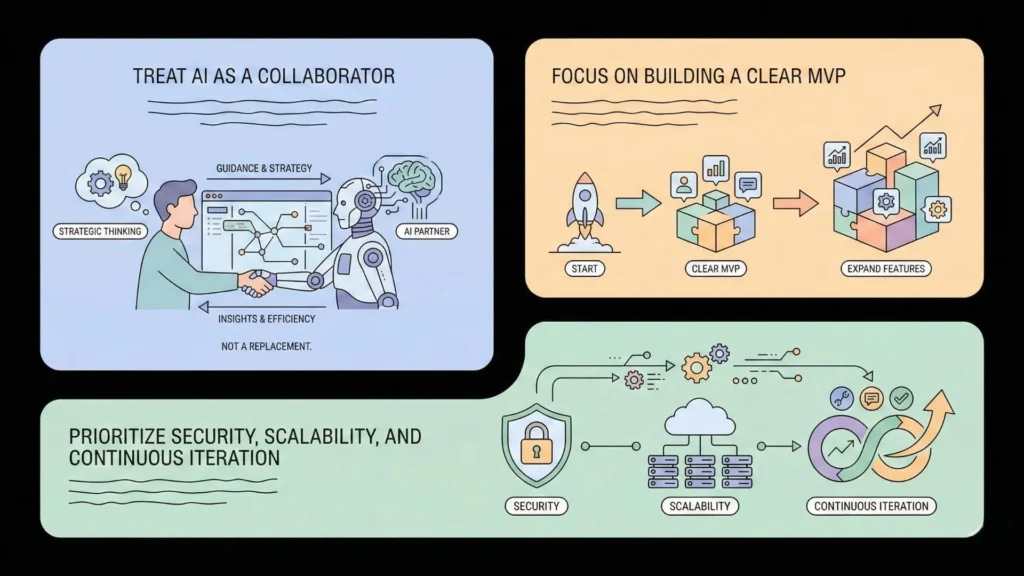
To get the most out of AI Android app development, you need to adopt a new mindset.
- Be an Architect, Not Just a User: Don’t just accept the AI’s first draft. Your job is to provide clear, detailed instructions and to guide the AI through iterations. A clear vision is more valuable than ever.
- Start with a Clear MVP (Minimum Viable Product): Don’t try to build every feature at once. Use AI to build the core functionality of your app first, as outlined in the “Common Mistakes to Avoid” section of a development guide. Launch it, get user feedback, and then use the AI to iterate and add features.
- Audit and Understand (When Possible): While platforms are moving to “no-code,” if you have technical-leaning, it’s wise to review the AI’s output. Understand the database structure it created. This will help you make smarter requests later.
- Leverage Human Support: The best platforms know that AI isn’t everything. A key differentiator for a platform like Imagine.bo is its inclusion of Expert Engineer Support. Don’t be afraid to use it. If you get stuck, a human expert who understands the AI platform can solve your problem in minutes, saving you days of frustration.
- Prioritize Security from Day One: Don’t assume the AI has handled all security. Use platforms that explicitly build in security and compliance (like GDPR/SOC2-readiness) to ensure your user data is protected from the start.
Common Mistakes and How to Avoid Them
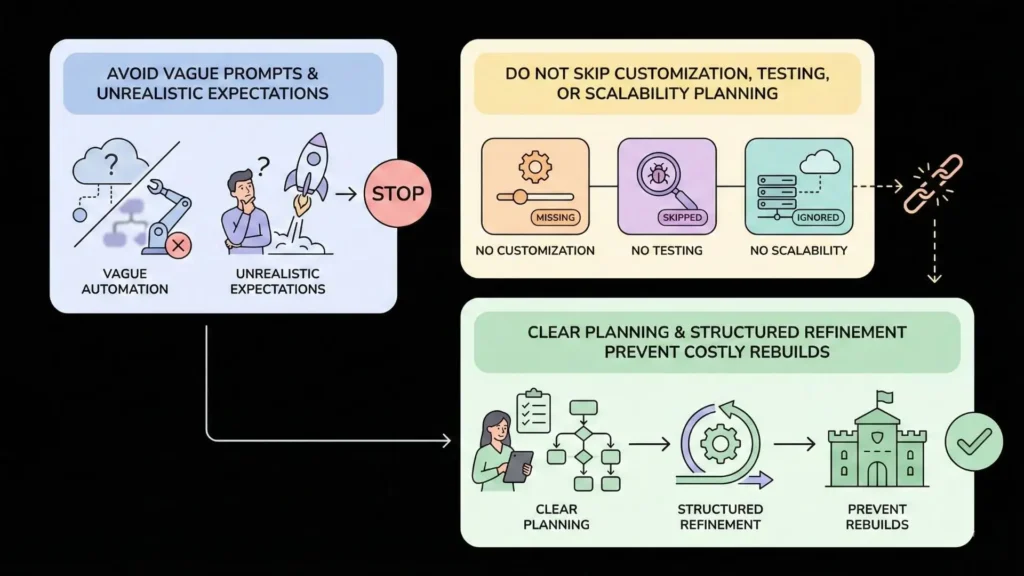
This new paradigm is powerful, but it comes with new pitfalls. Here’s how you can avoid them.
- Mistake 1: Vague Prompts & “Magical Thinking”
- The Problem: Expecting the AI to read your mind. A prompt like “Build the next Uber” will result in a generic, unusable mess.
- The Fix: Be specific. Detail your users, your features, and your user flow. The more detail you give the AI, the better your starting point will be.
- Mistake 2: Over-Reliance on Full Automation
- The Problem: Trusting the AI 100% and skipping the customization and testing phases.
- The Fix: Treat the AI’s output as a “hyper-accelerated first draft.” You, the founder, must still own the final user experience. Use the drag-and-drop editor to refine every screen and test every button.
- Mistake 3: Ignoring Scalability (The “Prototype Trap”)
- The Problem: Using a tool that’s great for a simple prototype but can’t handle 10,000 users, let alone a million.
- The Fix: Choose your platform wisely. If your goal is to build a real business, start on a platform designed for scalability. Ensure it offers a world-class tech stack and robust cloud deployment, not just a web-based simulator.
- Mistake 4: Skipping the Planning Phase
- The Problem: The “let’s just see what happens” mentality. Just because you can build an app in an afternoon doesn’t mean you should.
- The Fix: A lack of planning is still a fatal flaw. Before you write your first prompt, map out your user journey. What problem does your app solve? Who is it for? What is the one core action you want users to take?
Future of AI in Android App Development (2025 and Beyond)
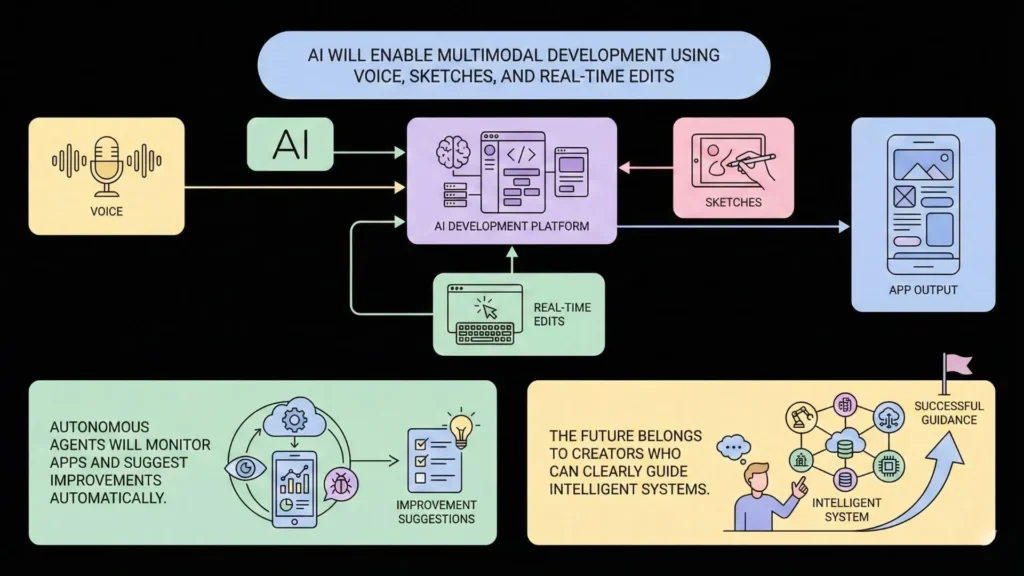
We are only at the very beginning of this transformation. The trends for 2025 and beyond point to a future where app creation is even more intuitive and powerful.
- Multimodal Development: The next generation of AI will be multimodal. This means you won’t just type your app’s description; you’ll be able to sketch a UI on a napkin, upload the photo, and have the AI generate the code. You’ll be able to talk to the AI (“Add a login button here and make it bright green”), and it will perform the action in real-time.
- Real-Time Generative Design: Instead of a “generate and then edit” workflow, AI will become a real-time collaborative partner. As you drag an element, the AI will suggest complementary UI components, auto-align elements based on design principles, and even generate placeholder content (images and text) that perfectly matches your app’s context.
- Autonomous AI Agents: In the near future, you may be able to deploy an autonomous AI “developer” that can not only build your app but also monitor its performance, identify user drop-off points from analytics, and then proactively suggest and build new features to improve engagement.
- AI-Powered Growth: Platforms will increasingly integrate AI-driven growth tools, such as built-in analytics that don’t just show you data but tell you what to do with it (“Your user retention is low. Try adding a rewards feature to this page.”).
Conclusion
The barriers that once protected the “kingdom” of software development are gone. Artificial intelligence has fundamentally democratized creation, shifting the world’s focus from “who can code” to “who has the best ideas.” The challenge of complexity, cost, and time has been answered by a new generation of AI Android app development platforms.
The future doesn’t belong to those who can write the most complex code. It belongs to the visionaries, the founders, and the creators who can clearly articulate their ideas and leverage these powerful new tools to bring them to life. The question is no longer if you can build your app, but when.
Ready to stop dreaming and start building? Platforms like Imagine.bo are revolutionary and designed to turn your big idea into a scalable, professional-grade app without writing a single line of code. Explore how you can launch your MVP in days, not months, and unlock your future in the new age of AI-driven development.
Launch Your App Today
Ready to launch? Skip the tech stress. Describe, Build, Launch in three simple steps.
Build