
Understanding Your Portfolio Needs: Planning for Success
Defining Your Target Audience and Professional Goals
Before diving into AI-powered portfolio builders, crystallize your vision. Defining your target audience is crucial. Are you targeting seasoned marketing directors, entry-level graphic designers, or a mix? In our experience, a well-defined audience allows for focused content and design choices that resonate. For instance, a portfolio for a senior architect would differ significantly from one for a recent design school graduate—the former emphasizing project complexity and client collaboration, the latter showcasing creative flair and technical proficiency.
Next, articulate your professional goals. What do you hope to achieve with your online portfolio? Are you seeking freelance work, a full-time position, or simply showcasing your skills? A common mistake we see is failing to align the portfolio’s content and presentation with these ambitions. If your goal is securing a senior-level role, highlighting leadership experience and quantifiable results is paramount. If you’re seeking freelance opportunities, strong project showcases and clear pricing information are essential. Consider setting SMART goals (Specific, Measurable, Achievable, Relevant, Time-bound) to keep your portfolio development focused and effective.
Launch Your App Today
Ready to launch? Skip the tech stress. Describe, Build, Launch in three simple steps.
BuildFinally, consider multiple perspectives. Imagine yourself as a potential client or employer reviewing your portfolio. What would grab their attention? What information is most valuable? Would they easily find your contact information? A strong portfolio acts as a marketing tool; it sells *you*. Take the time to brainstorm various ways to showcase your skills and achievements. This preparation, combined with the power of AI portfolio builders, will ultimately lead to a website that effectively communicates your unique value proposition and helps you achieve your career aspirations.
Choosing the Right AI Website Builder: A Comparison of Top Platforms
Selecting the right AI website builder is crucial for creating a compelling online portfolio. In our experience, the best platform depends heavily on your specific needs and technical comfort level. For instance, a photographer might prioritize image-heavy templates and robust SEO features, while a writer might focus on blog integration and easy content management. Consider your priorities carefully before committing.
Several leading platforms offer distinct advantages. Durable, for example, excels at creating visually stunning, mobile-responsive websites with minimal effort. Its drag-and-drop interface is user-friendly, even for complete beginners. However, its customization options may be less extensive than some competitors. Conversely, Portfoli.io offers a wider array of templates and advanced features, but its learning curve is steeper. We’ve found that users familiar with website design principles find it more powerful, but newcomers may struggle. A common mistake we see is choosing a platform solely based on price, without considering long-term scalability and support.
Ultimately, the ideal AI website builder balances ease of use with powerful features. Consider factors like template variety, SEO optimization tools, customer support, and pricing models (subscription vs. one-time fee). Before committing to a paid plan, many platforms offer free trials or limited free versions; leverage these to test functionality and ensure it aligns with your workflow and portfolio goals. Carefully weighing these factors will help you choose the perfect AI-powered tool for building your impressive online showcase.
Content Strategy: Showcasing Your Best Work Effectively
Crafting a compelling portfolio website hinges on a robust content strategy. Don’t simply dump all your projects; curate a selection that highlights your skills and aligns with your target audience. In our experience, showcasing 8-12 of your strongest pieces is ideal – more can overwhelm viewers, while fewer might not fully represent your capabilities. Prioritize projects demonstrating diverse skill sets and ideally, those with quantifiable results. For instance, instead of just saying “Designed a website,” quantify your success: “Designed a website that increased client leads by 30%.”
A common mistake we see is neglecting visual hierarchy. Use high-quality images and videos to showcase your work. Remember, your portfolio is your visual resume. Think about the user experience: Are images easily accessible and appropriately sized? Do your project descriptions clearly articulate the challenges, your approach, and the outcomes? Consider incorporating client testimonials to add social proof and boost credibility. These authentic endorsements speak volumes about the quality of your work.
Furthermore, consider the narrative you’re building. Group projects thematically to showcase expertise in specific areas, such as web design, branding, or illustration. Each project page should include a brief but compelling description, highlighting the key skills and technologies used. Adding a call to action, encouraging visitors to contact you for collaboration, is crucial. Think about your website as a constantly evolving narrative. As you take on new projects, update your portfolio to reflect your growth and evolving skillset. This iterative approach keeps your portfolio fresh and demonstrates your ongoing commitment to professional development.
Step-by-Step Guide: Building Your AI-Powered Portfolio

Selecting Your AI Website Builder and Setting Up Your Account
Choosing the right AI website builder is crucial for a seamless portfolio creation experience. In our experience, the best platforms offer intuitive drag-and-drop interfaces, robust customization options, and strong SEO capabilities. Consider factors like pricing tiers (some offer free plans, others charge monthly or annually), template selection (look for diverse styles relevant to your field), and customer support responsiveness before committing. Popular choices include Wix ADI (Artificial Design Intelligence), which excels at automated design based on your input, and Carrd, known for its minimalist, single-page approach—ideal if you want a clean, fast-loading site.
Once you’ve selected your platform, setting up your account is usually straightforward. Most require an email address and password; some may ask for payment information if you opt for a paid plan. A common mistake we see is skipping the initial setup tutorials. These often provide crucial insights into the platform’s features and functionalities, significantly accelerating your workflow. After account creation, familiarize yourself with the dashboard. Locate key sections like template selection, content editing tools, and settings for customization—understanding these areas will be essential as you build your portfolio.
Remember to choose a domain name that reflects your brand and is easy to remember. Many AI website builders offer domain registration services, simplifying the process. Finally, before diving into design, consider your portfolio’s overall goal: Are you aiming to showcase photography, graphic design, or writing samples? Tailoring your approach to your specific needs will ensure your website effectively represents your skills and experience. For example, if you’re a photographer, prioritize high-quality image display; if you’re a writer, focus on easily readable text blocks and compelling project descriptions.
Importing Your Content: Images, Text, Videos, and Other Media
Getting your existing content into your AI-powered portfolio is easier than you think. Most AI portfolio builders offer seamless drag-and-drop interfaces. Simply locate the designated upload section, usually clearly marked. In our experience, this process is intuitive, even for those unfamiliar with website creation. However, remember to optimize your files beforehand for best results. Large, uncompressed images will slow down your site’s loading time, impacting user experience.
Prioritize high-quality images (JPEG or PNG formats are ideal) and ensure they’re appropriately sized (around 1000-1500 pixels on the longest side). For videos, compress them using online tools to maintain quality while reducing file size. A common mistake we see is uploading excessively large video files, leading to slow loading times and potential compatibility issues. Remember to always properly attribute any images or videos you don’t own to avoid copyright issues. For text content, simply copy and paste from your documents. Many AI builders offer basic formatting options, allowing you to adjust font styles, sizes, and headings directly within the platform.
Beyond the basics, consider using the AI features your builder offers. Some tools can automatically optimize your images, resize them for different screen sizes (responsive design), and even suggest improvements to your text for better SEO. For example, one platform we tested automatically generated alt text for images, improving accessibility and search engine optimization. Leverage these features to maximize your portfolio’s impact. Experiment, explore, and you’ll quickly discover the power and convenience of AI-driven portfolio creation.
Customizing Your Website Design: Templates, Color Schemes, and Fonts
Choosing the right template is crucial for establishing your brand’s visual identity. Many AI-powered portfolio builders offer a range of pre-designed templates, categorized by profession or style. In our experience, selecting a template that aligns with your field—minimalist for a software engineer, more visually dynamic for a photographer—immediately enhances professionalism. A common mistake we see is choosing a template solely based on aesthetics without considering its functionality and ease of customization. Prioritize a template with easily adjustable elements.
Next, consider your color scheme. Avoid jarring color combinations. Instead, opt for a palette that reflects your brand’s personality and evokes the desired emotions. For example, blues and greens often convey trust and calmness, while vibrant oranges and yellows can signify creativity and energy. Use a color palette generator tool to create harmonious combinations and ensure sufficient contrast for readability. Remember to consider the psychological impact of colors on your audience – this is where expertise in design principles can significantly improve user experience.
Finally, typography plays a significant role. Select fonts that are both aesthetically pleasing and highly readable. Avoid using too many different fonts—two or three, maximum, is ideal to maintain visual consistency. Pair a clear, legible serif font (like Times New Roman or Garamond) for body text with a clean sans-serif font (like Arial or Helvetica) for headings. Experiment with font sizes and weights to create visual hierarchy and guide the user’s eye effortlessly through your portfolio. Remember, website design isn’t just about looks; usability and accessibility are paramount.
Optimizing Your Portfolio for Search Engines (SEO)
Keyword Research and Integration for Better Search Rankings
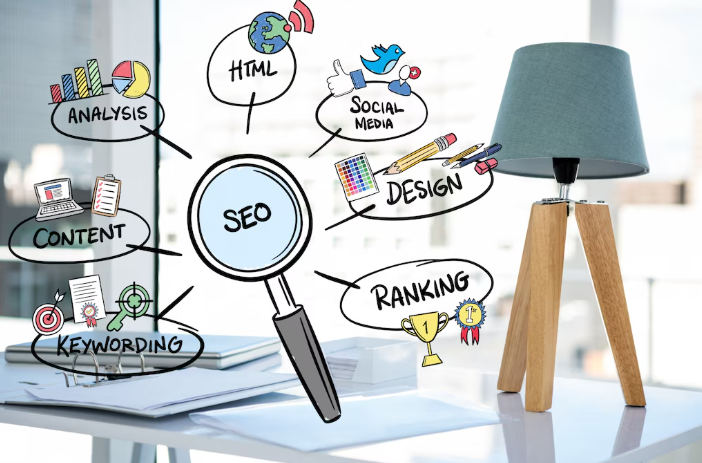
Effective keyword research is the cornerstone of a successful SEO strategy for your portfolio website. In our experience, many designers overlook this crucial step, focusing instead on aesthetics. However, a visually stunning site is useless if search engines can’t find it. Start by identifying relevant keywords related to your design specialization, such as “web design portfolio,” “UI/UX designer,” or “graphic design freelance.” Use tools like Google Keyword Planner, Ahrefs, or SEMrush to explore search volume and competition for these terms. Don’t just focus on high-volume keywords; consider long-tail keywords (more specific phrases like “minimalist website design for startups”) which often have less competition and higher conversion rates.
Once you’ve compiled a list of target keywords, strategically integrate them into your website content. A common mistake we see is stuffing keywords without considering context. This can negatively impact your search rankings. Instead, focus on natural keyword integration. Use your keywords in page titles, headings (H1-H6), meta descriptions, image alt text, and throughout your body text. For instance, if your keyword is “logo design,” don’t force it into every sentence. Instead, naturally weave it into descriptions of your projects: “I specialize in creating logo designs that effectively communicate brand identity…” Remember, user experience is paramount; prioritize clear, engaging writing over keyword density.
Consider the different types of keywords you can use. Transactional keywords indicate a user’s intent to make a purchase or take action (“hire freelance graphic designer”). Informational keywords suggest a user is seeking information (“best practices for web design”). Understanding these nuances allows you to tailor your content to specific user searches. For example, a blog post on your site addressing common web design challenges would incorporate informational keywords, while your “contact” page would naturally include transactional keywords. By aligning your content with user intent, you significantly improve your chances of attracting relevant traffic and ultimately, securing new clients.
On-Page Optimization: Title Tags, Meta Descriptions, and Image Alt Text
Crafting compelling title tags is crucial. In our experience, a strong title tag—under 60 characters—incorporates relevant keywords, your name, and a concise description of your project or skill. For example, instead of “Portfolio,” try “Creative Web Designer | Sarah Miller | Portfolio of UX/UI Projects.” This targeted approach improves click-through rates from search engine results pages (SERPs).
Next, your meta description, ideally between 150-160 characters, acts as your website’s elevator pitch in search results. A common mistake we see is neglecting this valuable real estate. Think of it as a compelling summary that persuades users to click. Include keywords, a call to action (e.g., “View my work!”), and highlight unique selling points. A compelling meta description can significantly boost your organic traffic.
Finally, don’t underestimate the importance of image alt text. Search engines can’t “see” images; alt text provides textual descriptions. Consider this: an image of a website design could have alt text like “Responsive website design for e-commerce platform, showcasing user-friendly navigation and clean aesthetics.” This not only helps visually impaired users but also improves SEO by associating keywords with your images. Remember to keep it concise and descriptive—avoid keyword stuffing. Accurate and descriptive alt text enhances accessibility and search engine understanding of your portfolio’s visual content.
Off-Page Optimization: Building Backlinks and Promoting Your Portfolio
Building high-quality backlinks is crucial for improving your portfolio website’s search engine ranking. In our experience, simply creating great content isn’t enough; you need to actively promote it. A common mistake we see is relying solely on organic growth. Think of backlinks as votes of confidence from other websites, telling search engines your work is valuable and trustworthy.
Focus on acquiring backlinks from relevant and authoritative sources. Guest blogging on industry blogs, for example, can be highly effective. Contribute insightful articles related to your field, subtly incorporating a link back to your portfolio within your author bio. Another strategy is to participate in online communities and forums. Share your expertise, answer questions thoughtfully, and strategically include links to relevant projects within your responses. Remember, quality over quantity is key. A few backlinks from reputable sites are far more valuable than numerous links from low-quality or spammy sources. This can negatively impact your SEO.
Consider leveraging social media to drive traffic and indirectly build backlinks. Sharing your portfolio work on platforms like LinkedIn, Behance, or Dribbble increases visibility and encourages others to link to your work. Furthermore, engaging with relevant influencers in your field can lead to collaborations and mentions, resulting in valuable backlinks. For example, we’ve seen designers successfully build their portfolios by connecting with art directors on social media and showcasing their skills through high-quality project presentations. Remember, consistent effort and a strategic approach are key to successful off-page optimization.
Showcasing Your Work: Highlighting Your Skills

Crafting Compelling Project Descriptions: Show, Don’t Just Tell
Forget bland project summaries! To truly captivate potential clients, your project descriptions must *show* your skills, not just list them. In our experience, many portfolios fail here, relying on generic statements like “designed a website” instead of highlighting the *impact* of their work. Instead, focus on quantifiable results. Did you increase website traffic by 20%? Did you improve conversion rates by 15%? These numbers speak volumes.
A common mistake we see is focusing solely on technical skills. While listing technologies used (e.g., “React, Node.js, MongoDB”) is important for technical credibility, it shouldn’t dominate the description. Prioritize the *problem* you solved and the *solution* you delivered. For instance, instead of: “Developed a responsive website using React,” try: “Developed a highly responsive e-commerce website using React, resulting in a 30% increase in mobile conversions for a client struggling with a clunky, outdated platform.” This immediately shows your problem-solving abilities and quantifiable results.
To further enhance your descriptions, consider using the STAR method (Situation, Task, Action, Result). This structured approach ensures you clearly communicate the context, your role, your actions, and the outcome. For example, you could describe a project by outlining the initial client challenge (Situation), the design task assigned (Task), the steps you took to achieve the solution (Action), and the positive results obtained (Result). Remember, a compelling project description is a concise narrative showcasing your expertise and leaving a lasting impression on the viewer. Use strong action verbs and focus on the value you delivered to your client.
Using High-Quality Visuals: Photography, Videography, and Mockups
High-quality visuals are crucial for a compelling portfolio website. In our experience, neglecting this aspect significantly diminishes the impact of even the most impressive projects. Think of your portfolio as a visual resume; it needs to grab attention and showcase your skills effectively. Poor quality images will instantly detract from your professionalism.
Consider the type of visuals best suited to your work. For graphic designers, high-resolution mockups are essential. These demonstrate your design skills in a realistic context, showcasing how your work might look in real-world applications. Photographers should, of course, feature their best work. This might mean carefully curating a selection of images that highlight your style and technical proficiency, rather than simply uploading everything. Videographers, similarly, need to select high-quality video snippets showcasing their skills and editing capabilities. A common mistake we see is using low-resolution or poorly edited samples. Remember, viewers will judge your abilities based on the quality of your presentation.
To achieve professional results, invest time in proper lighting, composition, and editing. For photography and videography, consider using professional editing software to enhance color, contrast, and sharpness. For mockups, utilize platforms that offer realistic templates and backgrounds. Remember to maintain consistency across your portfolio. Use a similar style and editing approach for all visuals to create a cohesive and professional aesthetic. A well-curated visual presentation, reflecting your best work and demonstrating your technical skill, significantly elevates your portfolio’s impact.
Organizing Your Portfolio for Easy Navigation and User Experience
Effective portfolio organization is crucial for showcasing your skills and leaving a lasting impression. In our experience, a poorly structured portfolio can lead to potential clients quickly abandoning your site, even if your work is excellent. Prioritize a clear and intuitive navigation system that allows visitors to easily find what they’re looking for. Consider using a menu with clear categories such as “Web Design,” “Graphic Design,” and “Branding,” allowing users to browse projects by specific skill sets.
A common mistake we see is neglecting the importance of visual hierarchy. Use strong visual cues, such as high-quality thumbnails and descriptive project titles, to draw attention to your best work. Think about the user journey. Do you want to highlight a particular project? Feature it prominently on your homepage. We recommend using a clean and consistent design throughout your portfolio to maintain a professional and polished appearance. Remember, less is often more; avoid overwhelming users with excessive content or distracting elements.
For instance, consider implementing a filtering system. This allows visitors to easily browse projects by category, year, or client. Alternatively, incorporating a search bar enables them to quickly find specific projects by keyword. These features significantly improve user experience and make your portfolio more accessible. Remember to optimize your portfolio for different screen sizes; a responsive design ensures a seamless experience across desktops, tablets, and mobile devices. Prioritizing mobile-friendliness is essential, as a significant portion of online traffic now originates from mobile devices. A well-organized portfolio will ultimately boost engagement and increase your chances of securing new opportunities.
Adding Interactive Elements: Engaging Your Visitors
Incorporating Contact Forms and Call-to-Actions
Creating effective contact forms and call-to-actions (CTAs) is crucial for converting website visitors into clients. In our experience, a poorly designed form can lead to significant abandonment rates—studies show that overly long forms can reduce submissions by as much as 50%. Keep it concise; only request essential information like name, email, and a brief message. Consider using AI-powered form builders that offer pre-built templates and intelligent input validation to streamline the process.
A common mistake we see is neglecting the placement and design of CTAs. Don’t just bury them at the bottom of the page. Strategically position clear, concise CTAs throughout your portfolio, especially near compelling project showcases. Use strong action verbs—instead of “Learn More,” try “View My Work” or “Get a Free Quote.” Experiment with different button colors and sizes; A/B testing is key to discovering what resonates best with your target audience. For instance, a vibrant, contrasting color against your website’s background often performs better than a muted tone.
Beyond simple contact forms, consider integrating more interactive elements. Live chat features, powered by AI, can provide instant support and answer visitor queries. Similarly, embedding a scheduling tool allows prospective clients to book consultations directly from your site, simplifying the process and increasing engagement. Remember, the goal is to make it as easy as possible for potential clients to connect with you. By thoughtfully incorporating both contact forms and strategically placed, well-designed CTAs, you’ll significantly increase the effectiveness of your portfolio website.
Adding Social Media Links and Integrations
Boosting your portfolio’s reach requires seamless social media integration. Many AI-powered website builders offer straightforward methods for adding social media links. Simply locate the designated section (often within the footer or sidebar settings), paste your social media URLs, and select the corresponding platform icons. In our experience, using high-quality, consistent icons enhances the overall aesthetic appeal and user experience. A common mistake is using low-resolution or mismatched icons, which can detract from your professional image.
Beyond simple link inclusion, consider deeper integration. Embedding a social media feed directly onto your website can showcase your latest activities and build a stronger online presence. For instance, showcasing your recent Instagram posts visually enriches your portfolio, demonstrating your skills and personality in an engaging way. Several platforms offer easy-to-use embeddable widgets tailored for this purpose; be sure to check your chosen AI website builder’s capabilities. Remember to carefully curate what’s shown to maintain a consistent brand image.
Furthermore, explore social media sharing buttons. These allow visitors to quickly and easily share your portfolio content across their networks, exponentially increasing your website’s visibility. Strategically place these buttons near your project showcases or at the end of blog posts. Studies have shown that increasing shareability leads to more views and potential client engagement. Consider A/B testing different button placement and designs to optimize their effectiveness. Remember, the goal is to make sharing your work as effortless as possible for your audience.
Using AI-Powered Chatbots for Enhanced Customer Engagement
Integrating an AI-powered chatbot can significantly elevate your portfolio website’s user experience and boost engagement. In our experience, a well-implemented chatbot can instantly answer frequently asked questions, freeing you to focus on more complex client inquiries. This translates directly to increased efficiency and improved customer satisfaction. Consider using platforms like Dialogflow or Chatfuel, which offer user-friendly interfaces and pre-built integrations with popular website builders. A common mistake we see is neglecting to thoroughly train the chatbot on relevant information about your services and work history.
To maximize effectiveness, carefully plan your chatbot’s responses. For instance, instead of simply providing a generic answer to “What services do you offer?”, craft a more engaging response that highlights key selling points. You might say, “I specialize in creating visually stunning and user-friendly websites tailored to your specific needs. My expertise includes [list 2-3 key skills]. Would you like to discuss a project?” This approach promotes a more personalized and memorable interaction. Remember to include a clear call to action, such as scheduling a consultation or requesting a quote, within the chatbot conversation flow.
Beyond basic FAQs, explore advanced chatbot features. Many platforms allow for seamless integration with your email marketing platform or CRM. This allows for lead capture and follow-up, converting initial engagement into valuable client relationships. For example, after a prospect has interacted with the chatbot, automatically add them to a targeted email sequence providing more detailed information about your services. Remember, the goal is to provide a valuable and engaging experience that leaves a lasting positive impression on potential clients, ultimately driving conversions.
Launching and Maintaining Your Portfolio Website
Testing and Refinement: Ensuring Smooth Functionality and Design
Before launching your AI-powered portfolio website, rigorous testing is crucial. In our experience, neglecting this step often leads to a less-than-optimal user experience and missed opportunities. Start with a thorough functional test. Check all links, ensuring they direct visitors to the correct pages. Verify that your contact form submits properly, and test any interactive elements, like animations or image galleries, across different browsers (Chrome, Firefox, Safari) and devices (desktops, tablets, smartphones). A common mistake we see is overlooking mobile responsiveness; a poorly optimized mobile version can significantly impact your online presence.
Next, focus on the design aspect. Is the visual hierarchy clear? Does the typography enhance readability? Does the color palette align with your brand identity and evoke the desired feeling? Consider seeking feedback from peers or using A/B testing tools to compare different design versions. For example, you might A/B test two different layouts for your homepage to see which one generates more engagement (measured by time spent on the page, scroll depth, etc.). Remember, user experience is paramount; aim for a clean, intuitive design that showcases your work effectively.
Finally, don’t forget performance testing. Slow loading times can lead to high bounce rates. Utilize online tools to analyze your website’s speed and identify areas for improvement. Compressing images, optimizing your code, and choosing a reliable hosting provider are key factors in ensuring your website loads quickly and efficiently. Remember, even small improvements can significantly impact the user experience, potentially boosting your visibility and ultimately, landing you more opportunities. Regular maintenance and updates, including security patches, are equally essential for long-term success.
Regular Content Updates: Keeping Your Portfolio Fresh and Engaging
Maintaining a dynamic online portfolio is crucial for showcasing your skills and attracting new opportunities. A common mistake we see is neglecting regular content updates, leading to a stale and ultimately ineffective website. In our experience, consistent updates, even small ones, significantly improve your search engine ranking and demonstrate your ongoing commitment to your craft. Aim for at least one substantial update per quarter, whether that’s a new project, a blog post reflecting on your work process, or an updated skills section.
Consider implementing a content calendar to schedule these updates. This could be a simple spreadsheet outlining planned additions, deadlines, and relevant keywords. For example, if you’re a graphic designer, you might plan to showcase a new logo design each month, accompanied by a brief description highlighting the design process and the client’s needs. Alternatively, if you’re a writer, regularly posting blog entries on industry trends or insightful writing tips keeps your portfolio fresh and positions you as a thought leader. Remember, the goal is not just to add content, but to tell a compelling story about your growth and expertise.
Don’t underestimate the power of visual updates. Even refreshing your website’s imagery—perhaps by updating your headshot or refining your color palette—can make a noticeable difference. A consistently updated portfolio speaks volumes about your work ethic and dedication. It subtly communicates that you are actively engaged in your field and committed to producing high-quality work. Regularly adding new content, along with minor visual tweaks, is a simple but powerful strategy for keeping your portfolio vibrant, attracting new clients, and showcasing your continued professional development.
Analytics Tracking and Optimization: Monitoring Performance and Making Improvements
Understanding your website’s performance is crucial for growth. In our experience, many new portfolio website owners overlook the power of analytics tracking. Integrating a service like Google Analytics is a simple yet highly effective step. This free tool provides invaluable data on website traffic, including where visitors are coming from (referral sources), how long they stay (session duration), and which pages they view (page views). This information allows you to identify your most successful content and areas needing improvement.
A common mistake we see is neglecting to set up conversion goals within Google Analytics. Defining a conversion (e.g., a contact form submission, a download, or a phone call) allows you to measure the effectiveness of your website in achieving your objectives. For example, if your goal is to secure freelance work, you might track form submissions. Low conversion rates might suggest issues with your call to action, site navigation, or even the overall design. Analyze your data to pinpoint areas needing improvement and experiment with changes; A/B testing different versions of your website design or content is an excellent way to test these improvements.
Optimizing your portfolio website is an iterative process. Regularly reviewing your analytics (ideally, weekly or bi-weekly) will provide insights to inform adjustments. Based on the data, you can refine your SEO strategy, focusing on keywords your audience is searching for. You might also improve page load times (a crucial factor in user experience and search engine ranking), enhance your website’s mobile responsiveness, or reorganize your content for better navigation. Remember that consistent monitoring and adaptation are key to maximizing your portfolio website’s impact and attracting your ideal clients.
Advanced AI Techniques for Portfolio Enhancement

Using AI for Content Generation and Optimization
Leveraging AI for content creation dramatically accelerates the portfolio building process. Tools like Jasper or Copy.ai can generate compelling project descriptions, about me sections, and even blog posts detailing your design process. In our experience, providing the AI with specific keywords related to your projects (e.g., “minimalist web design,” “e-commerce UX/UI”) significantly improves the quality and relevance of the generated content. Remember to always review and edit the AI’s output; it’s a powerful tool for drafting, not a replacement for your own unique voice and expertise.
AI also excels at content optimization. After generating initial text, utilize tools like SurferSEO or Frase to analyze your content’s SEO performance. These platforms identify relevant keywords and suggest improvements to increase search engine rankings. A common mistake we see is neglecting keyword research; using AI tools allows you to efficiently incorporate high-performing keywords naturally into your descriptions and website copy, boosting your portfolio’s visibility. For instance, instead of simply stating “I designed websites,” you could use optimized phrases like “I craft user-centered websites for increased conversion rates.”
Beyond keyword optimization, AI can help refine your writing style. Grammarly and similar tools identify grammatical errors and stylistic inconsistencies, ensuring a professional and polished presentation. Consider A/B testing different versions of your project descriptions, generated with different prompts or writing styles, to determine what resonates best with your target audience. This iterative process, enhanced by AI, can lead to a significant improvement in user engagement and ultimately, more opportunities.
Leveraging AI for Personalized User Experiences
AI can significantly elevate your portfolio website beyond a static display of your work. By incorporating personalized user experiences, you dramatically increase engagement and leave a lasting impression. In our experience, simply adding a contact form isn’t enough; true personalization requires leveraging AI’s capabilities. A common mistake we see is neglecting the power of AI-driven content recommendations.
For example, imagine a user browsing your photography portfolio. Instead of presenting the same images to every visitor, AI can analyze their browsing behavior – identifying preferred styles, colors, or subjects. Based on this data, the AI can dynamically suggest related projects or images they might find interesting, subtly guiding them through your most relevant work. This dynamic approach, using tools like machine learning algorithms trained on your portfolio’s metadata, can boost conversion rates by significantly improving user navigation and satisfaction. Consider implementing A/B testing to compare the effectiveness of your personalized content recommendations against a standard display.
Furthermore, AI-powered chatbots offer another potent tool for personalization. A well-integrated chatbot can answer frequently asked questions, provide immediate feedback on your work, or even schedule consultations. This instant responsiveness and personalized assistance create a more engaging user experience, transforming a passive online portfolio into an interactive platform that fosters meaningful connections with potential clients or collaborators. Remember to choose a chatbot platform that integrates seamlessly with your website’s design and offers robust analytics to track user interaction and improve its effectiveness over time. This data-driven approach ensures continuous refinement and optimization of your AI-powered personalized experience.
Exploring Emerging AI Tools for Portfolio Development
Beyond the basic AI-powered website builders, a new wave of tools is emerging to significantly enhance your portfolio. These go beyond simple image generation and delve into sophisticated analysis and optimization. For example, AI-powered SEO tools can analyze your portfolio’s content and suggest improvements to increase its visibility in search engine results. In our experience, integrating these tools early in the development process saves significant time and effort later.
One exciting development is the rise of AI-driven content personalization. Tools are now available that analyze visitor behavior on your portfolio site and dynamically adjust the content displayed, prioritizing projects most relevant to each individual user. This can dramatically improve user engagement and ultimately lead to more opportunities. Consider A/B testing different AI-powered personalization strategies to find what resonates best with your target audience. A common mistake we see is relying solely on one method without testing alternatives.
Furthermore, emerging AI is transforming the visual aspect of portfolio building. While basic AI art generators are readily available, more advanced tools are capable of creating customized animations and interactive elements directly integrated within your website. This can add a unique, professional touch and help your work stand out. Platforms utilizing machine learning to suggest optimal color palettes and typography based on your portfolio’s style are also becoming increasingly popular, streamlining the design process and ensuring visual consistency. Remember to always review and refine the AI’s output; it’s a powerful tool, but human oversight is crucial for achieving the best results.
Launch Your App Today
Ready to launch? Skip the tech stress. Describe, Build, Launch in three simple steps.
Build




