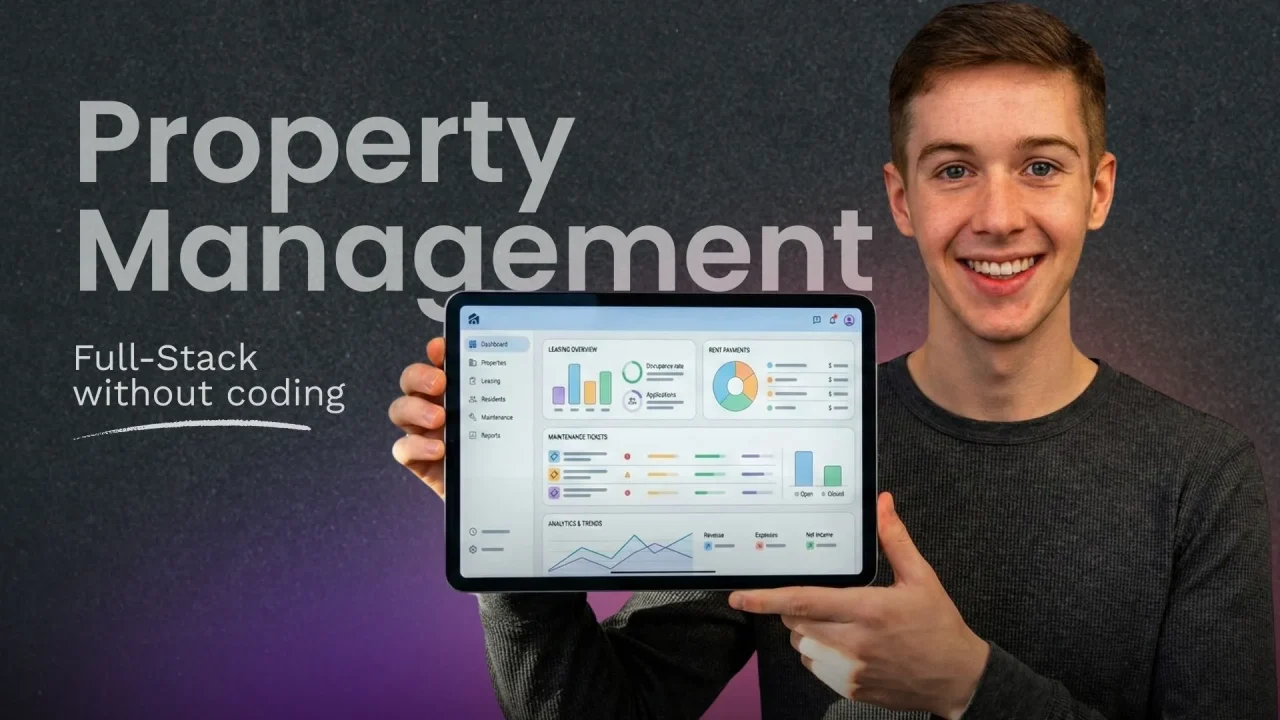
Property management software is becoming the operational backbone of rental businesses across the U.S., replacing spreadsheets and fragmented tools with secure, automated systems for leasing, payments, maintenance, and reporting.
U.S. property operations are moving from spreadsheets to systems. A great PMS makes leasing, payments, maintenance, and reporting feel automatic without compromising security or
compliance.
Launch Your App Today
Ready to launch? Skip the tech stress. Describe, Build, Launch in three simple steps.
BuildPhase 1: Understanding the Market & Strategic Foundation
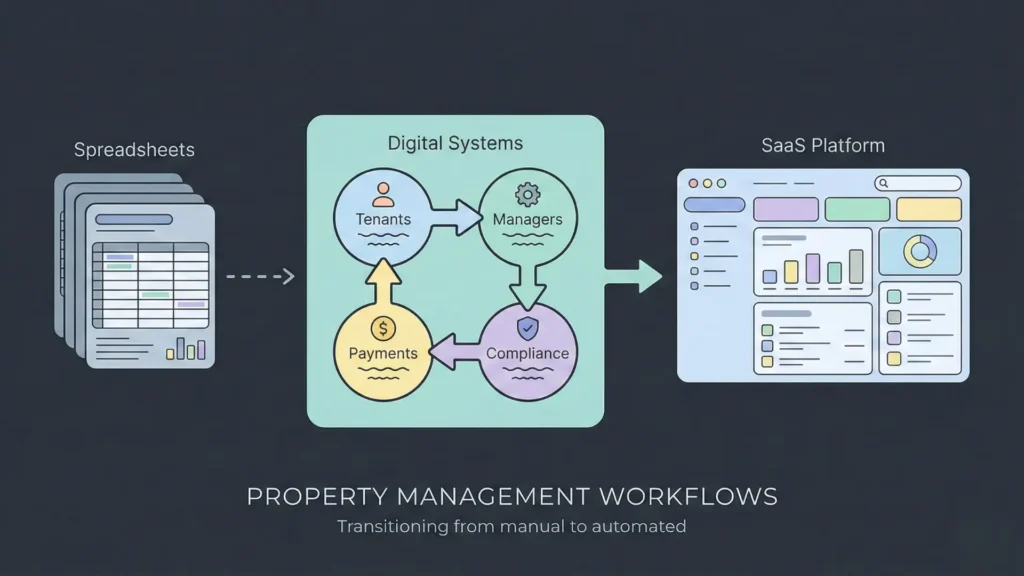
Before writing a single line of code (or generating a single screen), define the scope. A Property
Management Software (PMS) streamlines the rental lifecycle end-to-end tenant acquisition, leasing,
rent collection, maintenance, and financial reporting.
- Operational workflows: reduce handoffs and manual steps from onboarding through day-to-day
management. - Accessibility: mobile-first experiences for managers in the field and tenants on the go.
- Compliance: leases, payments, and reporting must align with U.S. regulations and state requirements.
- Scalability: the same platform should work for a single unit or an enterprise portfolio.
To start on the right foot, it is crucial to understand the principles of building your MVP (Minimum Viable Product) to validate your assumptions early.
Phase 2: Core Modules of Modern Property Management Software
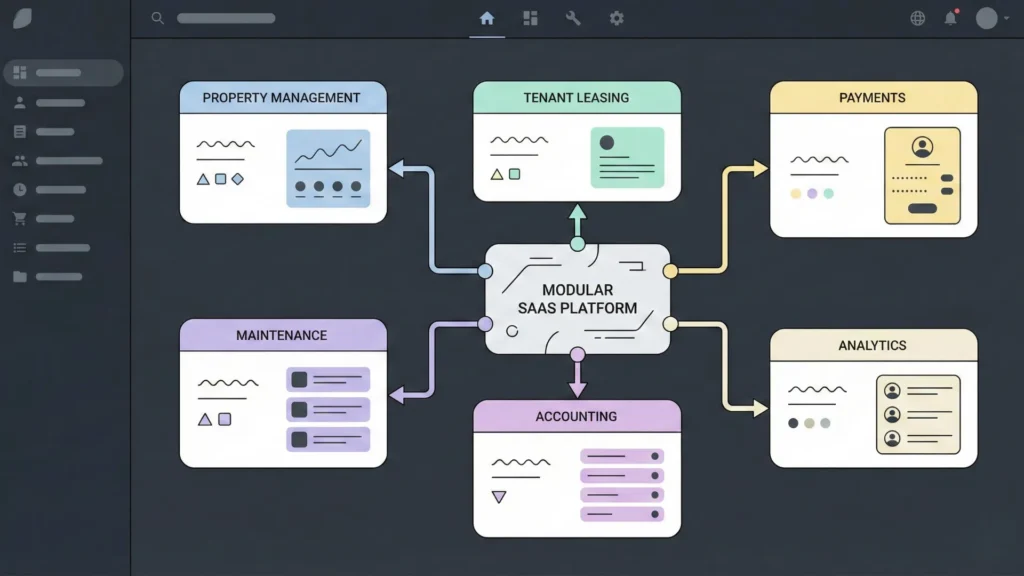
A market-ready PMS is modular. These modules become your product’s backbone:
- Property & Unit Management: a single source of truth (portfolio → property → building → unit),
status visibility (vacant/occupied/maintenance), and granular attributes like rent, size, and lease
history. - Tenant & Lease Lifecycle: tenant profiles, screening integrations, lease drafting and e-signatures,
and a clear lifecycle (draft → pending → active → ended). - Rent & Payment Management: portals for ACH/cards, recurring charges, late fees, and reconciliation
into accounting. - Maintenance & Work Orders: Automating workflows for tenant requests, vendor assignments, and tracking.
- Accounting & Financial Reporting: rent rolls, P&L;, owner statements, and integrations with tools
like QuickBooks/Xero. - Advanced Analytics & AI: occupancy trends, anomaly detection, and assistants for repetitive
communication.
Phase 3: Technical Architecture & Development Roadmap
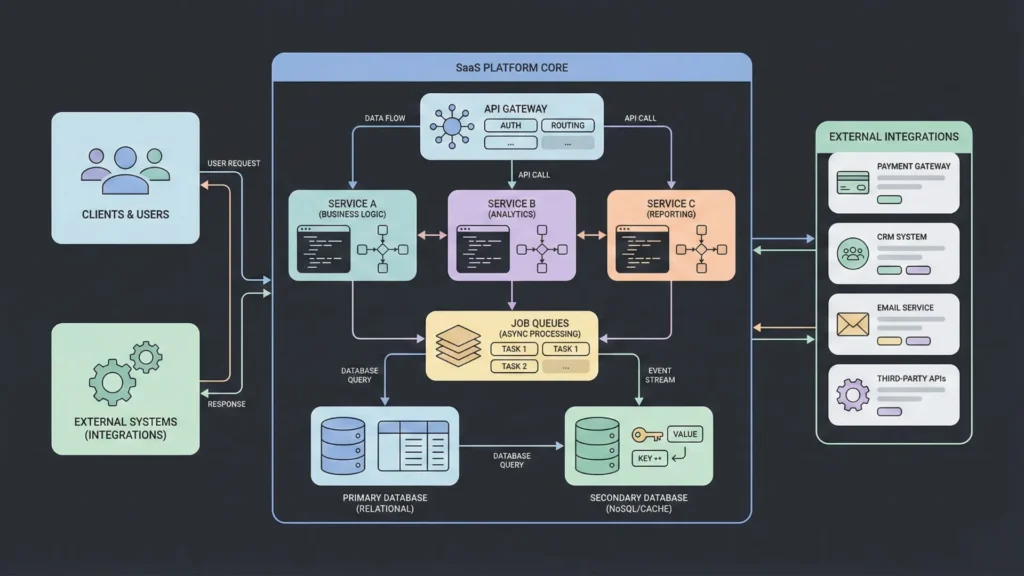
Building a scalable PMS requires (1) architecture that won’t collapse under complexity, and (2) a phased
delivery plan that keeps scope controlled while you prove value
1) Technical architecture that won’t collapse later
At its core, a PMS is three systems working together: a money system (charges, payments, ledgers), a
contracts system (leases and documents), and a workflow system (maintenance, approvals,
communication). The glue is a clean data model, strong permissions, and auditability.
A. Choose an architecture style
- Option 1 — Modular monolith (recommended): one backend codebase organized by domains
(Leases, Payments, Maintenance, Accounting). Easier to ship and operate than microservices, and it
still scales if boundaries stay clean.
- Option 2 — Microservices (only if you already have strong DevOps): separate services for
payments, accounting, notifications, etc. More resilient at very high scale, but adds complexity (service
discovery, tracing, deployments, cross-service transactions). - Option 3 — Serverless-first: great for event-driven features (webhooks, notifications, scheduled
jobs). Can be harder to debug and can get expensive if you don’t design for cost and observability
Practical default: start with a modular monolith + background jobs. Split into services later once you can
point to real bottlenecks
2) Tech stack breakdown (backend perspective)
The stack choices matter less than the behaviors you enforce: tenant-safe permissions, reliable billing,
idempotent webhooks, immutable financial records, and a job system for automation.
A. Cloud hosting (AWS/Azure/GCP)
- Compute: start with managed containers or an app service. Kubernetes is not required on day one
- Networking: private subnets for databases, a public load balancer, and WAF/rate limiting for
tenant-facing endpoints
- Storage: object storage for documents and photos (leases, IDs, maintenance images) plus a CDN for
fast delivery
- Secrets: store API keys and tokens in a secret manager, not in code
- Observability: centralized logs, metrics, and tracing. Alert on payment failures, webhook errors, and
job-queue backlogs
B. Backend framework (Node/Express, Django, Laravel)
API layer: REST (great default) or GraphQL (best when dashboards need flexible queries)
Auth + roles: multi-tenant authentication with role-based access control (tenant, manager, owner,
vendor).
Domain modules: properties, leases, payments, maintenance, accounting each with clean
boundaries.
Job system: billing runs, reminders, webhook processing, exports, OCR, reporting.
Event system: internal events like LeaseSigned and PaymentPosted to trigger automations safely.
Webhook receiver: payment provider webhooks (and screening callbacks) must be verified, logged,
and idempotent.
C. Database (PostgreSQL)
PostgreSQL is a strong default for structured financial and operational data. Design the schema for
multi-tenancy, fast reporting, and auditability from day one.
- organizations, users, roles/permissions
- properties, units
- tenants, leases, lease_terms
- charges, payments, payment_allocations
- maintenance_requests, work_orders, vendors
- documents, ledger_accounts, ledger_entries, audit_logs
- Multi-tenancy: every row scoped by organization_id; enforce guardrails (e.g., strict query scoping).
- Money handling: store amounts as integer cents (no floats) and record currency.
- Immutability: never edit ledger history; use correcting entries for reversals
- Indexes: index org, property, unit, tenant, status, and due_date because those power dashboards and
reports.
D. APIs (REST vs GraphQL)
- REST: simple, predictable, and ideal for integrations and mobile clients.
- GraphQL: powerful for complex dashboards but requires cost controls and careful authorization.
Practical approach: start with REST for core + integrations; add GraphQL later if needed.
E. Mobile support (React Native / Flutter)
Mobile users need stable APIs, resilient auth, and offline-friendly UX. Treat rate limiting and caching as
first-class concerns because mobile networks are unreliable.
Recommended tech stack (reference)
| Layer | Recommended Technology |
| Cloud Hosting | AWS, Azure, or Google Cloud (GCP) |
| Backend | Node.js (Express), Django (Python), or Laravel (PHP) |
| Frontend | React.js or Angular for responsive web |
| Mobile | React Native or Flutter for iOS/Android |
| Database | PostgreSQL (relational) |
| APIs | RESTful or GraphQL |
3) The development roadmap (what to build in each phase)
A disciplined roadmap reduces risk. Each phase unlocks real value while keeping engineering
manageable.
Phase 1 (MVP): property database, tenant onboarding, basic rent collection.
Phase 2 (Core Enhancements): maintenance/work orders, document management, basic financial
reporting.
Phase 3 (Scaling): AI automation, vendor portals, and third-party marketplace integrations.
Phase 4: Security & Compliance
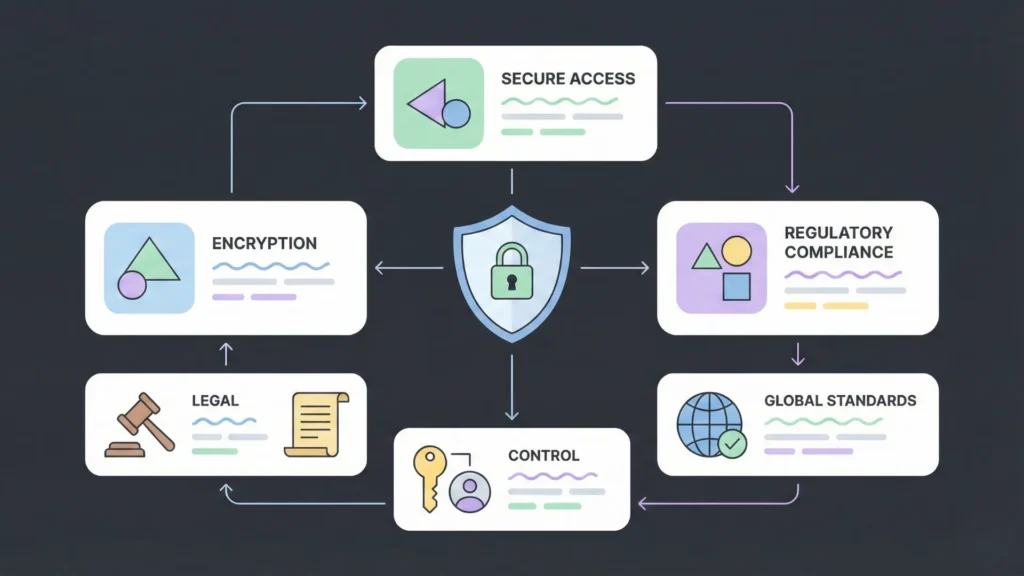
- Data protection: encryption at rest (e.g., AES-256) and TLS in transit.
- Access control: role-based access control (RBAC) so tenants, managers, and owners only see
relevant data.
- Legal compliance: support Fair Housing Act (FHA) guidelines and state-specific lease requirements.
The Future of Development: Building with blog.imagine.bo
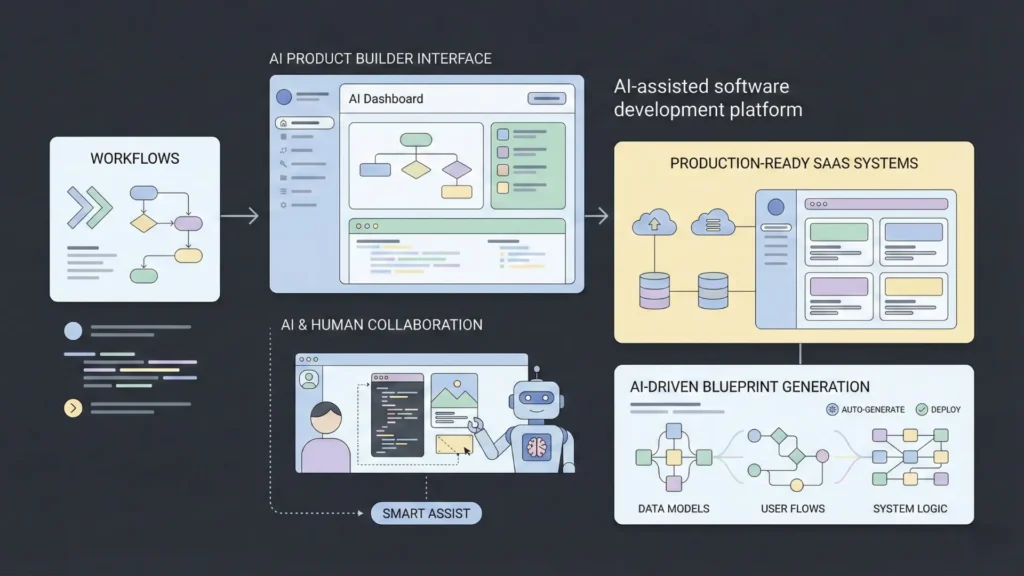
Traditional development can take months and a large team. blog.imagine.bo takes a different approach: you
describe your PMS, and the platform generates a production-ready foundation you can customize and
launch quickly.
1) “Technical architecture that won’t collapse later” — how blog.imagine.bo helps
The main reason PMS apps collapse isn’t “bad code”. It’s messy domain boundaries, weak multi-tenancy
and permissions, editable financial records with no audit trail, unreliable webhooks, and missing job
systems for billing, late fees, reminders, and exports. blog.imagine.bo helps by forcing structure early through
AI-driven blueprinting: it maps user flows, generates data models, and scaffolds the core logic before you
ship.
A. Choosing an architecture style (Monolith vs Microservices vs Serverless)
- Modular monolith (best place to start): describe the PMS as modules (Properties/Units,
Tenants/Leases, Payments/Accounting, Maintenance/Vendors). blog.imagine.bo generates a structured
blueprint (screens + flows + data + logic) instead of a random CRUD app.
- Microservices (later, not first): by keeping domains clean early, you can evolve a heavy module
(payments/reporting/notifications) without rewriting the whole system. For advanced customization,
blog.imagine.bo supports human + AI collaboration.
- Serverless-first (event-driven): ideal for payment webhooks, screening callbacks, scheduled rent
charge generation, late fee rules, and notification pipelines — where event-driven workflows shine.
2) Tech stack breakdown — how blog.imagine.bo covers each layer
- Cloud + deployment: launch quickly without getting stuck in DevOps; configure secure environment
variables for payment keys and webhook secrets.
- Backend logic: focus on business rules (RBAC, billing rules, workflows) while the platform scaffolds
the app’s core architecture.
- Database: generate a relational schema for your core entities; validate multi-tenancy and money
handling rules.
- APIs + integrations: add payment providers, accounting, screening, and listing partners through
structured integration points.
- QA + iteration: ship, learn, and refine. Scaling is usually an iteration problem, not a one-time build
problem.
3) The phased roadmap — how to build your PMS inside blog.imagine.bo
- Step 1 — Start with your vision: define roles (owner/manager/tenant/vendor), modules, and core
workflows in one prompt.
- Step 2 — Generate the MVP blueprint: let the AI produce screens, flows, and a first-pass data
model, then refine scope.
- Step 3 — Build Phase 1: property/unit source of truth, tenant + lease lifecycle, and basic rent
collection with webhook-confirmed payment status.
- Step 4 — Build Phase 2: maintenance requests to work orders, document management, and
baseline reporting (rent roll, delinquency, basic P&L;).
- Step 5 — Scale with Phase 3: add AI suggestions (triage and draft replies), vendor portals, and
third-party integrations (payments, accounting, screening, listings).
Bottom line: blog.imagine.bo doesn’t just “mock up” an app. It helps you produce a revenue-ready PMS faster,
then iterate toward a scalable platform as you learn from real users.
Curious about the specifics? Read more on how imagine.bo works and why choose imagine.bo for your next SaaS project.
Property Management Trends (U.S. Market)
If you’re building a PMS today, the market signals are clear: steady software growth, a massive rental
operating base, and strong incumbents expanding quickly — all of which increases demand for modern,
automated workflows.
Trend 1: PMS market growth is steady and compounding
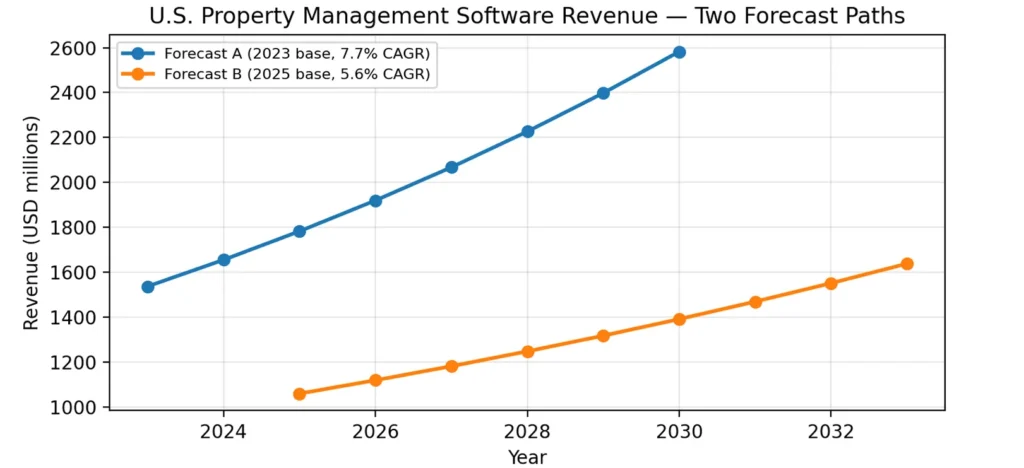
Two published U.S. forecast paths (using different scopes) still point to sustained growth over the next
decade. Use this as a confidence signal: the category is expanding and buyers are budgeted for software
that saves time and reduces risk.
Trend 2: Global momentum reinforces U.S. adoption
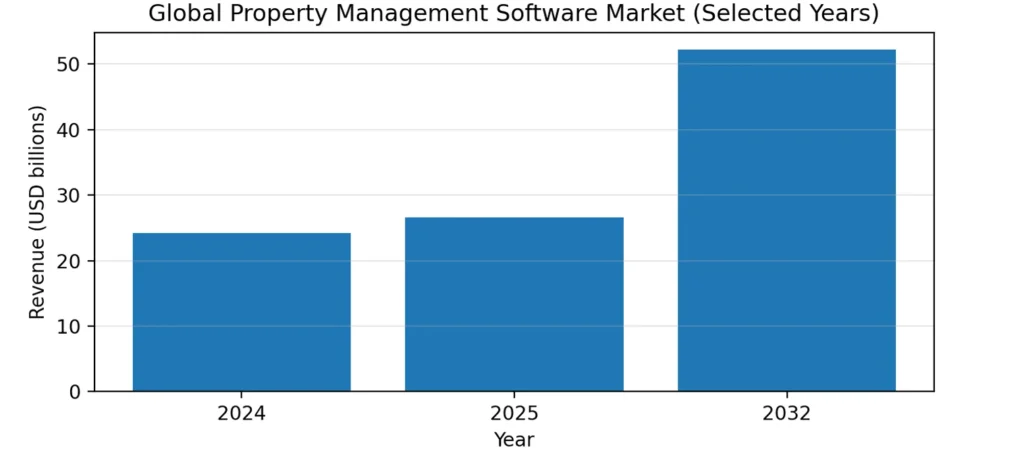
The global PMS market shows strong growth from 2024 to 2032 in the compiled report, suggesting the
industry tailwind isn’t local.
Trend 3: The rental operating base is huge (and workforce-driven)
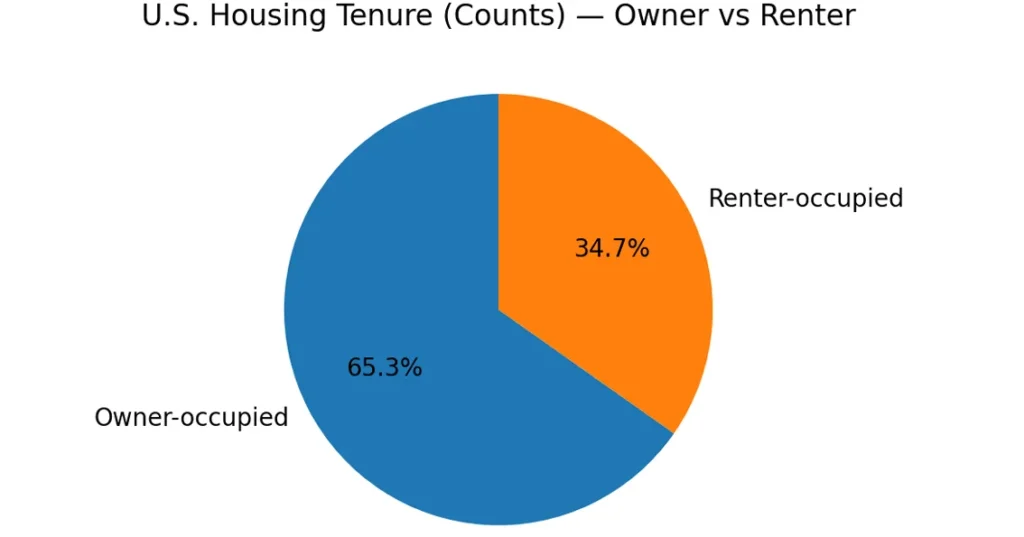
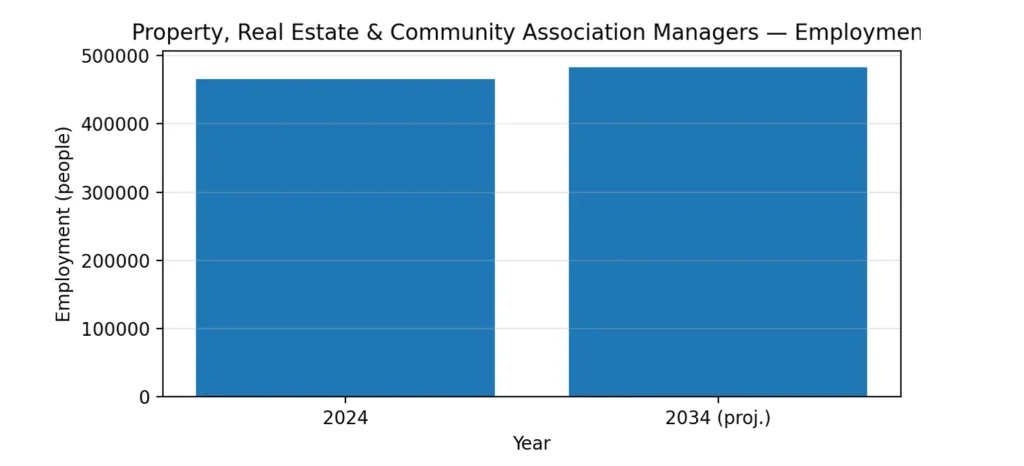
The report highlights tens of millions of renter-occupied households. That volume creates constant
leasing, payment, and maintenance activity which is exactly where automation pays off.
Trend 4: Incumbent vendor scale keeps rising
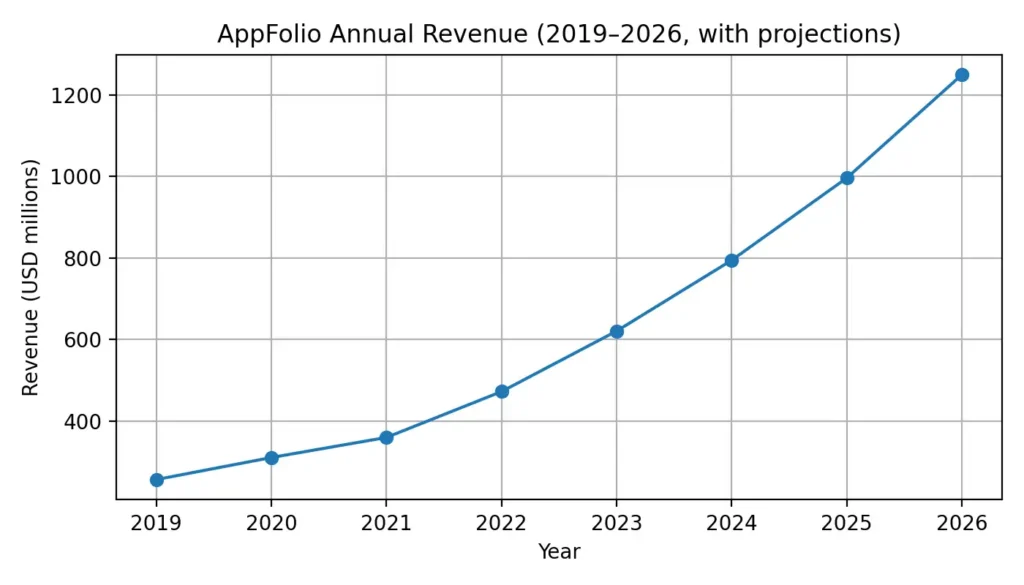
As one example in the report, AppFolio revenue growth from 2019 to 2024 illustrates how fast leading
platforms can scale once the operating system is sticky.
Closing note
A modern PMS wins by removing friction in the day-to-day: fewer manual steps, cleaner books, faster
maintenance resolution, and better tenant experience. Start modular, ship in phases, and treat security +
compliance as product features
Ready to start? Learn how to launch your SaaS Now.
Related Articles
- AI App Builder App Builder No Code: Build World-Class Apps Without Writing a Single Line of Code
- Scalable SaaS Architecture for No-Code Platforms: Building Robust and Flexible Solutions
- From Zero to Hero: How This Non-Profit Built a Donor Management App with No-Code and Saved $50,000
- AI Website Builder for Real Estate Listings: Enhancing Property Marketing Efficiency
- AI Website Builder for Real Estate
Launch Your App Today
Ready to launch? Skip the tech stress. Describe, Build, Launch in three simple steps.
Build