What you’ll build: A unified, scalable AI content engine that automates 80% of your production cycle using no-code logic and the Imagine.bo platform.
TL;DR:
- The Problem: Manual “tool-hopping” workflows (Canva, CapCut) fail at the scale required by modern social algorithms.
- The Solution: Building a custom no-code content factory to centralize media automation.
- The Tool: Imagine.bo allows you to build a proprietary no-code app builder environment to manage your content pipeline.
- The Result: 10x throughput with a “Hybrid” model of AI automation and human polish.
Quick Guide: How to Build a No-Code Content Factory in 5 Steps
To capture the featured snippet, here is the high-level blueprint for scaling media production:
- Define Your Source: Connect an RSS feed, Google Sheet, or YouTube URL as your “Data Core.”
- Architect the Pipeline: Use a no-code app builder (like Imagine.bo) to map the flow from data to script to asset.
- Integrate AI Models: Connect APIs (GPT-4o, Midjourney) to handle batch creative tasks like scripting and image generation.
- Create a Human-in-the-Loop UI: Build a simple dashboard for editors to approve or tweak AI-generated drafts.
- Automate Distribution: Sync your final assets to a scheduler (Buffer, Zapier) for multi-channel posting.
Introduction: The Invisible Wall in Media Marketing
The math of modern marketing is broken. In 2024, maintaining relevance requires brands to post 3–5 times per day across TikTok, Reels, and Shorts. High-growth accounts often post upwards of 100 times per month to satisfy the algorithm (Source: Social Media Examiner).
For a traditional agency, this volume is a death sentence for margins. But for “Media Tech” leaders, this isn’t a manpower problem—it’s a media automation problem. The bottleneck is the manual labor of resizing, captioning, and distribution. This is where the no-code content factory transforms your agency from a creative boutique into a scalable production engine.
The Content Pipeline Crisis: Why Manual Workflows Fail
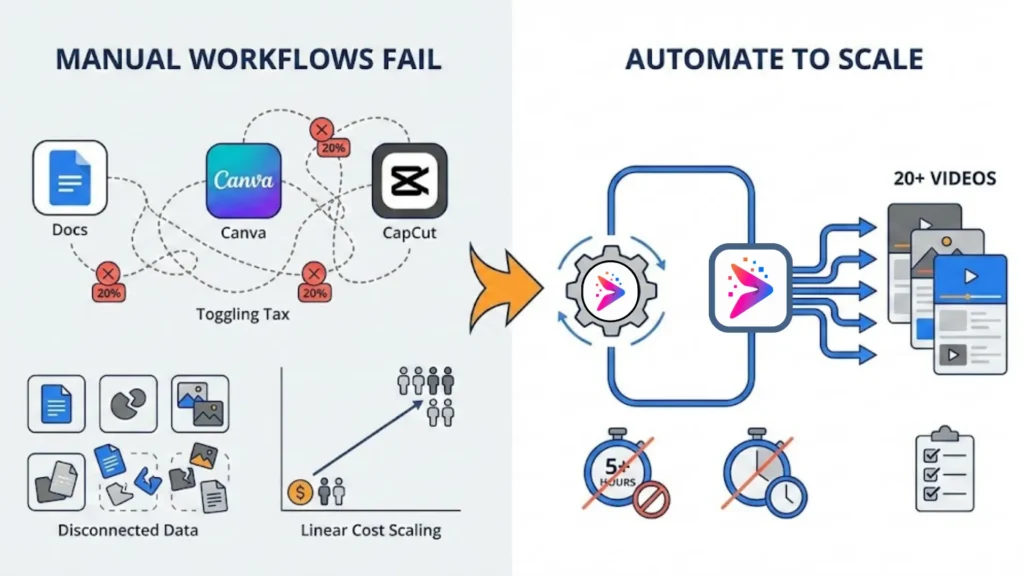
Most agencies today are stuck in the “Tool-Hopping Loop.” A creator writes a script in Docs, designs in Canva, edits in CapCut, and manually uploads.
Why this fails at scale:
- The Toggling Tax: Moving data between apps costs 20% of creative productivity.
- Disconnected Data: Your content pipeline becomes a series of silos where brand assets get lost.
- Linear Cost Scaling: To double output, you have to double headcount.
Checklist: Are You Ready for Media Automation?
- [ ] You produce 20+ short-form videos monthly.
- [ ] You spend 5+ hours weekly on repetitive “batch creative” resizing.
- [ ] Your team spends more time managing files than brainstorming strategy.
What is a “No-Code Content Factory”?
A “Content Factory” isn’t a single tool; it is a unified application architecture. Unlike disconnected SaaS subscriptions, a content factory uses a no-code AI app builder to connect your data directly to AI rendering engines.
The Unified Pipeline Advantage:
- Centralized Brand Logic: One dashboard governs the “voice” for every asset.
- Trigger-Based Production: A single blog post automatically generates a script, a LinkedIn carousel, and three TikTok variations.
- Batch Creative Power: Leveraging the best generative AI tools allows you to generate 100 ad variations with the same effort as one.
The Enterprise Blueprint: Scaling Without the Overhead
Large media companies (Spotify, Netflix) use “Content Supply Chains.” You can replicate this enterprise-grade logic by automating internal tools using no-code principles:
- The “Single Source of Truth”: Use a database (Airtable or Imagine.bo backend) to store every caption, clip, and prompt.
- Modular Micro-Apps: Break the workflow into small modules—a “Thumbnail App,” a “Scripting App,” etc.
- Human-in-the-Loop Gate: 80% of the work is done by AI; the final 20% “polish” is done by a human in a custom UI.
Imagine.bo Feature Spotlight: Your No-Code Command Center

Building these apps used to require a development team. Imagine.bo has changed that. It is a “no-code platform designed for building custom internal tools and client-facing applications with a focus on media and content production workflows” :contentReference{index=3}.
By serving as a professional-grade no-code app builder, Imagine.bo allows you to follow a streamlined 5-step workflow to launch your content factory: Connect your data sources, Architect the logic, Integrate AI models, Build the review UI, and Deploy to your preferred cloud.
SDE-Level Architecture for Agencies
Unlike basic “drag-and-drop” website builders, Imagine.bo provides an SDE-level (Software Development Engineer) architecture. This means your content factory isn’t just a series of automations; it is a full-stack application with a robust AI reasoning engine at its core. This engine doesn’t just execute simple prompts—it makes intelligent decisions about content routing, brand compliance, and asset selection based on the logic you define.
For agency owners concerned with scale, Imagine.bo offers true no-code app security and complete infrastructure flexibility. You aren’t locked into a proprietary silo; you can deploy your content factory directly to AWS, GCP, or Vercel. This ensures that your media tech stack remains high-performance, secure, and fully under your control.
Real-World Example: The 50-Video Monthly Engine
Imagine a mid-sized agency that needs to produce 50 high-quality short-form videos per month for real estate listings. Traditionally, this would require 150+ hours of editing. With Imagine.bo, the agency builds a custom app that:
- Pulls new listing data from a CRM.
- Uses the AI reasoning engine to write five unique hooks per property.
- Automatically triggers a remote render farm via API to overlay captions, background music, and property specs onto templates.
- Pushes the drafts to a “Human+AI Collaboration” dashboard for a 30-second final review.
The result? The entire 50-video batch is ready for distribution in under 5 hours of human labor.
The Hybrid Advantage: No-Code + Pro-Dev
The most robust factories use a “Hybrid” model. Use Imagine.bo to build your core logic, and leverage their dedicated developers for complex tasks like custom video rendering or high-performance data migrations. This shows how small teams can scale big without exploding their headcount.
Estimated ROI Comparison:
- Manual Production: $2,500/mo per head (Low throughput).
- Imagine.bo Hybrid: $2,000/mo for a custom content pipeline (Unlimited scalability). Estimate based on mid-sized agency benchmarks.
A Practical 6-Week Playbook: From Manual to Machine
| Week | Focus | LSI Goal |
|---|---|---|
| Week 1 | Audit | Map your existing content pipeline. |
| Week 2 | Data Core | Centralize assets in a no-code database. |
| Week 3 | MVP App | Build a “Script-to-Draft” tool in Imagine.bo. |
| Week 4 | AI Logic | Set up prompt engineering tips for your team. |
| Week 5 | Review UI | Create the “Approvals Dashboard.” |
| Week 6 | Scale | Stress test the system with 100+ assets. |
Case Examples & Templates
1. The TikTok Batch Script Template
Inside your no-code app builder, use AI video editing tools logic:
“Analyze [Input Article]. Generate 3 ‘scroll-stopper’ hooks. Draft a 45-second script with visual instructions for B-roll every 4 seconds.”
2. The 1-Page App Spec for Imagine.bo
Project: “The Social Multiplier”
- Input: One Blog URL.
- Process: Extract text → AI Summary → Generate 5 LinkedIn posts + 5 Midjourney prompts.
- Output: A campaign dashboard ready for review.
3. Slack QA Automation
Compare Zapier vs Make to push AI drafts to a #content-review channel.
- Action: Buttons for [Approve] | [Edit] | [Reject].
- Result: A Creative Director can manage a 10x content load in 15 minutes a day.
Metrics to Track
- Throughput: Total assets produced per week.
- Turnaround Time: Hours from “Trend” to “Post Live.” (Goal: < 4 hours).
- Cost per Asset: System cost / total volume. (Target: < $5.00/asset).
FAQ: People Also Ask
What is a no-code content factory?
A no-code content factory is an automated system built on platforms like Imagine.bo that uses AI and logic to generate high volumes of marketing assets without manual editing.
How does media automation save money?
It reduces “toggling tax” and manual labor, allowing a single creator to do the work of a five-person team, drastically lowering the cost per asset.
Do I need coding skills for a content pipeline?
No. With a no-code app builder, you can use drag-and-drop interfaces to connect AI models and databases. For more on the future of this tech, check out our guide to mobile app development in 2025.
Can AI handle “batch creative” for video?
Yes. Modern pipelines can automate scripting, voiceovers, and even B-roll selection, leaving only the final 20% creative polish to humans.
Why choose Imagine.bo over other tools?
Imagine.bo is specifically optimized for media workflows, offering better handling of large video files and native AI integrations compared to generic builders.
Conclusion: Build Your Moat
The media landscape is splitting: those drowning in manual work and those building an AI Content Factory. By learning how to build a SaaS with AI logic using Imagine.bo, you aren’t just saving time—you are building a proprietary asset that scales.
Ready to automate?
- Book a Demo of Imagine.bo to see our templates in action.
- Download our “One-Pager for Agency Owners.”
Related Articles
- Effortlessly Automate Your Social Media with AI: The Ultimate No-Code Guide
- Supercharge Your Social Media: The Ultimate Guide to AI-Powered Automation
- Mastering AI Social Media Content Generation: Your Step-by-Step Guide
- Supercharge Your Content: Mastering AI Content Repurposing Tools
- Human vs. AI Writing: Which is Right for Your Content Strategy?