

Most educators who want to build their own platform face the same wall: a developer quote of $40,000 to $120,000, a timeline of four to six months, and the realisation that every platform that exists was built for someone else’s curriculum model. Teachable charges 5% transaction fees on every sale. Thinkific caps customisation at template limits. Kajabi costs $149 per month before you have enrolled a single student. And none of them let you build the specific workflow your teaching model actually needs. According to HolonIQ, the global EdTech market is projected to reach $404 billion by 2025 (HolonIQ, 2023), and the educators capturing the most revenue are not the ones on the most popular platform. They are the ones who own their student relationship and their product infrastructure. This guide covers exactly how educators, course creators, and coaches build and scale custom apps without developers in 2026, what those apps look like in practice, and where the boundary between AI generation and human engineering sits. For context on what building a platform for online courses looks like with AI tools today, this post on AI website builders for online courses covers the current landscape.
TL;DR Educators can build custom course platforms, coaching portals, booking systems, community tools, and student progress trackers without developers using AI-generation tools like imagine.bo. The platform generates a full-stack application from a plain English description, starting at $0. According to Research.com, 90% of students say they learn better with digital tools (Research.com, 2023), and custom-built platforms that match a specific pedagogy outperform generic templates for learner retention. imagine.bo deploys to production infrastructure with one click and includes on-demand human engineering for complex features.
Why Do Educators Need Their Own Apps, Not Just Another Platform?
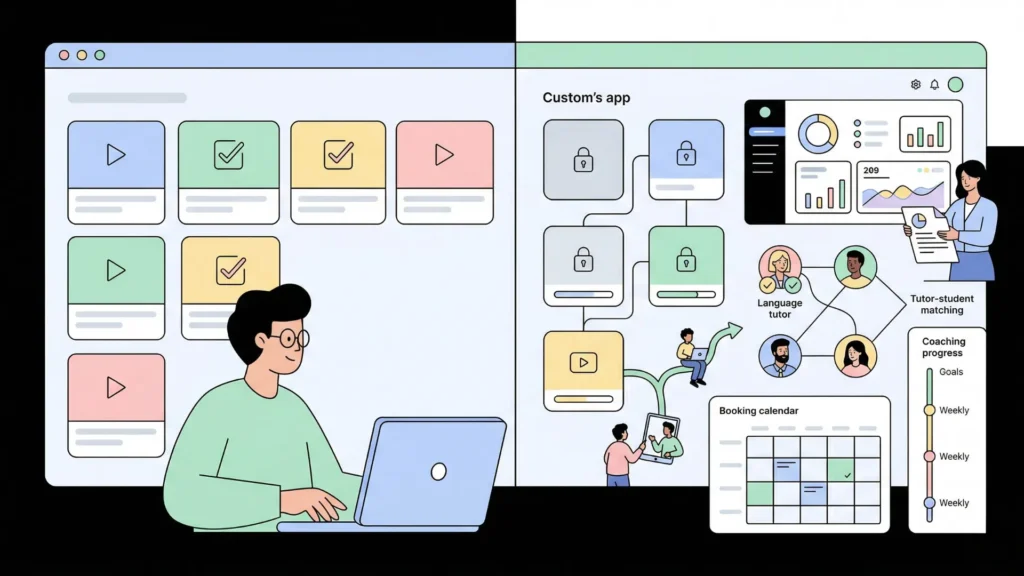
Educators need their own apps because the gap between how they teach and what generic platforms support is widest in education. A fitness certification educator needs progress-gated content where Module 2 unlocks only after the student scores above 80% on the Module 1 quiz. A language school needs a booking system that matches students to tutors based on language level, availability, and native tongue. A business coach needs a client portal that tracks goal completion across twelve weeks, surfaces weekly check-in responses, and generates a progress report the coach reviews before each session.
Launch Your App Today
Ready to launch? Skip the tech stress. Describe, Build, Launch in three simple steps.
BuildNone of these are edge cases. They are the specific workflows that differentiate effective educators from generic content publishers. According to Eduventures, learner retention on platforms with custom progress tracking and instructor interaction is 42% higher than on standard video-and-quiz platforms (Eduventures, 2023). The platform shapes the pedagogy. A platform that cannot support your teaching model forces your teaching model to conform to the platform.
The cost argument is equally direct. According to Kajabi’s published pricing, an educator paying $149 per month for Kajabi’s basic plan over three years spends $5,364 in platform fees, with no code ownership, no data portability, and no ability to build custom features. An educator building a custom platform on imagine.bo’s Pro plan at $25 per month over three years spends $900, owns the code outright, and builds exactly what their teaching model requires. This post on launching a subscription-based app without developers covers the subscription architecture that most educator platforms are built on.
What Types of Apps Do Educators Build Without Developers?

The five types of applications educators build without developers each solve a specific problem in the education delivery, student management, or community building stack. The most effective approach is building the type that addresses your highest-friction workflow first.
Custom course and curriculum platforms: A course platform built with imagine.bo generates a complete learning management system from a description, including lesson sequencing, progress tracking, quiz logic, certificate generation, and student dashboards. Unlike Teachable or Thinkific, a custom-built LMS enforces your specific completion rules, your exact quiz scoring thresholds, and your curriculum structure without working around platform constraints.
Coaching and client management portals: Coaches running twelve-week programs, accountability cohorts, or one-to-one advisory relationships need a portal where clients see their session history, action items, submitted homework, and progress metrics in one place. A custom coaching portal built on imagine.bo includes the coach’s dashboard view, the client’s personal view, and the session notes and goal tracking structure that matches the specific coaching framework. This post on building a SaaS for coaches and consultants covers the specific application types coaches are building with AI-generation tools.
Session booking and scheduling systems: Individual tutors, language teachers, and one-to-one coaches need booking systems that enforce their specific availability rules, match students to the right tutor based on criteria, and handle rescheduling and cancellation policies without manual management. A custom booking system built with imagine.bo applies your rules rather than the rules of a generic scheduling platform. This guide on building a booking or scheduling app in minutes shows the specific build workflow for scheduling applications.
Online course marketplaces: Educators with multiple instructors, multiple courses, and a student community need a marketplace structure where students browse, enrol, and track progress across multiple instructors’ courses. A custom-built marketplace handles instructor revenue splits, course approval workflows, and student community features that no off-the-shelf platform manages cleanly. This post on creating an online course marketplace without coding covers the specific marketplace architecture for education platforms.
Community and cohort tools: Cohort-based learning programs, masterminds, and community memberships need tools that manage cohort enrollment, facilitate peer interaction, track participation, and gate content by cohort start date. These are highly specific requirements that generic community platforms like Circle or Mighty Networks approximate but rarely match precisely.
Step-by-Step: Building a Custom Course Platform Without a Developer
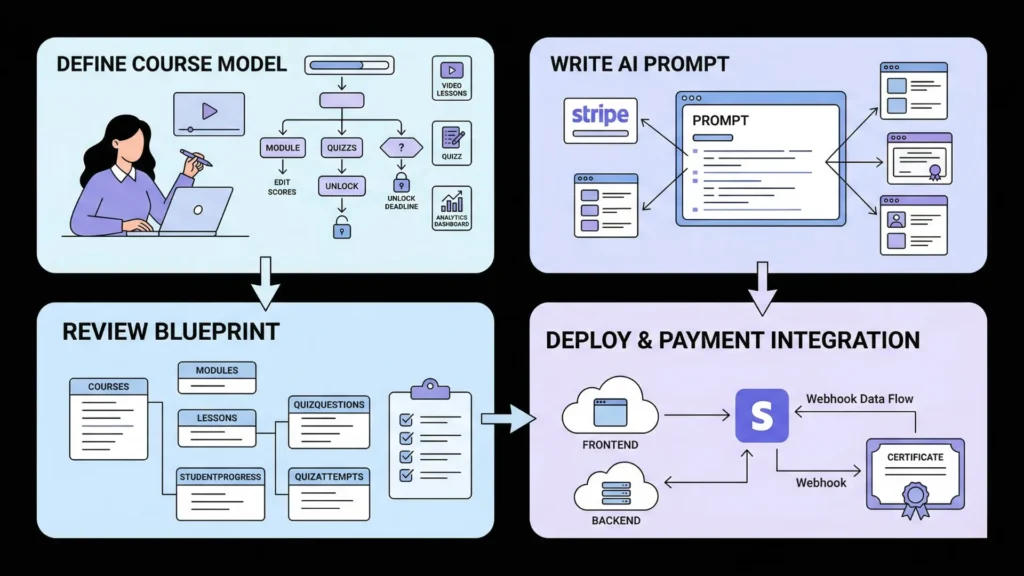
The course platform is the most commonly requested educator application, and the one where the gap between what generic platforms offer and what educators actually need is largest. Here is the complete workflow from concept to deployed product.
Step 1: Define your course delivery model before writing any prompt.
Before opening imagine.bo, answer six questions precisely. How is your course structured, modules, weeks, or phases? What unlocks the next section, time, quiz completion, or manual instructor approval? What does the student dashboard show, progress percentage, time spent, quiz scores, or upcoming deadlines? Does the course have a community component where students interact? How are certificates generated, and what criteria must be met? Does the course have multiple instructors or one?
These questions define the data model and the access logic. A course platform with time-based unlocking has a fundamentally different database schema than one with quiz-score-based unlocking. Getting this specificity into the prompt determines whether the first generation is accurate.
Step 2: Write the four-element prompt.
“Build a custom online course platform for a professional development educator. Students register with email and password, select a course at enrolment, and complete a Stripe payment to gain access. Each course has modules, and each module has lessons with video embeds and text content. Modules unlock sequentially: Module 2 is available only after the student marks all lessons in Module 1 as complete. Each module ends with a quiz of five questions. Students who score below 70% are prompted to retake the quiz before proceeding. Students see a dashboard showing their course progress percentage, their current module, and quiz scores. Instructors see a dashboard showing all enrolled students, each student’s progress percentage, and quiz scores per module. Instructors can add new lessons to any module. A certificate with the student’s name and completion date generates automatically when the final quiz is passed with a score above 70%.”
The element of this prompt that produces the most significant first-generation improvement is the explicit state machine for content unlocking. Most educators describe their unlocking logic as “students must complete module one before accessing module two” and leave the implementation details unspecified. The generator then implements a simple sequential unlock based on the last lesson being viewed, which is different from marking all lessons complete, which is different from passing a quiz, which is different from an instructor manually approving progression. Making the specific trigger condition explicit eliminates the most common structural error in course platform generations and prevents a full rebuild later.
Step 3: Review the AI-Generated Blueprint specifically for the quiz and progression data model.
The blueprint should show a Courses table, a Modules table, a Lessons table, a QuizQuestions table, a StudentProgress table tracking lesson completion status, and a QuizAttempts table recording scores. If the blueprint shows only Courses, Modules, and Lessons without the progress tracking and quiz attempt tables, the generated application will not support the completion-based unlocking your prompt specified. Use a follow-up prompt to add the missing data structure before confirming the build.
Step 4: Deploy and configure Stripe for course payment.
One-Click Deployment sends the frontend to Vercel and the backend to Railway. For Stripe payment integration, use the Hire a Human feature at $25 per page for the payment and webhook handler specifically. The Stripe webhook that confirms payment and activates course access must be idempotent and must handle the race condition where the webhook fires before the student’s session is fully established. This is engineering precision territory rather than prompt territory. On the Pro plan, this task completes within 24 hours.
Citation capsule: According to Research.com, 90% of students say they learn more effectively with digital learning tools, and platforms that incorporate active learning elements including quizzes, progress tracking, and immediate feedback show 25 to 60% higher completion rates than passive video-only platforms (Research.com, 2023). Course platforms built with custom progress gating and quiz logic directly implement the active learning elements that drive those completion rate differences.
For a deeper look at how AI-generation tools support the full educator platform stack, this post on AI tools for coaches and consultants building their own SaaS covers the platform architecture from multiple educator perspectives.
How Do Coaches Build Client Management Apps Without Developers?
Coaching apps have a specific structural requirement that generic client portals miss: the coaching relationship is longitudinal. It accumulates context over weeks and months, and both coach and client need to see that accumulated context to have productive sessions. A coaching portal built on imagine.bo generates exactly that longitudinal structure.
The design decision that most improves coaching app effectiveness is building the session preparation workflow into the portal rather than the session itself. Most coaching portals focus on session notes taken during the call. The more valuable structure is the pre-session preparation: client submits their wins, challenges, and focus areas before the session, and the coach reviews that submission and prepares their agenda based on it. This turns the portal from a documentation tool into a preparation tool, which directly improves session quality. A prompt that includes this workflow generates the pre-session submission form, the coach’s review view, and the session agenda builder as connected features rather than as separate afterthoughts.
A complete coaching portal prompt for a twelve-week business coaching program:
“Build a coaching portal for a business coach running twelve-week one-to-one programs. Clients register after the coach invites them by email. Each client has a twelve-week timeline showing their current week. At the start of each week, clients complete a check-in form: three wins from last week, one current challenge, and their primary focus for this week. The coach sees all clients on their dashboard with each client’s current week, their last check-in submission date, and a red flag if no check-in was submitted in the last seven days. When the coach opens a client profile, they see all twelve weeks, which check-ins were submitted, and the full history of notes. Coaches can add session notes after each call. Clients can view their own session notes and check-in history but not another client’s data. Include a goals section where the coach sets three goals at the start of the program and tracks them as in-progress, achieved, or revised at each session review.”
This prompt generates a complete coaching management system including the longitudinal timeline structure, the pre-session workflow, the progress tracking, and the correct data isolation between clients. Review the blueprint specifically for the client data isolation rules before confirming the build.
According to the International Coaching Federation, coaches who use structured progress tracking tools report 35% higher client satisfaction scores and 40% higher program completion rates compared to those using unstructured communication tools (ICF, 2023). A custom-built portal that matches a specific coaching methodology delivers that structure without the compromise of adapting your methodology to a generic platform’s structure.
How Does Scheduling Work in a Custom Educator App?
Scheduling for educators is more structurally complex than scheduling for most service businesses because it involves matching logic. A language school does not just need any available tutor at any available time. It needs a Spanish-speaking tutor at the B2 level who has availability on Tuesday evenings for a student who has completed the A2 module. That matching logic cannot be configured in Calendly or Acuity Scheduling. It requires a custom booking system with the right data model.
imagine.bo generates the matching logic when you describe it specifically in the prompt. A language school booking system prompt:
“Build a session booking system for an online language school. Tutors register with their native language, the languages they teach, and the proficiency levels they teach at: A1, A2, B1, B2, C1, C2. Tutors set their weekly availability by day and time slot. Students register and set their target language and current proficiency level. When a student books a session, they see only tutors who teach their target language at their current proficiency level. Students can book any available slot from a matching tutor’s calendar. Students receive an email confirmation with the Zoom link for their session. Tutors receive an email notification when a student books their session. Both parties can cancel with more than 24 hours notice; cancellations within 24 hours require admin approval. Admins can see all bookings, all tutors, and all students.”
That prompt generates the tutor matching filter, the availability calendar, the booking confirmation emails, and the cancellation rule enforcement. The matching logic and the availability calendar data model are the two elements to check carefully in the blueprint before confirming.
A language school paying $99 per month for Acuity Scheduling’s Teams plan plus $299 per month for a custom tutor matching plugin spends $4,776 per year in scheduling infrastructure that still cannot enforce proficiency-level matching natively. A custom-built booking system on imagine.bo’s Pro plan at $25 per month with a one-time Hire a Human task for the Stripe payment integration at $25 costs $325 in year one. The platform-specific matching logic that costs zero to implement through a custom prompt would cost $5,000 to $15,000 to build as a custom Calendly integration.
This guide on building a booking or scheduling app in minutes covers the full scheduling application build workflow with worked examples across different booking model types.
How Do Educators Scale Their Apps After Launch?
Scaling an educator app without developers means three things in practice: handling more students without performance degradation, adding features as your curriculum evolves, and integrating new tools as your tech stack grows.
Handling more students: imagine.bo deploys to Vercel and Railway by default. Vercel’s edge network handles global frontend traffic automatically without capacity planning. Railway’s backend scales with traffic. A course platform deployed on this infrastructure handles the jump from 50 students to 5,000 students without any infrastructure changes from you. This is a meaningful advantage over educator platforms that self-host or use shared hosting configurations that require manual scaling.
Adding features through conversation: Post-launch feature additions use the same conversational interface as the initial build. Adding a community forum to an existing course platform: “Add a community discussion forum to the course platform. Students enrolled in the same course can create posts, reply to posts, and like replies. Posts are organised by module. Instructors can pin important posts. Students can only post in courses they are enrolled in. Instructors can post in any course’s forum.” That prompt extends the existing platform with the new feature without rebuilding the surrounding system.
Integrating tools as you grow: Zoom for live session links, Stripe for subscription billing, Mailchimp for student email sequences, and Google Analytics for learning behaviour data all integrate into custom-built educator apps. Standard integrations through webhook connections are handleable through conversational prompts. Non-standard integrations with complex authentication flows use the Hire a Human feature at $25 per page. The Pro plan’s 20% discount on Hire a Human tasks makes this affordable as a regular part of the scaling workflow.
The post-launch addition that consistently has the highest impact on educator platform engagement is a progress notification system. After a course platform is live, adding weekly progress emails that tell each student their current completion percentage, their quiz scores, and the next module they should complete drives students back into the platform more reliably than any marketing campaign. The prompt for this feature is specific and targeted: “Add a weekly automated email to all enrolled students every Monday at 9am UTC. The email includes the student’s name, their current course progress percentage, their last completed lesson, and the name of the next lesson to complete. Students who have completed the course receive a congratulations email instead.” This generates the email scheduling system and the personalised content logic in a single prompt session.
For educators thinking about the full technology stack that supports a growing education business, this guide on the no-code tech stack for founders in 2026 covers how custom-built apps fit alongside the other tools in a lean operator’s infrastructure.
When Should Educators Use Hire a Human?
The Hire a Human feature exists for the specific scenarios where engineering precision produces materially better outcomes than iterative prompt refinement. For educators building platforms, four scenarios consistently justify bringing in a vetted engineer.
Stripe subscription webhooks: Course platform subscriptions require a webhook handler that confirms payment, activates course access, handles failed renewals, and manages cancellations. The webhook must be idempotent, must validate Stripe’s signature on every incoming event, and must handle the race condition between payment confirmation and session establishment. Getting this wrong means students who paid cannot access the course, or students whose subscription lapsed retain access indefinitely. A $25 engineer task for the webhook handler prevents both failures.
Video hosting integration with progress tracking: Connecting a video hosting platform like Vimeo or Wistia to a custom LMS, and specifically tracking when a student has watched enough of a lesson video to count it as complete, requires JavaScript event handling from the video player’s API. Vimeo’s Player API fires specific events at percentage completion points, and wiring those events to your progress database requires precise implementation. This is Hire a Human territory.
Certificate generation with PDF output: Generating a PDF certificate with a student’s name, course title, completion date, and a unique verification code is straightforward to describe but technically specific to implement. PDF generation libraries have specific encoding requirements, font embedding rules, and layout constraints that prompt-based generation sometimes handles incorrectly. A one-time Hire a Human task for the certificate generation module produces reliable output.
GDPR data export and deletion workflows: If your course platform serves students in the EU, you need a data export function that produces a complete record of a student’s personal data and a deletion function that removes all their data from the system on request. These are legal compliance requirements with specific data completeness obligations. A vetted engineer implements them correctly.
The Pro plan at $25 per month includes a one-hour expert pre-launch session specifically designed for reviewing the architecture of your educator platform before your first cohort enrolls. Use this session to audit the enrollment flow, the content gating logic, the payment integration, and the student data model. An hour of expert review before launch is the most leveraged hour in the entire build process. For a comprehensive guide to launching a client portal for educators and coaches specifically, this post on launching a client portal without code covers the portal architecture and implementation workflow.
What Does Building an Educator Platform Cost Without a Developer?
The cost comparison between building an educator platform with a development agency versus building it on imagine.bo fundamentally changes the financial model of starting an education business.
| Platform type | Agency build cost | Monthly SaaS alternative | imagine.bo Pro (year 1) | Hire a Human additions |
|---|---|---|---|---|
| Course platform with LMS | $50,000 to $120,000 | $149/mo Kajabi | $300 | $25 to $75 |
| Coaching portal | $30,000 to $70,000 | $99/mo practice management tool | $300 | $25 |
| Booking and scheduling system | $20,000 to $50,000 | $99/mo Acuity Teams | $300 | $25 |
| Course marketplace | $80,000 to $150,000 | $299/mo white-label platform | $300 | $50 to $100 |
| Community and cohort tool | $25,000 to $60,000 | $99/mo Circle | $300 | $25 |
An educator building all five of these platforms on imagine.bo, which represents the complete infrastructure for a full education business, spends under $1,800 in year one. The same infrastructure from development agencies costs $205,000 to $550,000. Three years of monthly SaaS subscriptions for equivalent functionality costs $19,620 with no code ownership and no customisation capability.
According to Eduventures, custom-built learning platforms that match a specific pedagogy show 42% higher learner retention than generic platforms (Eduventures, 2023). That retention improvement translates directly to revenue through lower churn, higher completion testimonials, and stronger word-of-mouth referrals. The competitive advantage of a custom-built educator platform compounds over time in a way that a generic template never does.
For the full breakdown of how development costs compare across custom build, SaaS, and no-code approaches, this 2026 cost comparison for building apps covers the detailed numbers across education and other product categories.
FAQ
Can an educator with no technical background build a course platform on imagine.bo?
Yes. imagine.bo requires the ability to describe your teaching workflow in plain English. No programming knowledge, database configuration, or deployment experience is needed. The more specifically you describe your pedagogy, your content gating rules, and your student management workflow, the more accurately the generator produces what you need. According to Gartner, non-technical professionals now build more applications than trained developers at many organisations (Gartner, 2022), driven specifically by tools like imagine.bo that convert domain expertise into working software. The educator who knows exactly how their twelve-week program works produces a better first generation than a developer who has never taught. This post on non-technical founders building products with AI covers how the domain expert advantage plays out in AI-generation workflows.
How does imagine.bo handle video content in a course platform?
Imagine.bo generates course platform pages with video embed support using standard iframe integration from Vimeo, YouTube, or Wistia. You specify in your prompt which video hosting you use, and the generated lesson pages include the correct embed structure. For progress tracking based on video completion percentage, the Hire a Human feature implements the JavaScript event handling from your video platform’s API. Specify this requirement in your prompt: “Track lesson completion based on video watch progress. A lesson is marked complete when the student watches at least 80% of the video.” The Hire a Human engineer implements the Vimeo or Wistia event listener that fires the completion update to your progress database.
What happens when a student has a technical issue on a custom-built platform?
Your custom platform is deployed on Vercel and Railway, both of which have documented uptime SLAs above 99.9%. For technical issues specific to your application, the same conversational interface you used to build the platform handles bug fixes: “Students are reporting that clicking the complete lesson button sometimes does not update their progress. Investigate and fix the bug.” For issues that require debugging across the database query, the API endpoint, and the frontend component simultaneously, the Hire a Human feature provides a vetted engineer who investigates and resolves the specific issue. This post on AI client onboarding flows covers how to design the onboarding experience for students and clients joining your custom platform for the first time.
How do I handle refunds and cancellations on a custom course platform?
Stripe handles refunds through its dashboard regardless of how the payment was initially processed. A refund on a student’s subscription or course purchase is processed directly in Stripe and does not require any changes to your custom application. The cancellation workflow, specifically revoking course access when a subscription cancels, is handled by the Stripe webhook for customer.subscription.deleted, which should update the student’s enrollment status in your database. This webhook is one of the specific implementation tasks handled through the Hire a Human feature for the payment module, ensuring that access revocation happens reliably rather than requiring manual intervention. For the mechanics of subscription lifecycle management in custom applications, this guide on launching a subscription-based app without developers covers the full subscription architecture including cancellation and access management.
Can I migrate my students from Teachable or Kajabi to a custom-built platform?
Yes, though the migration process requires a data export from your existing platform and an import to your new application’s database. Teachable and Kajabi both provide student data exports in CSV format including student names, emails, enrolled courses, and completion data. Your custom platform built on imagine.bo can receive an imported CSV to populate the student database. The import script that maps your existing platform’s CSV columns to your custom database schema is a Hire a Human task at $25 per page. Students receive an email invitation to set a new password on the custom platform, and their progress data is pre-populated from the import. Most educator migrations from generic platforms to custom-built platforms complete within one week including the data migration.
Conclusion
Three things determine whether an educator successfully launches and scales a custom app without developers. First, pedagogical specificity in the prompt. The educator who describes their teaching methodology, their content gating rules, and their student management workflow with precision gets an accurate first generation. The educator who describes their app as “an online course platform” gets a generic first generation that requires extensive correction. Second, blueprint review discipline before every build. The five minutes spent confirming that the data model matches the teaching workflow prevents the multi-session rebuilds that consume time and credits. Third, using Hire a Human for the four precision engineering points, payment webhooks, video progress tracking, certificate generation, and GDPR compliance, rather than treating these as prompt tasks.
imagine.bo’s free plan gives you 10 credits to build and deploy a first version at zero cost. The Pro plan at $25 per month adds 150 rollover credits, private projects, a 20% discount on Hire a Human tasks, and a one-hour expert pre-launch session. Start with the application type that addresses your most immediate friction, whether that is the course platform, the coaching portal, or the booking system, and deploy your first version to real students this week. For the complete workflow of turning a teaching practice into a scalable SaaS product, this post on turning a freelance service into a scalable SaaS product covers the business model and technical infrastructure together.
Launch Your App Today
Ready to launch? Skip the tech stress. Describe, Build, Launch in three simple steps.
Build




